Whether you are leaving Wix, Squarespace, Shopify, Drupal or a folder of hand-written HTML, the same list of things fails to arrive. Platform-specific guides cover the mechanics; this one covers what no importer carries, because that is where website migration projects actually hurt.
Nine of them, in the order they cost you money. Read this before you accept a website migration quote, because most of the nine are the items a cheap quote has quietly left out.
1. Your URLs
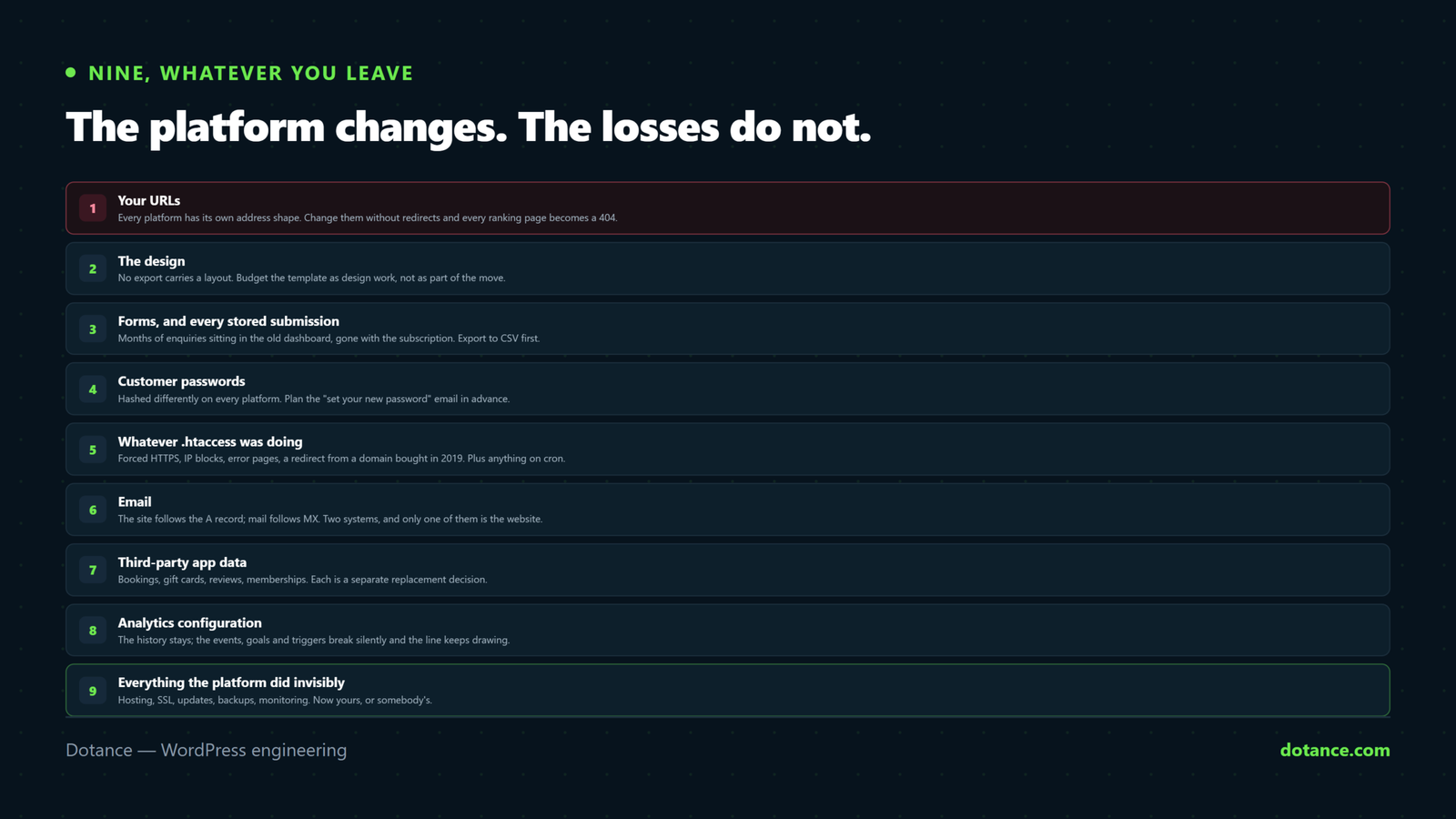
This is the one that matters more than the other eight together. Every platform has its own address shape: .html files, /post/slug, /#!page/id, /collections/name. Almost none of them match WordPress, and a website migration that changes addresses without redirects turns every ranking page into a 404 and every inbound link into nothing.
No tool writes this for you. Every website migration map is written by a person who looked at the old site.
# Build the inventory from three sources, not one
curl -s https://oldsite.com/sitemap.xml | grep -oP '(?<=<loc>)[^<]+' | sort -u > a.txt
wget --spider -r -l inf -nv https://oldsite.com/ 2>&1 | grep -oP '(?<=URL: )\S+' | sort -u > b.txt
# plus every URL with impressions in Search Console
cat a.txt b.txt | sort -u | wc -l
Then one row per old URL, pointing at its closest equivalent — never all of them at the homepage, which Google treats as a soft 404 and which passes nothing. The discipline is set out in WordPress redirects without losing rankings, and Google’s own site move with URL changes guidance says the same.
2. The design
No website migration carries a layout. A Squarespace template is Squarespace code; a Wix design is Wix code; a static site’s CSS assumes markup you are about to replace. The export, where one exists, contains content.
Budget the template as design work rather than as part of the move. It is the line people most often discover mid-project, and it is usually the largest single number in an honest quote.
3. Forms, and every submission behind them
Forms are rebuilt in every website migration. That part is expected. What catches people is the stored responses: months of enquiries sitting in the old platform’s dashboard, which vanish with the subscription.
Export form submissions to CSV before you cancel anything. This is the most common permanent loss in any website migration and it is entirely preventable with ten minutes of forethought.
Then rebuild the forms and send a real test to an external address — not your own domain. WordPress mail fails quietly on fresh installs more often than anything else, for the reasons in why WordPress emails stop sending.
4. Customer passwords
Passwords are stored hashed, and every platform hashes differently. There is no way to carry them across, and any tool claiming otherwise is either storing them in plain text somewhere or lying.
So the customer accounts move, the order history moves, and nobody can log in. The fix is a planned one: a “set your new password” email on launch day, written in advance, sent to everyone. It is a normal part of a commerce website migration and it only becomes a crisis when nobody planned it.
5. Whatever the old .htaccess was doing
Static and self-hosted sites accumulate server configuration that nobody documented: forced HTTPS, hotlink protection, IP blocks, custom error pages, cache headers, a redirect from a domain bought in 2019.
# Read it before you decommission anything
cat oldsite/.htaccess
grep -cE 'Redirect|RewriteRule' oldsite/.htaccess
Each rule was doing a job. Re-implement it, or decide deliberately to drop it — but do it from a list, not from memory three weeks later when somebody notices.
The same applies to anything scheduled. A cron job emailing a weekly report, a script rebuilding a feed overnight, an integration posting orders into an accounting system at 2am — none of that is in a database export, and none of it announces its absence. It simply stops, and the first person to notice is usually the one waiting for the report.
6. Email, which is not the website
Your site follows the A record. Your mail follows the MX records. They are different systems pointed at by different DNS entries, and the most common way to do a website migration badly is to move one and forget the other.
dig +short yoursite.com A     # the website
dig +short yoursite.com MX    # the mailboxes — check before touching anything
If mailboxes are provided by the old platform, they end when the subscription does. Move them separately, and several days apart from the site, so that when something breaks you know which change caused it. Our WordPress domain migration guide has the full DNS sequence.
7. Third-party app data
Bookings, memberships, gift card balances, review widgets, loyalty points. Each was an app on the old platform, each holds data in that vendor’s system, and none of it is in any export.
| What it holds | What survives a website migration |
|---|---|
| Upcoming bookings | Nothing — re-enter, or run both briefly in parallel |
| Gift card balances | Export the list; reissue as new codes |
| Product reviews | Only if the app exports them; many do not |
| Member subscriptions | Nothing, including the billing relationship |
List every app during the inventory, before anyone quotes. Each one is a separate replacement decision, and apps are the single most common reason a website migration estimate turns out to be wrong.
8. Analytics continuity
A website migration does not delete your analytics history. The data in Google Analytics stays where it is. What breaks is everything configured around it: events wired to old selectors, goals pointing at old URLs, tag manager triggers matching paths that no longer exist.
Nothing errors. The dashboard keeps drawing a line, and the line is wrong. Annotate the cutover date on day one so that the month-on-month comparison nobody will run until December has a visible explanation in it.
Ecommerce tracking is the version of this that costs real money. Purchase and add-to-cart events are usually wired to the old platform’s markup, and when the markup changes they simply stop firing — no error, no warning, just a number that quietly becomes wrong. Ad spend keeps optimising against it. Check the funnel end to end on launch day, in a private window, with the network tab open, and confirm each event actually leaves the browser.
9. Everything the old platform did invisibly
This is the part of a website migration that arrives after the project feels finished, and it is the reason a move that looked cheap stops looking cheap in month three.
| They handled | Now yours |
|---|---|
| Hosting and scaling | A plan, with limits you should know |
| SSL renewal | Usually automatic — verify it, do not assume |
| Software updates | Core, theme, plugins, on a schedule someone keeps |
| Backups | Yours to configure, and to restore at least once |
| Security patching | Yours, and the main reason unattended sites get hacked |
| Uptime monitoring | Nobody is watching unless you arrange it |
None of it is difficult; all of it is relentless. Put a real number against it — your time or a plan — or the saving you calculated against the old subscription is not the saving you will get.
The platform-specific parts
The nine losses above are constant across every website migration. What differs is how much the old platform hands back, and that decides whether a website migration is mostly import or mostly rebuild.
| Moving from | Export quality | The specific guide |
|---|---|---|
| Static HTML | None needed — you have the files, but no structure | HTML to WordPress |
| Squarespace | Partial WordPress file: one blog, pages, no shop | Squarespace to WordPress |
| Wix | Blog posts only; no site export at all | Wix to WordPress |
| Shopify | Good CSVs for products, customers and orders | Shopify to WooCommerce |
| BigCommerce | CSV exports, similar shape to Shopify | BigCommerce to WooCommerce |
| Magento | Full database access — the richest source, and the most work | Magento to WooCommerce |
| Drupal | Full database access; the content model usually maps well | Drupal to WordPress |
| Joomla | Full database access; extensions rarely have equivalents | Joomla to WordPress |
| Duda | Limited; largely a rebuild | Duda to WordPress |
Three of those have a full walkthrough on this blog: converting HTML to WordPress, moving from Squarespace and moving off Wix. For stores, migrating from Shopify to WooCommerce covers the commerce specifics.
The sequence that survives contact with reality
- Inventory every URL — sitemap, crawl and Search Console, merged.
- List every app and integration the old site relies on.
- Export everything the old platform will give you, including form submissions.
- Build in parallel on staging. The old site keeps trading throughout.
- Decide the content model before building templates.
- Write the redirect map from the inventory, one row per URL.
- Rebuild forms; test to an external address.
- Drop DNS TTL to 300 seconds, 48 hours ahead.
- Cut over in your quietest window. Not a Friday.
- Re-test every redirect live, submit the sitemap, annotate analytics.
- Keep the old site read-only for a month.
Step four is what makes any website migration low-risk: nothing switches until everything is proven, and the rollback is “do not change DNS”. Do it on a proper staging site rather than in place.
The rollback nobody plans
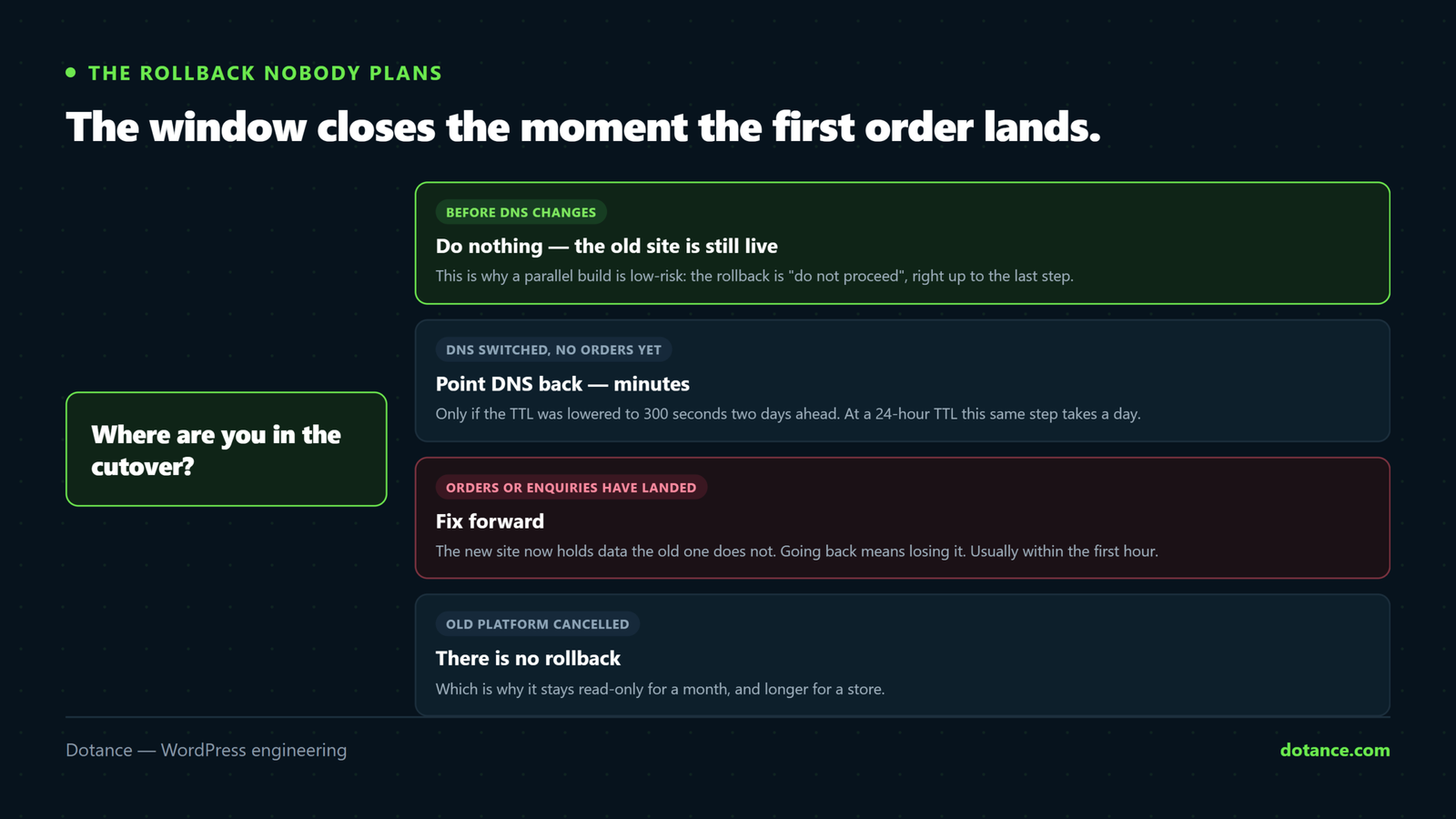
Every website migration plan has a cutover step. Very few have an answer to “and if it goes wrong at 9pm, what do we do”. The honest answer changes as the project moves, and knowing which stage you are in is what makes the decision fast instead of frightening.
| Stage | Rollback | How long |
|---|---|---|
| Before DNS changes | Do nothing — the old site is still live | Instant |
| DNS switched, no orders yet | Point DNS back | Minutes, if TTL was lowered |
| DNS switched, orders taken | Fix forward — the new site holds data the old one does not | No going back cleanly |
| Old platform cancelled | There is no rollback | — |
Two things follow. First, lowering the DNS TTL to 300 seconds two days ahead is not a nicety — it is the difference between a five-minute reversal and a day of split traffic. Second, the window in which a clean rollback exists closes the moment the first order or enquiry lands on the new site, which is usually within an hour.
So the useful question during planning is not “can we roll back” but “what is the last moment we can, and who decides”. Name the person and the time before cutover day, and the decision takes thirty seconds rather than a conference call.
Making two website migration quotes comparable
Quotes for the same move routinely differ by a factor of three, and it is almost never padding. They are pricing different scopes. Five questions collapse the spread:
- Who writes the redirect map, and is every URL in it? “We’ll handle redirects” is not the same promise as one tested row per old URL.
- Which of the nine losses above are in scope? Forms and app replacements are frequently assumed by the buyer and excluded by the quote.
- Is the design rebuilt or adapted? The largest single variable, and the easiest to leave vague.
- What happens to the apps? Ask them to list yours back to you. If they cannot, they have not looked.
- What is the rollback, and until when? A serious answer names a stage, not a reassurance.
Where website migration projects go wrong
| The mistake | What it costs | Do this instead |
|---|---|---|
| Trusting the importer’s success message | Missing pages found months later | Diff the new URL list against the old inventory |
| Cancelling the old platform at launch | No reference copy; submissions and app data gone | Keep it read-only for a month |
| Bulk-redirecting everything to the homepage | Soft 404s; passes nothing | One row per URL, to the closest equivalent |
| Leaving images hotlinked to the old host | Every picture vanishes when the subscription ends | Rewrite paths, then grep the database to confirm |
| Moving site and email together | Both break; nothing to isolate | Separate them by several days |
| Redesigning during the migration | Two variables, one bad outcome, no diagnosis | Move first, restyle after — or accept the risk knowingly |
The last row is worth dwelling on. Combining a redesign with a website migration is common and sometimes correct, but it means that if traffic falls you cannot tell which change did it. If you do combine them, keep the URL map strict — the rules in redesigning without losing SEO apply directly.
What normal looks like
| Timing | Normal | Not normal |
|---|---|---|
| Day 1 | Every old URL gives one 301 | 404s, or chains of two hops |
| Week 1–2 | A visible dip while Google recrawls | Pages reported “not found” |
| Week 3–4 | Impressions climbing back | Still falling |
| Week 6 | At or above the old baseline | Flat at half — go back to the map |
| Month 2 | Old URLs fading from the index | Both versions indexed |
A dip in the first fortnight is expected after any website migration. A dip still there at week six is a redirect problem, and it is nearly always a row nobody tested rather than anything to do with the content.
Frequently asked questions
What is the biggest risk in a website migration?
URLs changing without redirects. Everything else on this page is recoverable with work; rankings built over years are not recovered quickly. If you do one thing properly, make it the map — one row per old URL, tested before launch and again after.
Will I lose traffic?
Temporarily, almost always. Expect a dip of two to four weeks while search engines recrawl and reassess, then a return to the previous level. A website migration that is still down at six weeks has a fixable fault, not bad luck.
Should I redesign at the same time?
It is cheaper in fees and more expensive in risk. Doing both means that if something goes wrong you have two suspects and no way to separate them. If the current design is genuinely holding the business back, combine them and keep the URLs identical. Otherwise move first.
How long should I keep the old site?
A month at minimum, read-only, and longer for a store — until the accounting year closes if there is any chance of a refund or dispute needing the original record. It is the cheapest insurance in the entire project.
Can I do a website migration myself?
The content, usually yes. The URL map is the part that decides whether it goes well, and it is tedious rather than technical — a spreadsheet, one row per page, tested with a loop. If the site earns money, the honest advice is to have somebody check the map before you cut over.
How long does the whole thing take?
A brochure site is a week or two of elapsed time. A store, a membership site, or anything with several apps behind it is a month or more — and the length is set by the replacements, not by the content. The cutover itself is under an hour when the preparation is done.