“The contact form isn’t working” is one of the most expensive faults a business site can have, because nothing looks broken. The form submits, the visitor sees a thank-you message, and the enquiry never arrives. WordPress emails not sending is invisible until someone asks why you never replied.
This is how we diagnose it, in the order that finds the cause fastest — including the one that fooled us on our own site.
First: not sent, or sent and filtered?
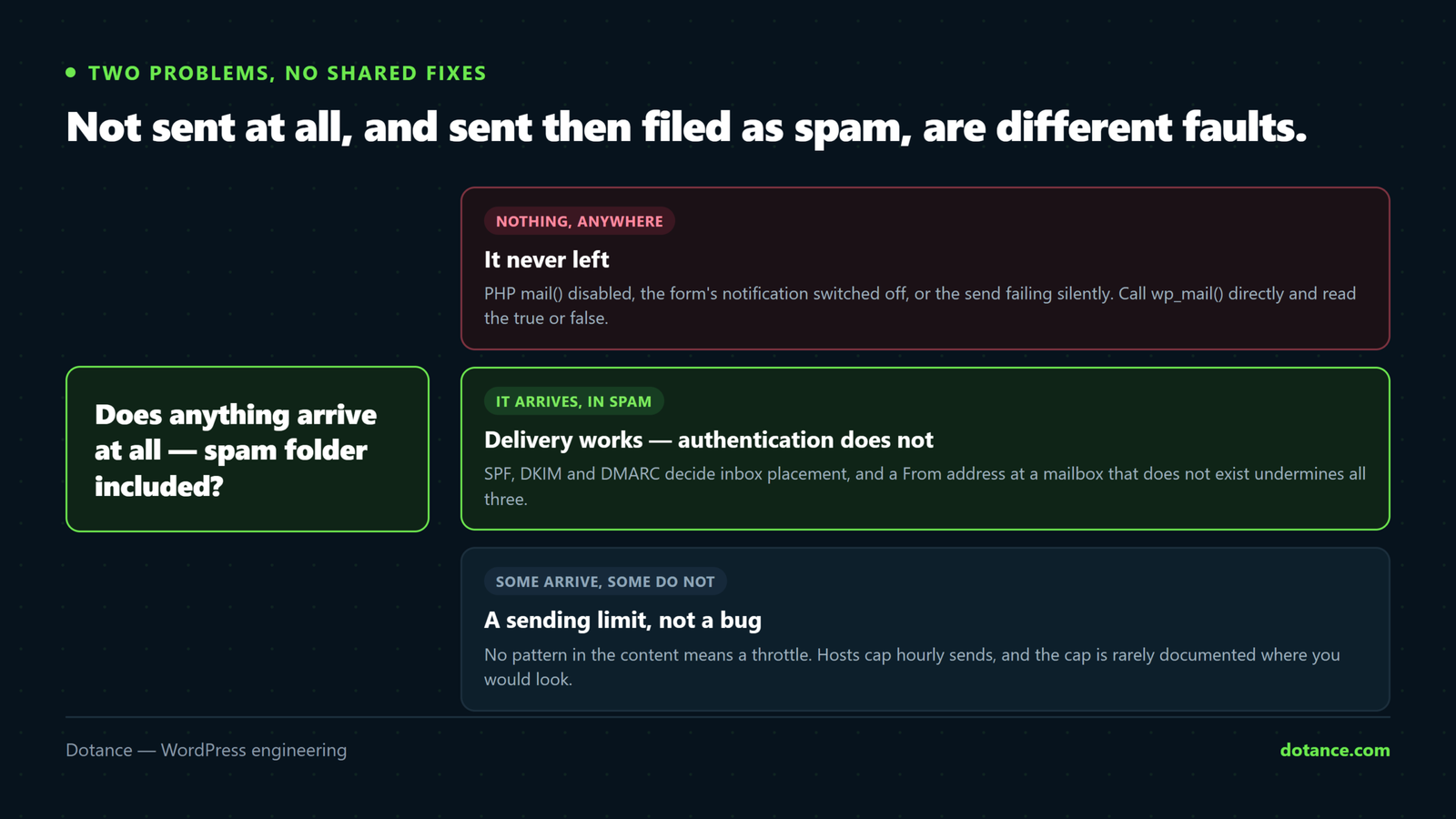
WordPress emails not sending covers two entirely different problems, and the fixes share nothing. Establish which you have before changing anything.
| Symptom | Almost certainly |
|---|---|
| Nothing arrives anywhere, including spam | Not being sent, or rejected at the gate |
| Arrives in spam | Sent fine — an authentication or reputation problem |
| Arrives at Gmail, not at Outlook | Authentication. Providers differ in strictness. |
| Arrives to your own domain, not elsewhere | Local delivery works; external does not |
| Some emails arrive, others do not | Usually the plugin, not the mail system |
Send a test to an address on a completely different provider — a Gmail account if your mail is on your own domain. Testing WordPress emails not sending by mailing yourself at the same domain proves almost nothing, because that message may never leave the server.
Prove whether WordPress emails not sending is real
To find out which kind of WordPress emails not sending you have, take the form plugin out of the picture and call WordPress’s mail function directly:
wp eval '
$ok = wp_mail(
    "you@gmail.com",
    "Dotance test " . gmdate( "H:i:s" ),
    "If this arrives, wp_mail works."
);
echo $ok ? "wp_mail returned TRUE\n" : "wp_mail returned FALSE\n";'
Two very different results:
- FALSE — WordPress could not hand the message off. The fault is in the mail configuration, below.
- TRUE but nothing arrives — WordPress handed it over successfully and something after that dropped it. That is delivery and authentication, further down.
That single distinction removes most of the guesswork around WordPress emails not sending.
The From address — the cause people miss
This one deserves its own section because it is the most common cause of WordPress emails not sending to the inbox, and almost nobody checks it.
By default WordPress sends from wordpress@yourdomain.com. That mailbox usually does not exist. Receiving servers check whether the sender is real, find nothing, and either reject the message or file it as spam.
We had exactly this on our own site. Enquiries were going to spam and everything pointed at DNS — so we checked MX, SPF and DKIM records first. All three were correct. The cause was WordPress’s own default From address on a mailbox that had never existed. Changing the sender to a real mailbox fixed it immediately. Check this before you touch DNS.
Set both the address and the name to something real:
add_filter( 'wp_mail_from', function ( $email ) {
	return 'hello@yourdomain.com';   // a mailbox that actually receives
} );

add_filter( 'wp_mail_from_name', function ( $name ) {
	return 'Your Business';
} );
Put that in a small site-specific plugin rather than the theme, so it survives a redesign — the reasoning is in plugin or theme code. Most SMTP plugins expose the same two settings in their interface.
Two rules: the From address must be on your domain, and it must be a mailbox that exists. Never send as the visitor’s address — that is forgery, and modern providers reject it outright. Put the visitor’s address in Reply-To instead.
Why PHP mail() fails so often
Out of the box WordPress uses PHP’s mail(), which hands the message to a local program on the web server. That approach has aged badly:
- No authentication. The receiving server has no proof the message is legitimate.
- Shared IP reputation. On shared hosting you inherit the sending reputation of every other site on that server.
- Often disabled. Many hosts now block
mail()entirely to stop spam, which produces WordPress emails not sending with no error at all. - No feedback. It returns success as soon as the message is queued. What happens next is invisible.
# Is it even available?
wp eval 'echo function_exists( "mail" ) ? "mail() exists\n" : "mail() disabled\n";'
wp eval 'echo ini_get( "disable_functions" ) . "\n";'
If mail appears in disable_functions, that is your answer and SMTP is the only route.
Switch to SMTP or an email API
This is the fix that resolves most cases of WordPress emails not sending, and it takes about fifteen minutes.
| Option | Good for | Watch for |
|---|---|---|
| Your host’s mailbox over SMTP | Small sites, simple setup | Sending limits; shared reputation |
| Google Workspace / Microsoft 365 SMTP | You already pay for it | App password needed, not your login |
| A transactional email service | Anything that matters | Domain verification required |
| An API rather than SMTP | Speed and better logs | An API key to keep out of the repository |
Whichever you choose, get four things right: the correct host and port (587 with STARTTLS, or 465 with SSL), a From address on your own domain, real credentials rather than your normal password where the provider issues app passwords, and encryption on — never plain.
SPF, DKIM and DMARC
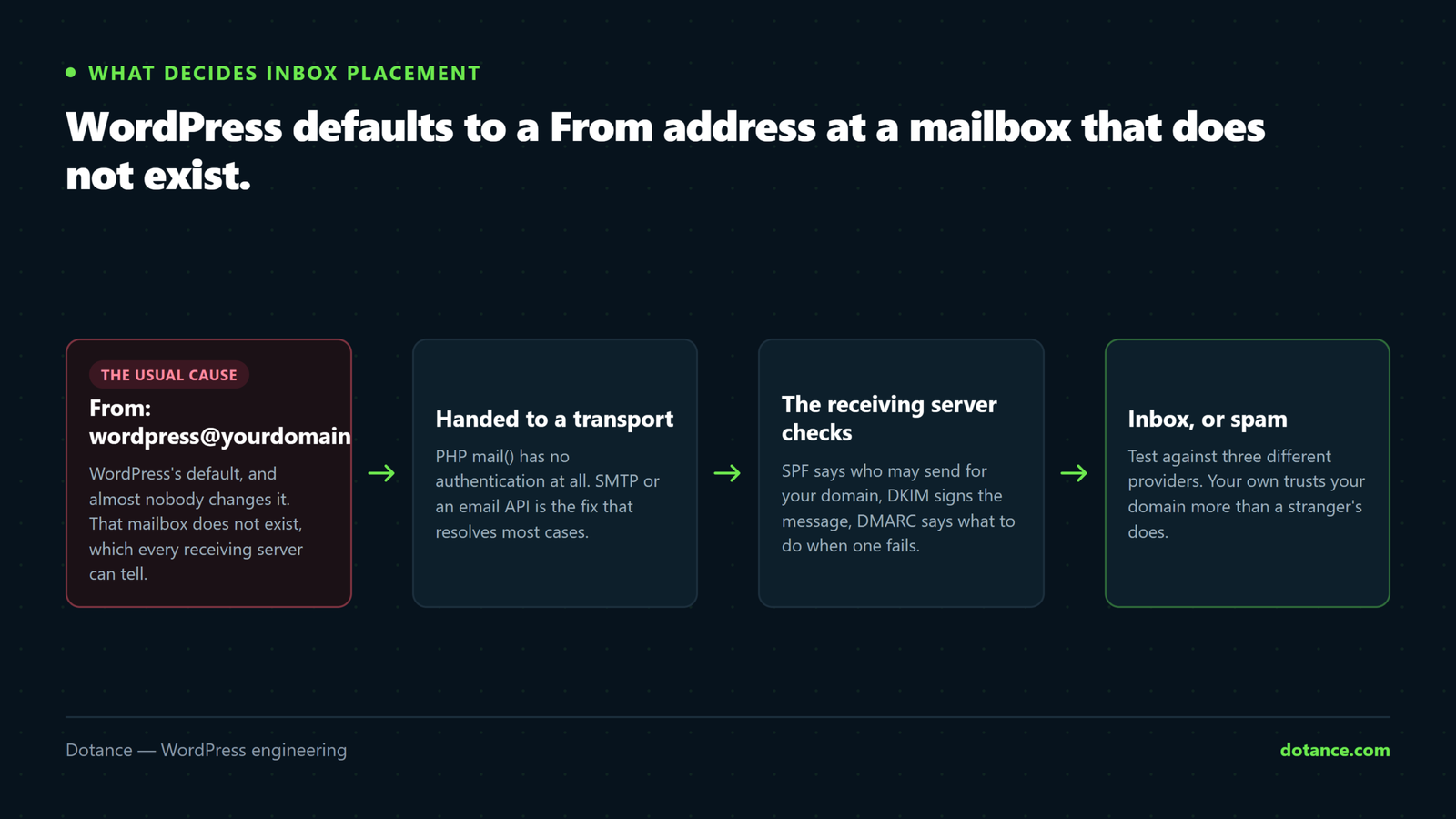
Once messages are leaving, these three decide whether they reach the inbox. If mail arrives but lands in spam, this is your section — WordPress emails not sending is no longer the problem; the receiver is judging you and finding nothing to trust.
| Record | Says | Missing means |
|---|---|---|
| SPF | Which servers may send for your domain | Anyone can forge you; spam scores rise |
| DKIM | A signature proving the message was not altered | Some providers reject outright |
| DMARC | What to do when SPF or DKIM fails | No policy, and no reports on abuse |
Check what you publish today:
dig +short TXT yourdomain.com | grep -i spf
dig +short TXT _dmarc.yourdomain.com
dig +short TXT selector._domainkey.yourdomain.com
Your email provider gives you the exact records. Two frequent mistakes: publishing two SPF records, which is invalid and fails both — merge them into one — and adding a new sending service without adding it to SPF, so that service’s mail silently starts failing.
Read the mail log
Most shared hosts write a mail log, and it removes all guesswork about WordPress emails not sending about whether a message left:
tail -50 ~/.logs/mail.log
tail -50 /var/log/maillog
You are looking for your test’s timestamp and what happened to it. A queued-then-delivered line means WordPress emails not sending is not your problem and you should be looking at the recipient’s filtering. A rejection line usually quotes the receiving server’s reason verbatim, which is the most useful sentence in the whole investigation.
Also install a logging plugin that records every wp_mail() call. Without it you cannot distinguish “the plugin never tried” from “it tried and failed” — and those need opposite fixes.
When it is the form, not the mail
If wp_mail() works from WP-CLI but form submissions still vanish, WordPress emails not sending is not your fault at all, the problem is the form:
- The notification is off, or points at an old address nobody reads.
- The From is set to the visitor’s address, so your provider rejects it as forgery. Use Reply-To.
- Anti-spam is discarding submissions silently — check the plugin’s spam folder before blaming mail.
- The form errors before sending — a required field, a failing captcha, a JavaScript error. Watch the browser console while submitting.
- Nothing is stored. If the plugin only emails and never saves, a delivery failure loses the enquiry permanently. Store submissions in the database as well; it turns an outage into a delay.
Which emails your site actually sends
People report “WordPress emails not sending” when in fact one category has stopped and the rest are fine. Knowing what should be going out narrows the fault immediately.
| Sent by | If it stops | |
|---|---|---|
| Password reset | Core | Nobody can recover an account |
| New user welcome | Core | Registrations stall |
| Comment moderation | Core | Comments queue unseen |
| Update and error notices | Core | Fatal errors go unreported |
| Contact form notifications | Form plugin | Enquiries vanish silently |
| Order and shipping emails | WooCommerce | Customers chase you instead |
Test the core path independently of any plugin — request a password reset for your own account. If that arrives and form notifications do not, the mail system is fine and the fault is in the form. If nothing arrives at all, WordPress emails not sending is a mail configuration problem and the form is innocent.
WooCommerce order emails
Order emails deserve their own check, because a store losing them loses money quietly — customers assume the order failed and buy elsewhere.
# Which order emails are enabled, and where do they go?
wp eval '
$mailer = WC()->mailer();
foreach ( $mailer->get_emails() as $e ) {
    printf( "%-34s %-8s %s\n", $e->id, $e->is_enabled() ? "on" : "OFF", $e->get_recipient() );
}'
Three things go wrong here more than anything else. Admin notifications point at an address nobody monitors. The “Processing order” email is disabled, so customers get nothing until dispatch. And the store’s From address is the WordPress default rather than a real mailbox — the same root cause described earlier, but on the emails that matter most.
Place a real test order and check both sides arrived: the customer confirmation and your own notification. The wider checkout picture is in checkout optimisation.
Sending limits and throttling
If some messages arrive and others do not, and there is no pattern in the content, suspect a limit rather than a bug. This is a version of WordPress emails not sending that no configuration change will fix.
- Hourly caps on shared hosting — often a few hundred messages, counted across every site on the account.
- Provider limits — Google Workspace and Microsoft 365 both cap daily sending on standard plans.
- Rate limiting by the receiver, which defers rather than rejects. The message arrives late rather than never.
- A newsletter plugin using the same route as your transactional mail, consuming the whole allowance in one campaign.
That last one is worth separating deliberately: send bulk email through a bulk provider and transactional email through a transactional one. Sharing a route means one campaign can take your order confirmations down with it.
Testing deliverability properly
“It arrived in my inbox” is a weak test — your own provider trusts your domain more than a stranger’s does. To know where you really stand:
- Send to three different providers — Gmail, Outlook and one business domain. They apply different rules.
- Read the full headers of a delivered message. Look for
spf=pass,dkim=passanddmarc=pass. Anything else is your next task. - Use a mail-testing service that scores the message and shows what receivers see.
- Check the sending IP’s reputation, especially on shared hosting where you inherit the neighbours’.
- Repeat after any change of host — a new server means a new IP with no history.
The headers settle arguments. A dkim=fail on a message you thought was signed means the address you are sending from is an alias rather than a real mailbox — a distinction that looks identical in your own inbox and is the difference between delivery and the spam folder.
Work it in this order
- Send a test to an external provider, not your own domain.
- Call
wp_mail()directly — TRUE or FALSE? - Check the From address. Is that mailbox real?
- Check whether
mail()is disabled. - Configure SMTP or an email API properly.
- Read the mail log for your test message.
- Verify SPF, DKIM and DMARC.
- Only then look at the form plugin.
Steps 2 and 3 account for most WordPress emails not sending cases we see. Going straight to DNS — which is where the internet’s advice points — is how a fifteen-minute fix becomes a day.
Making sure it stays fixed
- Store form submissions in the database, not only in email. Then a delivery failure delays an enquiry instead of destroying it.
- Send yourself a monthly test, or have monitoring do it. WordPress emails not sending is silent by nature — nobody reports the email they never received.
- Add new sending services to SPF the day you add them.
- Keep an eye on DMARC reports. They tell you about failures before customers do.
- Re-test after every migration. A new server means a new sending IP and often a broken setup.
Catching WordPress emails not sending in five minutes a month
WordPress emails not sending is a silent fault, and silent faults need a scheduled check rather than a reactive one. Nobody complains about an email they never knew was coming.
- Submit your own contact form as a visitor would, from a private window.
- Confirm the notification arrives — in the inbox, not the spam folder.
- Request a password reset for a test account, which exercises the core mail path rather than the plugin’s.
- Check the mail log for rejections since last month.
- Open a delivered message’s headers and confirm SPF, DKIM and DMARC all still pass.
Five minutes, and it catches the two changes that silently start WordPress emails not sending: a host altering its mail configuration, and a DNS record edited for some other reason that broke SPF as a side effect.
If you would rather it were somebody else’s job, it is a standing item in our maintenance checks — precisely because WordPress emails not sending costs real enquiries and nothing on the site looks wrong while it is happening.
Common questions
Why do emails go to spam even though they send?
Because with WordPress emails not sending, delivery and inbox placement are different things. The usual causes are a From address that does not exist, missing SPF or DKIM, or a shared hosting IP with a poor reputation.
Do I need a paid email service?
Not always. If your host’s SMTP works and volume is low, that is fine. If enquiries are revenue, a transactional service pays for itself the first time it shows you a rejection you would never otherwise have seen.
Can I send from the visitor’s email address?
No. Providers reject it as forgery, and it is a common cause of WordPress emails not sending. Send from your own domain and set Reply-To to the visitor.
Why does it work for Gmail but not Outlook?
WordPress emails not sending to one provider but not another is normal — they apply different thresholds. Outlook is stricter about authentication, so a domain with SPF but no DKIM often reaches Gmail and not Outlook. Fix the authentication rather than treating it as an Outlook quirk.
How do I know an email was actually sent?
Only a log proves it. A logging plugin records every attempt with its result, and the server mail log records what left the machine. Without both, you are guessing — which is the real reason this fault survives so long.