A static site is fast, cheap to host and completely fine — right up to the afternoon somebody needs to add a page and cannot. That is usually when moving HTML to WordPress comes up, and it is usually framed as a conversion job: take the files, put them in WordPress, done.
It is not that. The markup is the easy half of any HTML to WordPress project. This article covers the half that costs money, in the order the decisions actually arrive.
What transfers, and what quietly does not
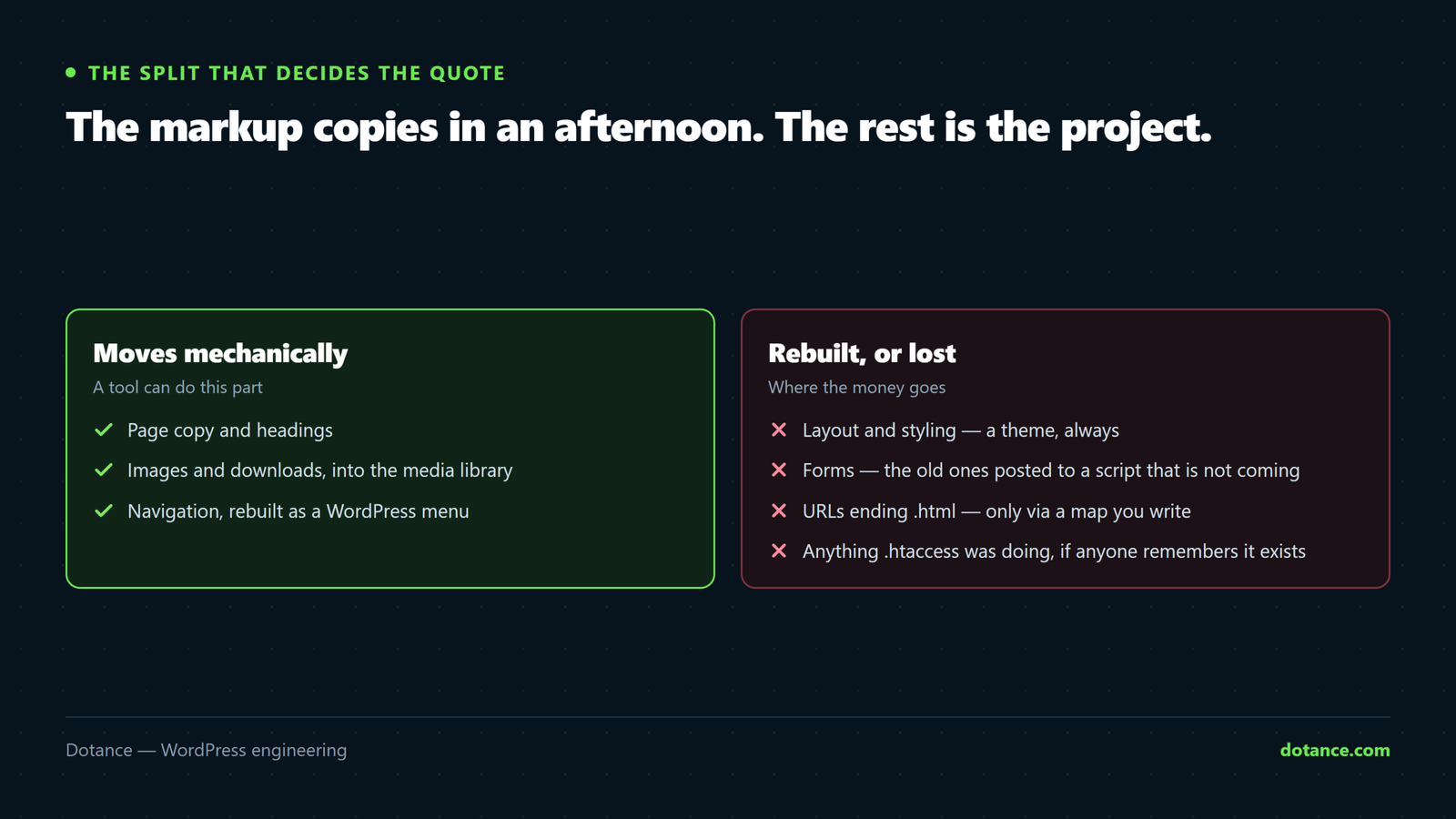
Before any tool or quote, it helps to see the split. An HTML to WordPress project moves three kinds of thing, and only the first is mechanical.
| What you have | Moves how | Effort |
|---|---|---|
| Page copy and headings | Straight across, cleanly | Mechanical |
| Images and downloads | Into the media library, paths rewritten | Mechanical |
| Layout and styling | Rebuilt as a theme, or approximated by a builder | Design work |
| Navigation | Rebuilt as a WordPress menu | Small, but manual |
| Forms | Rebuilt — the old ones posted to a script that is not coming | Rebuild |
URLs ending .html | Only via a redirect map you write | The SEO risk |
Anything .htaccess was doing | Re-implemented, if anyone remembers it exists | Easy to miss |
The bottom three rows are where HTML to WordPress projects go wrong, and none of them is visible in a screenshot of the old site.
Start with an inventory, not a tool
You cannot map what you have not listed. Before opening any HTML to WordPress tool, get every URL the old site serves and every URL the internet thinks it serves — those are different lists.
From any terminal
# Every page on the old site, crawled from the homepage
wget --spider -r -l inf --no-verbose --reject-regex '\.(png|jpe?g|gif|svg|css|js|woff2?)$' \
  https://oldsite.com/ 2>&1 | grep -oP '(?<=URL: )\S+' | sort -u > live-urls.txt

# How many, and how many are .html
wc -l live-urls.txt
grep -c '\.html$' live-urls.txt
Then add the URLs you cannot crawl to: anything in Search Console with impressions, anything with inbound links, anything printed on a business card. A page nobody links to internally can still be the one earning your enquiries.
If the old site has a sitemap, use it as a second source rather than a replacement. Hand-built static sitemaps go stale, and a crawl finds pages the sitemap forgot.
The decision no converter can make for you
This is the heart of an HTML to WordPress project and the reason automated converters disappoint. A converter reads about.html and produces a WordPress page containing the whole of about.html as one block of markup. Technically correct. Editorially useless — because nobody can change the middle of it without knowing HTML, which is the reason you are moving.
What makes the result editable is a content model: deciding what types of thing your site holds, and what fields each type has.
| On the static site | In WordPress | Why it matters |
|---|---|---|
| Five near-identical service pages | One template, five entries | Change the layout once, not five times |
| A team page with eight people hard-coded | A “person” type with name, role, photo | A ninth hire is a form, not a developer |
| A hand-maintained news list | Posts | Archives, feeds and dates come free |
| A one-off homepage | A page with blocks or sections | Nothing to model — leave it alone |
Doing this well is what separates a site your team can run from a site that needs you again in three months. It is also most of the labour in any honest HTML to WordPress quote, which is why two quotes for the same page count can differ so widely — see our breakdown of what a WordPress website actually costs.
URLs: the part that loses rankings
Static sites serve /services/plumbing.html. WordPress serves /services/plumbing/. Every single page changes address. Nothing about an HTML to WordPress move is more likely to cost you traffic, and nothing is cheaper to get right.
Build the map before the build starts, one row per old URL:
redirect-map.csv
# old,new — one row per URL, no exceptions, no wildcards to the homepage
/services/plumbing.html,/services/plumbing/
/about-us.html,/about/
/news/2024-summer-offer.html,/blog/summer-offer/
/contact.html,/contact/
Then implement them at the server, above WordPress, where they cost nothing per request:
.htaccess — above the WordPress block
# Specific rules first. Never bulk-redirect everything to /
Redirect 301 /services/plumbing.html /services/plumbing/
Redirect 301 /about-us.html /about/

# Only as a last resort, and only where the slug genuinely matches
RewriteRule ^(.+)\.html$ /$1/ [R=301,L]
Then test every row, not a sample:
while IFS=, read -r old new; do
  code=$(curl -sI -o /dev/null -w '%{http_code}' "https://yoursite.com$old")
  dest=$(curl -sI "https://yoursite.com$old" | grep -i '^location:' | tr -d '\r')
  echo "$code  $old  ->  $dest"
done < redirect-map.csv | grep -v '^301'
Anything that prints is a row that does not work. Redirecting everything to the homepage is treated as a soft 404 and passes nothing, which our guide to setting up redirects without losing rankings covers in more detail.
Theme, builder or blocks
Once the content model exists, something has to render it. This is the second big decision in an HTML to WordPress build. Three routes, and the right one depends on how long the site has to live rather than on anyone’s preference.
| Route | Suits | The cost |
|---|---|---|
| Page builder | Under two years, few pages, all different | Framework weight on every page; content locked in builder data |
| Block theme + patterns | Most business sites | Content stays in core format; needs patterns built up front |
| Custom classic theme | Heavy bespoke templates already written in PHP | Needs a developer for every change |
If your static site was hand-written and lean, a builder will usually make it slower than it was. That is a genuinely common outcome of an HTML to WordPress move and it surprises people, because they expected a modern platform to be faster. Our comparison of a page builder against a custom theme sets out how to decide with numbers rather than opinion.
Forms, and everything the old server was doing
Static sites are never purely static, and this is the part of an HTML to WordPress move that arrives late. Something was handling the contact form — a PHP script, a third-party endpoint, a mail script somebody wrote in 2016. None of it comes with the HTML.
Find what the old forms posted to
grep -rhoP '(?<=action=")[^"]+' ./oldsite --include='*.html' | sort -uRebuild each one in WordPress, then — and this is the step that gets skipped — send a real test to an external address and confirm it arrives. WordPress mail fails silently more often than anything else on a new install, for reasons covered in why WordPress emails stop sending.
Check the old .htaccess too. Hotlink protection, IP blocks, custom error pages, forced HTTPS, cache headers: all of it was doing a job, and all of it needs re-implementing or deliberately dropping.
The sequence that works
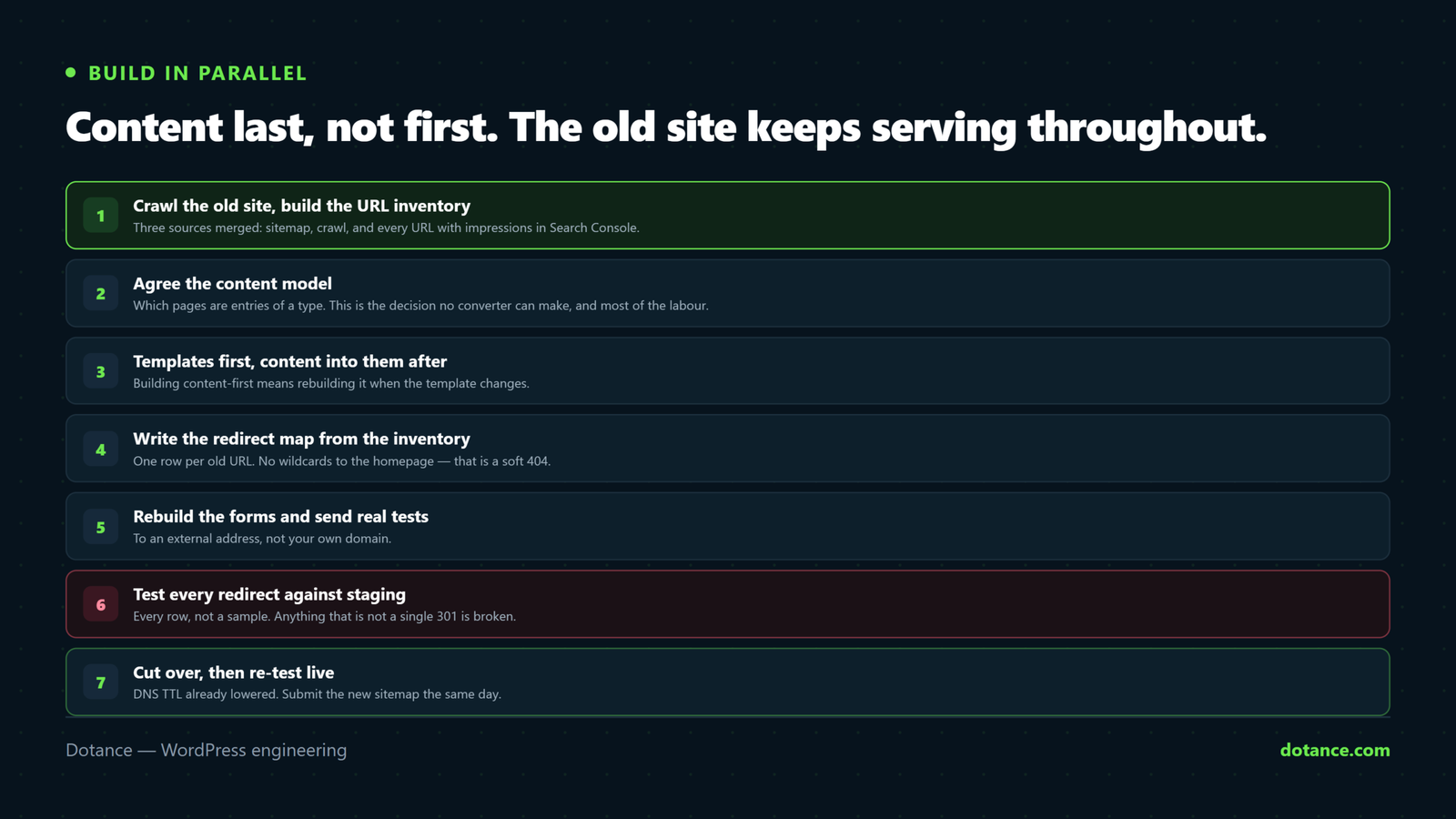
Run the HTML to WordPress build in parallel. The static site keeps serving while the new one is assembled, and nothing switches until the redirects are tested.
- Crawl the old site and build the URL inventory.
- Agree the content model — types, fields, which pages become entries.
- Stand WordPress up on a staging domain, noindexed and password-protected.
- Build templates, then move content into them. Content last, not first.
- Write the redirect map from the inventory. Every row, no wildcards.
- Rebuild the forms and send real test submissions.
- Test every redirect against staging, then fix what fails.
- Cut over in a quiet window with DNS TTL already lowered.
- Re-run the redirect test against live, and submit the new sitemap.
A staging copy is not optional here, and setting one up properly is quick — see how to set up a WordPress staging site.
Images, and the thing nobody checks until later
Media is mechanical to move and easy to move badly, and an HTML to WordPress import is where it goes wrong. On a static site the images sit in a folder and are referenced by relative path. WordPress wants them in the media library, where it can generate the sizes that make responsive images work.
Before you import anything
# How heavy is the media you are about to carry over?
du -sh ./oldsite/images
find ./oldsite -type f \( -name '*.jpg' -o -name '*.png' \) -size +500k | wc -l

# Which images are actually referenced? The rest are dead weight.
grep -rhoP '(?<=src=")[^"]+\.(jpe?g|png|gif|webp)' ./oldsite --include='*.html' | sort -u | wc -l
Two things follow from those numbers. First, a static site built over a decade usually carries more unreferenced images than referenced ones, and there is no reason to move the orphans. Second, anything over 500 KB was never optimised and should be resized on the way in rather than after, because WordPress will otherwise generate every intermediate size from the oversized original.
After the import, confirm the paths were rewritten. An HTML to WordPress move that leaves images pointing at the old domain looks fine until the old hosting is cancelled, at which point every picture on the site disappears at once.
# Anything still pointing at the old host?
wp db search 'oldsite.com' --stats 2>/dev/null | tail -5
curl -s https://yoursite.com/ | grep -o 'src="https://oldsite\.com[^"]*' | head
A worked example: forty pages, what it actually took
Abstract advice is easy to nod at, so here is the shape of a real HTML to WordPress project — a trades business with forty-one static pages, hand-built and maintained by the owner’s nephew until he moved away.
| Stage | Time | What surprised them |
|---|---|---|
| Crawl and inventory | Half a day | Fifty-three URLs, not forty-one — twelve were orphans nobody linked to |
| Content model | One day | Thirty-one of the pages were the same service page with different towns |
| Templates | Four days | Two templates covered the whole site once the model existed |
| Content move | Two days | Fast, because thirty-one pages became entries in one template |
| Redirect map | Half a day | Three old URLs still had inbound links worth keeping |
| Forms and testing | One day | The old form had been silently failing for months |
The lesson of this HTML to WordPress example is in the second row. Forty-one pages sounded like forty-one units of work and was really two templates plus a spreadsheet. That collapse only happens if the content model comes before the build, which is the single most valuable habit in any HTML to WordPress project.
Google’s own guidance on a site move with URL changes is worth reading before you start. It is short, it is from the search engine whose opinion counts, and it says the same thing about mapping every URL.
Where HTML to WordPress conversions go wrong
| The mistake | What it costs | Do this instead |
|---|---|---|
| Running an automated converter and shipping the output | Pages nobody can edit; the original problem, now in WordPress | Model the content first, convert into the model |
| No redirect map | Every ranking page 404s; every backlink stops counting | One row per old URL, tested before launch |
Bulk-redirecting .html to the homepage | Treated as soft 404s — passes nothing | Redirect to the closest equivalent page |
| Forgetting the forms until launch day | Enquiries silently vanish for a fortnight | Rebuild and test with a real external address |
| Assuming the new site is faster | A lean static site replaced by a heavy builder | Measure both; budget for the difference |
| Cancelling the old hosting immediately | No reference copy when something is missing | Keep it read-only for a month |
Five questions that make two quotes comparable
HTML to WordPress quotes vary wildly for the same page count, and almost always because the quotes describe different work. Ask these five and the spread usually collapses.
- What is the content model? If the answer is “we’ll import your pages”, you are buying a conversion, not a site your team can edit.
- Who writes the redirect map, and is every URL in it? “We’ll set up redirects” is not the same commitment as one tested row per old URL.
- What renders the pages — builder, block theme or custom? This decides your page weight and your exit cost for years.
- Are the forms rebuilt and tested to an external address? Not “we’ll add a contact form”.
- What happens in week six if traffic has not recovered? A serious HTML to WordPress quote has an answer.
Two HTML to WordPress proposals at very different prices are usually both honest — one is converting files and one is building a system. Neither is wrong; they are simply not the same purchase, and the cheaper one costs more the first time you need a new page.
When the move is not worth making
An honest article names the case against. If your static site is five pages, changes twice a year, and one person edits it comfortably in a text editor, an HTML to WordPress migration buys you maintenance work and very little else. WordPress needs updating, backing up and watching; a folder of HTML files does not.
The move earns its cost when at least one of these is true: several people need to publish, the content has repeating structure worth modelling, you need a blog or a shop, or the person who could edit the HTML has left. If none of them apply, the honest answer is to stay where you are.
What to watch after launch
| When | Check | Normal looks like |
|---|---|---|
| Launch day | Every redirect returns a single 301 | No 404s, no chains |
| Week 1 | Search Console coverage | New URLs discovered, old ones marked redirected |
| Weeks 2–4 | Impressions | A modest dip while Google recrawls |
| Week 6 | Impressions and positions | Back to the old baseline, or better |
| Ongoing | Form submissions arriving | A monthly test that you actually send |
A dip in the first fortnight is expected. A dip still there at week six means a redirect problem, not a patience problem — go back to the map and find the rows that never worked.
Frequently asked questions
Can I convert HTML to WordPress automatically?
Partly. Converters will import your markup and your images, and that genuinely saves time. What they cannot do is decide which pages are entries of a type, which fields those entries have, or which parts an editor should be allowed to change. That decision is the project, and it is why an automated HTML to WordPress result usually still needs rebuilding.
Will I lose my Google rankings?
Only if the URLs change without redirects, which on an HTML to WordPress move they always do unless someone maps them. With a complete, tested map you should see a dip for two to four weeks and a return after that. Without one, every page starts again from nothing.
How long does it take?
For a straightforward brochure site with a clear content model, a few weeks of elapsed time — most of it spent on templates and the redirect map rather than on moving text. A site with hundreds of pages and no consistent structure takes longer, because the modelling work scales with the inconsistency rather than with the page count.
Do I have to keep my old design?
No, and it is usually the wrong call. If you are paying to rebuild the templates anyway, the marginal cost of improving them is small. Redesigning and migrating at once does raise the risk, so keep the URL map strict and change one thing at a time where you can — our notes on redesigning without losing SEO apply directly.
What about the old hosting?
Keep it running, read-only, for at least a month after cutover. It costs very little and it is the only reference you have when somebody notices a page that never made it across. Cancel it once a full crawl of the new site matches the old inventory.
Is WordPress slower than static HTML?
Uncached, yes — it is building pages with PHP and a database where the old site served a file. Cached, the difference is small for anonymous visitors. The honest risk in an HTML to WordPress move is not WordPress itself but what gets installed on top of it, which is covered in the seven causes of a slow WordPress site.