If you run appointments on BookingPress, you have probably seen the notice by now: the plugin was closed on WordPress.org on 1 February 2025, with “Guideline Violation” given as the reason, and it is still closed. Your booking form keeps working. What stopped is everything around it: updates from the dashboard, the support forum, and anyone checking the code against new versions of WordPress. This guide is about choosing a BookingPress alternative and moving to it without losing a single booking.
A disclosure before anything else. We make Bookance, one of the options below, and we built its BookingPress importer after reading BookingPress’s own table definitions. That makes this guide useful and also not neutral. Where another BookingPress alternative suits a business better, we say so, and the migration steps apply whichever plugin you choose.
What the BookingPress closure means for your site
A closed plugin is not a broken plugin, at least not on the day it closes. The code on your server is the code that was there yesterday. The risk grows slowly, with every WordPress release and every PHP upgrade your host rolls out, because nobody in the directory is testing the plugin against them any more. That slow drift, not a sudden failure, is the case for planning a BookingPress alternative. Here is what changed and what did not:
| Area | Before 1 February 2025 | Now |
|---|---|---|
| Updates in Dashboard → Updates | Delivered by WordPress.org | None from WordPress.org |
| Security fixes | Released through the directory | Only if the vendor ships them some other way |
| Compatibility | Last release (1.1.28) tested up to WordPress 6.7.1 | WordPress 7.1.2 is current; nobody at the directory checks the gap |
| Support forum | wordpress.org/support | Closed with the plugin |
| Your bookings | In the wp_bookingpress_* tables | Still there. A closure deletes nothing |
The last row is the one that matters most. Your services, customers and appointments are sitting in ordinary database tables, which means any BookingPress alternative that can read those tables can bring them across. If you bought the paid version from the vendor, your update situation may be different; ask them directly how updates now reach you, and get the answer in writing.
Do you need a BookingPress alternative right now?
Not necessarily this week, and not in a panic. A booking form that works today will usually work tomorrow. What changes is the direction of travel: each WordPress update, each PHP version bump and each new theme release is one more thing the old code was never tested against. When something does break, there is no forum to ask and no update to wait for.
Three situations make the move to a BookingPress alternative urgent rather than optional:
- Your host has announced a PHP upgrade. Old plugin code is the most common casualty of a PHP jump, as we covered in what to do when a PHP upgrade breaks WordPress.
- You are about to update WordPress itself. Test the booking form on a staging copy first; if it breaks there, you have your answer.
- Bookings are your income. If a dead form means lost revenue, the cost of waiting is higher than the cost of an afternoon’s migration.
If none of those applies, the sensible plan is to pick a BookingPress alternative now, rehearse the migration on staging, and switch at a quiet moment of your choosing, rather than at the moment something forces you to.
What to look for in a BookingPress alternative
The feature lists of booking plugins are long and mostly similar. The things that decide whether a BookingPress alternative works for you after the move are fewer and more specific:
| Requirement | Why it matters after BookingPress | How to check |
|---|---|---|
| Reads BookingPress data directly | Re-typing appointments by hand is where dates and customers go wrong | Look for BookingPress in the plugin’s import screen; without it you are moving data through a spreadsheet |
| A free tier that actually runs a business | You are leaving one plugin; you do not want to arrive at a paywall | Read what the free version withholds, in a table, not a headline |
| A native form for your builder | A shortcode inside a builder never quite fits the page | A block, an Elementor widget, or both, with style controls |
| Protection against double bookings | Two people in the same slot is the complaint customers remember | Look for a lock or a unique slot key, not just “real-time availability” |
| Reminders that do not depend on page visits | WP-Cron only runs when someone visits the site | A background queue with retries and a delivery log |
| A way back out | This is the second time you are moving; make sure it is easy next time | CSV export of bookings and customers |
Bookly, Amelia and Simply Schedule Appointments are all maintained in the directory, and each is a reasonable BookingPress alternative; we compared them on these criteria in our Bookly alternative guide. If you need to take online payment at the moment of booking, Bookly and Amelia offer it; check which tier includes the gateway you use. If you choose one of them, check whether it can read BookingPress’s tables; if it cannot, you will be moving the data through a spreadsheet, and the checking step below becomes more important, not less.
Bookance is the BookingPress alternative we build. The free plugin has no limits on staff, services or bookings, the form is a native block and Elementor widget, bookings are protected by a per-staff lock, reminders run on a background scheduler, and since version 0.17.0 it imports BookingPress and exports everything to CSV. It does not take online payments yet. That is the trade-off to weigh.
What moves across, and what does not
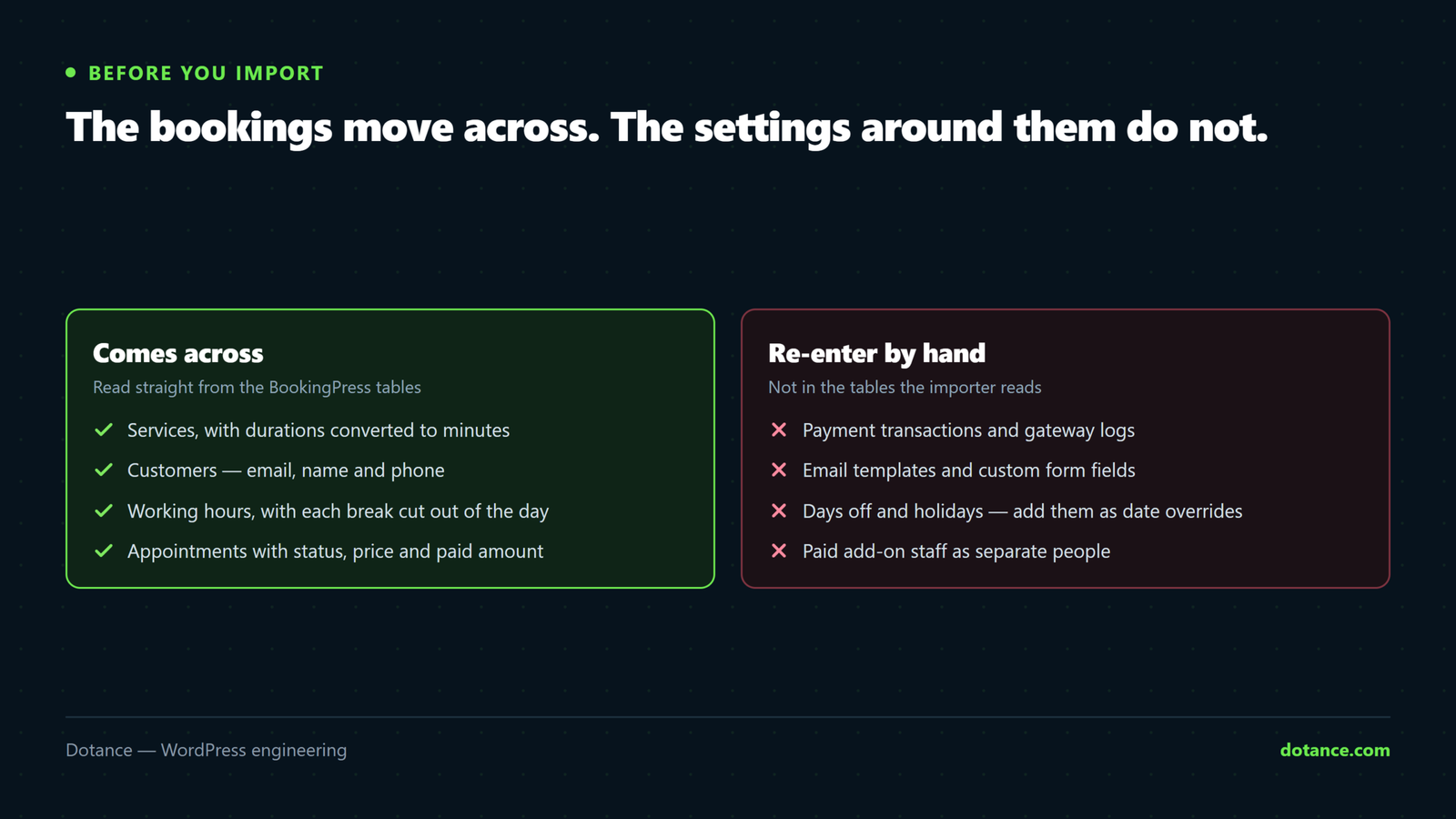
Before you run any importer, know exactly what your BookingPress alternative will read. This is the map for the Bookance BookingPress importer, taken from the table definitions in BookingPress 1.1.28, the last version released through the directory:
| In BookingPress | In Bookance | Detail |
|---|---|---|
| Services | Services | Name, description, price and duration; durations in hours or days are converted to minutes |
| Customers | Customers | Email, first and last name, phone. A customer with only a full name is split into first and last |
| Working hours | One staff member’s weekly hours | Breaks are cut out of the day, so 9–5 with a 1–2 break becomes 9–1 and 2–5 |
| Appointments | Appointments | Date and time, service, customer, price, currency, paid amount and internal note |
| Status “Approved” | Confirmed | Past ones become Completed |
| Status “Pending” | Pending | Past ones become Completed |
| Status “Cancelled” or “Rejected” | Cancelled | Kept as history |
The free BookingPress plugin has no staff: every service is delivered by the business, on one set of working hours. So the import creates one staff member, named after your site, gives it those hours and every service, and books each appointment with it. Rename it afterwards and add more staff if you have them.
These do not come across, and you should plan to recreate them by hand:
- Payment transactions and gateway logs. The paid amount on each appointment is imported, so your history is right, but the transaction records are not.
- Email templates. Bookance has its own, with merge tags; rewrite your wording there.
- Custom form fields and service categories.
- Days off and holidays. Add them as date overrides on the staff member’s hours.
- Staff from the paid add-on. Their appointments come across, but all under the one imported staff member.
The seven-step migration to a BookingPress alternative
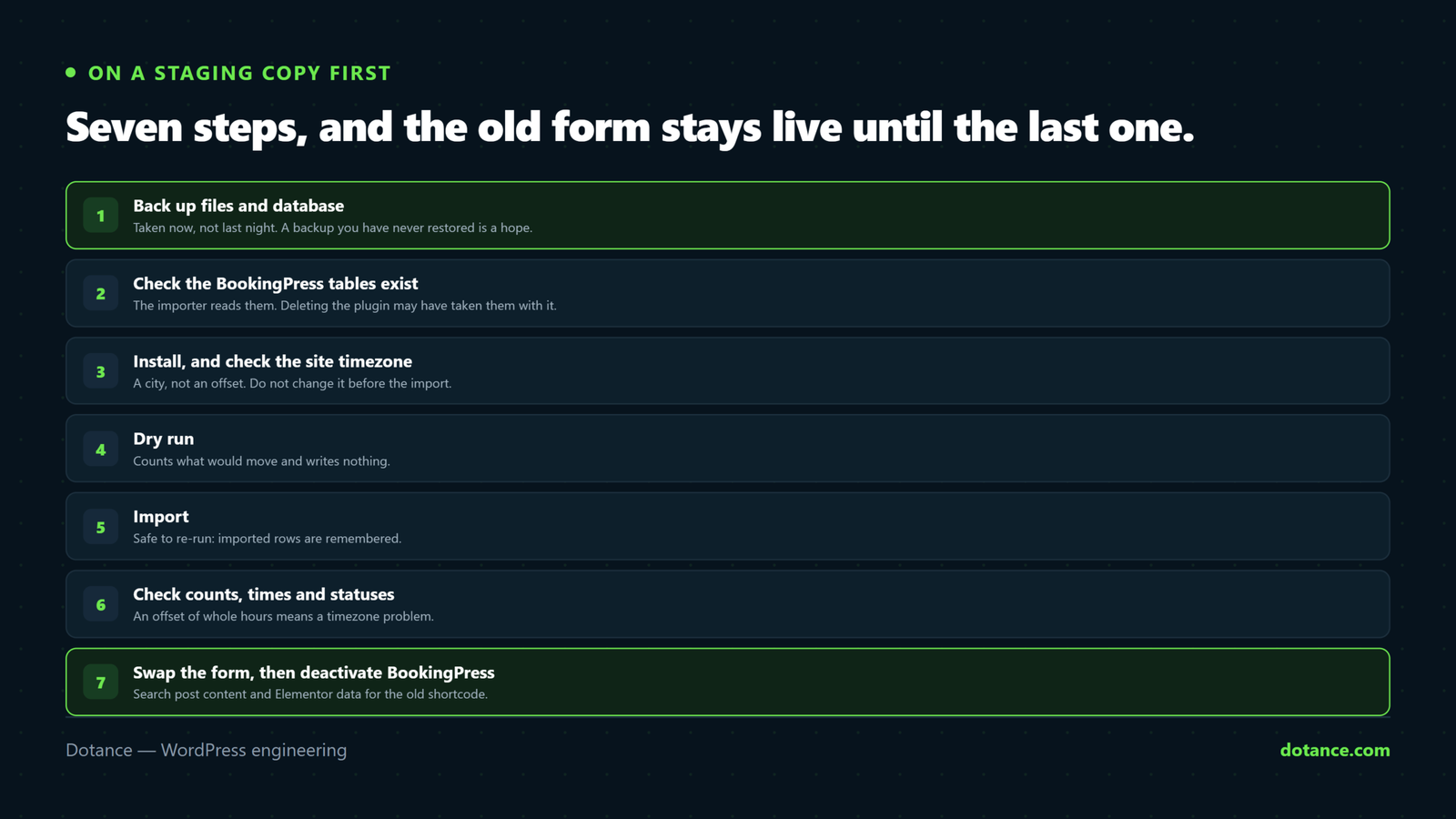
Do this on a copy of the site first. If you do not have one, our guide to setting up a WordPress staging site takes about twenty minutes. The steps are the same on staging and on live; only the stakes differ.
1. Back up before you install any BookingPress alternative. A full backup, files and database, taken now, not the nightly one from yesterday. If you have never tried restoring your backups, read how to test a WordPress backup first; a backup you cannot restore is a hope, not a plan.
# database only, as a quick extra safety net
wp db export before-bookingpress-migration.sql
2. Check that the BookingPress tables are there. The importer reads them, so they must exist. If you already deleted BookingPress, its tables may have gone with it; restore them from a backup before you continue.
# your table prefix may not be wp_ — match what wp-config.php says
wp db tables 'wp_bookingpress_*'
3. Install the BookingPress alternative and check the timezone. BookingPress saved appointment times in your site’s time. The import converts them using the timezone the site has now, so do not change the timezone between now and the import. It should be a city, such as Europe/London, not a bare offset like UTC+1, which cannot follow daylight saving.
wp plugin install bookance --activate
wp option get timezone_string   # empty means an offset is set; pick a city in Settings → General
4. Run a dry run. It counts what would be imported and writes nothing. In the dashboard it is Bookance → Tools → Import from BookingPress → Dry run.
wp bookance import bookingpress --dry-run5. Import. Re-running is safe: every imported row is remembered, so a second run adds only what is new and reports the rest as already imported.
wp bookance import bookingpress6. Check the result in the BookingPress alternative against the original, using the checks in the next section. Do not skip this, because it is the step that catches a timezone problem while it is still cheap to fix.
7. Swap the booking form. Find every page that still carries the BookingPress shortcode. Pages built with Elementor keep their content in post meta, so run both searches:
# classic and block editor content
wp post list --post_type=page,post --s='bookingpress_form' --fields=ID,post_title,post_status
# Elementor pages
wp post list --post_type=page,post --meta_key=_elementor_data --meta_compare=LIKE --meta_value=bookingpress_form --fields=ID,post_title
Replace [bookingpress_form] with the Bookance block, the Bookance Elementor widget or the shortcode [bookance]. Our guide to building an Elementor booking form covers the styling side. Then deactivate BookingPress, but leave it installed until you are sure the BookingPress alternative is taking bookings correctly.
How to check the import before you switch
Five minutes of checking saves an awkward phone call from a customer who turns up at the wrong hour. Compare the BookingPress alternative against the source on these points:
| Check | How | What good looks like |
|---|---|---|
| Counts | Compare the dry-run numbers with BookingPress’s own lists | Same number of services, customers and appointments, or a clear reason for each gap |
| Times | Open three upcoming appointments in both plugins | Identical dates and times. An offset of whole hours means a timezone problem |
| Statuses | Filter Bookance appointments by Cancelled | Cancelled and rejected BookingPress bookings, nothing else |
| Hours | Bookance → Staff & Hours | Your working days, with breaks as gaps |
| Skipped rows | The import report’s skipped table | Empty, or a reason you understand for each line |
The skipped table is honest by design. A customer with an invalid email address, or an appointment whose service was deleted in BookingPress, is listed with the reason rather than imported half-right. Fix the source and run the import again; the rows already imported are left alone.
After the switch: reminders, emails and payments
Three things behave differently in a BookingPress alternative from what you might assume, and it is better to know them before the first Monday.
Imported appointments send no confirmation. That is deliberate: nobody wants two hundred customers to receive a “your booking is confirmed” email for a booking they made last spring. Reminders are different. Since version 0.17.1, every upcoming imported appointment that is pending or confirmed has its reminder emails queued, on the same schedule as a new booking. So switch off BookingPress’s own reminders once the import is checked, or customers will hear from both. Imported appointments are not pushed to Google Calendar; if you use the calendar sync, add the next few weeks by hand.
Make sure the emails actually arrive. Reminders are only as good as your site’s mail delivery. Bookance has its own SMTP settings with a test button that shows the mail server’s real error; if you have never set up SMTP, read why WordPress emails do not send first.
Payments. If you took payment at booking time in BookingPress, know that the free Bookance plugin does not take online payments yet; bookings confirm with payment on arrival. The paid amounts on your past appointments are imported, so your records stay correct. If online payment is essential today, one of the payment-capable BookingPress alternatives above is the better choice, and we would rather you picked it than came back disappointed.
Where a BookingPress migration goes wrong
Most moves to a BookingPress alternative are uneventful. The ones that are not tend to fail in the same few ways:
| Symptom | Cause | Fix |
|---|---|---|
| Every appointment is off by the same number of hours | The site timezone changed, or is an offset rather than a city | Restore the staging copy, set a city timezone, import again |
| “BookingPress tables were not found” | A different table prefix, or the plugin was deleted along with its data | Check wp db tables; restore the tables from a backup |
| A customer is skipped: “invalid email” | BookingPress accepted an address Bookance cannot mail | Correct it in BookingPress, then re-run the import |
| An appointment is skipped: missing mapping | Its service was deleted in BookingPress | Recreate the service in BookingPress, or add the booking by hand |
| The old form still shows on a page | The shortcode lives in Elementor data, not post content | Run the second search in step 7 |
| Customers get two reminders for one booking | BookingPress is still sending its own reminders next to the new ones | Deactivate BookingPress, or turn its reminders off, once the import is checked |
If reminders fail for new bookings too, the cause is almost always outside the booking plugin. Our guides to WordPress cron not running and to choosing a WordPress booking plugin cover the checks that apply to any BookingPress alternative, not just ours.
Frequently asked questions
Is BookingPress still safe to use?
It still works on many sites, but it receives no updates through WordPress.org, and its last directory release was tested only up to WordPress 6.7.1. Nobody can promise it is safe on current WordPress and PHP versions. Treat it as something to replace with a maintained BookingPress alternative on your own schedule, not as an emergency, and back up before every update.
Will the BookingPress closure delete my bookings?
No. The closure removed the plugin from the directory; it did not touch any site. Your data stays in the BookingPress tables until you delete it. Deleting the plugin itself may remove those tables, which is why you should import into a BookingPress alternative before deleting anything.
Is there a free BookingPress alternative that imports my data?
Bookance is free and imports BookingPress directly from version 0.17.0, including services, customers, working hours and appointments. Whichever BookingPress alternative you consider, look for BookingPress on its import screen before you commit; if it is not there, plan for a spreadsheet migration and a longer check.
Can I import staff from BookingPress Pro?
Not as separate staff members. The importer reads the free plugin’s tables, where every booking belongs to the business. Appointments from Pro staff still come across, all under the one imported staff member, and stay there as history. Add your team in the BookingPress alternative afterwards, and new bookings go to the right person from then on.
Will my customers get an email when I import?
Not at the moment you import. Appointments imported into the BookingPress alternative send no confirmation and no admin email. Upcoming ones do get their normal reminder before the day (from Bookance 0.17.1), so turn BookingPress’s own reminders off to avoid sending two. If you want customers to know about the new system, send one short email yourself.
Can I undo the import?
On staging, restore the backup. On a live site, restore the database export from step 1, which is why that step comes first. The importer never changes the BookingPress tables, so the source is always intact if you need to start again or try a different BookingPress alternative.