Choosing a WordPress booking plugin looks like a feature comparison and is actually a risk assessment. The feature grids all look the same — services, staff, calendar, reminders, payments. What separates them is what happens on a Saturday morning when two customers pick the same 10:00 slot, or on a Tuesday when the reminder email that was supposed to go out at 08:00 quietly did not.
We spent the summer reading the support forums and one-star reviews of every popular WordPress booking plugin while building our own. The complaints are remarkably consistent, and most of them are testable up front. This article is that test list: seven checks, in the order that finds the most expensive problems first.
Where this comes from. Install counts and pricing below are from the WordPress.org directory and each vendor’s site in September 2026. They change. The failure modes do not.
What the reviews of every WordPress booking plugin say
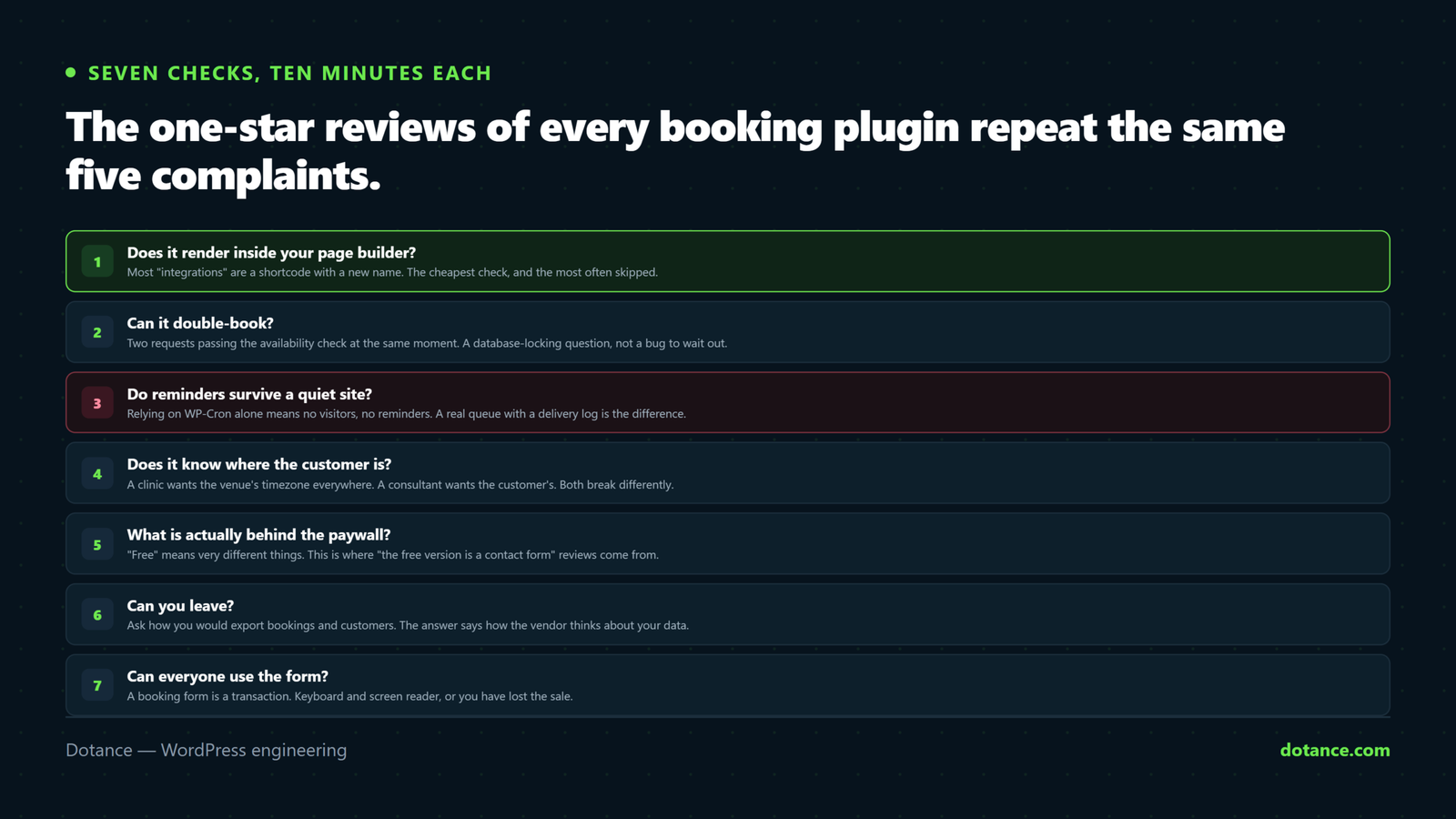
Read enough one-star reviews and you stop seeing individual plugins and start seeing categories. Here is the tally from the six largest, with roughly how often each complaint shows up.
| Complaint | What it looks like in the review | How common |
|---|---|---|
| Paywalled basics | “The free version is a contact form.” “Google Calendar sync is an add-on.” | The most frequent, by a distance |
| Double bookings | “Two clients booked the same slot and I found out at the door.” | Every plugin has shipped it at least once |
| Reminders not sending | “Cron never runs, customers no-show, support says buy the cloud cron.” | The dominant support-forum thread |
| Form does not render | “Works in the editor, blank on the live page inside Elementor / a popup.” | Constant with page-builder users |
| Update broke the site | “Updated, white screen, rolled back, lost bookings.” | Spikes around major releases |
| Support latency | “Nine days for a first reply, then a link to the docs.” | Universal on the paid tiers too |
Notice that none of these are about missing features. They are about the WordPress booking plugin failing at the things it already claims to do. That is why the checks below test behaviour, not the feature grid.
Check 1: does the WordPress booking plugin render inside your page builder?
This is the cheapest check and the most often skipped. Most WordPress booking plugin “integrations” are a shortcode with a new name. A shortcode works — until it sits inside an Elementor popup, a lazy-loaded Beaver Builder row, or a Breakdance section that renders after the plugin’s script has already run. Then you get the skeleton loader forever, or nothing.
The test: place the form in every place you will actually use it, not just a blank page.
- A normal page in your builder of choice.
- Inside a popup or modal, opened by a button.
- Inside a tab or accordion that starts collapsed.
- On a page with a caching plugin active and a cold cache.
If the WordPress booking plugin has a real block, widget, module or element for your builder, it will usually re-initialise when the builder injects content. If it only has a shortcode, watch for a MutationObserver or a builder-specific hook in its front-end script. Without one, the popup case fails. Our notes on what a builder does and does not give you are in Elementor without Pro and page builder or custom theme.
# Does the front-end script re-mount on injected content? Look for the observer.
curl -s https://example.com/wp-content/plugins/<plugin>/assets/js/frontend.js \
  | grep -c "MutationObserver\|elementor/popup/show\|frontend/element_ready"
Zero matches is not proof of failure, but it is the signal to run the popup test before you commit.
Check 2: can it double-book?
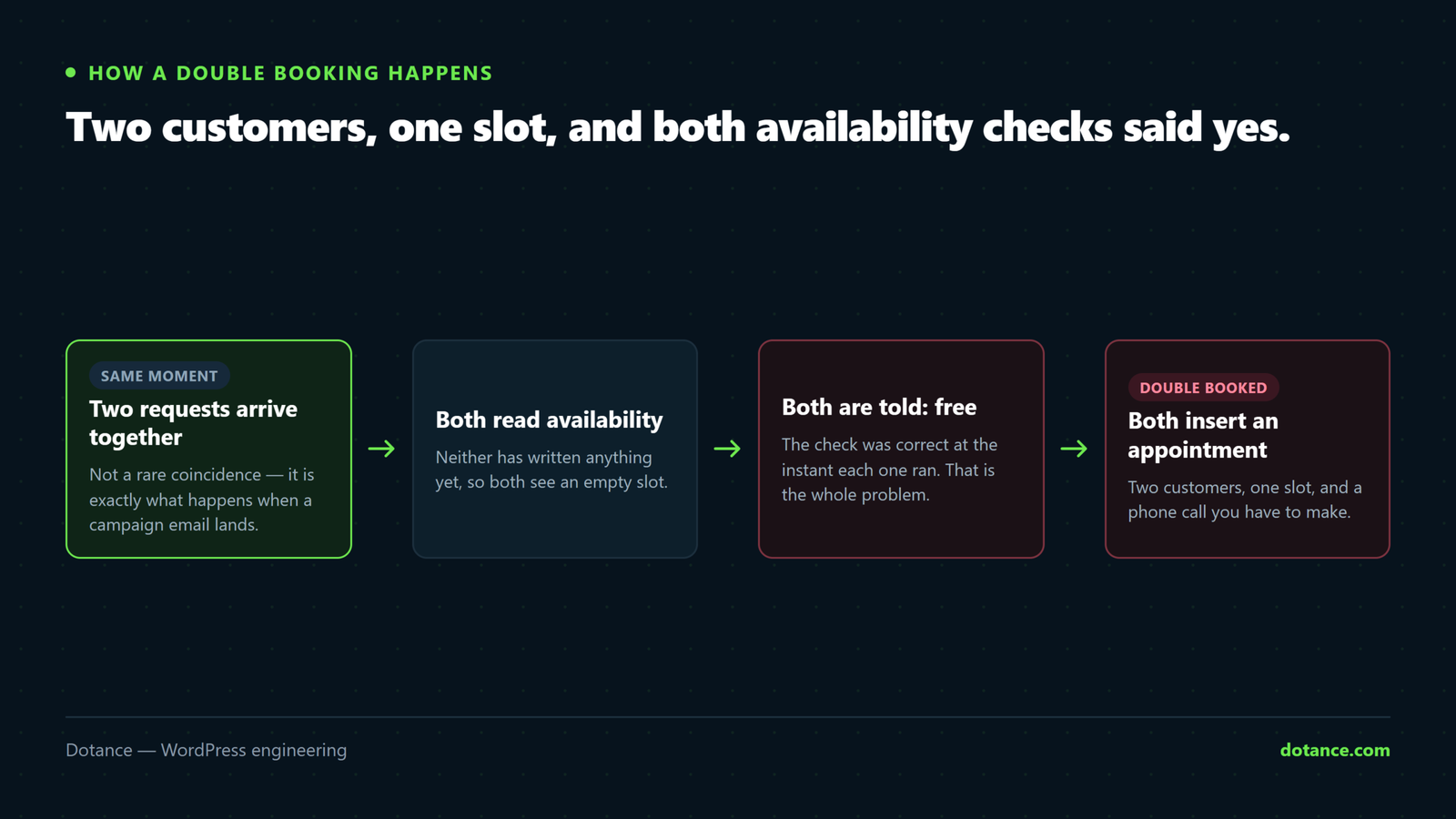
A WordPress booking plugin double-books when two requests for the same slot pass the availability check at the same moment and both insert an appointment. The availability check is not the protection; it runs before the insert, and two requests can both see the slot as free. The protection is what happens at insert time.
There are three WordPress booking plugin designs for that moment, from weakest to strongest:
| Design | How it fails | How to spot it |
|---|---|---|
| Check, then insert | Two requests both pass the check | No transaction, no lock, no unique index on the appointments table |
| Application-level lock (transient or option) | Works until the object cache drops the lock, or two PHP workers race on the option write | set_transient( 'lock_…' ) in the booking code |
| Database lock plus unique key | Does not, for a given staff member and start time | SELECT … FOR UPDATE on the staff row and a UNIQUE KEY on staff + start time |
You do not have to read the code to find out. Fire twenty identical bookings at once and count how many succeed. This needs a public booking endpoint; most plugins have an AJAX or REST route the form calls, visible in the browser’s network tab when you submit.
race-test.sh
# Twenty parallel bookings for the same slot. Exactly one should return 201.
for i in $(seq 1 20); do
  curl -s -o /dev/null -w "%{http_code}\n" \
    -X POST https://example.com/wp-json/bookance/v1/bookings \
    -H "Content-Type: application/json" \
    -d '{"service":1,"staff":1,"start_utc":"2026-09-15 09:00:00","customer":{"first_name":"Race","email":"race'$i'@example.com","consent":true}}' &
done; wait | sort | uniq -c
Run it against a staging copy, never production. If you see two or more success codes, the WordPress booking plugin can double-book, and it will — eventually, on the busiest day of your year.
Check 3: do reminders survive a quiet site?
The single largest support-forum topic across every WordPress booking plugin we looked at is reminders that did not send. The cause is almost always the same: the plugin schedules the email with WP-Cron, and WP-Cron only runs when someone visits the site. A small business site with forty visits a day can go hours without a page load. The 08:00 reminder fires at 11:40, or never, and the vendor sells a “cloud cron” subscription as the fix.
Two things separate a WordPress booking plugin that sends from one that does not.
First, a real queue. Action Scheduler — the background job library WooCommerce uses, documented at actionscheduler.org — stores jobs in its own tables, processes them in batches, retries failures and survives a missed cron tick. A plugin that bundles it, or something equivalent, is in a different class from one that calls wp_schedule_single_event() and hopes.
Second, a delivery log. Not “sent” or “not sent”, but the actual error wp_mail() returned. The most common reason a reminder never arrives is not scheduling at all; it is the host refusing the From address. We wrote that one up in WordPress emails not sending. Without a log you cannot tell the two apart.
# What is actually scheduled, and is anything stuck in the past?
wp cron event list --fields=hook,next_run_relative | head -20

# If the plugin uses Action Scheduler, pending and failed jobs are queryable:
wp action-scheduler list --status=pending --per-page=10
wp action-scheduler list --status=failed  --per-page=10
Then fix cron itself, whichever WordPress booking plugin you pick: a real server cron hitting wp-cron.php every five minutes, with page-load cron left on as the fallback. That single change removes most “reminders do not send” complaints on its own.
Check 4: does it know where the customer is?
Timezones break a WordPress booking plugin in two directions. A venue business — a salon, a clinic — wants every time shown in the venue’s zone, whatever device the customer is on. An online business — coaching, consultations — wants the customer’s own zone, or they book 3pm and join at midnight. Most of the WordPress booking plugin market picks one behaviour globally and gets half its users wrong.
Check three things about any WordPress booking plugin:
- Is the site timezone a city (
Europe/London) or a fixed offset (UTC+1)? A fixed offset cannot handle daylight saving. The plugin should warn you; many do not. - Can a service be marked as in-person versus online, and does the form change which zone it displays accordingly?
- Does a staff member — or a location — carry their own zone, for a team spread across cities?
# A fixed-offset site is a timezone bug waiting to happen.
wp option get timezone_string   # should be a city, not empty
wp option get gmt_offset        # if timezone_string is empty, this is all you have
Book a test appointment across a daylight-saving boundary — the last Sunday of October in Europe — and confirm the confirmation email, the calendar invite and the admin screen all agree. That one test catches a surprising amount.
Check 5: what is behind the paywall?
“Free” means very different things from one WordPress booking plugin to the next. This is where the “the free version is a contact form” reviews come from, and it is worth mapping before you install anything, because the upgrade you need is often not the one you expected.
| Plugin | Free tier, in practice | The thing people end up paying for |
|---|---|---|
| LatePoint | Broad — most features included | Google Calendar sync is a paid add-on, and it is the subject of nearly every one-star review |
| Amelia | Narrow — one staff, limited services, no notifications to speak of | Starter tier just to run a single-person business properly |
| Bookly | Usable for one person | Pro, then a long list of separately priced add-ons — the sprawl is the top complaint |
| Simply Schedule Appointments | Solid for one calendar | Team features sit in the top tier |
| FluentBooking | No free tier on WordPress.org | Everything |
| Bookance | Everything in the plugin: unlimited staff, locations, calendar, notifications, Google Calendar push | Pro, when it ships, adds payments, deposits, two-way sync and SMS — nothing in free is locked |
The honest way to read this table: if you need online payments today, Bookance is not yet the WordPress booking plugin for that, and LatePoint or Simply Schedule Appointments will serve you better. If you need reliable bookings with reminders, a real calendar and more than one staff member without a licence, the free tiers of most of the incumbents will not get you there and ours will.
The related question — whether to buy at all or build something narrow — is covered in when a custom plugin is cheaper than buying one, and the wider budget context in what a WordPress website costs.
Check 6: can you leave?
Every WordPress booking plugin is easy to install. Ask how you would get out. The answers tell you a great deal about how the vendor thinks about your data.
| Question | Good answer | Bad answer |
|---|---|---|
| Where are bookings stored? | Its own tables with a documented schema | Serialised blobs in wp_postmeta |
| Can I export? | CSV of customers and appointments, plus WordPress’ personal-data exporter hooked up | “Contact support” |
| What does uninstall do? | Asks, then removes tables and options cleanly | Leaves twelve tables behind, or deletes everything without asking |
| Can I import from my last plugin? | Importers for the common ones, idempotent so a re-run does not duplicate | No — start again |
| GDPR requests? | Exporter and eraser registered with WordPress | Manual SQL |
# Are personal-data exporters and erasers registered? Empty output means no.
wp eval 'print_r( array_keys( apply_filters( "wp_privacy_personal_data_exporters", array() ) ) );'
wp eval 'print_r( array_keys( apply_filters( "wp_privacy_personal_data_erasers",  array() ) ) );'
Tables left behind after uninstall are the second-most-cited complaint against the largest WordPress booking plugin in the directory. It is not dangerous, but it tells you nobody tested the exit.
Check 7: can everyone use the form, and how heavy is it?
A booking form is a transaction. If a customer cannot complete it with a keyboard, or with a screen reader, you have lost the sale and — since June 2025 for many EU-facing businesses — possibly broken the law. The detail is in WordPress accessibility in 2026; the short test is to tab through the whole form to the confirmation without touching the mouse.
Weight matters for the same commercial reason. More than one popular WordPress booking plugin ships a full front-end framework and 300–800 KB of JavaScript to render a calendar. On a phone on a slow connection that is the difference between a booking and a bounce, and it shows up in LCP on every page the form sits on.
# Total transferred bytes for the plugin's front-end assets on a page with the form.
curl -s https://example.com/book/ \
  | grep -o 'src="[^"]*plugins/<plugin>[^"]*\.js[^"]*"' \
  | sed 's/src="//;s/"$//' \
  | xargs -I{} sh -c 'curl -s -o /dev/null -w "%{size_download} {}\n" "{}"'
Under 50 KB gzipped for a WordPress booking plugin widget is achievable. Over 300 KB is a framework bundle, and you will feel it.
Where choosing a WordPress booking plugin goes wrong
Six patterns account for most of the WordPress booking plugin regret we get called in to fix.
| The mistake | What it costs | What to do instead |
|---|---|---|
| Comparing feature grids | Picking the plugin with the longest list, which fails on the basics | Run checks 1–3 first; features come after behaviour |
| Testing on a blank page only | The form dies inside the real popup on launch day | Test in every placement you will actually use |
| Trusting “sends reminders” | No-shows, and a cloud-cron upsell | Check for a queue and a log; fix server cron |
| Ignoring the uninstall path | Locked in by inertia, not by choice | Ask the five exit questions before installing |
| Buying the top tier for one feature | Paying for twenty things to get one | Map the paywall; sometimes a narrow custom build is cheaper |
| Skipping the daylight-saving test | A week of wrong times twice a year | Book across the boundary before go-live |
How Bookance answers the seven checks
We built Bookance because we kept installing the incumbents for clients and kept hitting the list above. It is a free WordPress booking plugin, GPL, and nothing in it is locked. Here is how it does against each check, including the one it does not pass yet.
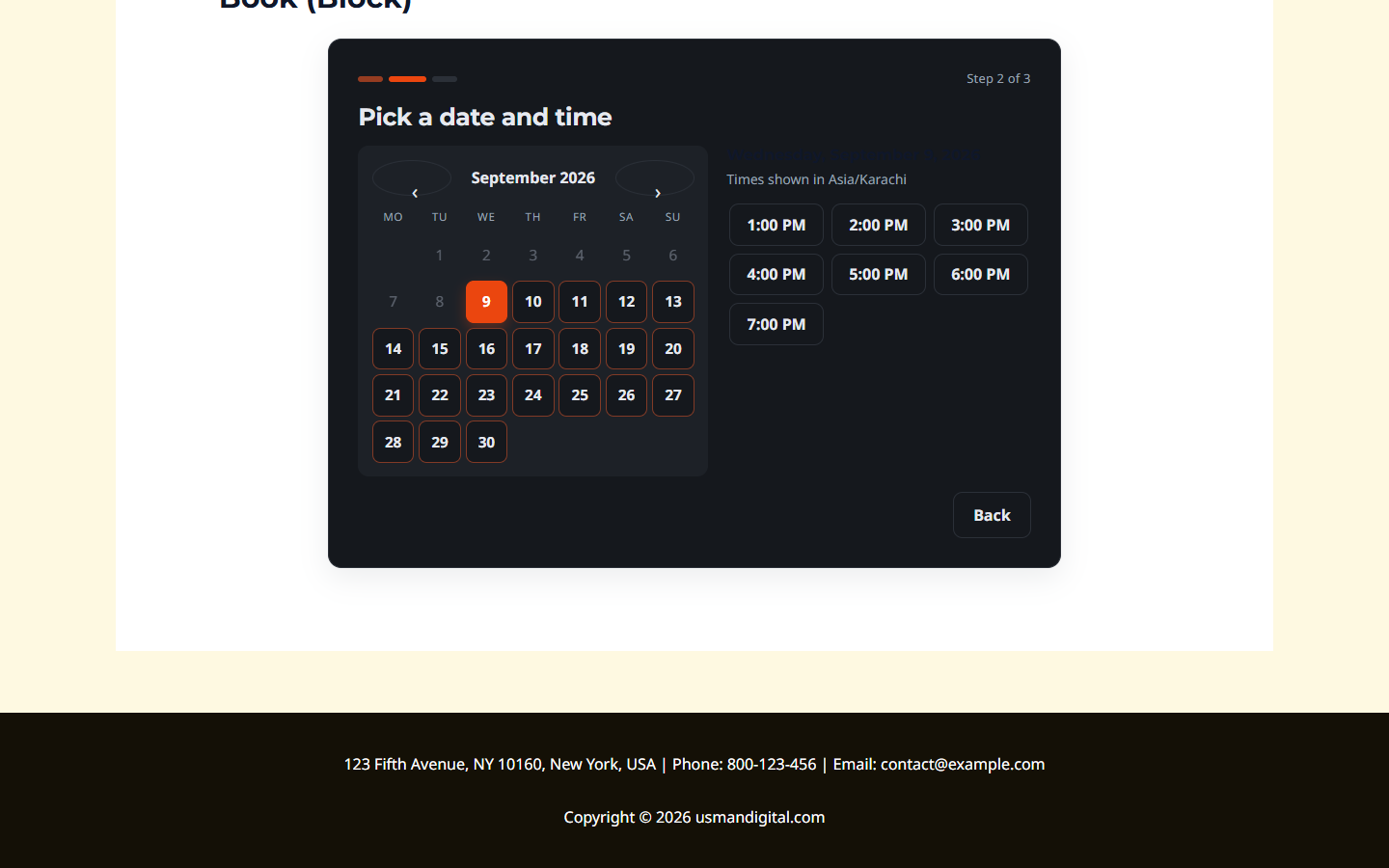
Builder rendering. One PHP renderer feeds a real Gutenberg block, an Elementor widget with its own category and a full Style tab (48 controls, every colour, font, radius and spacing per widget), a Beaver Builder module and a Breakdance / Oxygen 6 element, plus a shortcode. The front-end script watches for injected content, so the popup and lazy-section cases mount.
Double bookings. Every reservation runs inside a transaction that locks the staff row, checks overlaps, and inserts with a unique slot key as the last line of defence. The twenty-request test above is part of the plugin’s own self-check: nineteen get a “just taken” response with the next free times, one gets the slot.
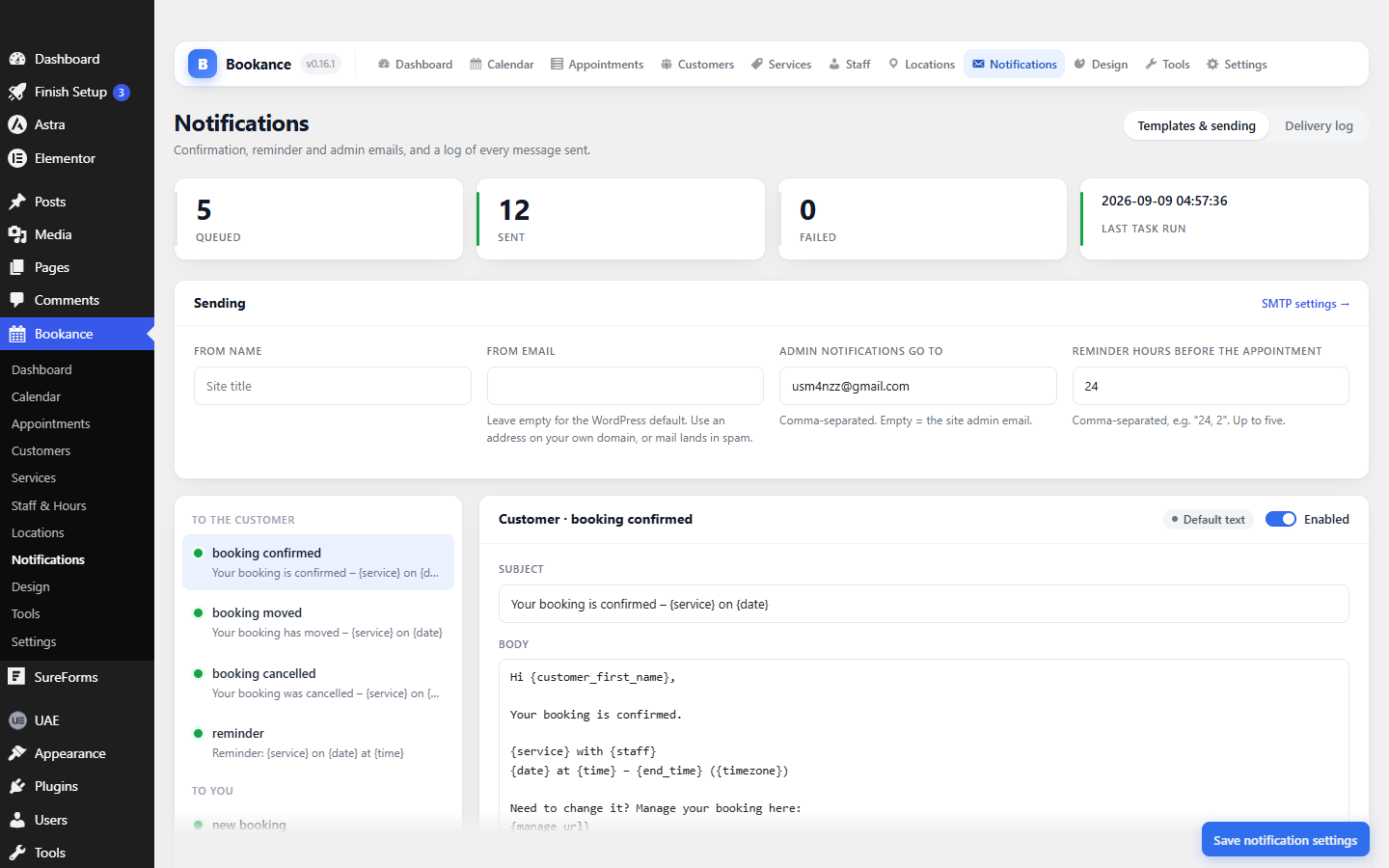
Reminders. Action Scheduler is bundled. Confirmations, reschedules, cancellations and reminders are queued jobs with three retries, and the Notifications screen shows every message, when it went, and the wp_mail() error when it did not. The dashboard warns when the queue is stalling. For the other half of the problem — the host’s mail function being the thing that fails — Settings has a built-in SMTP option: enter your own provider’s server, send a test, and see the mail server’s real error if it refuses.
Timezones. Everything is stored in UTC. A service is in-person, online or either, and the form shows venue time or the visitor’s time accordingly. Staff and locations carry their own zones. Daylight-saving days are covered by tests, not hope.
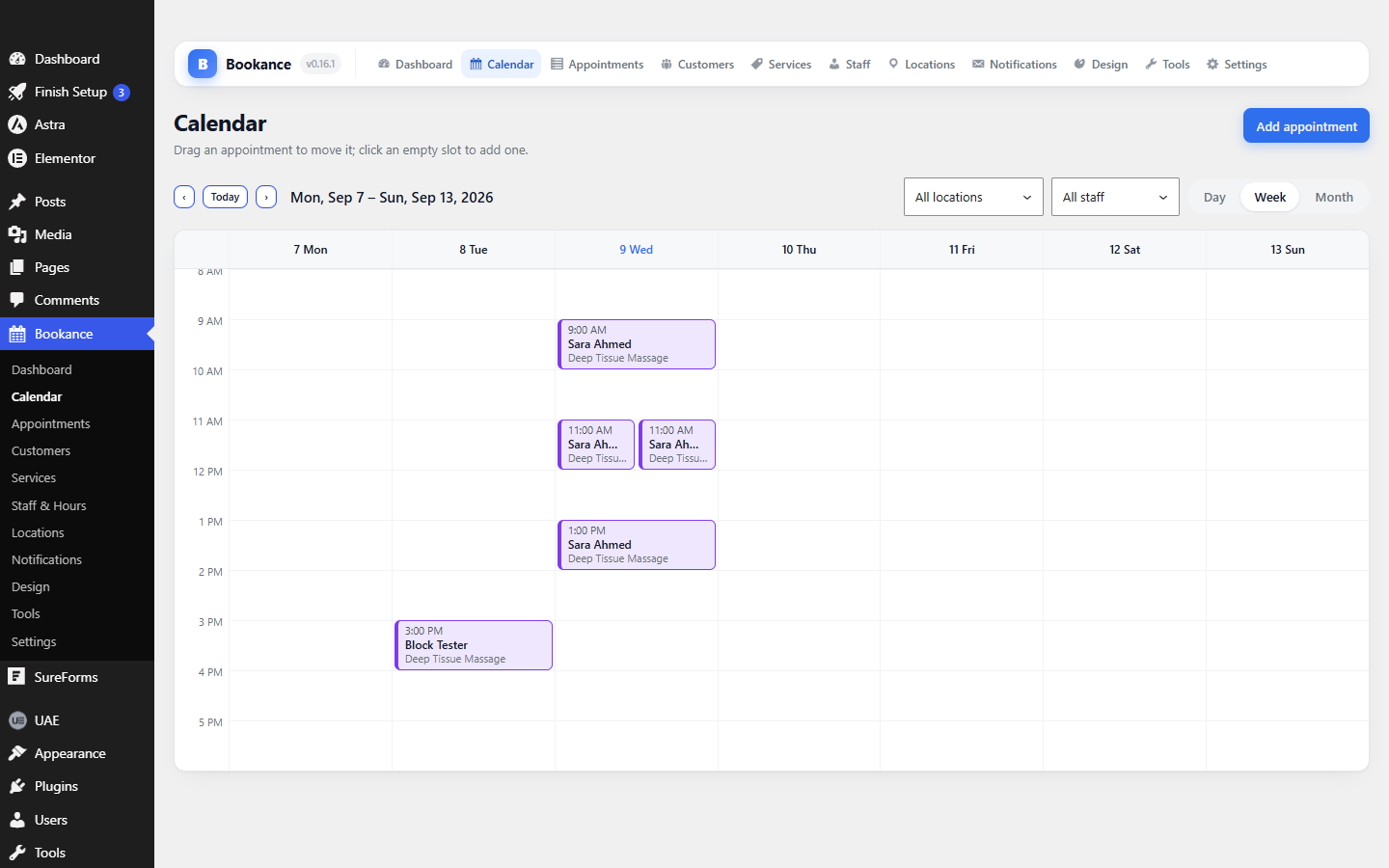
Paywall. There is none. Unlimited staff, services, locations and appointments; the admin calendar; Google Calendar push through your own Google Cloud client; importers for Bookly and Amelia. The Pro plugin, when it ships, adds payments, deposits, two-way calendar sync and SMS — it will not take anything away from free.
Leaving. Its own tables with a documented schema, CSV import, the WordPress personal-data exporter and eraser wired up, and an uninstall that asks before dropping anything.
Accessibility and weight. The widget is a 15 KB gzipped Preact bundle. Keyboard-complete calendar, visible focus, live regions for slot updates, right-to-left support and reduced-motion respected. No framework, no jQuery.
Where it does not compete yet: online payments. Bookings confirm with payment on arrival. If you need to take a card at booking time today, this is not the WordPress booking plugin for you until Pro ships; LatePoint or Simply Schedule Appointments are better choices for that specific need.
Common questions
Which WordPress booking plugin is best for a single-person business?
One where the free tier actually runs the business — bookings, reminders, a calendar and a way out. Test checks 2 and 3 first; a single-person business is hit hardest by a missed reminder because there is nobody else to notice.
Can a WordPress booking plugin work without WP-Cron?
Yes, if it uses a proper queue. Point a server cron at wp-cron.php every five minutes, leave page-load cron enabled as a fallback, and choose a plugin with a background scheduler and a delivery log. Then a quiet site sends on time.
How do I test a WordPress booking plugin for double bookings?
On staging, send twenty identical booking requests in parallel for the same slot and count the successes. Exactly one should succeed. The shell loop earlier in this article does it in five lines.
Does a WordPress booking plugin slow down my site?
Only the pages it renders on, and only by the weight of its front-end assets. A widget under 50 KB gzipped is negligible; a 500 KB framework bundle is visible in Core Web Vitals. Measure it with the curl loop above rather than trusting the marketing page.
Is Bookance really free?
Yes. Bookance is a free WordPress booking plugin: everything currently in it is unlocked, including unlimited staff and Google Calendar push. Pro will be a separate plugin that adds payments and messaging channels. It is being submitted to the WordPress.org directory; until then the download on the plugin page is the same build.
Can I move from Bookly or Amelia?
Bookance imports services, staff, hours, customers and appointments from both, with a dry run first. Keep the old plugin installed while you compare, then deactivate it once the numbers match.