A post was meant to publish at nine this morning and it is still sitting there marked “Missed schedule”. Your backup plugin last ran four days ago. The order confirmation email turned up two hours after the order. All three are the same fault, and WordPress cron not running is the phrase you are looking for. Here is what is actually happening and how to fix it so it stays fixed.
WordPress cron not running is the default behaviour, not a failure
The first thing to understand is that WordPress does not have a scheduler. It has a to-do list called cron stored in the options table, and it checks that list when somebody loads a page.
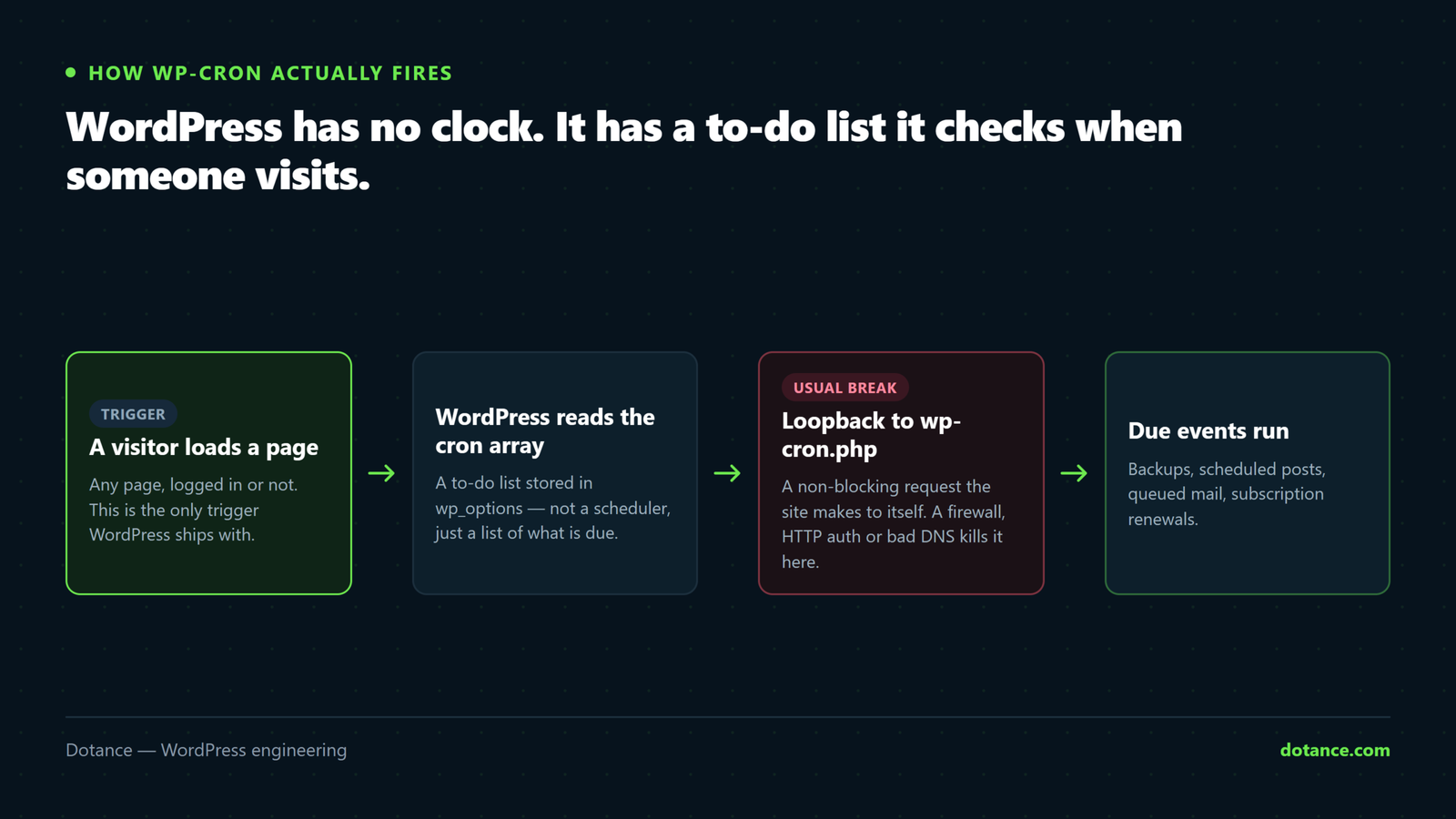
That is the whole mechanism. A visitor arrives, WordPress fires a non-blocking request back to itself at wp-cron.php, and that request runs whatever was due. No visitors means no page loads, and no page loads means WordPress cron not running at all.
So a brochure site with forty visits a day will miss schedules constantly, and a busy shop almost never will. Same software, completely different reliability, and nothing is broken in either case.
Why the name is misleading: real cron is an operating-system daemon that wakes on a clock. WP-Cron wakes on traffic. Every problem in this article comes from people assuming the first while running the second.
Symptoms that mean WordPress cron not running
The events are silent when they fail, so you diagnose from what did not happen rather than from an error.
| What you see | What it usually means |
|---|---|
| Posts stuck on “Missed schedule” | Nothing ran at the scheduled minute — the classic sign |
| Backups that stop silently | The backup hook is queued but never fires |
| Emails arriving hours late | Queued mail plugins flush on cron, not immediately |
| Updates never applied automatically | wp_version_check is a cron event too |
| Subscriptions or renewals not charging | WooCommerce Subscriptions is entirely cron-driven |
| Transients that never expire | Stale prices, stale stock, stale feeds |
| Everything runs, but only when you visit wp-admin | Cron works — you are its only trigger |
Work down that table before touching anything: if two or three rows match, WordPress cron not running is confirmed without any further testing. That last row is the giveaway. If the queue drains the moment you log in, the scheduler is functional and starved. If it does not drain even then, something is genuinely blocking it.
Check whether WordPress cron not running is really your problem
Two commands settle whether WordPress cron not running is your diagnosis or a red herring. Do not change any configuration before you run them.
Over SSH, in the WordPress root
# What is queued, and when was it due?
wp cron event list --fields=hook,next_run_relative,recurrence

# Can WordPress reach its own wp-cron.php?
wp cron test
Read the next_run_relative column. Anything showing a negative time — -3 days, -14 hours — was due and never ran. One or two overdue events can be a slow hour. A whole column of them is WordPress cron not running.
wp cron test is the other half. It performs the same loopback request WordPress performs and reports the HTTP status. A clean pass prints a success line. Anything else — a timeout, a 401, a 403 — is the actual fault, and it is the one you fix.
Without SSH, request the file directly instead:
curl -sS -o /dev/null -w "%{http_code}\n" https://example.com/wp-cron.php?doing_wp_cronYou want 200. A 401 means HTTP authentication is in the way, a 403 means a firewall is, and a hang means the loopback is being swallowed. Each of those is covered below.
The six causes of WordPress cron not running
| # | Cause | Tell | Fix |
|---|---|---|---|
| 1 | Not enough traffic | Queue drains when you log in | Real server cron |
| 2 | DISABLE_WP_CRON true, nothing replacing it | Nothing ever runs | Add the server cron you forgot |
| 3 | Full-page cache serving without PHP | Busy site, dead queue | Server cron; exclude the file |
| 4 | Loopback blocked | wp cron test fails | Firewall, auth or DNS |
| 5 | A fatal error inside one event | Queue stalls at the same hook | Find and unschedule it |
| 6 | Wrong site URL | Loopback hits the wrong host | Correct siteurl and home |
1. There is simply not enough traffic
The most common reason for WordPress cron not running is the least interesting: nobody visited. A site with a handful of daily sessions cannot schedule anything reliably, because the trigger is the visitor.
You cannot fix this with a plugin. You fix it by giving WordPress a clock, which is the server cron below. No amount of optimising a low-traffic site changes the arithmetic — WordPress cron not running on a quiet brochure site is the expected outcome of the design.
2. DISABLE_WP_CRON is true and nothing replaced it
Plenty of hosts and tutorials tell you to put this in wp-config.php:
define( 'DISABLE_WP_CRON', true );That line does exactly one thing: it stops page loads from triggering the queue. It does not schedule anything. If a real cron job was never added afterwards — or was added and later removed during a migration — you have WordPress cron not running permanently and silently.
Our position, and it is a minority one: leave DISABLE_WP_CRON as false even when a server cron exists. The server cron is then primary and page loads are the fallback, so a cron outage costs you punctuality instead of costing you every scheduled task. The duplicate-run risk is handled by WordPress’s own lock.
3. A full-page cache is serving pages without touching PHP
This one catches busy sites, which is why it surprises people. LiteSpeed, Varnish, Cloudflare’s cache, a static-page plugin — when a cached page is served, PHP never executes, WordPress never loads, and no loopback fires.
Your traffic graph looks healthy and the queue is dead, which is why WordPress cron not running gets misdiagnosed as a plugin bug on exactly the sites that are best configured. The more effective your caching, the worse WordPress cron not running becomes, which is a genuinely perverse incentive. Again: server cron. See why WordPress sites go slow for how the caching layers stack up.
4. The loopback request is blocked
WordPress calls its own URL to run cron. Several things break that call:
- HTTP basic auth on a staging site — the loopback gets a 401.
- A security plugin or WAF rate-limiting or blocking
wp-cron.php. - A hosts-file or DNS split where the server cannot resolve its own domain.
- Cloudflare “Under Attack” mode, which challenges the server’s own request.
- A firewall blocking outbound requests from the web server.
The fix is to allow the request rather than to route around it. On staging, exclude wp-cron.php from basic auth. On a WAF, allow the server’s own IP. This is the one cause where WordPress cron not running is a real misconfiguration rather than a design consequence, and a server cron hides it instead of solving it — worth knowing before you declare victory.
5. One event is fatally erroring and stalling the queue
Cron events run in sequence in a single request. If one hits a fatal error or a timeout, everything behind it in that run never executes. You then see a queue that always stalls at the same point.
Run a single hook by hand and watch what happens:
# Run one event in the foreground so errors are visible
wp cron event run my_plugin_daily_sync --debug
If it dies, you have found your culprit. A memory limit or an execution-time ceiling is the usual reason — see allowed memory size exhausted and maximum execution time exceeded, both of which hit cron before they hit the front end because cron runs the heaviest work.
To clear a broken event while you investigate:
wp cron event delete my_plugin_daily_sync6. The site URL is wrong
After a migration, siteurl and home sometimes still point at the old domain or at plain HTTP. The loopback then requests a host that redirects, 404s, or never answers, and you get WordPress cron not running on an otherwise healthy site.
wp option get siteurl
wp option get home
Both should be the exact live URL, with https, and matching each other. This is a standard post-migration check — the full list is in our guide to changing WordPress hosting.
The durable fix: give WordPress a real clock
Every cause above is solved or softened by one change — a genuine system cron that requests the file on a schedule instead of waiting for a visitor.
crontab -e
# Every five minutes, quietly, with a timeout
*/5 * * * * curl -s -m 60 https://example.com/wp-cron.php?doing_wp_cron >/dev/null 2>&1
If your host gives you a control panel instead of a shell — Hostinger, cPanel and Plesk all do — create a PHP cron job pointing at the absolute path of the file:
/home/USER/domains/example.com/public_html/wp-cron.phpFive minutes is the right interval for almost everyone. One minute wastes resources on a site with nothing due; fifteen makes a nine o’clock post publish at ten past. If you need a task to run at an exact minute, do not use WP-Cron for it at all — call your own script directly from system cron.
Verify, do not assume. After adding the job, schedule a test post two minutes out and walk away. If it publishes on its own, WordPress cron not running is behind you. If you had to load the page to make it publish, the cron job is not firing and the panel is telling you otherwise.
What WordPress cron not running actually costs you
It is worth being concrete about WordPress cron not running, because “scheduled tasks are not firing” sounds like a housekeeping issue until you list what is queued on a normal site.
| Queued task | What stops | How long before you notice |
|---|---|---|
| Nightly backup | No restore point after the last successful run | Until you need it — often months |
| Subscription renewals | Cards are never charged | One billing cycle |
| Abandoned-cart emails | The recovery sequence never sends | Only in the revenue numbers |
| Security scans | No file-change alerts at all | After an incident |
| Sitemap pings and index refreshes | New posts sit undiscovered longer | Weeks |
| Scheduled content | Publishing stops dead | Same day, thankfully |
Only the last row announces itself. Everything above it fails in a way that looks exactly like a quiet week, which is why WordPress cron not running is so often discovered during an emergency rather than before one. A store on subscriptions can lose a full month of recurring revenue to a setting somebody added during a speed-optimisation pass and never finished.
There is a second cost that is harder to see. Plugins that expect their cron hooks to fire will often re-queue work they believe failed, so an idle queue slowly fills up. When the scheduler is finally restored, hundreds of backlogged events run in one go — and that burst is what takes the site down at the exact moment somebody fixed it. If a queue has been dead for weeks, drain it deliberately with wp cron event run --due-now in small batches rather than letting a first cron hit do it all at once.
WP-Cron, Action Scheduler and system cron
Three schedulers exist on a typical WooCommerce site and people confuse them constantly, which leads to fixing the wrong one.
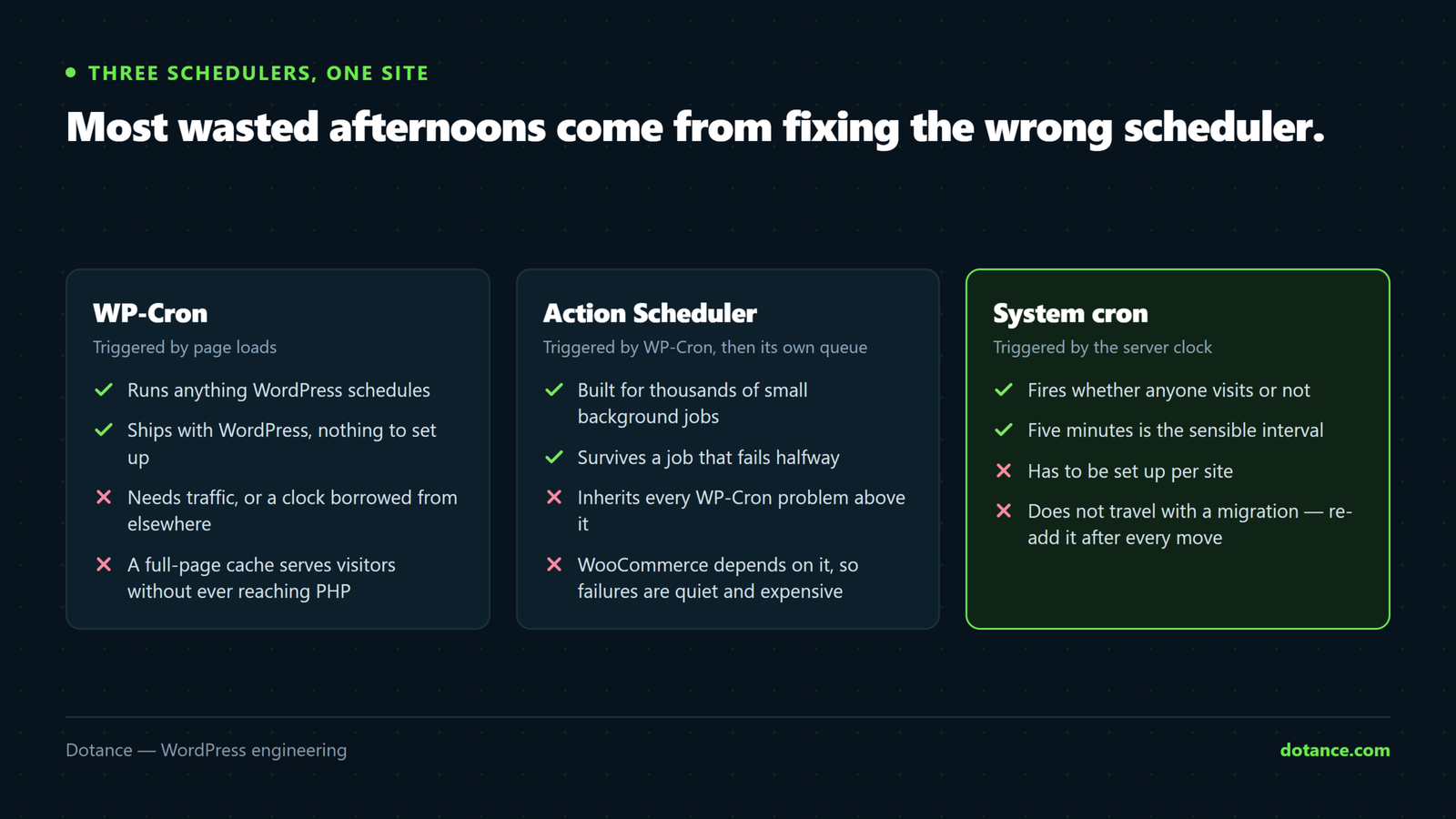
| Scheduler | Triggered by | Good for | Weak point |
|---|---|---|---|
| WP-Cron | Page loads or a server cron | Anything WordPress schedules | Needs traffic or a clock |
| Action Scheduler | WP-Cron, then its own queue | Thousands of small background jobs | Inherits every WP-Cron fault |
| System cron | The operating system | Exact timing, heavy work | Needs shell or panel access |
The dependency runs downward, which is the point people miss: Action Scheduler cannot rescue you from WordPress cron not running, because WP-Cron is what starts it. Fix the bottom of the chain and both layers recover together.
Where this goes wrong
| The mistake | What happens | Do this instead |
|---|---|---|
Setting DISABLE_WP_CRON true and stopping there | Every scheduled task dies silently | Add the server cron first, then decide |
| Installing a “fix missed schedule” plugin | Masks the symptom, adds a plugin | Find which of the six causes it is |
| Running cron every minute | Constant PHP processes for nothing | Five minutes |
Using wget without a timeout | Overlapping hung requests pile up | curl -s -m 60 |
| Assuming the host’s panel cron works | Silent failure for weeks | Test with a real scheduled post |
Blocking wp-cron.php in a WAF “for security” | Kills the scheduler outright | Rate-limit it, do not block it |
Deleting the whole cron option to “reset” | Loses every plugin’s schedule until reactivation | Delete the single broken hook |
Keeping it fixed
| Habit | How often | Why |
|---|---|---|
wp cron event list for overdue hooks | Monthly | Catches a stalled queue early |
| Confirm the last backup ran | Weekly | Backups are cron-driven and fail quietly |
| Re-check cron after every migration | Every move | Server cron jobs do not migrate |
| Schedule a throwaway post | Quarterly | The only end-to-end proof |
| Watch for events added by new plugins | On install | Heavy hooks stall the ones behind them |
The migration row is the one people learn the hard way. Server cron jobs live on the server, not in the site, so moving hosts leaves them behind while wp-config.php happily keeps DISABLE_WP_CRON set to true. That is WordPress cron not running from the moment the DNS switches, and it goes unnoticed until a backup is needed. A maintenance checklist that includes this check costs nothing.
For the full mechanism, the WordPress developer handbook on cron is short and accurate, and states the traffic dependency plainly.
Frequently asked questions
Does WordPress cron not running mean my site is hacked?
Almost never. It is a scheduling design, not a compromise. That said, some malware does schedule its own events, so if you see an unfamiliar hook in wp cron event list, look it up — our notes on signs a WordPress site is hacked cover what else to check.
Does WordPress cron not running affect the REST API or the editor?
No. Both work normally with a dead queue, which is part of why the fault goes unnoticed — see WordPress REST API errors for what those failures look like instead.
Will a server cron slow my site down?
No. It is one HTTP request every five minutes, usually finishing in milliseconds when nothing is due. That is far less load than the loopback firing on every uncached page view.
Can two cron runs overlap and double-charge a subscription?
WordPress sets a lock before running the queue, so a second request that arrives while the first is working exits immediately. Genuine double-runs need a much stranger setup than a five-minute cron.
Why do my posts publish the moment I open the dashboard?
Because you became the trigger. WordPress cron not running stops the moment an administrator loads any page. That is confirmation of cause one — the scheduler works fine and has no traffic to run on.
Should I use a third-party cron service instead?
It works, and it is a reasonable choice on hosting with no cron access at all. The trade-off is an external dependency on a fundamental part of your site, plus a public URL being hit from outside. A server cron is simpler when you can have one.
Is Action Scheduler affected by this too?
Yes. Action Scheduler — used by WooCommerce and many plugins for background work — is itself started by WP-Cron. If WordPress cron not running is your fault, the WooCommerce queue at Status → Scheduled Actions will be backed up as well, which is a useful second opinion. See why WooCommerce stores get slow for what a backed-up queue does to a shop.
How quickly should a scheduled post publish?
Within your cron interval. If it is not, treat WordPress cron not running as still open rather than fixed. With a five-minute job, a nine o’clock post appears by 9:05. If it is later than that consistently, the job is not running at the frequency you think it is.