You change a setting, click Save, and it holds. You come back an hour later and it is the old value again. You change it again, and this time it lasts until the next morning. Nothing in the admin explains it, and the setting is not one you touched anywhere else. When WordPress settings keep reverting like this, the cause is never “WordPress”; something specific is writing the value back, and it leaves tracks. This guide is how to read them, in the order that finds the culprit fastest.
The first test when WordPress settings keep reverting
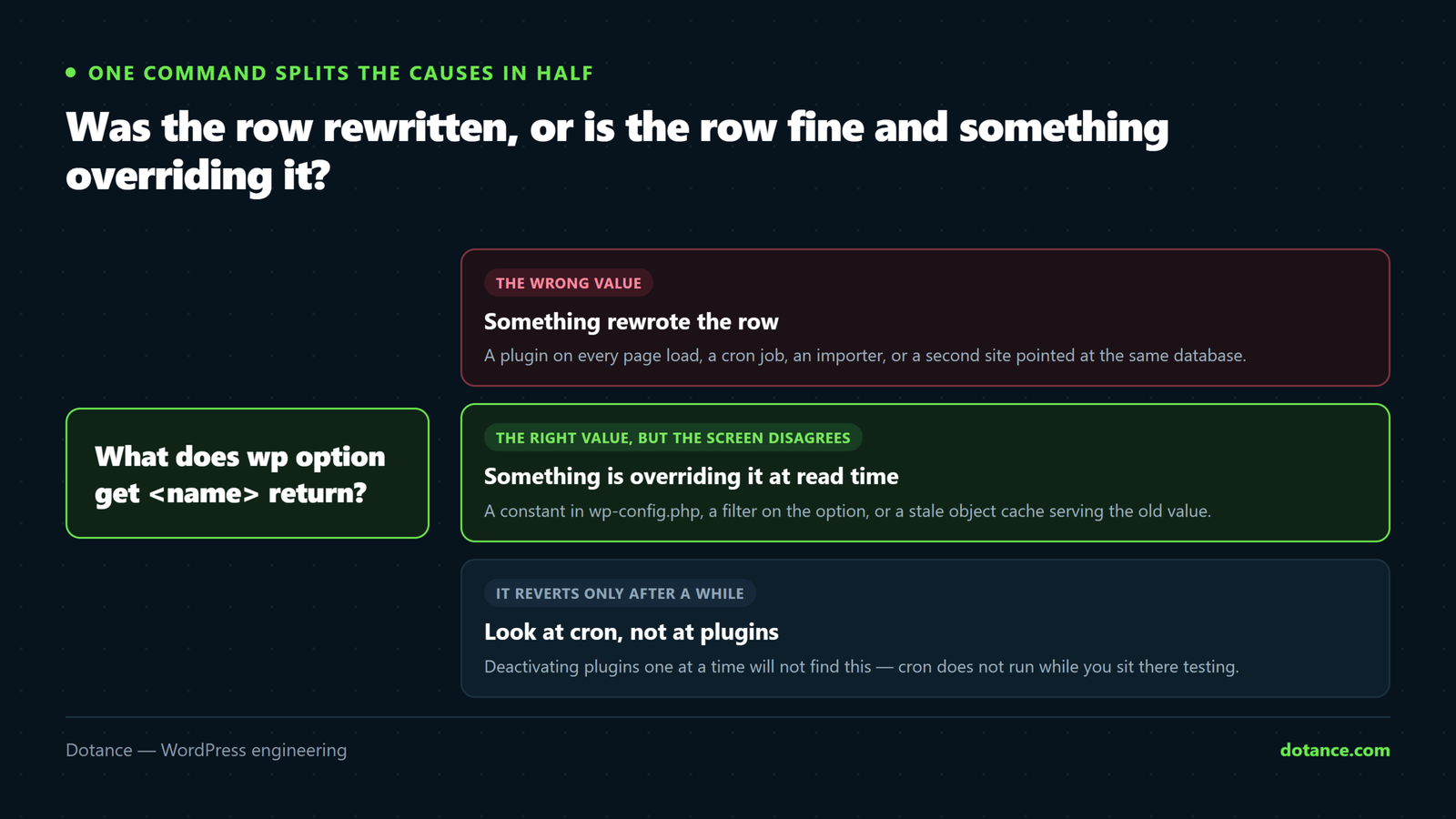
Every setting is one row in wp_options, and there are only two ways WordPress settings keep reverting: the row was rewritten, or the row is fine and something is overriding it when it is read. That means there are only two ways a screen can show you a value you did not save: the row was rewritten, or the row is fine and something is overriding it when it is read. Those are different problems with different suspects, so check which one you have before anything else:
Is the stored value wrong, or just the displayed one?
# The value in the database, with no filters applied
wp option get blog_public

# The value WordPress would give a plugin — filters applied
wp eval 'var_dump( get_option( "blog_public" ) );'
If both show the old value, the row itself is being rewritten — go to the write-side causes below. If wp option get shows your new value but get_option() shows the old one, the database is right and a filter or a constant is overriding it at read time. That is a smaller list of suspects and usually a five-minute fix.
| Cause | Side | Tell-tale | Where to look |
|---|---|---|---|
| A plugin rewrites the option on every request | Write | Reverts within seconds of a page load | Backtrace of the write (way 4) |
| A cron job rewrites it on a schedule | Write | Reverts at a regular interval | wp cron event list (way 5) |
| A second site shares your database | Write | Reverts to the other site’s values | Its wp-config.php (way 6) |
A constant in wp-config.php | Read | The field is greyed out in the admin | wp config list (way 3) |
A pre_option_* or option_* filter | Read | DB right, screen wrong | Registered filters (way 3) |
| A stale object cache | Read | Reverts only until the cache expires | wp cache flush (way 2) |
That table is the map for the rest of this guide. Every reason WordPress settings keep reverting is one of those six rows, and the ways below are ordered by how little effort each takes.
Six ways to catch why WordPress settings keep reverting
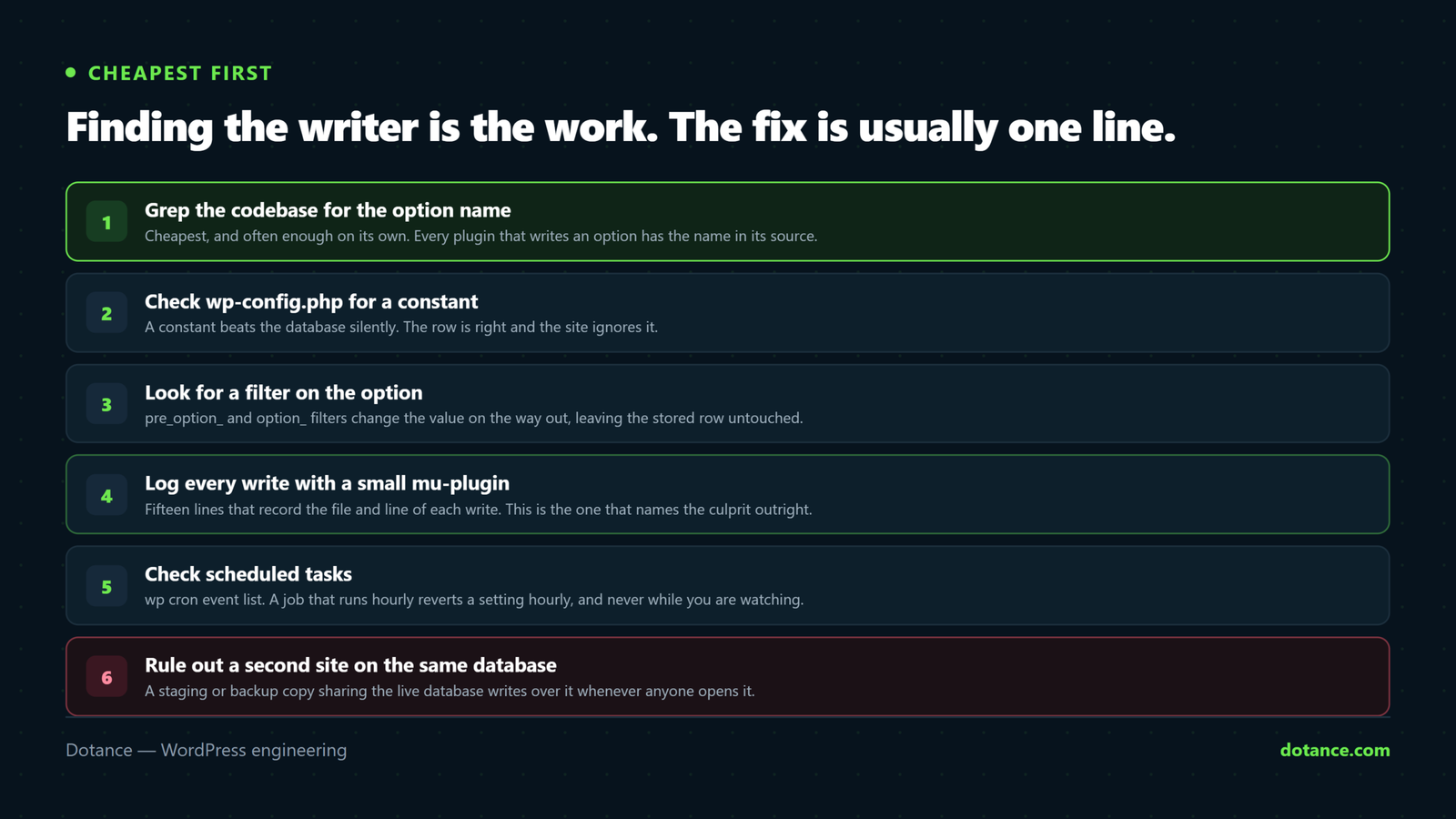
1. Grep the codebase for the option name
Cheapest first, and often enough on its own when WordPress settings keep reverting. Every plugin that writes an option has its name somewhere in its source, so search for it:
Who mentions this option at all?
cd wp-content
grep -rn --include=*.php "blog_public" plugins/ mu-plugins/ themes/ | grep -v "get_option"
Dropping the get_option lines leaves the writers: update_option, add_option, delete_option, and calls to a plugin’s own settings class that end up there. On a site with thirty plugins this returns a handful of lines, and one of them is usually the answer. It fails when the option name is built dynamically — update_option( $prefix . $key, … ) — which is exactly the case the backtrace in way 4 handles.
2. Rule out the caches
An object cache (Redis, Memcached, or the host’s own) stores options after the first read. Write a new value to the database by a route the cache does not see — phpMyAdmin, a direct SQL import, a migration tool — and every page keeps serving the cached old value until it expires. The symptom is that WordPress settings keep reverting for a while and then, mysteriously, stop.
Flush and re-test
wp cache flush
wp option get blog_public
# If the value is now correct and stays correct, it was the cache, not a writer
Page caches cause the same confusion one level up: the setting is right, the option is right, and the cached HTML still shows the old behaviour. Purge the page cache before deciding the setting has reverted; the Elementor cache post is the same lesson from a different direction.
3. Check constants and filters
Some settings are not read from the database at all, which is the read-side reason WordPress settings keep reverting. A constant in wp-config.php wins over the stored value, and the admin greys the field out — which is the tell. WP_HOME and WP_SITEURL are the common ones; DISALLOW_FILE_MODS, WP_POST_REVISIONS and AUTOMATIC_UPDATER_DISABLED are others.
Every constant the site defines
wp config list --fields=name,value | grep -iv "DB_\|KEY\|SALT"Filters are the subtler version. Any plugin can hook pre_option_{name} to replace a value before the database is even read, or option_{name} to alter it after. The database is right and the screen is wrong, permanently. List what is hooked:
Who is filtering this option?
wp eval 'global $wp_filter;
foreach ( array( "pre_option_blog_public", "option_blog_public", "default_option_blog_public" ) as $h ) {
  if ( empty( $wp_filter[ $h ] ) ) { continue; }
  foreach ( $wp_filter[ $h ]->callbacks as $prio => $cbs ) {
    foreach ( $cbs as $cb ) {
      $f = $cb["function"];
      echo $h, " @", $prio, ": ", is_array( $f ) ? get_class( $f[0] ) . "::" . $f[1] : ( is_string( $f ) ? $f : "closure" ), "\n";
    }
  }
}'
A class name is enough to identify the plugin. Most filters on core options are legitimate — a maintenance-mode plugin filtering blog_public, a multilingual plugin filtering WPLANG — but they explain why WordPress settings keep reverting on screen while the database says otherwise.
4. Log every write with its file and line
This is the decisive one for the write-side causes. WordPress fires updated_option after every real change to an option, and at that moment the code that made the change is still on the call stack. A fifteen-line mu-plugin records it:
wp-content/mu-plugins/who-writes-options.php
<?php
// Logs every write to one option, with the file:line chain that made it.
add_action( 'updated_option', function ( $option, $old, $new ) {
	if ( 'blog_public' !== $option ) {
		return;
	}
	$chain = array();
	foreach ( debug_backtrace( DEBUG_BACKTRACE_IGNORE_ARGS, 14 ) as $frame ) {
		if ( ! empty( $frame['file'] ) && false === strpos( $frame['file'], 'wp-includes' ) ) {
			$chain[] = basename( dirname( $frame['file'] ) ) . '/' . basename( $frame['file'] ) . ':' . $frame['line'];
		}
	}
	error_log( "[who-writes] {$option}: " . var_export( $old, true ) . ' -> ' . var_export( $new, true ) . ' via ' . implode( ' < ', $chain ) );
}, 10, 3 );
Drop the file into mu-plugins (create the folder if it does not exist), set the option name, and wait for the next revert. Whatever the reason WordPress settings keep reverting on your site, it now has to pass through this function. Then read wp-content/debug.log, or the server error log if WP_DEBUG_LOG is off:
The line you are looking for
[who-writes] blog_public: '1' -> '0' via some-plugin/class-sync.php:212 < some-plugin/some-plugin.php:88 < wp-settings.php:640The first entry in the chain that sits under plugins/ or themes/ is the culprit, and the line number takes you straight to the code. Delete the mu-plugin when you are done; it is a diagnostic, not a feature.
If you would rather not write PHP, this is precisely what a settings-history plugin does permanently and for every option at once. Settings Undo records each write with the plugin or theme that made it and the screen or job it came from, so when WordPress settings keep reverting the timeline already names the writer. The settings history guide compares it with the other ways of keeping that record.
5. Check the cron queue
A revert on a regular rhythm — every hour, every night at three — is a scheduled event, and the commonest reason WordPress settings keep reverting overnight. WordPress cron runs plugin jobs that sync with external services, rebuild caches, or "repair" settings they believe should have a certain value.
What is scheduled, and when
wp cron event list --fields=hook,next_run_relative,recurrence

# Run a suspect now and watch the option
wp option get blog_public
wp cron event run some_plugin_sync
wp option get blog_public
Hook names are prefixed with the plugin's slug, so the list usually reads as a roster of suspects. Running the suspect by hand and watching the value change is the proof; then the plugin's settings usually have a "sync" or "override" switch that explains the behaviour.
6. Look for a second site on the same database
This one is rarer and the most confusing when it happens, because the WordPress settings keep reverting to values that belong to a site you are not looking at. The classic case is a staging copy created by copying files but not the database, so both sites read and write the same tables. Every cron run on staging writes staging's idea of the settings into production.
Compare the two configs
# On each site
wp config get DB_NAME
wp config get table_prefix
# Same name and prefix on two installs = one database, two writers
The fix is a real staging database, which setting up a staging site properly walks through. A related case is a migration that was never quite finished: the old host's copy still runs cron against the database at the new host through a connection string nobody removed.
A worked example: the plugin that rewrote a role on every click
While building Settings Undo we installed it on our own test site, opened the timeline, and saw twenty-nine entries within minutes — almost all of them the same option, wp_user_roles, written twice on every admin page load by a popular template-library plugin. Nobody had changed a role. Nothing looked wrong on the site. The plugin had been doing this silently for as long as it had been installed.
The key-level diff showed what it was: the editor role losing one capability, manage_zip_ai_assistant, and gaining it back in the same request. A library bundled inside the plugin called remove_cap() and then add_cap() to make sure the capability existed, and each call is a full write of the roles option. Net effect on the site, zero. Effect on anything trying to keep a record, ninety per cent noise. This is the pattern behind a good share of "WordPress settings keep reverting" reports: the setting is not reverting, it is being rewritten to the same value, and anything watching sees churn.
What we changed because of it. The plugin now drops any option that ends a request at the value it started with, so a toggle-and-toggle-back leaves no entry. A real change still records. Any tool that watches the options table needs that rule or it drowns; if you write your own logger from way 4, add it.
The practical lesson for a site owner whose WordPress settings keep reverting: when a plugin writes constantly, it is worth an issue on its support forum with the file and line. The plugin author almost never knows, because nothing in WordPress tells them either.
What to do once you know why WordPress settings keep reverting
Knowing the writer is most of the fix. The table gives the rest, with a fallback for the plugin you cannot change or replace.
| Culprit | Fix | If you cannot change the plugin |
|---|---|---|
| Plugin writes on every request | Find its setting for the behaviour; report it to the author | Return early from its hook with a small mu-plugin |
| Cron job syncs a value | Turn the sync off in the plugin, or change the source | wp cron event delete hook_name — it will be rescheduled unless the plugin is told not to |
| Constant in wp-config | Change the constant; the field is read-only by design | — |
| Filter on the option | Change the plugin's setting that drives the filter | remove_filter() from an mu-plugin, at a later priority |
| Object cache | Write settings through WordPress, not around it; flush after imports | — |
| Second site on the database | Give it its own database | Disable cron on the copy: DISABLE_WP_CRON true |
Whatever the reason WordPress settings keep reverting, put the value back once, properly, and confirm it stays. Undoing a settings change covers the mechanics, including the two options that lock you out if you get them wrong.
Where the investigation goes wrong
| Mistake | What happens | Instead |
|---|---|---|
| Deactivating plugins one at a time | An afternoon gone; the culprit may be cron, which does not run while you test | Way 4: one log line names it |
| Assuming the site is hacked | Panic, a security scan, no finding | A rewrite with a clean backtrace is a plugin; the real signs look different |
| Leaving the logging mu-plugin in place | A debug log that grows by megabytes a day | Delete it once the culprit is named |
| Fixing the value without fixing the writer | It reverts again tomorrow | Change the plugin setting or the cron, then the value |
| Editing the plugin's code directly | The next update puts it back | An mu-plugin that removes its hook survives updates |
| Trusting the admin screen over the database | Chasing a display filter as if it were a write | The first test, every time |
The first row is the expensive one. Deactivating plugins in turn is the advice on every forum, and it works for fatal errors. For a setting that reverts on a schedule it proves nothing, because the schedule does not fire during the ten minutes each plugin is off. One line in a log beats an afternoon of toggling, which is why way 4 sits at the centre of this guide and why the plugin we built keeps that log running all the time. It is one of the checks that belongs in a maintenance plan rather than in an emergency, because WordPress settings keep reverting on sites nobody is watching long before anybody notices.
Keeping it from happening again
Three habits make "my WordPress settings keep reverting" a rare problem rather than a recurring one. Fewer plugins, because every plugin is a potential writer and the ones that rewrite on every request are rarely the ones you would miss. A real staging database, so a copy of the site can never write into production. And a running record of settings changes, so that when WordPress settings keep reverting the answer is already in a log rather than in an afternoon of toggling. None of the three costs money; the third is a plugin install.
The record matters for a second reason. A plugin that rewrites a setting today will do it again after the next update, and the update notes will not mention it. With the history running, the first entry after the update tells you, and the fix from the table above is a minute rather than a rediscovery.
Questions about WordPress settings that keep reverting
Why do my WordPress settings keep reverting after I save?
Because something writes the old value back, or something overrides the stored value when it is read. Run wp option get for the option: if it shows your new value, the cause is a filter, a constant or a cache; if it shows the old value, a plugin, a cron job or a second site is rewriting the row. The six ways above find which.
Can a theme make WordPress settings keep reverting?
Yes. Themes can call update_option() from functions.php, and some do so on every load to "ensure" a default. The grep in way 1 with themes/ in the path finds it, and the backtrace in way 4 names the file.
If WordPress settings keep reverting, has the site been hacked?
Usually not. Malware that changes settings tends to change siteurl, home, admin_email or users_can_register, and it changes them once. A setting that flips back and forth on a schedule is a plugin doing its job badly. If the backtrace points at a file you do not recognise inside wp-includes or uploads, then treat it as a compromise and follow the breach checklist.
Why is the field greyed out in Settings › General?
This is the one case where WordPress settings keep reverting by design. A constant in wp-config.php is overriding it — WP_HOME or WP_SITEURL for the address fields. WordPress disables the input so you do not save a value that will never be used. Change the constant, or remove it if the database value is the one you want.
Does WP-CLI see the same value as the admin when WordPress settings keep reverting?
wp option get reads the row directly and skips filters; the admin screen and get_option() apply them. That difference is the whole first test: if the two disagree, a filter or constant is the cause, and the database is fine.
How do I stop a plugin writing an option without deactivating it?
Find the hook it uses (the backtrace gives the function) and remove it from an mu-plugin with remove_action() or remove_filter() at a priority that runs after the plugin registers it. Keep the change in an mu-plugin rather than in the plugin's files, so an update does not undo it — the same rule as updating safely.
Will a settings-history plugin show why WordPress settings keep reverting from cron?
Only if it is told to. Settings Undo records logged-in changes by default and has a switch for background writes — cron, WP-CLI and anonymous requests — precisely for this kind of hunt. Turn it on while you investigate, and off again after, or the log fills with legitimate background work.