Somebody saved the wrong value on a plugin’s options screen on Friday evening, and on Monday the site behaves differently. Nobody remembers what the old value was. That is the whole problem: WordPress has versioned post content since 2008, but a WordPress settings history does not exist in core. There is nothing to compare against and nothing to roll back to. This guide covers the five free ways to get one, what each of them can and cannot do, and which to reach for first.
Why WordPress has no settings history
Every setting on a WordPress site — the tagline, the posts-per-page count, Elementor’s configuration, WooCommerce’s currency, your SEO plugin’s titles — lives in one table, wp_options. That table has four columns:
| Column | What it holds | What it does not hold |
|---|---|---|
option_id | An auto-increment id | Nothing about when the row last changed |
option_name | The key, e.g. blogname | Which plugin owns it |
option_value | The current value, often serialized | Any previous value |
autoload | Whether it loads on every request | Who wrote it |
Compare that with wp_posts, where every save creates a revision row with the author and the date. The update_option() function simply overwrites the value in place. Once it has run, the old value is gone from the database. Any WordPress settings history therefore has to be built on top, by something that watches the write as it happens or by copies taken before and after.
This is also why “restore from backup” is the usual answer. It is the only place the old value still exists. It is a heavy answer — a backup restores everything, not one setting — but until you add a WordPress settings history it is the only one available.
Five free ways to get a WordPress settings history
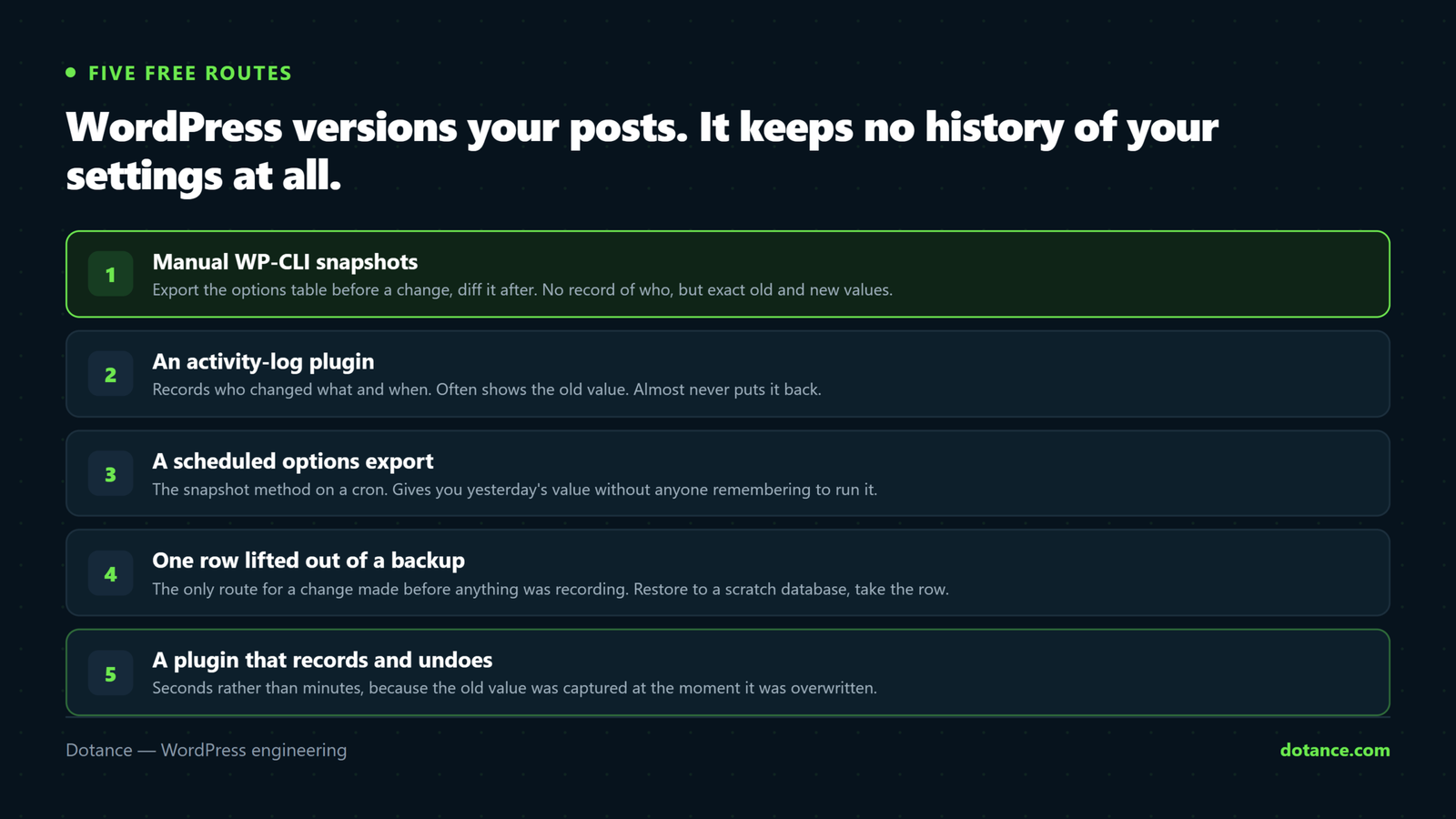
| # | Method | Records who changed it | Shows old vs new | Undo | Effort |
|---|---|---|---|---|---|
| 1 | Manual snapshots with WP-CLI | No | Yes, if you diff by hand | Manual | Every time, by you |
| 2 | An activity-log plugin | Yes | Often the new value only | No | Install once, wade through noise |
| 3 | A full backup schedule | No | Only by restoring | All or nothing | You have this already |
| 4 | Change settings on staging first | Sort of | Two sites side by side | Discard the staging copy | Discipline |
| 5 | A settings-history plugin that records and undoes | Yes | Key-level diff | One click | Install once |
1. Manual snapshots with WP-CLI
The cheapest WordPress settings history is a text file you make yourself before touching anything. WP-CLI can read a single option or the whole table:
Read one option, or search by prefix
# One value, exactly as stored
wp option get blogname

# Every Elementor option, as JSON you can keep
wp option list --search='elementor_*' --format=json > elementor-before.json
For a whole-table snapshot, export only wp_options rather than the full database. It is small, fast and easy to diff:
Snapshot the options table
# With WP-CLI
wp db export options-before.sql --tables=wp_options --skip-extended-insert

# On hosts that disable proc_open (wp db * fails there), call mysqldump directly
mysqldump --defaults-file=~/.my.cnf dbname wp_options --skip-extended-insert > options-before.sql

# After the change: what moved?
diff options-before.sql options-after.sql | grep '^[<>]' | head
--skip-extended-insert matters: it puts one row per line, so diff shows you the changed option rather than a single 400 KB line that differs somewhere. This is a real WordPress settings history, and it costs nothing. Its weakness is obvious — it only exists for the changes you remembered to snapshot before, and it never tells you who made the change.
2. An activity-log plugin
Activity-log plugins such as Simple History and WP Activity Log hook into WordPress events and write a record: this user changed this setting at this time. For core screens — General, Reading, Permalinks — they usually record the option name and the new value. That is a genuine WordPress settings history with a name on every line, and it is the right tool when the question is who rather than what was it before.
Two limits, both worth knowing before you install one. First, they log a great deal that is not settings: logins, post edits, plugin updates, comment moderation. On a busy site the settings entries are a few lines in a wall of activity. Second, none of them restores anything. You read that posts_per_page went from 10 to 12, then open Settings › Reading and type 10 back in yourself. For an array option with forty keys, you type forty things back in.
3. A full backup schedule
You should have backups regardless, and doing WordPress backups properly is its own subject. As a WordPress settings history, a backup has one property the other methods lack: it holds every option’s old value, guaranteed, as of the moment it ran. If you have daily backups, you have a daily settings history without lifting a finger.
The cost is granularity. Restoring a database backup to get one setting back also rolls back every post, order, comment and form entry since that backup. The middle path is to restore the backup somewhere else — a scratch database or a staging site — and copy the one value across:
Pull one old value out of a backup without restoring it
# Load the backup into a scratch database (never over the live one)
mysql --defaults-file=~/.my.cnf scratch_db < backup-2026-09-15.sql

# Read the one value you want
mysql --defaults-file=~/.my.cnf scratch_db -N -e \
  "SELECT option_value FROM wp_options WHERE option_name='posts_per_page'"

# Write it back to the live site
wp option update posts_per_page 10
That works, and we have done it for clients more than once. It is also twenty minutes of careful work for a setting that took two seconds to break, which is the argument for method five. The six checks for a backup plugin apply here too: a backup you have never restored is a hope, not a WordPress settings history.
4. Change settings on staging first
A staging site gives you a before and an after as two whole sites. Make the change on staging, compare, then repeat it on live. It is the safest of the five methods for large changes — a new caching plugin, a permalink structure — because the “undo” is simply not repeating the change on production.
It is a poor WordPress settings history for small, frequent changes, because nobody opens staging to change a tagline, and because the record of what was changed lives in your memory rather than anywhere durable. Staging is where risky changes should be rehearsed; it is not a log.
5. A plugin that records every change and undoes it
The fifth method is the one that behaves like revisions do for posts. Settings Undo is a free plugin we built for exactly this gap: it listens on the hooks WordPress fires when an option is added, updated or deleted, and writes one row per change with the user, the time, the plugin or theme that wrote it, the screen it came from, and the value before and after.
Because it hooks at the options layer, it does not need to know about any particular plugin. Elementor, RankMath, WooCommerce, the Customizer, the built-in Settings screens — anything that saves the normal way appears in the same timeline. A save that writes twelve options is one card with twelve rows, not twelve cards. Each row has a Diff button that compares arrays key by key, and an Undo button that writes the old value back. The undo itself is recorded, so a mistaken undo is one more click.
What the timeline records for one change
September 16, 2026, 4:42 am   usm4nzz@gmail.com   WordPress   Settings › Reading
  posts_per_page   updated   10 → 12   [Diff] [Undo]
  posts_per_rss    updated   10 → 12   [Diff] [Undo]
The Settings Undo page has the download and the screenshots. It is GPL, needs WordPress 5.9 and PHP 7.4, and has no paid tier. If you only want a WordPress settings history for core settings and are already running an activity log, method two may be enough; if you want the undo, this is the one.
The problem every WordPress settings history has: noise
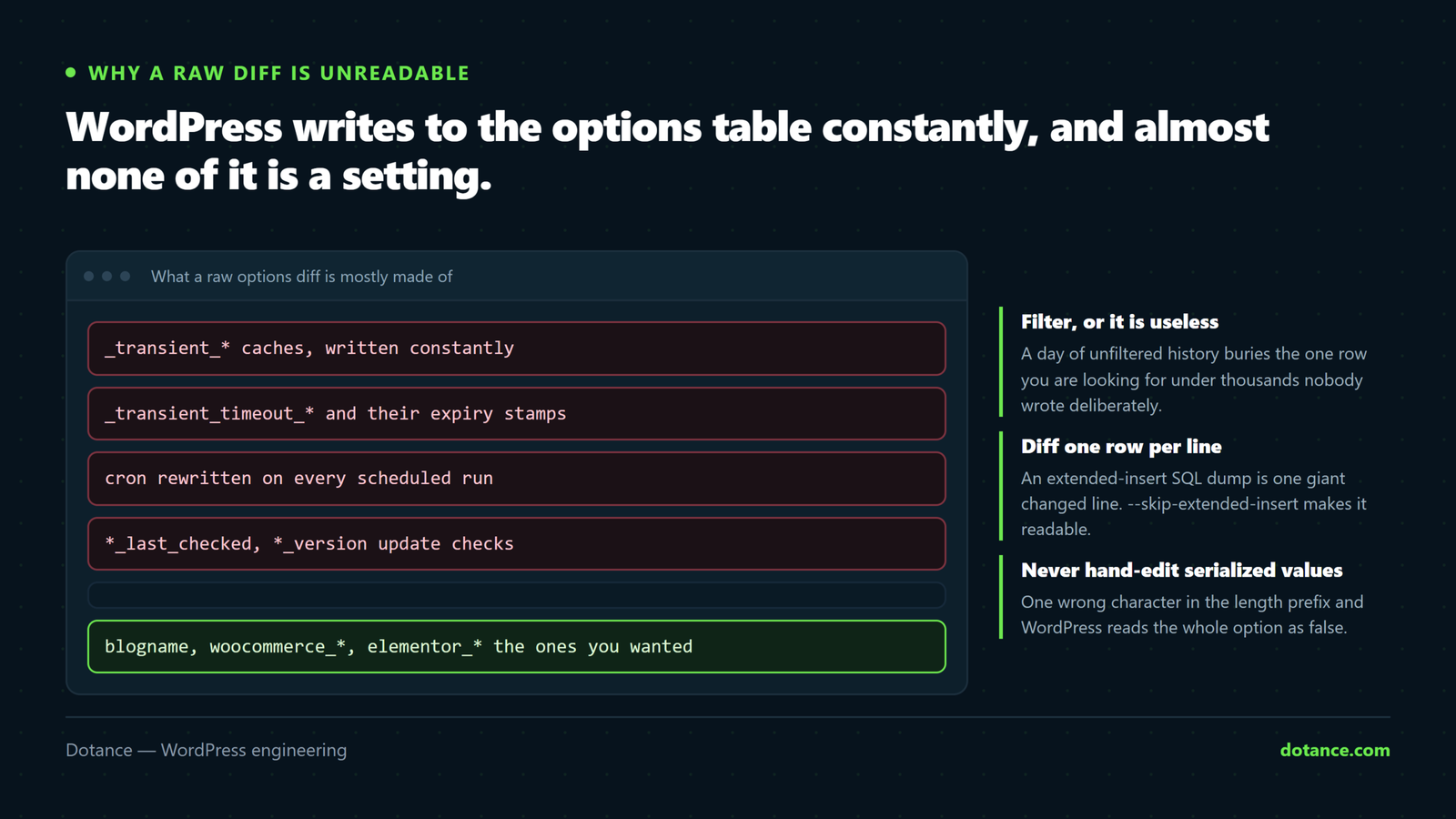
Whichever method you use, you will discover within a day that WordPress and its plugins write to the options table constantly, and almost none of it is a setting. This is the part that makes or breaks a WordPress settings history, and it is worth understanding before you blame the tool.
| Option pattern | What it is | How often it changes |
|---|---|---|
_transient_*, _site_transient_* | Cached values with an expiry | Constantly |
cron | The scheduled-event queue | Every time an event runs or is queued |
rewrite_rules | Compiled permalink rules | On any permalink or post-type change |
*_last_checked, *_last_run | Update-check and job timestamps | Hourly to daily |
*_version, *_db_version | Plugin version bumps | On every plugin update |
action_scheduler_*, woocommerce_queue_* | Background-job bookkeeping | Constantly on a shop |
You can see the churn yourself by taking two snapshots a minute apart on an idle site:
How noisy is your options table?
wp option list --search='_transient_*' --format=count
wp option list --search='_site_transient_*' --format=count
# A typical mid-sized site: 40–200 transients, rewritten many times a day
Then there is a subtler kind of noise we found while building Settings Undo. Some plugins change a value and change it straight back inside the same request. One popular template library removes a capability from the editor role and re-adds it on every admin page load — two genuine writes to wp_user_roles per click, net zero. A naive WordPress settings history records both, and the timeline is ninety per cent that plugin by lunchtime. The plugin now drops any option that ends a request at the value it started with, which is the right answer, but it took a live site to find the question.
For method one, filter the diff with grep -v '_transient_'. For method two, use the plugin’s own filters if it has them. For method five, the ignore list is built in and extendable from the settings screen.
Which WordPress settings history to use
The honest answer depends on what you are trying to find out, and most sites end up with two of the five.
| If your question is… | Use | Because |
|---|---|---|
| “What was this value last week?” | Backups (3), or a settings-history plugin (5) | Only these hold the old value |
| “Who changed this?” | Activity log (2) or settings-history plugin (5) | They record the user; snapshots do not |
| “What did this plugin write when I installed it?” | Snapshot before and after (1), or plugin (5) | A diff shows every key it touched |
| “Is this change safe to make?” | Staging (4) | The question is about the future, not the past |
| “Put it back, now” | Settings-history plugin (5) | The only one with an undo button |
Our own default for client sites under a maintenance plan is backups plus Settings Undo: the backup covers everything, the plugin covers the daily reality of settings screens. An activity log is added when a client needs an audit trail for logins and content as well, which is a different requirement. The maintenance plan post goes through where each of these sits in a monthly routine.
Where a WordPress settings history goes wrong
| Mistake | What happens | Fix |
|---|---|---|
| Diffing an extended-insert SQL dump | One giant changed line, no idea which option | --skip-extended-insert, one row per line |
| Editing serialized values by hand | String lengths no longer match; the option silently reads as false | Use wp option patch or a plugin that unserializes for you |
| Restoring a full backup for one setting | Every order, post and comment since then is gone | Restore to a scratch database and copy one value |
| Treating transients as changes | The log is unreadable within a day | Ignore _transient_*, cron, rewrite_rules and timestamps |
Restoring siteurl or active_plugins casually | Locked out, or the site down | Treat these as protected; know the way back in first |
| Keeping the history forever | A table larger than the site | Prune by age and row count; 30 days is plenty for most sites |
The serialized-value trap deserves a sentence more. Many options are PHP-serialized arrays — a:3:{s:5:"width";i:1200;…} — and the numbers inside are string lengths. Change a value in a text editor without updating the length and WordPress cannot unserialize the row, so get_option() returns false and the plugin behaves as if the setting were never saved. Any WordPress settings history that lets you edit values should unserialize and re-serialize for you; WP-CLI’s option patch does exactly that.
Change one key inside a serialized option safely
# Update the "width" key inside an array option without touching the rest
wp option patch update my_plugin_settings width 1240

# Delete a key
wp option patch delete my_plugin_settings legacy_flag
Questions about WordPress settings history
Does WordPress have a built-in settings history?
No. Post revisions are built in; settings revisions are not. The options table stores only the current value, with no date and no author, so a WordPress settings history has to come from a snapshot, a log, a backup or a plugin that records changes as they happen.
Can I see who changed a WordPress setting?
Only if something was recording at the time. An activity-log plugin or a settings-history plugin will show the user; a backup or a snapshot will show the old value but not who changed it. Server access logs can sometimes place a request on a screen at a time, but they do not name the option.
Do activity-log plugins slow the site down?
Slightly, because they write a row for many events, including on the front end for logins and form submissions. A plugin that only watches the options table does its work when a setting actually changes, which on a typical site is a few times a day, so the cost is not measurable. Either way, the database housekeeping that prunes old rows matters more than the recording itself.
Which settings should never be restored blindly?
siteurl and home (a wrong value takes the whole site to the wrong address), active_plugins (restoring the list does not run each plugin’s activation routine), template and stylesheet, and wp_user_roles. A good WordPress settings history marks these as protected and asks for a typed confirmation before writing them.
Is a WordPress settings history useful on a one-person site?
Less so, but not useless. The commonest single-person case is trying a plugin, disliking it, and discovering a week later that it changed twenty settings on install and put none of them back on uninstall. A record of what it wrote, with an undo, turns that from an afternoon into a minute.
Does a settings-history plugin cover posts and Elementor pages too?
No, and it should not try. Posts, pages and Elementor layouts are stored in wp_posts and already have revisions. A WordPress settings history is for the options table; keep the two separate and use the tool built for each.
How long should I keep a WordPress settings history?
Thirty days covers almost every “what changed?” question, because the question is usually asked within a week of the change. Keep a row cap as well as an age limit so a noisy plugin cannot fill the table, and prune on a daily schedule rather than never. A WordPress settings history that grows without limit becomes the largest table on the site within a year and slows the very backups it was meant to complement.
What about settings that plugins keep in their own tables?
Some plugins — security scanners, booking systems, form builders — keep configuration in their own tables rather than wp_options. None of the five methods above sees those except a full backup. If a plugin matters to you, check where it stores its settings before assuming the WordPress settings history covers it.