The certificate installed cleanly, the site loads over HTTPS, and there is still no padlock — or worse, half the styling is gone. That is a mixed content warning, and it is one of the most common things we are called in for after an SSL migration. It is also entirely fixable in an afternoon if you find the causes in the right order instead of guessing.
What a mixed content warning actually means
Your page arrived over an encrypted connection. Something inside it — an image, a stylesheet, a script, a font, an iframe — was then requested over plain HTTP. The browser will not pretend that page is secure, so the padlock goes.
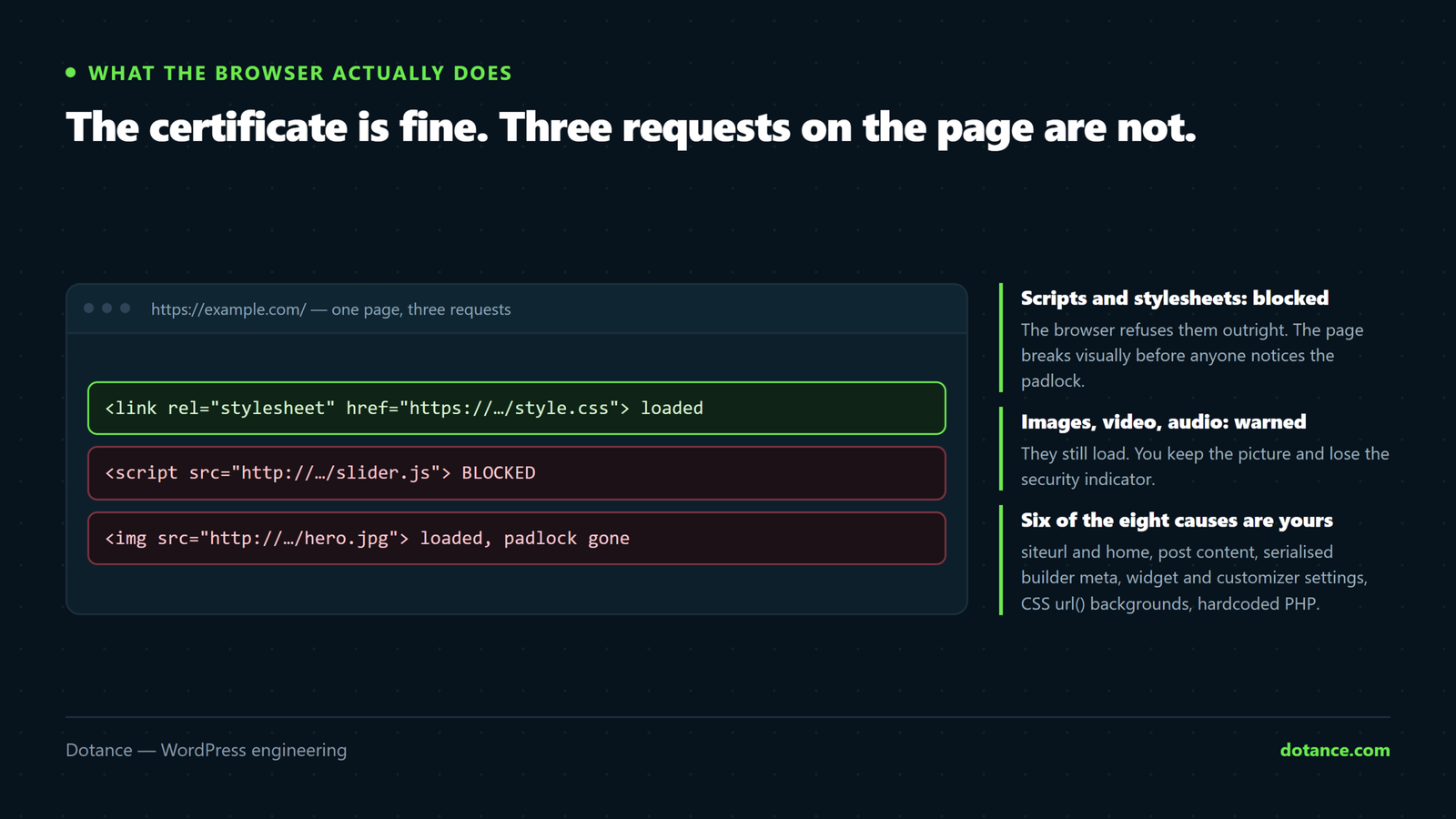
What happens next depends on what the insecure resource was:
| Resource type | Browser behaviour | What you see |
|---|---|---|
| Script, stylesheet, iframe | Blocked outright | Broken layout, dead features |
| Image, video, audio | Often upgraded, otherwise blocked | Missing images |
| Font | Blocked | Fallback typeface everywhere |
| Form action over HTTP | Blocked, with a prompt | The form simply does not submit |
| XHR or fetch call | Blocked | Silent failures in the console |
This is why a mixed content warning is not a cosmetic issue. The first row costs you a working page and the fourth row costs you enquiries — the form looks normal, the visitor fills it in, and nothing arrives. That is worth checking on your own site before you read any further.
The distinction that saves time: “active” mixed content — scripts, styles, frames — is blocked. “Passive” content — images, media — is warned about and sometimes upgraded automatically. If your site looks broken you have the first kind, and it is a shorter list to search.
Find every mixed content warning before you change anything
Do not start with a plugin. Every mixed content warning on the site is a specific URL in a specific place, so start by listing them.
The fastest inventory, per URL
# Every http:// reference in the rendered HTML
curl -s https://example.com/ | grep -oE 'http://[^"'\''< ]+' | sort -u
Run it against your home page, a blog post, a product page and the contact page. Four URLs will usually surface every pattern on the site, because a mixed content warning is almost never unique to one page — it comes from a template, an option or a content habit repeated everywhere.
The browser console is the second source, and it is more precise. Open DevTools, reload, and read the warnings: each one names the exact resource and the page that requested it. Chrome phrases it as “was loaded over HTTPS, but requested an insecure resource”, which is the string worth searching for in your own notes.
Write the list down before fixing anything. Half the entries usually turn out to share a single cause, and knowing that in advance stops you doing the same repair eight times.
The eight causes of a mixed content warning
| # | Cause | Where it lives |
|---|---|---|
| 1 | siteurl and home still on HTTP | Options table |
| 2 | Hardcoded http:// in post content | Posts table |
| 3 | Builder page data | Post meta, serialised |
| 4 | Widget and customizer settings | Options table, serialised |
| 5 | CSS url() backgrounds | Theme or child theme files |
| 6 | Hardcoded URLs in theme or plugin PHP | Template files |
| 7 | A third-party embed with no HTTPS | Someone else’s server |
| 8 | A cache or CDN serving the old HTML | Nowhere in your database |
1. The site URL was never updated
Check first, because everything else inherits from it:
wp option get siteurl
wp option get home
If either still says http://, every generated link and asset URL on the site is insecure and you have a site-wide mixed content warning from one row in one table. Fix it and re-test before touching anything else — this alone resolves a surprising share of cases.
wp option update siteurl https://example.com
wp option update home https://example.com
2 and 3. Hardcoded URLs in content and builder data
Years of pasted images and embedded videos leave absolute http:// URLs in your posts. Builders make it worse: Elementor, Divi and the rest store page data as serialised or JSON-encoded post meta, with escaped slashes, so a naive SQL replace corrupts it.
WP-CLI handles both correctly. Always dry-run first:
# See what would change. Change nothing.
wp search-replace 'http://example.com' 'https://example.com' \
  --all-tables --precise --recurse-objects --skip-columns=guid --dry-run

# Happy with the counts? Drop --dry-run.| Flag | Why it is there |
|---|---|
--precise | Uses PHP rather than SQL, so serialised data survives |
--recurse-objects | Reaches inside nested serialised arrays |
--skip-columns=guid | GUIDs are identifiers, not links — changing them breaks feeds |
--all-tables | Builder and plugin tables are not in the default set |
--dry-run | Because this writes to every table you own |
Take a database backup first regardless of how small the mixed content warning looks. If you do not have a staging site, this is the job that justifies making one — an hour of setup against a search-replace that went wrong on live.
The guid trap. People chasing a mixed content warning often replace GUIDs too, reasoning that they contain http://. They are permanent identifiers for feed readers, not URLs to fetch. Rewriting them makes every old post look brand new to subscribers.
4. Widgets, the customizer and plugin options
These are the quiet ones, and they produce a mixed content warning that survives an otherwise thorough clean-up. --all-tables covers them, which is why it is in the command. Logo URLs, header background images and social icons saved before the certificate are the usual survivors. If one image stubbornly refuses to go secure after a clean search-replace, it is almost always sitting in a customizer setting nobody thought to look at.
5 and 6. Hardcoded URLs in theme files
A database replace cannot touch files. Search them directly:
grep -rn "http://" wp-content/themes/your-theme/ --include="*.php" --include="*.css"Two patterns dominate: a CSS background-image: url(http://…) and a PHP template printing an absolute asset path instead of using get_template_directory_uri(). Both produce a mixed content warning on every page that loads that template, which is why the symptom looks site-wide when the cause is one line.
Fix them with fully secure URLs rather than protocol-relative ones — a single template line can be responsible for a mixed content warning on several thousand pages. If the theme is a third-party one, put the change in a child theme so the next update does not undo it.
7. A third party with no HTTPS
Occasionally the insecure resource is not yours — an old booking widget, a regional map service, a legacy analytics pixel. You have three choices and no fourth:
- Ask the provider for an HTTPS endpoint. Many have one and never announced it.
- Replace the service. If a vendor still cannot serve HTTPS, that tells you something.
- Proxy it through your own server, which you then have to maintain.
Do not disable HTTPS to make the mixed content warning go away. That is trading a warning for a real vulnerability, and it costs you rankings on top — the whole point of hardening a WordPress site is that you stop making that kind of trade.
8. It is fixed, and the cache has not noticed
You ran the replace, you verified the database, and the page still complains. Before diagnosing further, flush everything:
wp cache flush
wp litespeed-purge all   # or your cache plugin's equivalent
Then purge the CDN, then hard-reload in a private window. A cached copy of yesterday’s HTML produces a mixed content warning that no longer exists anywhere in your site, and people lose hours to it. The same caching layer causes the confusion described in Elementor changes not showing.
The stopgap: upgrade-insecure-requests
For third-party assets you genuinely cannot change, one header tells the browser to try HTTPS for every subresource before giving up:
.htaccess
Header always set Content-Security-Policy "upgrade-insecure-requests;"Be clear about what this does. It does not fix anything — it asks the browser to retry insecurely-referenced assets over HTTPS. Where the remote server supports HTTPS, the mixed content warning disappears and the asset loads. Where it does not, the request fails and the asset is gone entirely, which can be worse than the warning was.
Use it as a safety net, not as the fix. The header is excellent insurance against the one URL somebody pastes into a post next year. It is a poor substitute for cleaning the database, because it hides the problem from you while leaving it in your content.
The order to do it in
Sequence matters more than technique when you are clearing a mixed content warning. Most of the afternoons lost to a mixed content warning are lost to doing step five before step one and then re-doing everything.
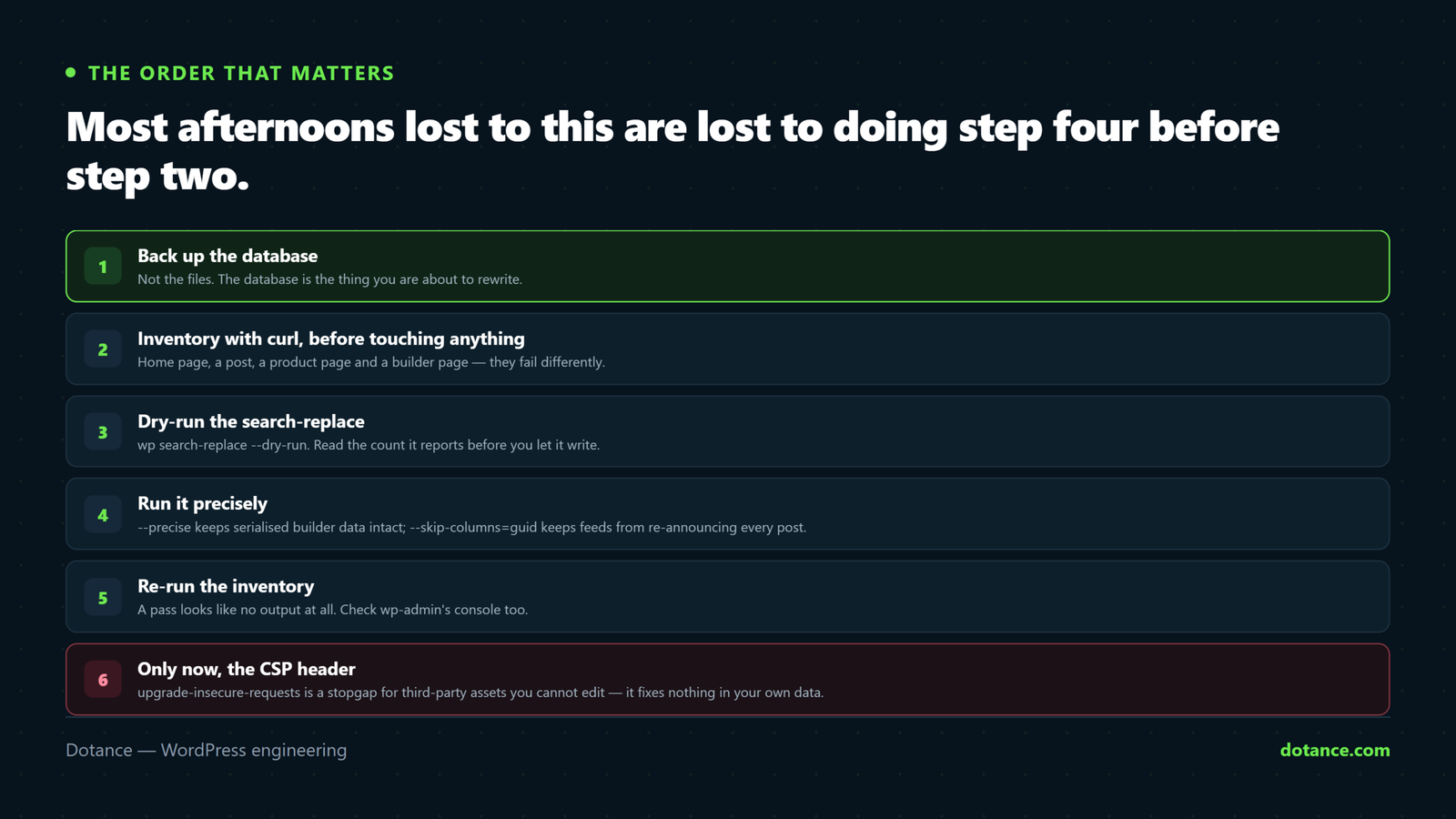
- Back up the database. Not the files, the database — that is what you are about to rewrite.
- Inventory. The
curlcommand on four page types, output saved to a file. - Fix
siteurlandhome. Re-run the inventory. Often half the list is gone. - Dry-run the search-replace. Read the counts. A table you have never heard of with fifty thousand replacements is a reason to stop and look.
- Run it for real. Re-run the inventory again.
- Grep the theme files for what the database could not reach.
- Purge caches and the CDN. Then test in a private window.
- Add the CSP header as the safety net, last.
Re-running the inventory after steps three and five is what makes this quick. Each pass shortens the list, and a mixed content warning that survives both passes is by definition in a file or on somebody else’s server — which is a much narrower search than the one you started with.
The migrations that cause it
It is worth knowing which events produce this, because the fix is the same but the timing is predictable and therefore preventable.
| Event | Why a mixed content warning appears |
|---|---|
| First SSL certificate on an old site | Years of HTTP content, none of it rewritten |
| Host move | Database restored with the old URLs intact |
| Staging copied to live | Staging URLs and protocols carried across |
| Domain change | Two replacements needed, and one gets forgotten |
| CDN added | Assets rewritten to a CDN hostname without HTTPS |
| Theme bought and installed | Demo content full of absolute HTTP URLs |
The staging row is the one that keeps recurring in agencies. A site is copied down, worked on for a fortnight, pushed back up, and the push carries a handful of staging URLs with it — so the mixed content warning arrives on the day of a launch rather than on a quiet Tuesday. Our notes on changing WordPress hosting list the other post-migration checks worth batching with this one.
The CDN row deserves a specific check. If your optimisation plugin rewrites asset URLs to a CDN hostname, that rewrite happens after your database is clean, so a perfectly correct search-replace can still leave you with insecure asset requests. Look at the rendered HTML rather than the database when the two disagree — the rendered HTML is what the browser judges.
Where this goes wrong
| The mistake | What happens | Do this instead |
|---|---|---|
Raw SQL UPDATE ... REPLACE() | Corrupts serialised builder data | wp search-replace --precise |
| Leaving a “force HTTPS” plugin active forever | Rewrites output on every page load | Fix the data, then remove it |
| Replacing GUIDs | Every post looks new in feeds | --skip-columns=guid |
| Skipping the dry run | No way back without a backup | Always dry-run first |
| Fixing the home page only | Inner pages still warn | Test four page types |
| Forgetting the CDN purge | Chasing a warning already fixed | Flush cache, then CDN, then test |
| Turning off HTTPS to stop the warning | A real security problem | Replace the third-party service |
| Ignoring the admin area | Editor scripts blocked, saves fail | Check wp-admin separately |
The second row deserves emphasis. Plugins that rewrite every page’s output to force HTTPS do work, and they are a reasonable emergency measure. But they add processing to every request forever and they conceal the underlying data, so the next person to migrate the site inherits a mixed content warning that reappears the moment the plugin is deactivated.
Verifying the fix properly
| Check | How | Pass looks like |
|---|---|---|
| Four page types | The curl command above | No output at all |
| Admin area | DevTools console in wp-admin | No console warnings |
| Forms actually send | Submit a real test enquiry | It arrives |
| Redirects | curl -I http://example.com | A single 301 to HTTPS |
| Search Console | URL inspection on the HTTPS URL | Indexed, no issues |
| Old links still resolve | Request an old HTTP post URL | 301, not 404 |
The redirect row matters for search. One clean 301 from HTTP to HTTPS preserves your rankings; a chain of three redirects loses a measurable slice of them. That is standard technical SEO territory, and it is easy to get wrong when a host adds its own redirect on top of yours.
Mozilla’s reference on mixed content is the authoritative description of what browsers block and why, and it is kept current as the rules tighten.
Frequently asked questions
Does a mixed content warning hurt SEO?
Indirectly and meaningfully. Google treats HTTPS as a signal, but the real damage is behavioural: a browser security notice on a checkout page, or a stylesheet that never loads, costs you conversions long before it costs you a ranking position.
How long should the whole job take?
An afternoon on a normal site, including the backup and the staging rehearsal. If it is taking days, you are almost certainly fixing symptoms one at a time rather than working down the eight causes — a mixed content warning has a short list of origins and guessing is what makes it long.
Why does only one page warn?
Because the insecure URL is in that page’s content rather than in a template. Open it in the editor, switch to the code view and search for http://. It is usually an old embed or a pasted image.
Is my SSL certificate broken?
No. A mixed content warning is entirely about what the page requests, not about the certificate. If the certificate itself were wrong you would get a full interstitial warning page rather than a missing padlock.
Can I just use protocol-relative URLs everywhere?
They work, and they are dated. Since everything should be HTTPS now, write the full https:// URL — it is clearer to the next person and it behaves identically when a file is opened locally, which protocol-relative URLs do not.
Will this come back?
Only if someone pastes an HTTP URL into a post. The CSP header above catches that quietly. Adding a check to your maintenance checklist catches the rest.
Does the warning affect the admin area too?
Yes, and it is worse there, because blocked editor scripts make saving appear to fail for no reason. If editors report that the block editor is behaving strangely after an SSL migration, check the console before anything else.
Should I do the search-replace on live or staging?
Staging, then repeat on live once you have seen the output. It writes to every table in the database, which is not something to discover a problem with at four in the afternoon.