The exact message
You will see one of these, either on a white page or in your error log:
Fatal error: Maximum execution time of 30 seconds exceeded in
/home/user/public_html/wp-includes/class-wpdb.php on line 2345
Fatal error: Maximum execution time of 300 seconds exceeded in
/home/user/public_html/wp-content/plugins/some-plugin/includes/import.php on line 88Read the file path before you change anything. It is the single most useful part of the message and almost everyone skips it. The path tells you which code ran out of time — and that decides whether you should raise the limit at all.
| The path points at | What it usually means |
|---|---|
wp-content/plugins/… | That plugin is the culprit. Start there, not with the limit. |
class-wpdb.php | A database query is slow. More seconds will not fix a bad query. |
wp-includes/http.php or class-requests.php | An outbound API call is hanging — a licence check, a font fetch, an external service that is down. |
| An importer, backup or migration file | Legitimately long work. This is the one case where raising the limit is the right answer. |
What is actually happening
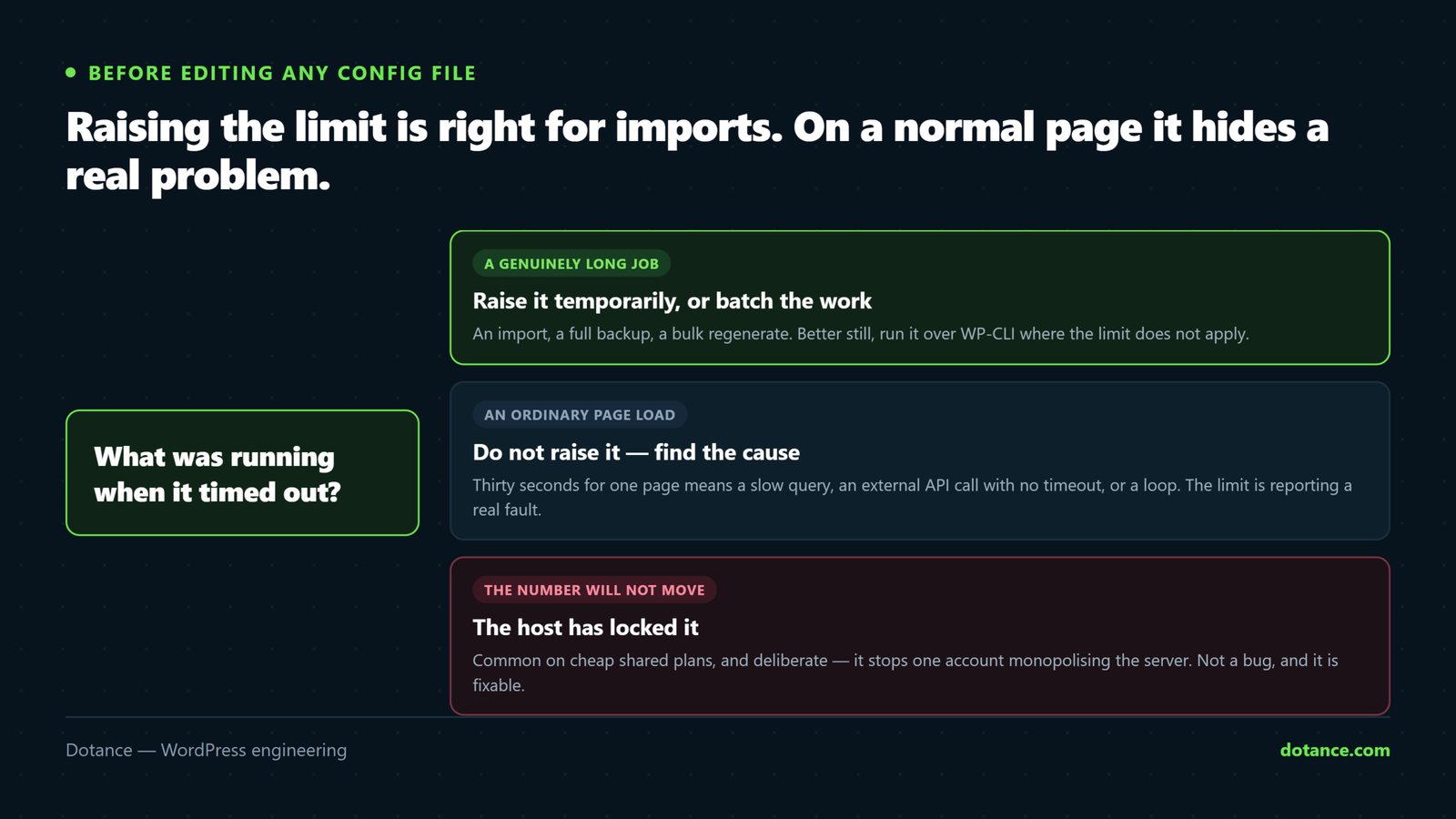
PHP caps how long any single script may run, so one runaway process cannot occupy a worker forever and take the site down with it. Thirty seconds is a common default; sixty is typical on managed hosts. When a script passes the ceiling PHP stops it mid-execution and writes that fatal error.
The limit is doing its job. The question is only whether the work deserved more time — or should never have taken that long.
The limit does not apply to WP-CLI. Commands run from the command line use PHP’s CLI mode, where max_execution_time defaults to 0 — unlimited. If a job keeps timing out in the browser, running it through WP-CLI often sidesteps the problem entirely rather than fighting it.
Find out what is actually slow first
Before touching a config file, spend five minutes finding the cause. It is usually faster than the fix.
- Turn on the debug log. Add this to
wp-config.php, above the “That’s all, stop editing” line. Errors then go towp-content/debug.loginstead of the screen.
wp-config.php
// Log errors to a file, do not display them to visitors.
define( 'WP_DEBUG', true );
define( 'WP_DEBUG_LOG', true );
define( 'WP_DEBUG_DISPLAY', false );
@ini_set( 'display_errors', 0 );
Turn this off again when you are done. A public debug.log leaks file paths and sometimes credentials. On a live site, switch it on, reproduce the error, read the log, switch it off.
- Install Query Monitor and load the page that times out. Its toolbar shows the slowest queries and the plugin each one belongs to. A query over ~0.05s that runs on every load, or a single query taking seconds, is your answer.
- Check whether it is one plugin. Deactivate the suspect and reload. If the page returns, you have found it — and the fix is that plugin, not the limit.
Raise the limit — in the right place
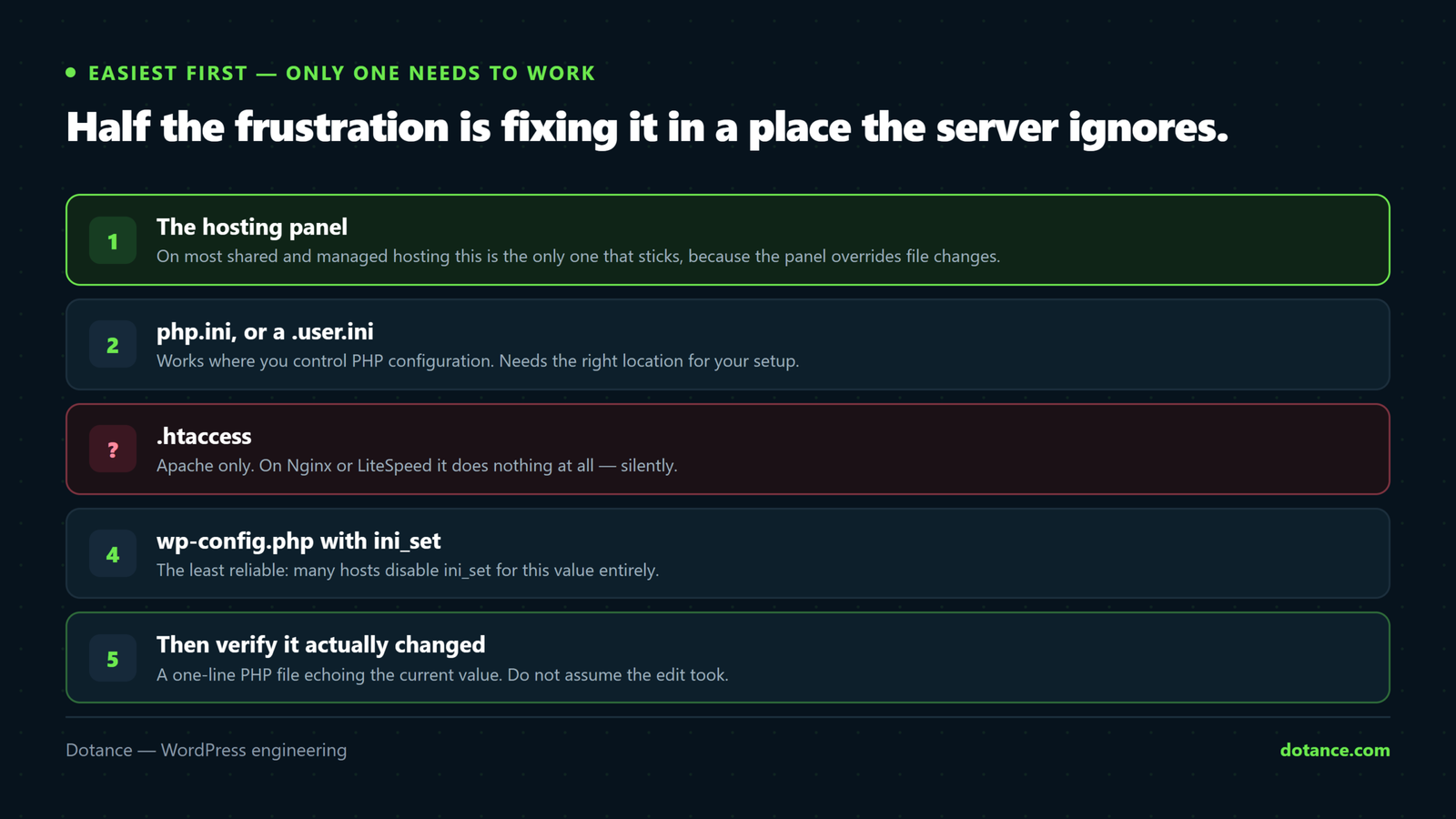
Use the first method your hosting actually allows. They are listed easiest-first, and only one of them needs to work.
1. Your hosting panel
On most shared and managed hosting this is the only method that sticks, because the panel writes the real php.ini and ignores your file overrides:
- Hostinger: hPanel → Advanced → PHP Configuration → PHP Options →
max_execution_time - cPanel: Select PHP Version → Options →
max_execution_time - Plesk: Websites & Domains → PHP Settings
- SiteGround: Site Tools → Devs → PHP Manager
- Cloudways: Server Management → Settings & Packages → Basic → Max Execution Time
- WP Engine, Kinsta, Flywheel: not editable — the platform sets it. Ask support, or use WP-CLI for the long job.
2. php.ini
If you have your own server or a panel that exposes the file:
php.ini
max_execution_time = 3003. .htaccess — Apache only
.htaccess
php_value max_execution_time 300This is the step that wastes the most time. php_value only works on Apache with PHP as a module. On Nginx, LiteSpeed, or any host running PHP-FPM — which is most modern hosting — the line is ignored silently, or throws a 500 Internal Server Error. If you get a 500 immediately after adding it, that is why: remove the line.
4. wp-config.php
A last resort, and a partial one. It only affects PHP once WordPress has already booted, so it cannot help with a timeout that happens earlier:
wp-config.php
set_time_limit( 300 );Check whether it actually changed
Do not assume the edit took. Half the frustration with this error is fixing it in a place the server ignores. Create a file called check.php in your site root:
check.php
<?php
echo 'max_execution_time: ' . ini_get( 'max_execution_time' );
Visit yoursite.com/check.php. If it still says 30, your change did not apply — move up to the hosting-panel method. Delete the file as soon as you have your answer.
With WP-CLI, one line does the same:
wp eval "echo ini_get('max_execution_time');"When the number will not move
If the panel, php.ini and everything else leave it at 30, the host has locked the value. That is common on cheap shared plans and it is not a bug — it stops one account monopolising a server. Three ways through it:
- Ask support to raise it temporarily. Most will, for a migration, if you say how long you need it.
- Run the job through WP-CLI, where the limit does not apply at all.
- Batch the work. A well-built importer processes in chunks and never hits the ceiling — which is a better fix than a bigger number.
For imports, backups and migrations
When the job genuinely is long — thousands of products, a full-site backup, a bulk regenerate — stop trying to fit it into one request. Batch it:
# Import in the background, no browser, no timeout
wp import products.xml --authors=create

# Regenerate thumbnails without a browser request
wp media regenerate --yes

# Long jobs survive a closed terminal
nohup wp media regenerate --yes > regen.log 2>&1 &
The last one keeps running after you disconnect, and writes progress to regen.log. For a large store that is the difference between a job that finishes and one that dies at 40%.
Put the limit back
A high max_execution_time left on permanently is not free. A slow page now holds a PHP worker for five minutes instead of thirty seconds, and under any real traffic the workers run out and the whole site queues behind them. Raise it for the task, then set it back to 30 or 60.
If ordinary pages need more than thirty seconds, the limit was never the problem. That is a performance problem — and more seconds only buys a slower failure.
Common questions
Is 300 seconds safe to leave on?
For an import, yes, for as long as it takes. As a permanent setting, no — see above. Sixty seconds is a sane everyday ceiling for most sites.
Why did the same import work on my other site?
Different host, different default, or a different PHP handler. The limit is server configuration, not something WordPress carries with a site.
I raised it and the page still dies at 30 seconds.
Something else is stopping it. Check the panel value with the check.php test above; if that reads 300, the ceiling is elsewhere — usually a proxy or PHP-FPM timeout (request_terminate_timeout), or Cloudflare’s own 100-second limit on a plan without extended timeouts. Those need the host.
Does the limit apply to WP-Cron?
Yes. A cron event that outgrows it fails silently and reschedules, which is why an unfinished job seems to run forever without ever completing. Real server cron plus WP-CLI is the durable fix.