“Error establishing a database connection” is the most alarming message WordPress prints, because it replaces your entire site with one line of text. It is also one of the most tractable — a database connection error has a short list of causes, and you can eliminate most of them in ten minutes.
This is the order we work through it, fastest checks first.
What a database connection error actually means
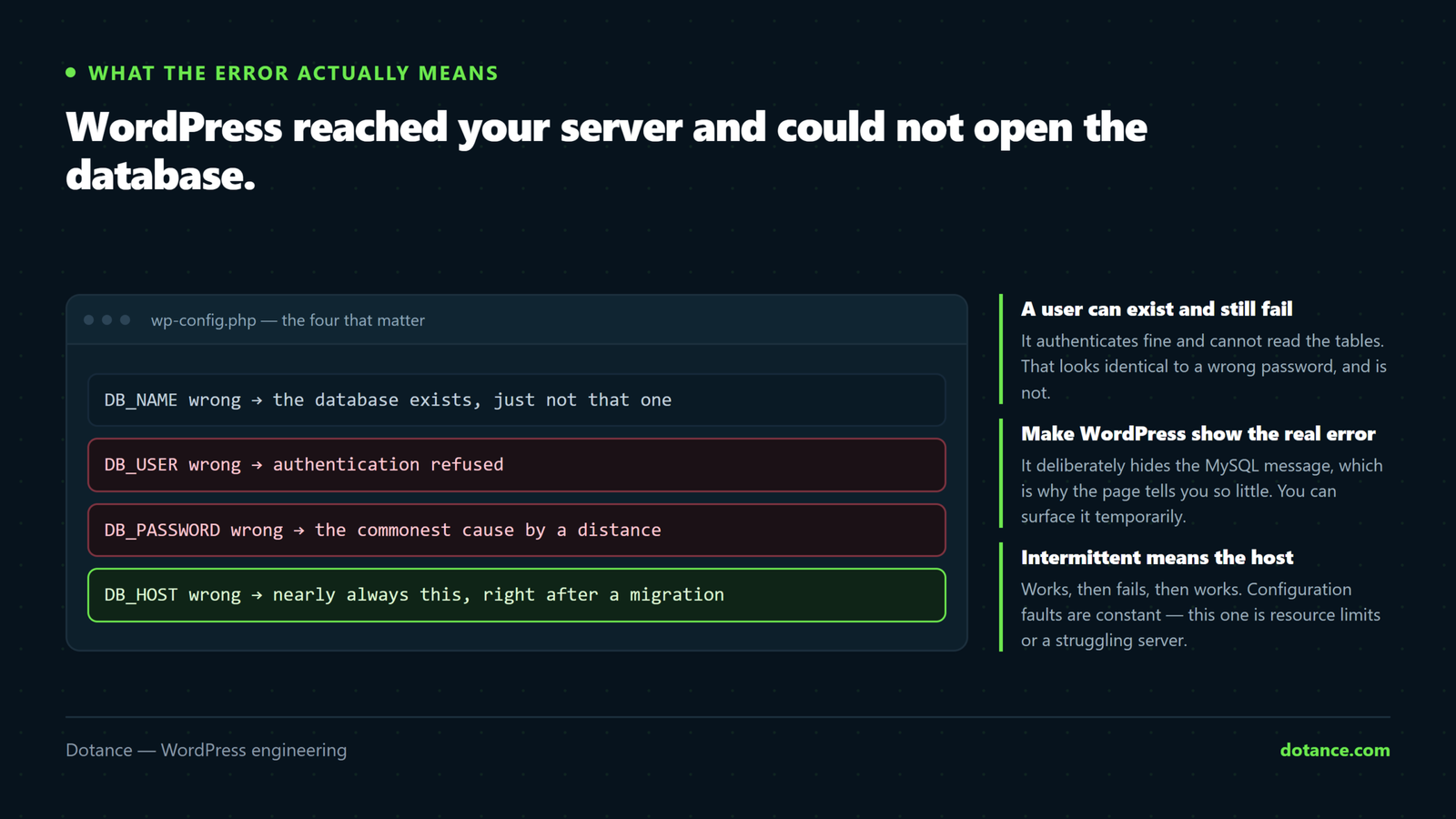
WordPress stores your posts, pages, settings and users in a MySQL or MariaDB database. On every page load it opens a connection using four values from wp-config.php: database name, username, password and host.
The message appears when that connection fails. Crucially, it means PHP ran — your server is up, your files are there. Only the database step failed. That already rules out a great deal.
| Cause | How common | Fix time |
|---|---|---|
Wrong credentials in wp-config.php | Very common | Two minutes |
| Database server down or overloaded | Common | Host’s job |
| Corrupted tables | Occasional | Ten minutes |
| Database user lost its permissions | Occasional | Five minutes |
Wrong DB_HOST after a migration | Common after a move | Two minutes |
| Connection limit reached | Under load | Depends |
Sixty-second triage
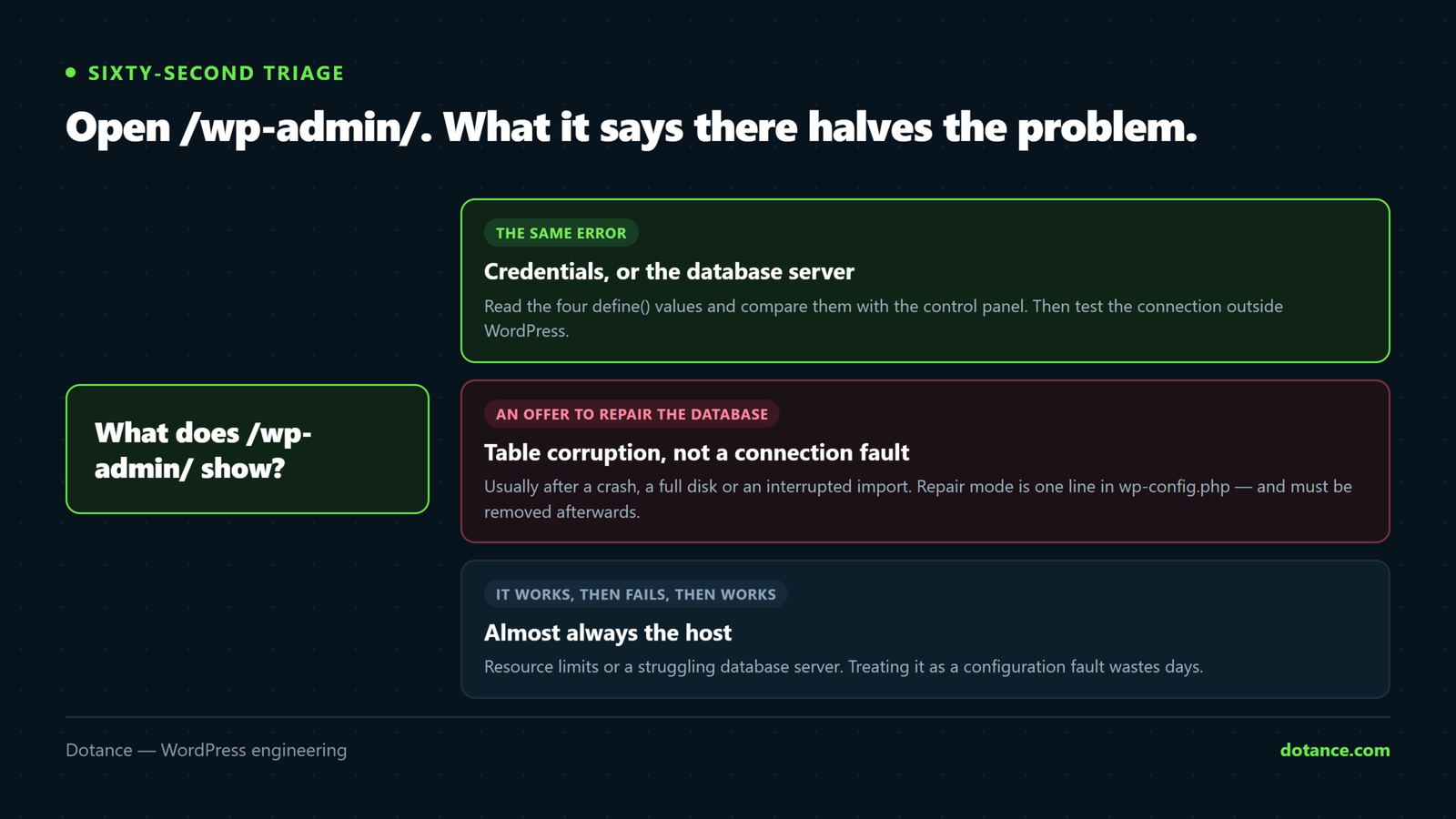
Before changing anything, find out which half of the database connection error you have. Open /wp-admin/.
| What you see | Means |
|---|---|
| The same database connection error on both | Credentials, host, or the database server |
| “One or more database tables are unavailable” | Corruption — go to the repair section |
| Admin loads, front end does not | Rare. Usually caching serving a stale error page. |
| It comes and goes | Load or resource limits, not configuration |
That last row matters more than people give it credit for. A database connection error that appears for a few minutes and clears on its own is not something you fix in wp-config.php — skip to the section on intermittent failures.
1. Check the credentials
The single most common cause of a database connection error, and it happens without anyone editing WordPress: a host migration, a control panel password reset, a security policy that rotates passwords.
# What WordPress is trying to use
wp config get DB_NAME
wp config get DB_USER
wp config get DB_HOST
No WP-CLI? Open wp-config.php in your file manager and read the four define() lines near the top. Compare each against what your control panel says for that database — in hPanel, cPanel or Plesk the database name and user are listed under MySQL Databases.
Watch for prefixes. Most shared hosts prepend your account name, so the database is u123456_wpsite, not wpsite. Copying a wp-config.php from another server is a reliable way to produce a database connection error, because the prefix does not travel with it.
If you are not certain of the password, set a new one in the control panel and put the same value in wp-config.php. Guessing wastes more time than resetting.
wp config set DB_PASSWORD 'the-new-password'2. Is the database server actually running?
If the credentials are right, the next database connection error suspect is the server itself. Test the connection on its own, outside WordPress:
# Connects and prints the server version, or fails with a reason
mysql -h localhost -u DB_USER -p -e "SELECT VERSION();"
The error it returns is more useful than WordPress’s generic message:
| MySQL says | Meaning |
|---|---|
Access denied for user | Wrong username or password — back to step 1 |
Unknown database | Right credentials, wrong database name |
Can't connect to local MySQL server | The service is down. Host’s problem. |
Too many connections | Limit reached — see the intermittent section |
| Connects fine | The database is healthy; the fault is in WordPress’s config or the tables |
If MySQL itself will not start, no amount of WordPress work will clear the database connection error. Raise it with your host with that exact message — it saves an hour of them asking you to reinstall plugins.
3. The DB_HOST value, especially after a migration
Most shared hosting uses localhost. Plenty of setups do not, and a database connection error immediately after moving hosts is nearly always this.
| Setup | Typical DB_HOST |
|---|---|
| Most shared hosting | localhost |
| Separate database server | A hostname or IP the host gives you |
| Non-standard port | hostname:3307 |
| Socket-based local connection | localhost:/path/to/mysql.sock |
| Managed cloud database | A long provider-specific endpoint |
Your host’s documentation names the correct value. Do not guess between localhost and 127.0.0.1 — on some configurations they take different routes and only one of them works.
4. The database user lost its permissions
A user can exist, authenticate, and still be unable to read the tables. This produces a database connection error that looks identical to a wrong password.
mysql -u DB_USER -p -e "SHOW GRANTS FOR CURRENT_USER();"You want ALL PRIVILEGES on your database. If the grants look thin, re-assign the user to the database in your control panel with full privileges — in cPanel and hPanel that is a two-click job under MySQL Databases.
5. Corrupted tables
If WordPress says “One or more database tables are unavailable” and offers to repair, that is corruption rather than a connection fault — usually after a crash, a disk-full event, or an interrupted import.
Check before repairing:
wp db checkIf tables report as corrupt, repair them:
wp db repairWithout WP-CLI, WordPress has a built-in repair page. Add this to wp-config.php:
wp-config.php — temporarily
define( 'WP_ALLOW_REPAIR', true );Then visit /wp-admin/maint/repair.php and run the repair.
Remove that line the moment you are finished. While it is present, the repair page is reachable by anyone, without logging in. Leaving it in place turns a solved database connection error into a security problem — and we have found it left behind on sites years later.
Take a backup before repairing if you possibly can. Repair operates on the tables in place, and on a badly damaged table it can lose rows. The point of having tested backups is exactly this moment.
6. When it comes and goes
An intermittent database connection error is a different problem from a broken one, and treating it as a configuration fault wastes days. If the site works, then fails, then works again, the cause is resources.
- Connection limit reached. Shared plans cap concurrent connections. A traffic spike, a crawler, or a plugin opening connections in a loop will hit it.
- Memory or CPU limits. The database gets killed and restarted under pressure.
- A slow query holding things up. Often an unindexed lookup added by a plugin.
- A noisy neighbour on shared hosting, which is nobody’s fault but still yours to escape.
What to look at first:
# How big is the database, and what is heaviest?
wp db size --tables --format=table | head -12

# Bloat that makes every query slower
wp option get _transient_timeout_dummy 2>/dev/null
wp transient delete --expired
wp post delete $(wp post list --post_status=trash --format=ids) --force
A database that has grown to several gigabytes on a small site is usually expired transients, revisions and spam. Clearing them will not fix a hard database connection error, but it removes the pressure that causes intermittent ones — the full method is in database optimisation.
If the database is healthy and it still happens under load, you have outgrown the plan. That is a hosting conversation, not a WordPress one.
7. Something edited wp-config.php
If the database connection error appeared immediately after you or a plugin edited a file, suspect the file itself. A stray character before the opening <?php, a smart quote pasted from a document, or a missing semicolon will break it.
# Does the file parse at all?
php -l wp-config.php

# Anything before the opening tag? Should print nothing.
head -c 5 wp-config.php | xxd | head -1
A byte-order mark or a blank line before <?php causes strange, inconsistent failures — the same root cause as “headers already sent”.
Is it a database connection error, or a hacked site?
Occasionally the two look similar, because an attacker changed wp-config.php or the site was taken offline mid-cleanup. Signs it is worth checking:
- The credentials in
wp-config.phpare not the ones you set, and nobody changed hosts. - The file’s modified date is recent and unexplained.
- The error started at the same time as other odd behaviour — unexpected admin users, redirects, new files.
If any of that fits, work through the signs of a compromise before you simply restore the credentials and move on.
Make WordPress show you the real MySQL error
WordPress deliberately hides the underlying message, which is why a database connection error tells you so little. You can surface it.
wp-config.php — temporarily
define( 'WP_DEBUG', true );
define( 'WP_DEBUG_LOG', true );
define( 'WP_DEBUG_DISPLAY', false );
Reload the site, then read wp-content/debug.log. Instead of the generic page you get the driver’s own words — “Access denied”, “Unknown database”, “Too many connections” — which maps straight onto the table earlier in this article.
Turn all three off again afterwards. A readable debug log on a public server leaks paths, queries and versions.
There is also a purpose-built page WordPress ships for this. Visit /wp-admin/setup-config.php and it will attempt a connection with values you type in, reporting the real failure — useful for confirming credentials without editing anything.
Do not let setup-config.php finish and write a new config. Use it only to see whether a set of credentials connects, then close it. On a site that already has a wp-config.php it will normally refuse to overwrite, but there is no reason to find out the hard way.
Two installs, one database
A cause that produces a database connection error long after the mistake was made: a staging or backup copy sharing the live database.
It happens when someone duplicates a site by copying the folder without changing DB_NAME. Both installs then read and write the same tables. Two symptoms follow — plugin activations on one site appear on the other, and the connection limit is reached twice as fast under load.
# Run on each install and compare
wp config get DB_NAME
wp option get siteurl
If two installs report the same database name and different site URLs, separate them before anything else. Export the database, import it under a new name, and repoint the copy. The right way to build a second environment is in setting up staging.
When the database is genuinely gone
Occasionally a database connection error is not a configuration fault at all — the database has been dropped, by a bad script, a failed migration, or a host action.
# Does it exist and does it have tables?
mysql -u DB_USER -p -e "SHOW DATABASES;"
mysql -u DB_USER -p DB_NAME -e "SHOW TABLES;" | head
An empty result means restoring is the only route. In order of preference:
- Your own most recent backup. Fastest, and you know what is in it.
- The host’s automated backup. Check retention — many keep only a few days.
- A staging copy, if one exists and is recent.
- A local development copy, accepting the content gap.
wp db create
wp db import ~/backup.sql
wp db check
This is the moment that decides whether a database connection error is an hour’s inconvenience or a genuine loss. If the answer to “when did we last restore a backup successfully?” is “never”, fix that this week — the method is in backups done right.
Work it in this order
- Open
/wp-admin/— same error, or a repair offer? - Read the four
define()values and compare with the control panel. - Test the connection with the
mysqlclient and read its actual error. - Confirm
DB_HOSTagainst your host’s documentation. - Check the user’s grants.
wp db check, then repair if needed — and remove the repair constant.- If it is intermittent, stop looking at config and look at limits.
Most database connection error cases end at step 2 or 3. Working in this order stops you repairing tables that were never broken.
Preventing the next one
A database connection error is rarely random. Three habits remove most of them:
- Keep a note of the database credentials somewhere other than the server. When a host resets them, the fix is thirty seconds instead of an hour of support tickets.
- Back up the database on a schedule and test a restore. Corruption is survivable with a recent backup and expensive without one.
- Watch the database size quarterly. Unchecked growth is the usual cause of intermittent failures — it is a standing item in our maintenance checks.
What to send your host
If you reach the point where the database server is the suspect, the quality of your support ticket decides whether this takes twenty minutes or two days. Most tickets about a database connection error say “my site is down”, and get a scripted reply asking you to disable plugins.
Send this instead:
| Include | Example |
|---|---|
| The exact error | “Error establishing a database connection” on every URL |
| When it started | “From roughly 14:20 UTC today” |
| What the MySQL client says | Can't connect to local MySQL server |
| What you have ruled out | Credentials verified against the panel; DB_HOST unchanged |
| Whether it is constant or intermittent | “Constant” or “roughly every 20 minutes” |
| What changed recently | “Nothing on our side” or “PHP upgraded yesterday” |
That ticket gets escalated past the first-line script, because it demonstrates the database connection error has already been isolated to their side. It is the same information you gathered working through this article, so it costs nothing extra to write down.
Common questions about the database connection error
Will I lose my content?
Almost never. The data sits in the database untouched; WordPress simply cannot reach it. Content is only at risk with genuine table corruption, which is why you back up before repairing.
Why did it happen with no changes on my side?
Because the usual causes are not on your side — a host resetting a password, moving your database to a new server, or the database service restarting. A database connection error is frequently something that happened to your site.
Can a plugin cause it?
Indirectly. A plugin cannot change your credentials, but one running heavy queries can exhaust connections and produce intermittent failures. If it started right after installing something, deactivate it and watch.
Should I just reinstall WordPress?
No. Reinstalling replaces the files, and the files are not the problem — the connection is. It also risks your customisations for no benefit.
How do I fix it with no admin access at all?
Everything on this page happens over SSH, SFTP or your control panel. Access to wp-config.php and the database is all you need; wp-admin is never required.