A Squarespace to WordPress migration is usually prompted by one of three things: a bill that keeps rising, a feature the platform will not add, or a developer who needs access the platform does not grant. All three are reasonable. None of them makes the move free.
This article is what a Squarespace to WordPress move actually transfers, what it does not, and the order that keeps your search traffic while you do it.
What the Squarespace export actually contains
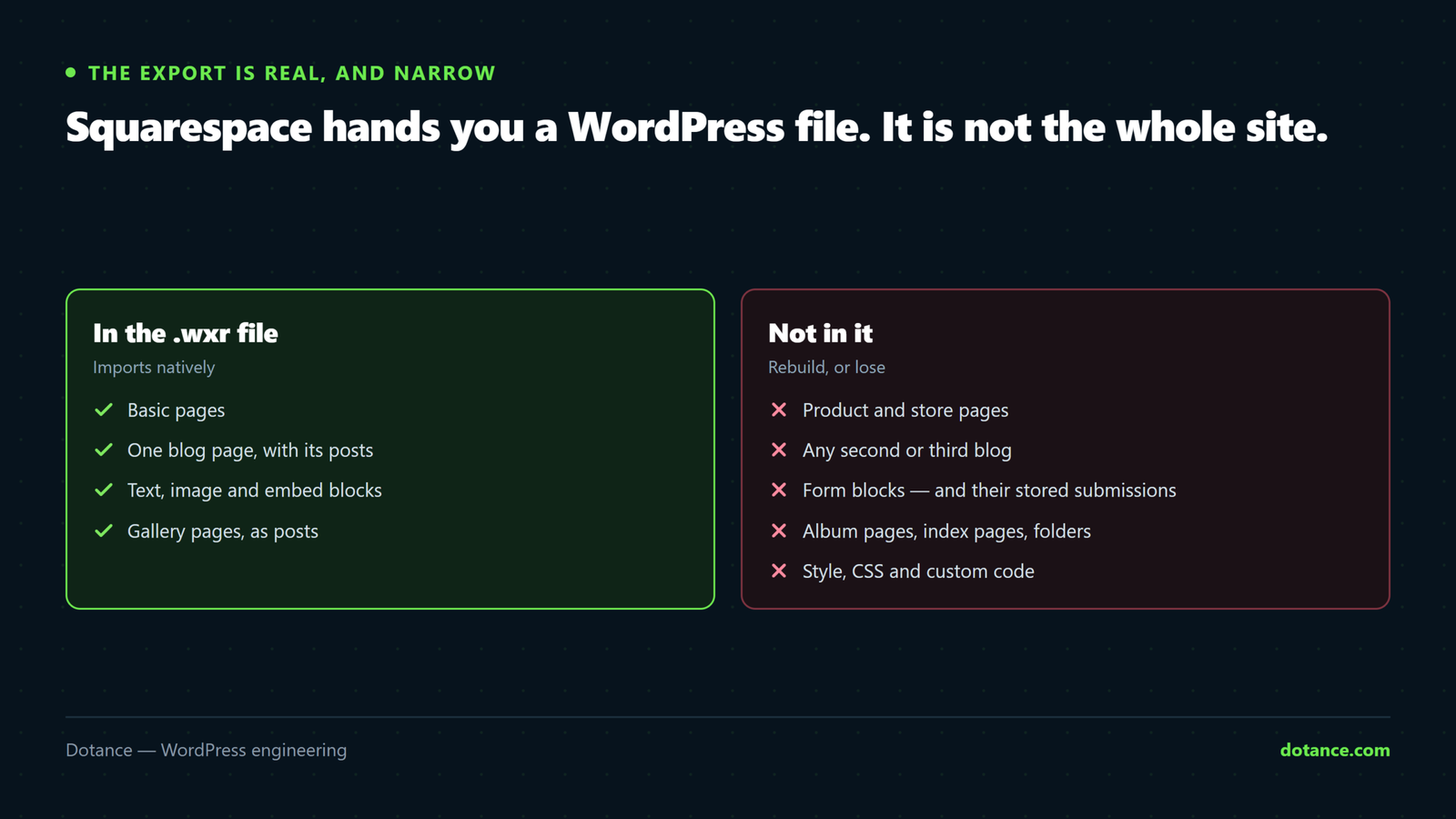
Squarespace exports a .wxr file — the same XML format WordPress imports natively. That sounds like a solved problem and is why so many Squarespace to WordPress projects start optimistically. The export is genuinely useful; it is simply narrower than it looks.
| Comes across | Does not |
|---|---|
| Basic pages | Product and store pages |
| One blog page, with its posts | Any second or third blog |
| Text blocks | Album pages and audio blocks |
| Image blocks | Index pages and folders |
| Embed blocks | Form blocks, and their stored submissions |
| Gallery pages, as posts | Style, CSS and any custom code |
Squarespace documents these limits itself, and it is worth reading their export page before you plan anything, because the list decides how much of your Squarespace to WordPress move is import and how much is rebuild.
The single most common surprise is the one-blog rule. If you run a news blog and a case-study blog, the second one does not export and has to be moved by hand.
Inventory first, export second
Before you export anything, list what the site actually serves. Every Squarespace to WordPress plan starts here. The export tells you what Squarespace is willing to hand over; a crawl tells you what exists.
From any terminal
# Every URL the site links to, from the homepage down
wget --spider -r -l inf --no-verbose \
  --reject-regex '\.(png|jpe?g|gif|svg|css|js|woff2?)$' \
  https://yoursite.com/ 2>&1 | grep -oP '(?<=URL: )\S+' | sort -u > live-urls.txt

# Squarespace publishes a sitemap at a fixed path
curl -s https://yoursite.com/sitemap.xml | grep -oP '(?<=<loc>)[^<]+' | sort -u > sitemap-urls.txt

# What the crawl found that the sitemap did not, and the reverse
comm -3 live-urls.txt sitemap-urls.txt
Add Search Console to that: any URL with impressions belongs on the list whether or not anything links to it. A Squarespace to WordPress move that drops a page earning enquiries is expensive in a way that does not show up for weeks.
URLs: the good news
This is where a Squarespace to WordPress migration is kinder than most other platform moves. Squarespace uses clean, slug-based URLs — /services/kitchen-design — and WordPress can serve exactly the same shape. Unlike a static HTML site, where every address changes, here most can stay identical.
Most, not all. The predictable differences:
| Squarespace | WordPress default | What to do |
|---|---|---|
/services/kitchen-design | /services/kitchen-design/ | Trailing slash only — harmless, one 301 |
/blog/2025/03/post-title | /blog/post-title/ | Choose a permalink structure that matches, or redirect |
| Index page children | Ordinary pages | Parent path may disappear — map each child |
/shop/product-name | /product/product-name/ | Always changes. Map every product. |
Set WordPress permalinks to match before importing, not after. Changing them afterwards rewrites every URL a second time and doubles the redirect work. Our guide to redirects that do not lose rankings covers the mapping discipline in full.
Design is rebuilt, never migrated
No Squarespace to WordPress route carries your layout. The export contains content; the template stays behind. That is not a limitation of the export — a Squarespace template is Squarespace code, and nothing outside it can run it.
So the real question is what replaces it, and the answer sets your cost for years:
| Route | Suits | Honest cost |
|---|---|---|
| A well-chosen theme, lightly adapted | Most brochure sites | Cheapest; you accept the theme’s shape |
| Block theme with custom patterns | Teams who publish regularly | More upfront, cheapest per page after |
| Page builder rebuild | Marketing sites that change often | Fast to first version; heavier pages |
| Custom theme | Distinctive design, long life | Highest upfront, needs a developer to change |
People underestimate this line consistently, because Squarespace made design feel like a setting rather than a deliverable. Budget it as design work, and read the honest WordPress website cost breakdown before comparing quotes.
Forms, commerce and members
Three things need rebuilding rather than moving in a Squarespace to WordPress project, and each has a trap.
- Forms. Form blocks do not export, and neither do the submissions behind them. Export your stored responses to CSV from Squarespace first — once the site is gone, so are they. Then rebuild the forms in WordPress and send a real test to an external address, because WordPress mail fails silently more often than anything else on a fresh install.
- Commerce. Products do not come in the export. They can be moved with a CSV into WooCommerce, but customer accounts, saved cards and order history do not travel. Plan a “set your new password” email for launch day.
- Member areas. Squarespace member accounts have no export path at all. If you sell access, this is the hardest part of a Squarespace to WordPress move and it deserves its own plan, not a line item.
The domain, which is its own small project
If your domain was bought through Squarespace, it is registered with their registrar partner and has to be transferred or re-pointed. Neither is hard; both are easy to leave until the worst moment.
Before cutover — check what you are dealing with
# Who is the registrar, and is the domain locked?
whois yoursite.com | grep -iE 'registrar:|status:|expiry|expiration'

# Where do web and mail currently point? They are different records.
dig +short yoursite.com A
dig +short yoursite.com MX
Two rules save most of the pain. Unlock the domain and get the auth code days ahead, not on the day. And check the MX records before you change anything — if email is running through Squarespace-provided Google Workspace, the website move must not take the mailboxes with it. Our WordPress domain migration guide covers the DNS sequence in detail.
The order that protects your traffic
- Crawl the live site and build the URL inventory.
- Export from Squarespace, and separately export form submissions and any product CSV.
- Stand WordPress up on a staging domain, noindexed and password-protected.
- Set permalinks to match the existing URL shape before importing.
- Import the
.wxr, then list what did not arrive against your inventory. - Rebuild the template, the forms and anything on the “does not export” side.
- Write the redirect map for the URLs that genuinely change.
- Lower DNS TTL 48 hours ahead, then cut over in a quiet window.
- Re-crawl, test every redirect, submit the new sitemap.
Build it on staging rather than in place — setting up a WordPress staging site takes an afternoon and removes most of the risk from the rest of this list.
Diff the import against the inventory
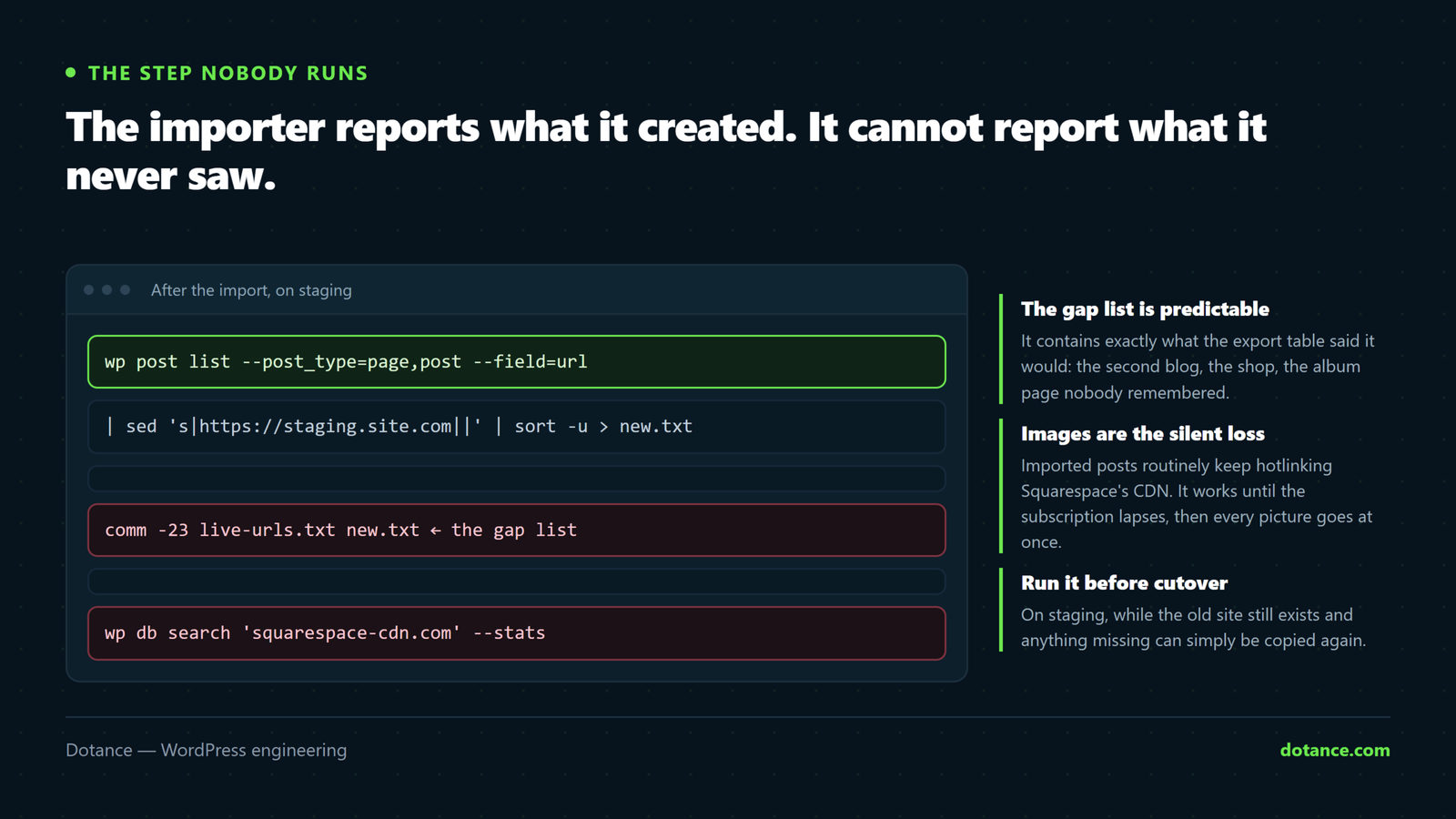
This is the step that turns a Squarespace to WordPress import from hopeful into checked, and almost nobody runs it. The importer reports how many items it created. It cannot report what it never saw.
After the import, on the new site
# Every URL WordPress now serves
wp post list --post_type=page,post --post_status=publish \
  --field=url 2>/dev/null | sed 's|https://staging.yoursite.com||' | sort -u > new-urls.txt

# In the old inventory but not in the new site — the gap list
comm -23 live-urls.txt new-urls.txt
Everything that prints is either a deliberate drop or an accident, and you have to decide which one by one. On a typical Squarespace to WordPress move the gap list contains exactly what the export table predicted: the second blog, the shop, the album page nobody remembered. Seeing it as a list rather than discovering it in three months is the entire point.
Then check the media came too, because images are the other silent loss:
# Anything still pointing at Squarespace's CDN?
curl -s https://staging.yoursite.com/ | grep -c 'squarespace-cdn\.com'

# Across the whole database
wp db search 'squarespace-cdn.com' --stats 2>/dev/null | tail -3
Imported posts routinely keep hotlinking Squarespace’s CDN. It works — until the subscription lapses, at which point every image on the site vanishes at once, months after anyone remembers doing a migration.
A worked example: what the gap list looked like
Here is the shape of one real Squarespace to WordPress project — a design studio, 34 pages, one shop with nine products, two blogs.
| Stage | Result |
|---|---|
| Crawl inventory | 61 URLs, including product and blog archives |
| Export imported | 38 items created — pages and the first blog |
| Gap list | 23 URLs: the second blog (14), the shop (9) |
| Rebuilt by hand | Second blog moved by copy-paste in a morning |
| Rebuilt as WooCommerce | Nine products by CSV, two days with testing |
| URLs kept identical | 38 of 61; the rest mapped and redirected |
Note the ratio. The import did about sixty per cent of the job and reported complete success while doing it. That is not a flaw in the tool — it is exactly what Squarespace documents. It only becomes a problem when a Squarespace to WordPress plan treats the import as the finish line.
Note the last row too. Keeping 38 URLs byte-identical is why this platform move is gentler on rankings than a static-HTML one, where every address changes by definition.
Where a Squarespace to WordPress move goes wrong
| The mistake | What it costs | Do this instead |
|---|---|---|
| Treating the export as complete | A second blog, the shop and every form quietly missing | Diff the import against your crawl inventory |
| Cancelling Squarespace on launch day | No reference copy, and form submissions gone for good | Keep the subscription a month; export responses first |
| Setting permalinks after importing | Every URL rewritten twice; double redirect work | Match the URL shape before the import runs |
| Expecting the design to come across | An unbudgeted rebuild discovered mid-project | Price the template as design work from the start |
| Moving the domain and the site on the same afternoon | Mail and web break together, with one thing to blame | Separate the two by at least a few days |
| Redirecting everything to the homepage | Treated as soft 404s; passes nothing | Map each URL to its closest equivalent |
What a Squarespace to WordPress move actually costs
Squarespace to WordPress quotes vary because the work varies, and the variable is almost never page count. It is how much of your site sits on the wrong side of the export table.
| Your site | Where the effort goes |
|---|---|
| Brochure, one blog, no shop | Almost entirely the template. The import does the rest. |
| Plus a second blog or gallery pages | Add manual content moving — hours, not days |
| Plus a shop | A WooCommerce build, priced separately from the migration |
| Plus member areas or subscriptions | A development project that happens to include a migration |
So when two Squarespace to WordPress quotes differ by a factor of three, the useful question is not “why are you more expensive” but “which of those four rows are you pricing”. Ask each quote to name the row and the spread usually explains itself.
One cost that belongs in the comparison and rarely appears: after the move, somebody has to keep WordPress updated and backed up. Squarespace was doing that invisibly and charging for it in the subscription. Budget it, either as your own time or as a plan, or the saving you calculated will not be the saving you get.
Going the other way
It is worth saying plainly, because a surprising share of the people searching Squarespace to WordPress want the opposite: some are moving from WordPress to Squarespace. That is a legitimate decision. If nobody on the team wants to think about updates, backups or hosting again, and the site is small and stable, Squarespace removes real work.
The trade is the one this whole article describes, in reverse. You gain a platform that looks after itself and lose the ability to export it cleanly later. Choose knowing that, not by accident.
When not to move at all
An honest Squarespace to WordPress article has to include the case for staying put. If your site is a handful of pages, one person edits it happily, nothing unusual has to integrate, and the annual bill is not painful — moving buys you maintenance work you did not have.
WordPress does not look after itself. Core, plugins and PHP move; an unattended install decays. The move earns its cost when you need a real content model, an integration the platform will not allow, or ownership you can take elsewhere. Our Wix versus WordPress comparison works through the same trade-off with different names on it.
What normal looks like afterwards
| Timing | Normal | Not normal |
|---|---|---|
| Week 1–2 | A modest dip while Google recrawls | Pages returning 404 in Search Console |
| Week 3–4 | Impressions climbing back | Still falling |
| Week 6 | At or above the old baseline | Flat at half the old level |
| Any time | A handful of 301s in the logs | Redirect chains, or loops |
A dip in the first fortnight is expected after any Squarespace to WordPress change. A dip still present at week six is a redirect problem — go back to the map and find the rows nobody tested, which is the same discipline described in redesigning without losing SEO.
Frequently asked questions
Does Squarespace let you export to WordPress?
Yes, and the file it produces is a WordPress import file. What it does not do is export everything: one blog only, no products, no forms, no member areas, no design. A Squarespace to WordPress project is therefore part import and part rebuild, and the ratio depends entirely on how much of your site sits on the right-hand column of that list.
Will I lose search rankings?
Less than most migrations, because Squarespace URLs and WordPress URLs can be made to match. Expect a dip of two to four weeks while Google recrawls, then recovery. Real loss happens when URLs change without redirects — which on a Squarespace to WordPress move is avoidable in a way it simply is not when leaving a static HTML site.
How long does it take?
For a brochure site with one blog and no shop, a couple of weeks of elapsed time, most of it template work rather than content. Add a store, a second blog or a member area and it becomes a project measured in months, because each of those is rebuilt rather than imported.
Can I keep my domain?
Yes. Either transfer it away from Squarespace’s registrar or leave it there and repoint the DNS. Transferring gives you cleaner ownership; repointing is faster. Whichever you choose, handle email separately — the MX records are not the website.
What happens to my form submissions?
They stay on Squarespace, and they disappear when the subscription lapses. Export them to CSV before you cancel anything. This is the single most common permanent loss in a Squarespace to WordPress migration, and it is entirely preventable with ten minutes of forethought.
Is WordPress cheaper than Squarespace?
Over a few years, usually — but not for the reason people expect. WordPress itself is free; hosting is cheap. The saving comes from not paying a per-site platform fee, and it is partly spent again on maintenance, whether you do it or pay somebody. If you compare only the monthly bill you will get the wrong answer in both directions.