The page will not load. Chrome says ERR_TOO_MANY_REDIRECTS, Firefox says the page is not redirecting properly, and often you cannot reach wp-admin to do anything about it. A too many redirects error is one of the few WordPress faults that locks you out of the tool you would normally use to fix it — but it is also one of the most mechanical to diagnose. Everything below runs from a terminal.
What too many redirects actually means
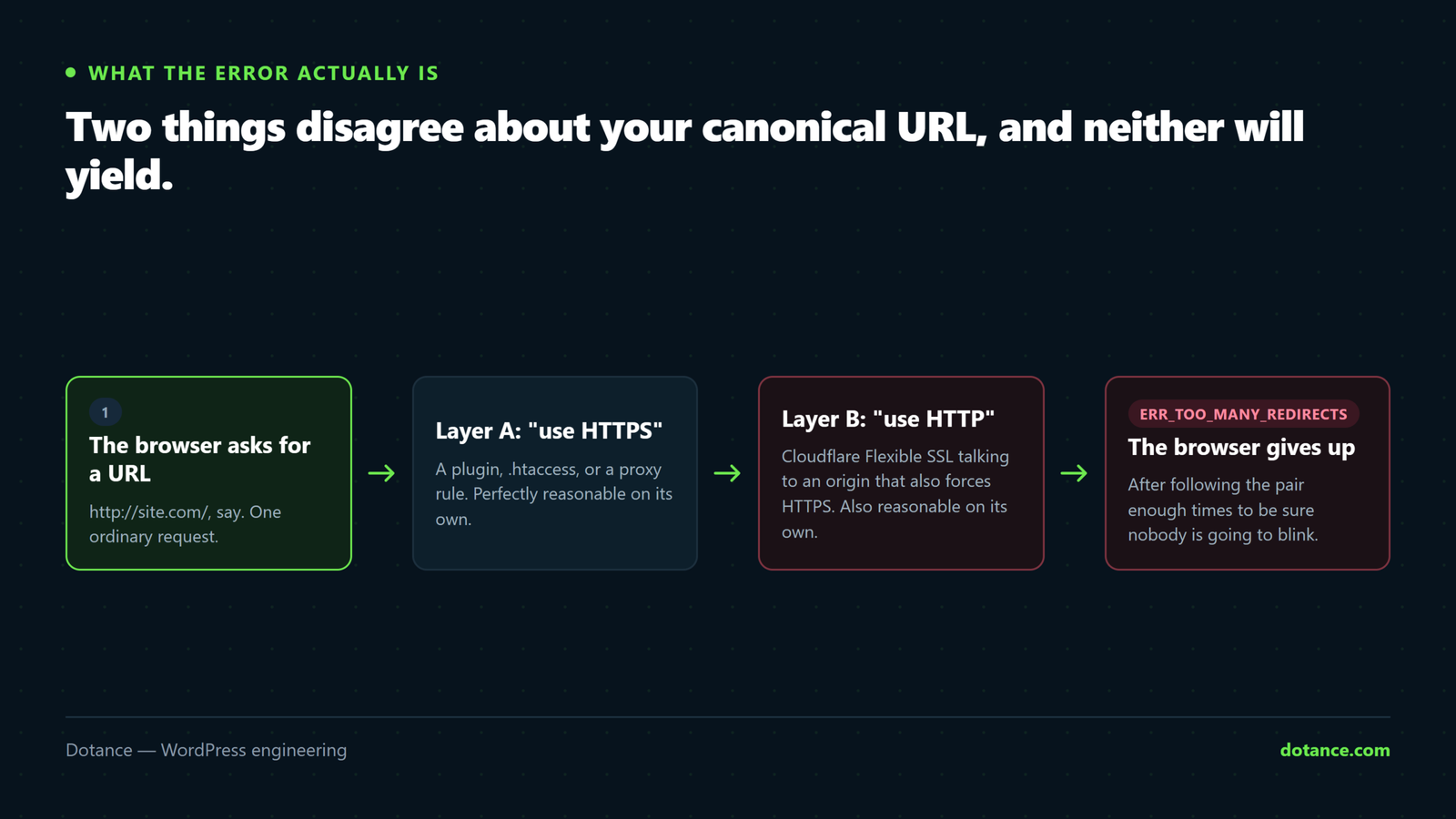
The error is a browser giving up, not a server crashing. Your browser asked for a URL. Something answered with “go here instead”. It went there, and something answered with “go here instead” again — back to where it started. After about twenty hops, the browser stops and shows you the error.
So there is no single broken thing. There are two things, each individually correct, that disagree:
| Thing A believes | Thing B believes | Result |
|---|---|---|
The site is https:// | The request arrived as http:// | Protocol loop |
The site is www.example.com | The site is example.com | Hostname loop |
| URLs end with a slash | URLs do not end with a slash | Trailing-slash loop |
| Admin must be secure | The proxy reports plain HTTP | Admin-only loop |
Identifying which row you are in is the whole job. Once you know that, the fix is usually one line. That is why every too many redirects investigation should start with looking at the loop rather than with changing settings.
See the loop before you change anything
Diagnosing too many redirects starts here. This command prints every hop, with the status and the destination of each:
From any terminal
curl -sIL --max-redirs 5 https://example.com/ | grep -iE '^HTTP/|^location:'A healthy site prints one line. A site with a too many redirects fault prints an alternating pattern, and the pattern names the cause:
| What you see repeating | What it means |
|---|---|
http:// → https:// → http:// | Protocol disagreement, usually a proxy or Flexible SSL |
example.com → www. → example.com | siteurl disagrees with a server rule |
/page → /page/ → /page | Trailing-slash rules fighting |
Only /wp-admin/ loops | FORCE_SSL_ADMIN behind a proxy |
| Loop only for logged-in users | A membership or role-redirect plugin |
Write down the two URLs that alternate. Between them they name both halves of the disagreement, and the rest of this article is a matter of finding which component is asserting each half.
Test in a private window, always. Browsers cache 301 responses hard and for a long time. A too many redirects error that persists after a correct fix is very often your own browser replaying yesterday’s answer. curl does not cache, which is the other reason to start there.
The seven causes of too many redirects
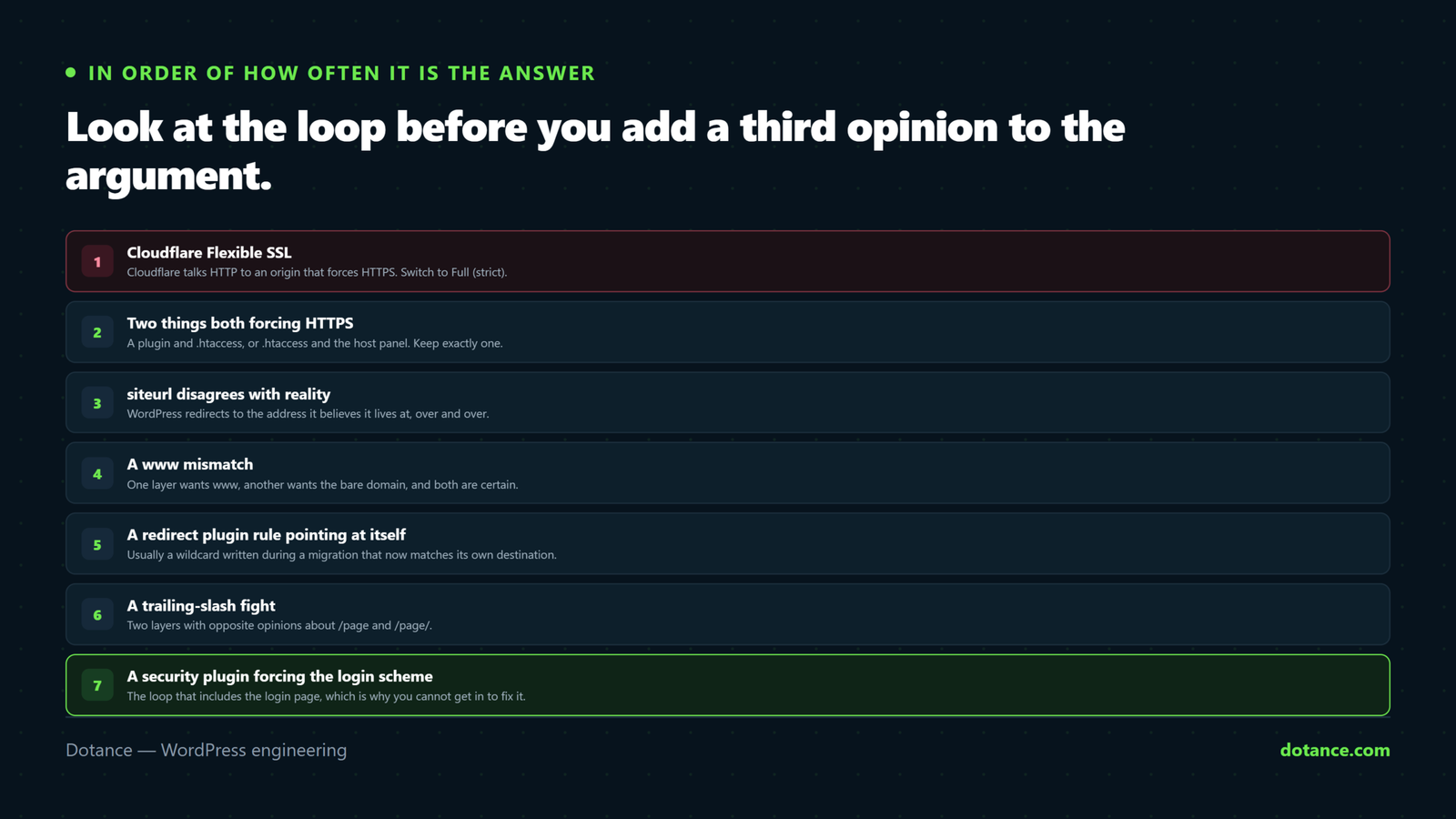
| # | Cause | Tell | Fix |
|---|---|---|---|
| 1 | Cloudflare Flexible SSL | Protocol loop, Cloudflare in front | Switch to Full (strict) |
| 2 | Two things forcing HTTPS | Protocol loop, no proxy | Keep one, remove the other |
| 3 | siteurl or home wrong | Hostname loop | Set them to the real URL |
| 4 | Proxy not passing the protocol | Everything loops, origin is fine | Trust the forwarded header |
| 5 | A redirect plugin rule | One URL loops, others do not | Delete the rule |
| 6 | FORCE_SSL_ADMIN behind a proxy | Only wp-admin loops | Fix the header first |
| 7 | A cached redirect | Fixed, and still looping | Purge, then private window |
1. Cloudflare’s Flexible SSL
This is the first thing to check whenever a proxy is involved. Flexible SSL means Cloudflare talks to the visitor over HTTPS and to your server over plain HTTP. Your server sees an insecure request, dutifully redirects it to HTTPS, Cloudflare receives that, and sends it back to the origin over HTTP again. That is a perfect loop and it is the single most common cause of too many redirects on any site behind a proxy.
The fix is not a WordPress setting. In Cloudflare, set SSL/TLS to Full (strict) and make sure your origin has a valid certificate. Flexible was a workaround for servers with no certificate at all, and there is no longer any good reason to use it — it also means the leg between Cloudflare and your server is unencrypted, which is a security problem dressed up as a convenience.
2. Two components both forcing HTTPS
Very common after a certificate install, and a classic too many redirects setup, because people add the redirect in more than one place and forget:
- An
.htaccessor nginx rule. - A “force SSL” plugin.
- The host’s own control-panel toggle.
- A CDN page rule.
Any two of those can be fine together, or can produce too many redirects depending on how each one tests the current protocol. Pick one layer — the server rule is usually the right one — and disable the rest. If disabling the plugin is what fixes it, do not simply reinstate it: the plugin was masking a configuration you now need to make properly, as described in our notes on mixed content warnings.
3. siteurl and home disagree with reality
These two options tell WordPress what it is called, and getting them wrong is the most frequent WordPress-side cause of too many redirects. If they say www.example.com and your server redirects www to the bare domain, WordPress sends visitors to www, the server sends them back, and around it goes.
wp option get siteurl
wp option get home
Both must match the hostname and protocol that your server actually serves. If you cannot reach WP-CLI or the admin, override them in wp-config.php — these constants beat the database and are the standard way out of a too many redirects lockout:
wp-config.php, above the “stop editing” line
define( 'WP_HOME', 'https://example.com' );
define( 'WP_SITEURL', 'https://example.com' );
Use the constants as a diagnostic, not a permanent fix. They work, and they hide the real values from anyone reading the database later. Once you are back in, set the options properly and remove the constants — otherwise the next person to move the site inherits a puzzle.
4. A reverse proxy is not passing the protocol
This is the cause that produces too many redirects on a site whose own configuration is faultless. Load balancers, some managed hosts and every CDN sit in front of PHP. They terminate HTTPS and then talk to WordPress over HTTP, passing the original protocol in a header. If WordPress does not read that header, it believes every request is insecure.
wp-config.php
if ( isset( $_SERVER['HTTP_X_FORWARDED_PROTO'] )
	&& 'https' === $_SERVER['HTTP_X_FORWARDED_PROTO'] ) {
	$_SERVER['HTTPS'] = 'on';
}
Add it above the require_once ABSPATH . 'wp-settings.php'; line. Only add it when you genuinely have a proxy in front: trusting that header on a server directly exposed to the internet lets anyone assert HTTPS by sending a header, which is a real, if modest, security weakness.
5. A redirect plugin rule that points at itself
If only one URL produces too many redirects and everything else is fine, you are looking at a rule rather than a configuration. The usual shapes are a rule that redirects a page to itself, two rules that point at each other, or a wildcard rule that matches its own destination.
# If you can reach WP-CLI, deactivate the redirect plugin to confirm
wp plugin deactivate redirection
If the loop stops, the rule is yours to find. If it does not, the plugin was innocent and you have saved yourself an hour of reading rules.
6. FORCE_SSL_ADMIN with an unhappy proxy
A loop that affects only /wp-admin/ while the front end is perfect is nearly always this. FORCE_SSL_ADMIN tells WordPress to insist on HTTPS for the admin, and if the proxy header is not being read, WordPress never believes the requirement has been met.
Fix cause four first. If you need to get in urgently, comment the constant out, log in, and put it back once the header is trusted. Being shut out of the dashboard by your own hardening is a close cousin of the situation in being locked out of WordPress admin.
7. It is already fixed and you are looking at a cache
You fixed it, and the too many redirects error is still there. Three separate layers can serve you a stale too many redirects response: your browser, your page cache, and your CDN. Clear them in that order and retest.
wp cache flush
wp litespeed-purge all   # or your cache plugin's equivalent
Then purge the CDN and open a private window. A great many “still broken” reports after a genuine repair are this, and the curl command at the top is immune to all three — if curl is clean and your browser is not, you are done.
Fixing too many redirects when you cannot log in
This is the awkward part of any too many redirects lockout, because the loop often includes the login page. Work in this order, escalating only as far as you need:
- Add the
WP_HOMEandWP_SITEURLconstants. No database access needed, effective immediately. - Rename the plugins folder over SFTP to
plugins-off. Every plugin deactivates; if the loop stops, rename it back and re-enable one at a time. - Rename
.htaccesstohtaccess-off. WordPress regenerates a clean one on the next permalink save. - Switch the theme with
wp theme activate twentytwentyfiveif you suspect a theme-level redirect. - Check the host’s panel for a force-HTTPS toggle you forgot about.
Step two is blunt and it works. A too many redirects error caused by a plugin is indistinguishable from one caused by a server rule until you remove one of them from the equation, and renaming the folder is the fastest way to do that without a database.
Do all of this on a copy if you possibly can. If you do not have one, setting up a staging site is an hour that pays for itself the first time you need to rehearse a fix like this.
A worked example, start to finish
This is a real shape we see most months, written out in full so you can follow the same path on your own site.
A store moved to a new host on a Friday. By Monday the front end loaded but the checkout produced too many redirects for some customers and not others. The support ticket said “intermittent”, which is the word that makes everybody assume a hard problem.
Step one: look at the loop
curl -sIL --max-redirs 5 https://example.com/checkout/ | grep -iE '^HTTP/|^location:'

HTTP/2 301
location: https://www.example.com/checkout/
HTTP/2 301
location: https://example.com/checkout/
Two hops, alternating on the hostname. Not intermittent at all — the customers who “were fine” had a cached response from before the move. That single output narrowed a vague ticket to cause three in about four seconds, which is the argument for always running the command before forming a theory.
Step two: find who asserts each half
wp option get siteurl
# https://www.example.com  ← WordPress wants www

grep -i 'www' .htaccess
# RewriteRule ... ← the server strips www
WordPress wanted www, the new host’s default .htaccess stripped it. Both were behaving correctly and the combination was a too many redirects error. The old host had no such rule, which is why the site had worked for years.
The fix was one decision — keep the bare domain, because that is what the certificate and the backlinks used — and two edits: update siteurl and home, leave the server rule alone. Total time after the curl: six minutes, most of it purging caches. The rest of the post-migration list that would have caught it earlier is in changing WordPress hosting.
When only part of the site loops
A partial too many redirects error is more informative than a total one, because the boundary tells you which component is responsible.
| What loops | What that rules in |
|---|---|
Only /wp-admin/ | FORCE_SSL_ADMIN and the proxy header |
| Only one page or post | A redirect plugin rule |
| Only for logged-in users | A membership, LMS or role-redirect plugin |
| Only the checkout or cart | A force-SSL rule scoped to those pages |
| Only on mobile | A legacy mobile-redirect rule or theme |
| Everything, everywhere | Protocol or hostname — causes one to four |
The last row is the only one that justifies touching server configuration. If your too many redirects error is confined to a subset of URLs or a subset of visitors, the cause is something scoped to that subset, and editing .htaccess will make the site worse rather than better.
Where this goes wrong
| The mistake | What happens | Do this instead |
|---|---|---|
| Changing settings before looking at the loop | You add a third opinion to an argument between two | curl -sIL first |
| Testing in your normal browser | Cached 301s make a fixed site look broken | Private window, or curl |
| Leaving Cloudflare on Flexible | The loop returns whenever a rule changes | Full (strict), with a real origin certificate |
Trusting X-Forwarded-Proto with no proxy | Anyone can assert HTTPS by header | Only add it behind a genuine proxy |
| Leaving the wp-config constants in permanently | The database says one thing, the site does another | Fix the options, remove the constants |
| Installing a second SSL plugin to fix the first | Two more redirects in the chain | Remove, do not add |
Editing .htaccess with no backup | A worse error than the one you started with | Copy the file before touching it |
Keeping it from coming back
| Habit | When | Why |
|---|---|---|
| Redirect at exactly one layer | Always | Two layers is the whole cause |
| Document which layer it is | On setup | The next person will otherwise add another |
| Check the hop count after any move | Every migration | One hop, not three |
Re-test /wp-admin/ separately | After SSL changes | Admin loops are a separate failure |
Keep a copy of a working .htaccess | Always | Restoring beats debugging |
The first row is the whole article in one line. A too many redirects error is never caused by one redirect; it is caused by two, and the reliable prevention is to decide where redirects live and refuse to add them anywhere else. Chained hops also cost you ranking signal, which puts this squarely in technical SEO territory as well as reliability.
MDN’s page on HTTP redirections is the clearest short reference for what each status code means and why browsers cap the chain where they do.
Frequently asked questions
Does a too many redirects error hurt my SEO?
Yes, immediately and more sharply than most faults. Search engines cannot render a looping page, so it drops out of the index rather than ranking lower. The recovery is usually quick once the loop is gone, but it is not instant — request indexing for your key URLs rather than waiting.
Why does the site work for me and loop for everyone else?
Almost always caching, working in the opposite direction from usual here: your browser has a cached working response and everyone else is getting the live one. Check in a private window before concluding the site is fine.
How long should a normal redirect chain be?
One hop. An insecure or misspelled request should reach its final URL in a single 301, and anything longer is both slower and a step closer to too many redirects the next time somebody adds a rule. Check the chain length after every migration.
Can a plugin update cause this?
Yes. Security and SSL plugins add redirect rules, and an update can change the conditions those rules use. If a too many redirects error starts on its own, check what updated in the previous twenty-four hours before anything else.
Is 301 or 302 better for the HTTPS redirect?
301, because it is permanent and browsers and search engines cache it. That is also why a mistaken 301 is so painful to undo — pick the destination carefully, and use a 302 while you are still testing.
Should I redirect www to bare, or the other way?
It genuinely does not matter for ranking. What matters is that you pick one, that siteurl and home agree with it, and that exactly one layer enforces it.
My host says the problem is WordPress. Is it?
Show them the curl output rather than arguing about whose too many redirects error it is. If the first hop comes from the server before PHP runs, it is theirs; if it comes with WordPress headers attached, it is yours. That one piece of evidence usually ends the conversation politely.
Could this be a hacked site?
Rarely, but a malicious redirect injected into a theme file can loop if it is clumsy. If the loop points at a domain you do not recognise, stop debugging and read the signs a WordPress site is hacked instead.