Every WordPress AI chatbot demo looks the same: a friendly bubble, a plausible answer, a delighted prospect. What the demo never shows is the third week, when the bot tells a customer the consultation is free, or that you deliver to a country you do not, or quotes a price from a page you deleted in 2024. A WordPress AI chatbot is a piece of your website that talks, and it needs the same discipline as the rest of the site. These are the seven questions we ask before one goes on a client site, and the honest answers for the main types, including our own.
The three kinds of WordPress AI chatbot
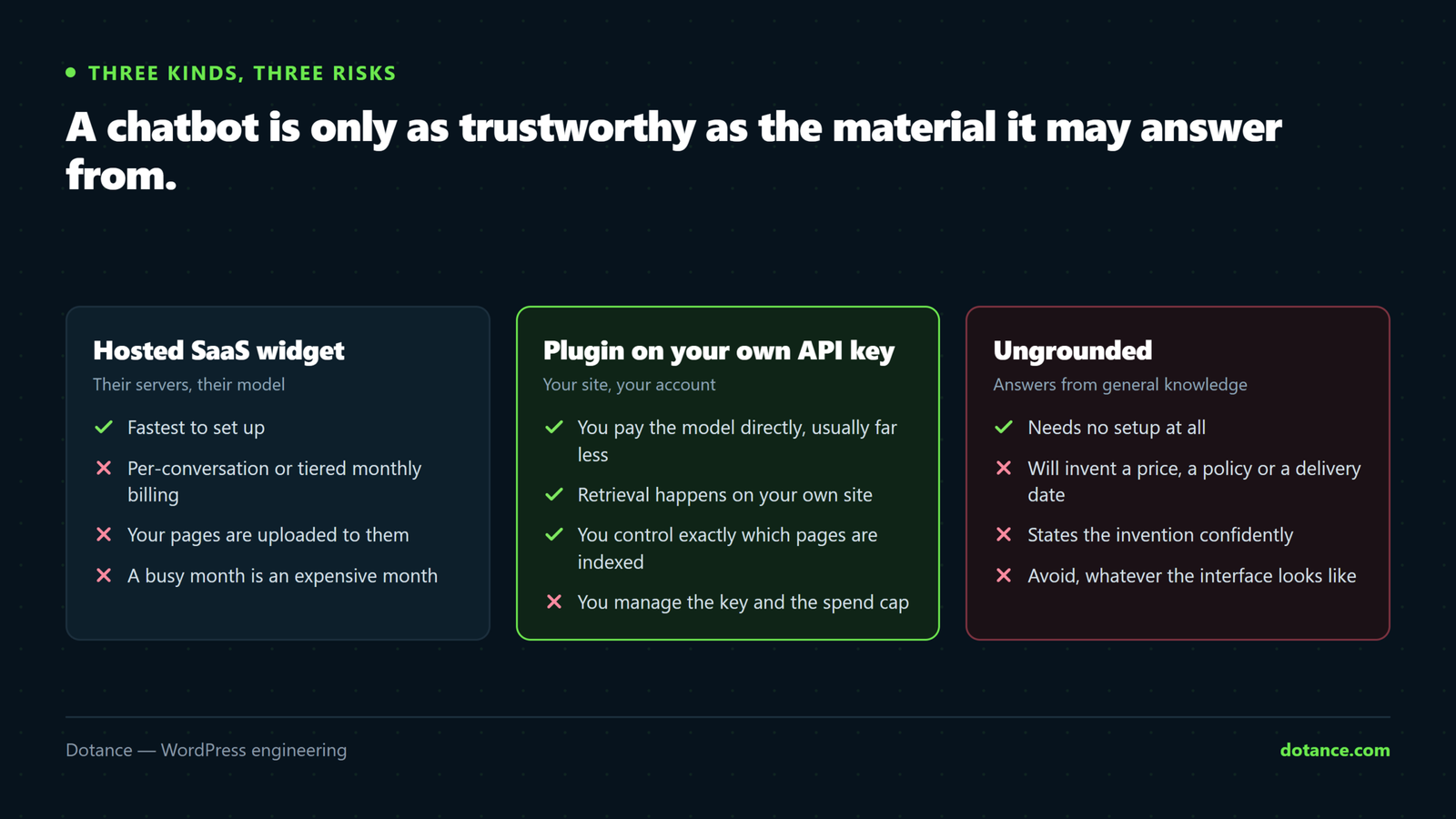
| Kind | How it answers | Typical pricing | Risk |
|---|---|---|---|
| Hosted SaaS widget | Their servers, their model, your pages uploaded to them | Per conversation or per month, tiered | Data leaves the site; cost scales with traffic |
| General-model plugin | Your API key, a system prompt, the model’s own knowledge | Plugin free or paid; you pay the provider | Answers from the model, not your site — invention |
| Site-grounded plugin | Your API key; answers built only from your indexed pages | Plugin free or paid; you pay the provider | Says “I don’t know” when the content is missing |
The third row is what most businesses actually want and the one fewest products deliver. The technique is called retrieval-augmented generation: the plugin searches your own pages for the passages relevant to the question, hands only those to the model, and instructs it to answer from them or decline. The model’s general knowledge is a liability here, not a feature, because a WordPress AI chatbot that knows the world will happily fill gaps in your content with the world’s average answer.
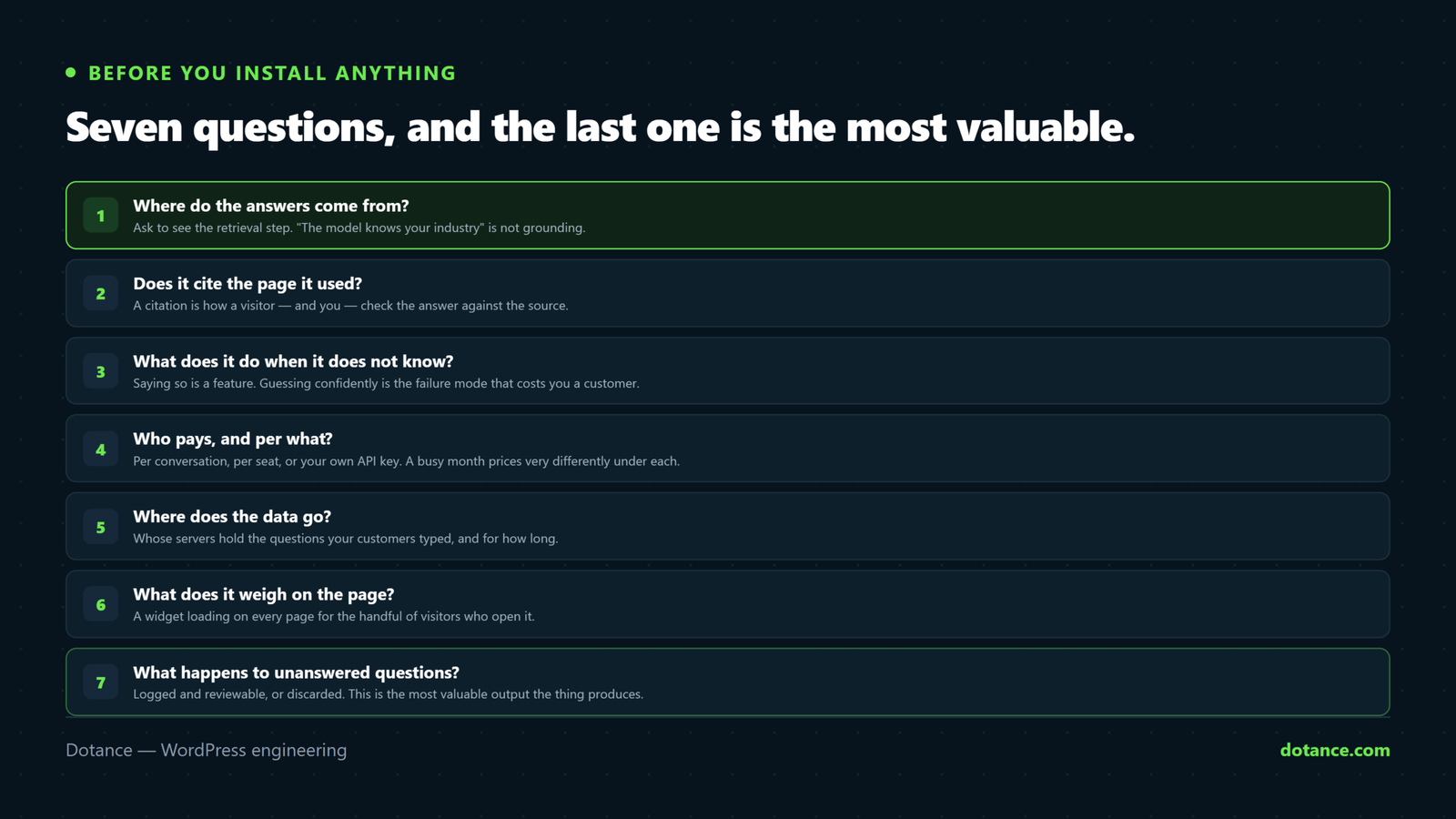
Seven questions before you add a WordPress AI chatbot
1. Where do the answers come from?
Ask the vendor to show you the retrieval step. If the answer is “the model knows your industry” or “we train it on your site” with no specifics, the bot answers from the model and your pages are a hint at best. Look for a visible index — a list of the pages it has read, with a way to exclude some — and a setting that makes the bot refuse rather than guess.
The difference is easy to test on any demo: ask it something true that is not on your site. A grounded WordPress AI chatbot declines; a general one answers, confidently, from the internet. Then ask it something about your site that changed last month and see which version it believes.
2. Does it show its sources?
A citation under each answer — the page it came from, as a link — does three jobs. It lets the visitor check. It sends them to the page, which is where the conversion happens. And it keeps you honest, because an answer with no source is an answer the bot made up. This is the same reason AI search engines cite pages: an uncited answer is a liability for whoever publishes it.
3. What does it do when it does not know?
The right behaviour for a WordPress AI chatbot is an honest “I could not find that on this site” plus an offer to take the question to a human. The wrong behaviour is a fluent paragraph. Test it with a question your site definitely does not answer — an obscure delivery region, a service you do not offer — and read the reply as a customer would.
4. Who pays, and per what?
| Model | You pay for | Cheap when | Expensive when |
|---|---|---|---|
| Per conversation | Each chat, or a monthly cap | Traffic is low | Traffic grows; a good month costs more |
| Per seat / per month | A flat fee regardless of use | Traffic is high and steady | Traffic is low; you pay for nothing |
| Your own API key | Tokens, to the provider, at cost | Almost always; small sites often pay nothing | Never dramatically; the model’s list price is the ceiling |
Bringing your own key means the WordPress AI chatbot costs what the provider charges for the tokens it uses and nothing more. A short answer is a few thousand tokens all-in; on the small models that is a fraction of a cent, and Google Gemini’s free tier covers a modest site entirely. We go through the arithmetic in a separate post on API costs. The one thing to confirm is that the plugin lets you set a monthly token budget, so a traffic spike cannot run up a bill.
5. Where does the data go?
Every question a visitor types is data, and some of it will be personal. With a hosted widget it goes to the vendor’s servers and then to their model provider; ask for the data-processing agreement and where the servers are. With a key-based plugin the question goes from your server to the provider you chose and the log stays in your database. Either way, the privacy policy needs a sentence about it, and a WordPress AI chatbot should never send the conversation to a third party the visitor was not told about.
Check how the WordPress AI chatbot stores the API key itself. It should be encrypted at rest in the database, not sitting in plain text in an option that every backup copies. That is a detail a surprising number of plugins get wrong.
6. What does it weigh?
Chat widgets are a classic cause of a slow front end: a 300 KB script, a font, an iframe, all loaded before the visitor has asked anything. Measure the plugin’s front-end payload before and after with the browser’s network tab, and look for a widget that loads lazily and renders in a shadow DOM so it cannot fight your theme’s CSS. Anything that adds a second to Largest Contentful Paint is costing you more visitors than the bot will ever convert, and a chat widget is one of the first things to check when a site is slow.
7. What happens to the questions it could not answer?
This is the question almost nobody asks and the one with the most value in it. Every unanswered question is a visitor telling you what page your site is missing, in their own words, at the moment they wanted it. A WordPress AI chatbot that logs those, groups them, and shows you the list is a content-research tool that pays for itself; one that discards them is throwing away the best data it produces. Ask to see the report before you buy.
How Dotance Chat answers the seven
We built Dotance Chat after installing several of the others on client sites and hitting the same three problems: invented prices, per-conversation bills, and no record of what visitors actually asked. It is a site-grounded WordPress AI chatbot, so the honest answers to the seven questions are:
| Question | Dotance Chat |
|---|---|
| Where do answers come from? | Only from pages and posts you have published and it has indexed; the index is a screen you can see and edit |
| Sources? | Links under every answer to the pages used |
| When it does not know? | Says so, offers to pass the question on, logs it |
| Who pays? | You, to your provider, at cost. Gemini, OpenAI, Anthropic or any OpenAI-compatible endpoint. Monthly token budget built in |
| Data? | Stays in your database; the key is encrypted at rest; only the question and the retrieved passages go to the provider |
| Weight? | Under 25 KB, shadow DOM, loads after the page |
| Unanswered questions? | A report, with a drafted answer you can pin or save as a draft post |
Two things it does not do, so you are not surprised. It will not answer from the model’s general knowledge, by design, which means a brand-new site with three pages gets a bot that says “I don’t know” a lot until the pages exist. And it is not a live-chat handover to a human agent; when a visitor is ready to buy it asks for their details and sends them to you by email or webhook, which for most small businesses is the better fit.
Setting up a WordPress AI chatbot properly
Whichever product you choose, the setup that avoids the third-week problems is the same.
The checklist
1. Index only the pages that should be answered from — exclude drafts, legal
   pages, and anything out of date. Fix the out-of-date page first.
2. Pin the answers that must be exact: prices, opening hours, delivery areas,
   refund terms. A pinned answer is returned verbatim, never paraphrased.
3. Write the "I don't know" reply yourself, with a next step in it.
4. Set a monthly token budget and an alert.
5. Add one sentence to the privacy policy about where questions go.
6. Read the unanswered-questions report weekly for the first month.
Step six is where the return is. In the first month of a WordPress AI chatbot on a services site, the unanswered list is usually thirty to fifty distinct questions, of which a dozen are worth a page each. That is a quarter’s content plan, handed to you by the people who wanted to read it — and the pages it produces are exactly the kind that AI search engines cite, because they answer a real question directly.
What a WordPress AI chatbot costs to run: a worked example
Take a services site with a thousand conversations a month, three questions each. A grounded WordPress AI chatbot sends the model the question plus two or three retrieved passages and asks for a short answer: call it 2,000 tokens in and 300 out per question, or roughly seven million tokens a month in total. At the time of writing, the small models from the major providers list at well under a dollar per million input tokens, and Gemini’s free tier absorbs a modest site entirely. The monthly bill for that site is a few dollars at most, and often nothing.
The index is the other cost, and it is one-off. Turning your pages into searchable vectors uses an embedding model once per page and again when a page changes; a 200-page site indexes for cents. Compare both numbers with a hosted widget’s plan — typically a fixed monthly fee for a conversation allowance, with overage above it — and the difference is not close. The hosted price buys you their support desk and no key to manage; whether that is worth ten to twenty times the running cost depends on how many conversations you have and who on your team would otherwise set up the key.
Two settings keep the key-based WordPress AI chatbot predictable. A monthly token budget that stops the bot politely when reached, and an alert at half of it. With those two, a traffic spike or a bored visitor sending five hundred questions cannot become an invoice. The AI-referral tracking post is worth pairing with the chatbot’s own log, because the two together show what AI-driven visitors came for and what they asked once they arrived.
Where a WordPress AI chatbot goes wrong
| Mistake | What happens | Fix |
|---|---|---|
| Letting it answer from general knowledge | Invented prices and policies, said with confidence | Ground it in your pages; pin the numbers |
| Indexing everything | It quotes a 2023 pricing page you forgot | Index a curated set; fix or unpublish stale pages |
| Per-conversation pricing on a growing site | The bill rises with your success | Own API key with a budget cap |
| Loading the widget eagerly | LCP up, conversions down | Lazy load; measure before and after |
| Ignoring the unanswered log | The best research you have, unread | Weekly review; one new page per real gap |
| No human path | A frustrated visitor with nowhere to go | Lead capture or a contact link in every “I don’t know” |
The first row is the one that reaches your inbox as a complaint, and it is the reason to insist on a grounded WordPress AI chatbot from the start. A WordPress AI chatbot that quotes a wrong price has, in the customer’s mind, quoted a price; arguing that “the AI made it up” is not a conversation you want. Grounding plus pinned answers removes the whole category.
Questions about adding a WordPress AI chatbot
Does a WordPress AI chatbot need a monthly subscription?
Not necessarily. Hosted widgets charge monthly; key-based plugins charge nothing themselves and you pay the model provider for what you use, which on a small site can be zero on a free tier. Read the pricing page for the phrase “per conversation” before assuming.
Can it answer only from my own content?
Yes, if it is built to. Look for retrieval-augmented generation, a visible index of your pages, source links under answers, and a refusal when the content is missing. If a demo answers a question your site does not cover, it is not restricted to your content.
Will a WordPress AI chatbot slow the site down?
It can, badly, if the widget is heavy and loads before the page. Measure the front-end payload; look for lazy loading and a small script. Server-side, a grounded plugin does its search and model call only when someone asks, so idle pages cost nothing.
Is my visitors’ data safe?
Only if you know where it goes. With your own key, the question and a few passages of your own pages go to the provider you chose and the log stays with you. With a hosted service, everything goes to them first. Either way, say so in the privacy policy.
Which AI provider should a WordPress AI chatbot use?
For most business sites, the cheapest small model from a major provider is more than enough, because the plugin is handing it the relevant passage and asking for a short answer. Gemini’s free tier is the obvious start; OpenAI and Anthropic’s small models cost fractions of a cent per answer. Pick the one whose data terms you are comfortable with.
Can a WordPress AI chatbot capture leads?
The good ones do it in the conversation: when a visitor’s question signals buying intent, the bot asks for a name and email and sends the thread to you. That is usually more useful than a human-handover feature for a business without a live support desk.
What is the single best reason to install one?
The unanswered-questions list. Even a site that does not need a chat bubble benefits from knowing, in visitors’ own words, what it fails to explain. Treat the bot as research first and support second, and it earns its place either way.