Every ageing site reaches the conversation. It is slow, it is awkward to edit, something broke last month, and somebody asks whether it would be easier to start again. Sometimes it would. More often the honest answer is that four specific problems are being described as one large one, and the cost to rebuild a WordPress site is being compared against a repair nobody has actually scoped. Here are seven tests that separate the two.
The question is usually asked at the wrong moment
Notice when the idea to rebuild a WordPress site comes up. Almost always after a bad week — an outage, a failed update, an editor who could not do something — or in a meeting with somebody whose income depends on the answer being yes.
| Who is asking | What they may actually mean |
|---|---|
| The marketing team | “I cannot edit this page without help” |
| The developer | “I do not enjoy working in this codebase” |
| An agency pitching | “I would like a larger project” |
| The owner | “It looks dated next to our competitor” |
| Whoever was on call | “It broke and I could not fix it quickly” |
Each of those is a real problem and none of them necessarily means you should rebuild a WordPress site. Three are content and training problems, one is a design problem, and one is a maintenance problem. A rebuild solves some of them expensively and others not at all.
Do this before anything else: write down every specific complaint, one line each, from everybody who has one. Not “it’s slow” — “the products page takes eight seconds on a phone”. The list is usually shorter and much more fixable than the mood around it suggests.
Seven tests before you rebuild a WordPress site
| # | Test | Points toward |
|---|---|---|
| 1 | Can customers see the problem? | Invisible problems rarely justify a rebuild |
| 2 | Are the foundations maintained? | Abandoned theme or builder favours rebuild |
| 3 | How much undocumented custom code? | A lot favours rebuild — eventually |
| 4 | Does it currently earn? | Earning sites favour repair |
| 5 | What is on the defect list? | Short lists favour repair |
| 6 | Who maintains the next one? | No answer means rebuild again in three years |
| 7 | Is a redesign hiding inside this? | Name it, and price it separately |
1 and 4. Visible problems, and money
Start with what a customer experiences, not with what frustrates the team. A site that is unpleasant to administer but fast, findable and converting is not a broken site — it is a site with an internal problem, and internal problems have cheaper fixes than rebuilds.
Then look at what it earns before you rebuild a WordPress site. A site producing steady enquiries or orders has something working that nobody fully understands: a page that ranks, a form that converts, a path through the navigation people actually take. A rebuild puts all of that back into play. It is a bet, and the bigger the current earnings the worse the odds you are taking.
2. Are the foundations still alive?
This is the test most likely to say plainly whether you should rebuild a WordPress site.
| Foundation | Healthy | Points to rebuild |
|---|---|---|
| Theme | Updated in the last year | Author gone, no updates since 2021 |
| Page builder | Actively developed | Discontinued, or abandoned |
| Key plugins | Maintained, compatible | Several abandoned, no replacements |
| PHP compatibility | Runs on current PHP | Stuck below 8.0 and cannot move |
| WordPress version | Current | Cannot update without breaking |
Two or more right-hand answers is the strongest case there is to rebuild a WordPress site, because you are not choosing between old and new — you are choosing between unsupported and supported. A theme nobody has patched since 2021 is privileged, unmaintained code, and that argument stands regardless of how the site looks. Note that “classic theme” is not the same as “abandoned theme”, a distinction we set out in classic themes on 7.1.
3. The undocumented code problem
Every site old enough to rebuild accumulates behaviour nobody can explain: an mu-plugin, a snippet in a settings field, a function in a child theme, a filter added for one campaign in 2022.
# Where the undocumented behaviour usually hides
ls -la wp-content/mu-plugins/
grep -rn "add_filter\|add_action" wp-content/themes/your-child-theme/functions.php | wc -l
A large, undocumented custom layer does eventually justify a rebuild — but on a timescale, not urgently. The intermediate step almost nobody takes is to document it first. A day spent writing down what each piece does frequently reveals that half of it is dead code for features that no longer exist, and the remaining half is smaller than the rebuild quote assumed.
5. The defect list is the whole decision
This is the test that changes the most minds about whether to rebuild a WordPress site. Collect every complaint and put a fix and an estimate against each:
| Complaint | Actual fix | Rough effort |
|---|---|---|
| “Products page is slow” | Image sizes and a query fix | Half a day |
| “Cannot edit the homepage” | Training, or one template change | Two hours |
| “Looks dated” | Typography, spacing and colour pass | Two to three days |
| “Forms go to the wrong inbox” | One setting | Ten minutes |
| “Mobile menu is awkward” | CSS and one template | Half a day |
| “Breaks on every update” | Genuine — investigate properly | Unknown until scoped |
Five of those six are days, not months. That is the usual shape: a handful of tractable problems and one real one. If your list looks like this, repair is obviously right, and the instinct to rebuild a WordPress site was the accumulated frustration rather than the evidence.
If instead every line reads “unknown until scoped”, that is itself the finding — you have a site nobody understands, and test three applies.
6 and 7. Who maintains it, and what are you really buying?
Rebuilding with no maintenance plan produces the same site in three years. Whatever caused this one to decay — no updates, no ownership, no documentation — will do it again unless something changes, and the new build is not what changes it.
Test seven is about honesty, and it is where most requests to rebuild a WordPress site come unstuck. A lot of rebuild requests are redesign requests wearing technical clothes, because “it looks dated” feels like a weaker justification than “it is technically obsolete”. It is not weaker — a dated site can genuinely cost you customers. But name it, because a redesign on healthy foundations is a fraction of the cost and risk of a rebuild.
The costs of rebuilding that nobody puts in the quote
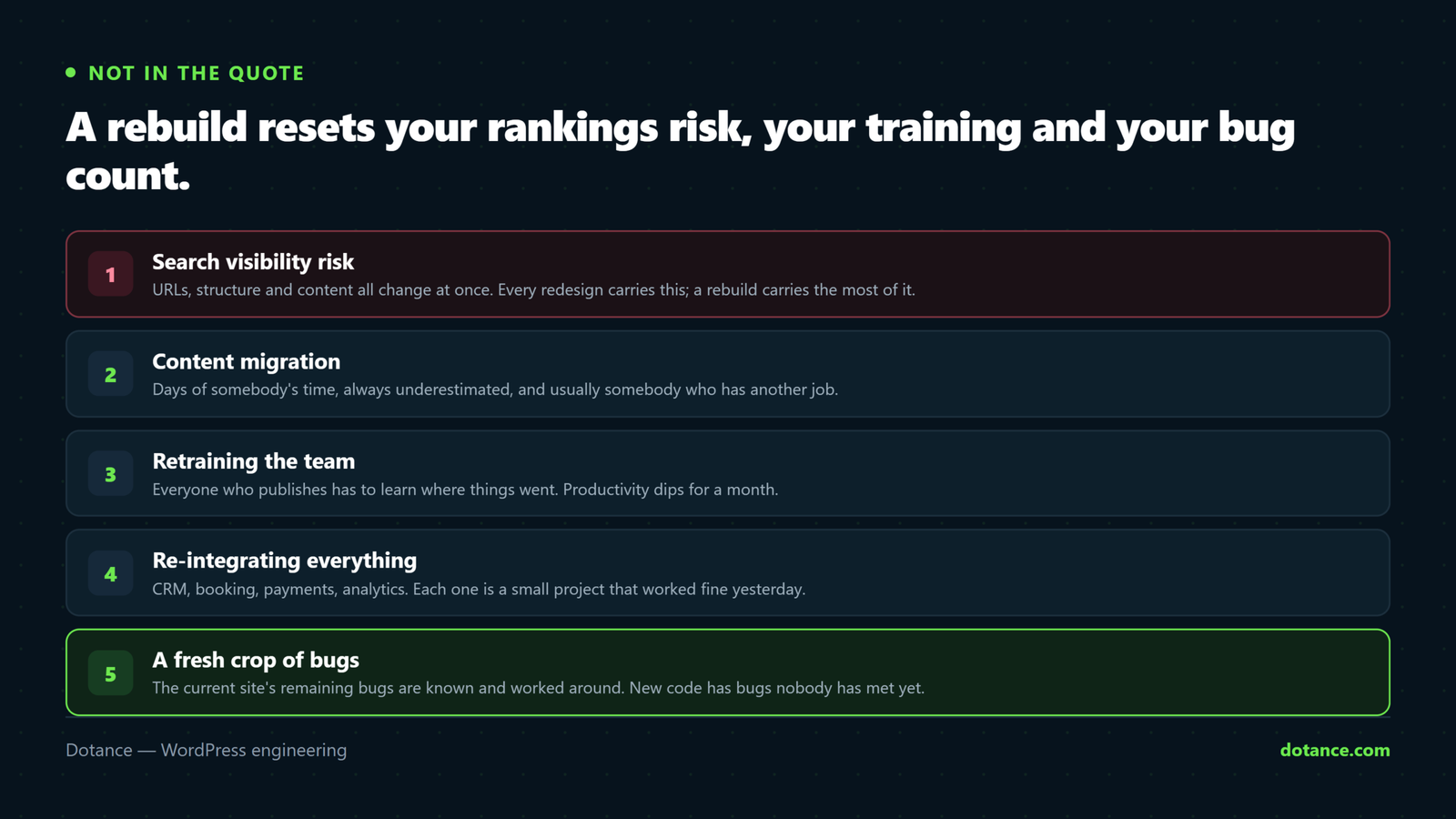
| Cost | Typically |
|---|---|
| Search visibility risk | Real. URLs, structure and content all change at once |
| Content migration | Days of somebody’s time, always underestimated |
| Retraining the team | Weeks of lower productivity |
| Rebuilding integrations | CRM, email, analytics, payment — each one |
| New bugs | Every new build has them; the old one’s are known |
| The gap period | Improvements stop while the rebuild runs |
| Lost undocumented behaviour | The redirect nobody knew about |
The first row is what hurts businesses that rebuild a WordPress site without planning. Changing every URL on a site that ranks is a controlled risk with a known procedure, and it is still a risk — Google’s own guidance on moving a site with URL changes is not short, and every step of it is a chance to lose something. Keeping URLs identical removes most of that exposure and is worth insisting on, alongside the rest of the technical SEO checklist.
The last row is the quiet one. Sites accumulate small kindnesses — a redirect for an old campaign, a snippet that fixes one client’s invoice, a rule handling a legacy URL format. None is documented. All disappear, and each reappears as a bug report three weeks after launch.
When each answer is clearly right
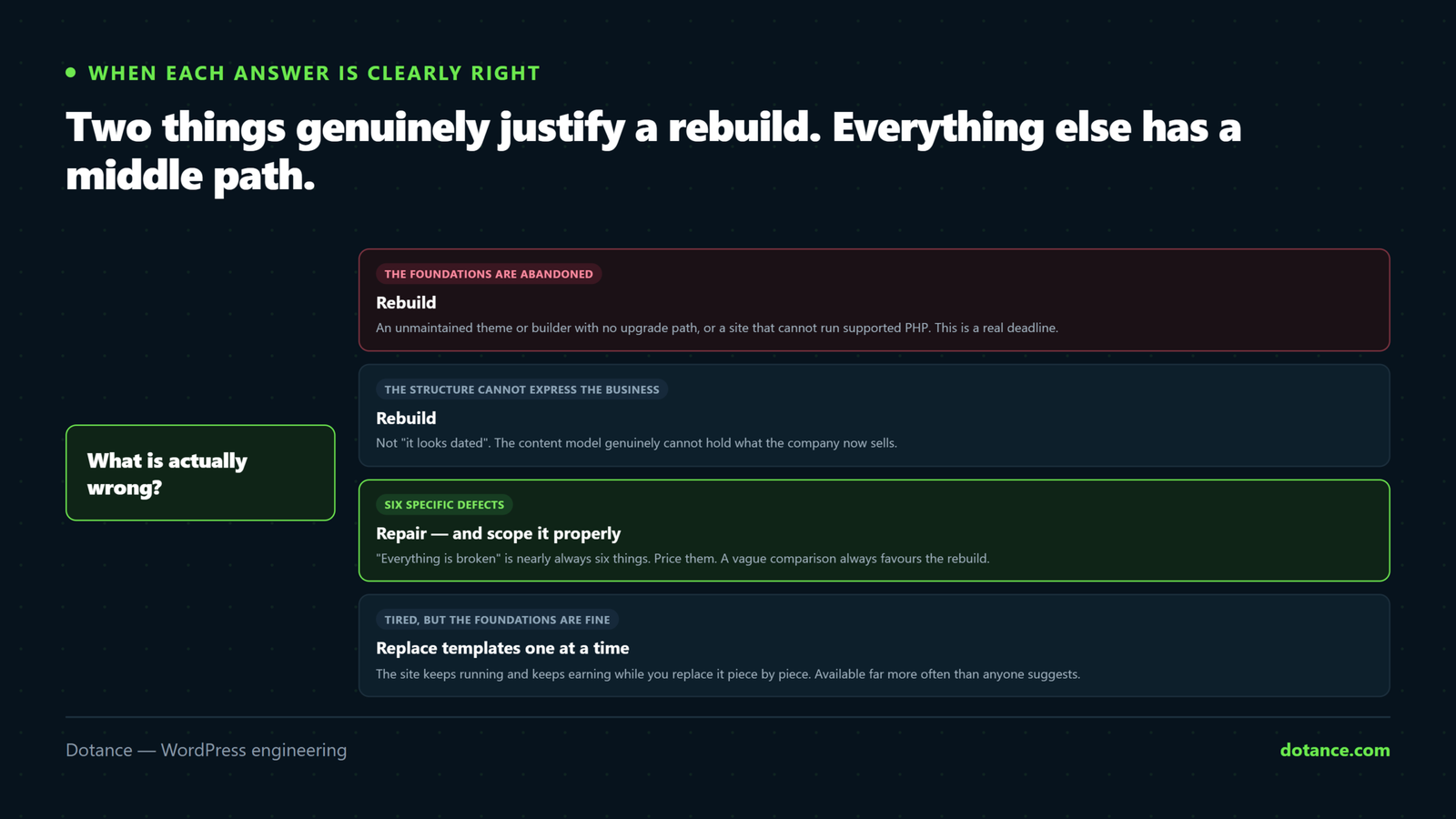
| Rebuild | Repair |
|---|---|
| Theme or builder abandoned, no upgrade path | Foundations maintained |
| Cannot run supported PHP | Runs current PHP fine |
| Structure cannot express the business any more | Structure is fine, presentation is dated |
| Compromised, and you cannot verify what was touched | Clean, with backups |
| Changing platform deliberately | Staying on WordPress |
| The site earns nothing and never has | It earns, steadily |
The third row is the only genuinely strategic reason to rebuild a WordPress site on the list. A site built for a five-page consultancy that now sells twelve products in four countries has outgrown its structure, and no amount of repair reshapes it. That is a good reason to rebuild a WordPress site, and it is a different reason from anything technical.
The fourth row is non-negotiable. If a site was compromised and you cannot establish what was modified, rebuilding from clean sources is the only defensible answer — the reasoning is in the signs a WordPress site is hacked.
You can rebuild a WordPress site one template at a time
The choice to rebuild a WordPress site is presented as a binary. They are not. You can replace a site one piece at a time while it keeps running.
- Build the new templates in a child theme or block theme, alongside the existing ones.
- Switch one template type — say, the blog — and leave everything else untouched.
- Watch it for a fortnight. Rankings, conversions, complaints.
- Move the next template. Landing pages, then services, then the home page.
- Retire the old theme when nothing references it.
Choosing to rebuild a WordPress site gradually has substantial advantages: no gap period, no big-bang launch, URLs preserved throughout, and every step reversible. The disadvantage is that it takes longer in calendar time and is harder to sell as a project, which is the real reason it is rarely proposed.
It also works well with the way most sites are actually built, since page builders and block themes can coexist on one install. If you are doing this, rehearse each step on a staging copy first and move one template at a time.
Putting numbers on it
The decision to rebuild a WordPress site becomes much easier once both options carry a figure. Vague comparisons always favour the rebuild, because the repair has no number attached and the rebuild has a polished proposal.
| Repair | Rebuild | Middle path | |
|---|---|---|---|
| Typical spend | Days | Weeks to months | Days, repeatedly |
| Time before benefit | Immediate | End of project | Per template |
| Ranking risk | Near zero | Real, manageable | Low |
| Retraining | None | Whole team | Gradual |
| Reversibility | Total | Effectively none | Per step |
| Fixes abandoned foundations | No | Yes | Yes, eventually |
Read the bottom row against the rest before you agree to rebuild a WordPress site. The rebuild column wins exactly one line, and that line is the only thing repair genuinely cannot address. If your situation does not include abandoned foundations, the table is telling you something clear.
One more figure is worth estimating: what a bad month costs. If the site produces thirty enquiries a month and a rebuild carries even a modest chance of a poor quarter, that expected loss belongs next to the quote. Most proposals to rebuild a WordPress site are presented as a cost against a benefit, with the risk left out entirely.
What ageing looks like before you rebuild a WordPress site
Sites that need rebuilding do not fail suddenly. They decay along a few predictable lines, and knowing which line you are on tells you how urgent this is.
| Stage | Symptoms | Right response |
|---|---|---|
| Cosmetic ageing | Looks dated, works fine | Redesign on existing foundations |
| Editorial friction | Staff need help to change things | Templates and training |
| Accumulated cruft | Plugin sprawl, slow admin | An audit and a clear-out |
| Dependency decay | A key plugin or theme is abandoned | Replace that component |
| Structural mismatch | The site cannot express the business | Rebuild, deliberately |
| Unsupportable | Cannot update core or PHP at all | Rebuild, urgently |
Most sites people want to rebuild are in the first three rows, where a rebuild is an expensive way to buy something cheaper alternatives deliver. The third row in particular masquerades as terminal decline and is usually a morning’s work with the methods in auditing plugin bloat.
Only the last two rows make rebuilding the obvious answer. The useful discipline is to identify your row honestly before anybody writes a proposal, because a proposal written for row six will be quoted at row six prices regardless of where you actually are.
Where this goes wrong
| The mistake | What happens | Do this instead |
|---|---|---|
| Deciding in a bad week | A large project bought on frustration | Write the defect list, wait a week |
| Not scoping the repair option | Comparing a quote against a feeling | Price both, honestly |
| Changing every URL | Avoidable ranking loss | Keep the URLs, or map every redirect |
| No maintenance plan afterwards | The same decay, three years on | Agree ownership before building |
| Rebuilding to fix speed | The new site is slow too | Find the actual cause first |
| Losing undocumented behaviour | Weeks of small bug reports | Document the old site before replacing it |
| Calling a redesign a rebuild | Paying rebuild prices for a redesign | Name what you are buying |
The fifth row is worth dwelling on, because speed is the most common stated reason to rebuild a WordPress site and one of the worst. Slowness is caused by specific, findable things — images, queries, plugin weight, hosting — and a new build inherits all of them unless somebody identified them first. The diagnosis is in why WordPress sites get slow, and it costs an afternoon rather than a quarter.
Deciding in an afternoon
Six steps settle whether to rebuild a WordPress site or repair the one you have.
- Write the defect list. One line per complaint, from everyone.
- Check the foundations. Theme, builder, plugins, PHP — maintained or not.
- Estimate the repair line by line. Most lines are hours.
- Ask what the site earns and what a bad month would cost.
- Separate the redesign from the rebuild and price it alone.
- Decide who maintains it either way, before committing.
You rebuild a WordPress site on the evidence of step two, not step one. If steps one to three produce a short list of tractable fixes on maintained foundations, repair. If step two produces abandoned foundations, plan a rebuild properly. If they conflict, the middle path exists — and knowing what you own is the prerequisite for all of it, which is why a proper handover document makes this decision so much easier when it arrives.
Frequently asked questions
How long does it take to rebuild a WordPress site?
The time to rebuild a WordPress site runs from two to four weeks for a small brochure site, and two to four months for a content-heavy site with integrations. The variable is rarely the design — it is content migration, integrations and testing, which is also where the estimate slips.
Is it risky to rebuild a WordPress site that ranks well?
It can. How much depends almost entirely on whether URLs change. Keep them identical and the risk is modest. Change them all without a complete redirect map and the risk is serious and sometimes permanent.
Can I keep my content?
Yes — posts, pages and media transfer between themes without difficulty. What does not transfer cleanly is anything stored in page-builder data or a theme’s custom fields, which is where migration time actually goes.
Is it cheaper to rebuild than to keep repairing?
Sometimes. The way to know whether to rebuild a WordPress site or keep repairing it is to price both rather than assume. Repairs on maintained foundations are usually cheap. Repairs on abandoned foundations get more expensive each year, and that is the curve that eventually justifies replacement.
What if the site was built by somebody I no longer work with?
That is a documentation problem before it is a reason to rebuild a WordPress site. An access and code audit costs a day and often shows the site is in better shape than its reputation — inheriting something undocumented feels worse than it usually is.
Should I change platform while I am at it?
Only if WordPress is genuinely the constraint, which is rarer than vendors suggest. Doing both at once means you cannot tell which change caused which outcome, and it doubles the training cost.
Our site is fine but looks old. Rebuild?
No — you do not need to rebuild a WordPress site for that. It is a redesign, and on healthy foundations it is a fraction of the cost. New typography, spacing, colour and imagery on the existing structure transforms how a site feels without touching what already works. That is the usual right answer to the question we are asked most.