WordPress not showing on Google is one of the most alarming things a business owner can discover, and one of the most commonly misdiagnosed. Most of the advice online jumps straight to “submit your sitemap”, which fixes almost none of the actual causes. This article works through it in the order that finds the problem fastest.
WordPress not showing on Google: sixty-second triage
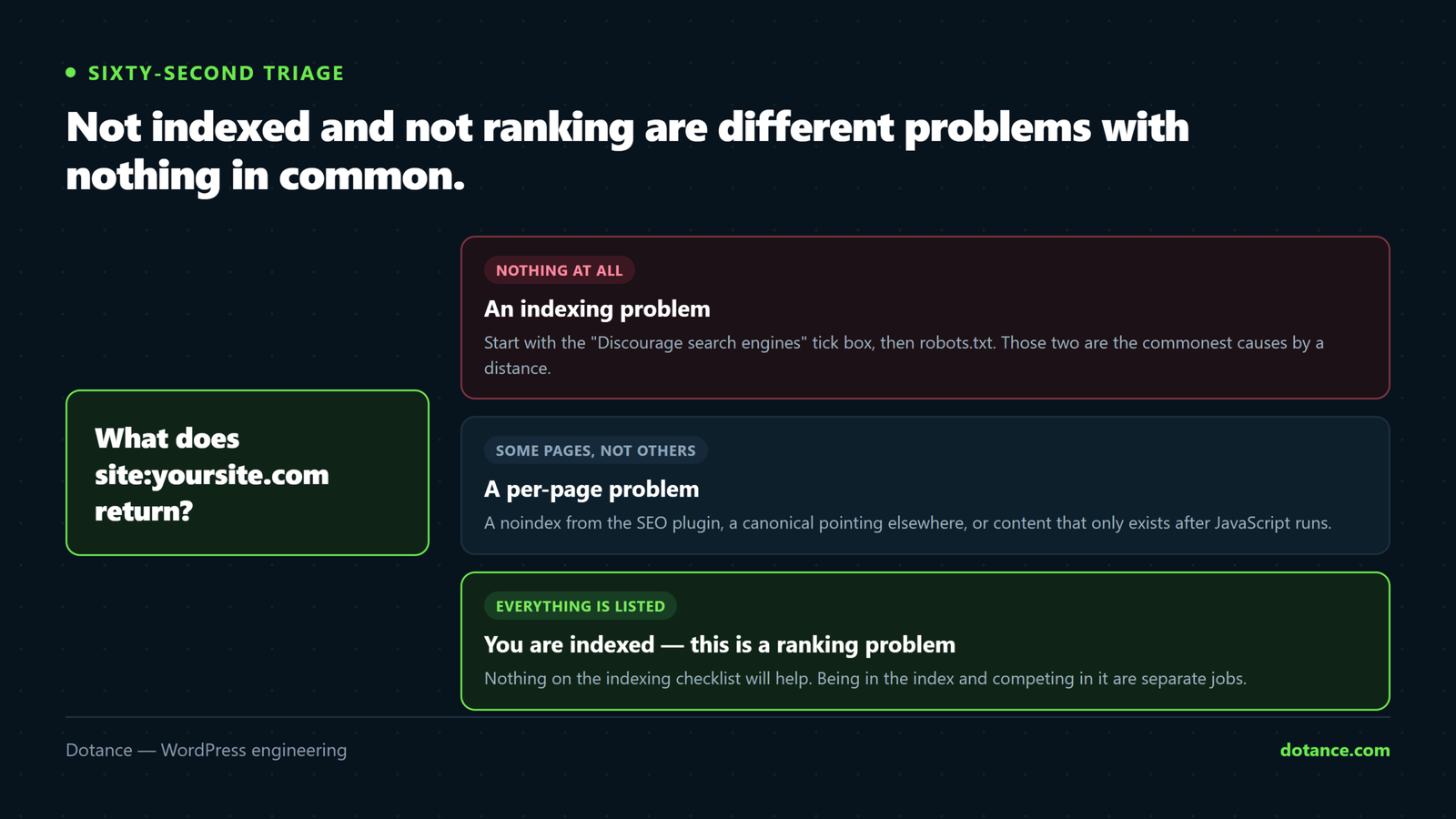
Before anything else, establish which kind of WordPress not showing on Google problem you have. Search Google for:
site:yoursite.com| Result | What it means | Go to |
|---|---|---|
| No results at all | Nothing is indexed | Causes 1–7 below |
| Some pages, not the ones you want | Partial indexing | Causes 4–8 |
| All your pages appear | You are indexed. This is a ranking problem. | The last section |
This distinction matters more than anything else here. If your pages appear in a site: search, then WordPress not showing on Google for your chosen keywords is a competition and content problem, not a technical one — no amount of technical fixing will change it.
1. The “Discourage search engines” tick box
This is the single most common cause of WordPress not showing on Google, and it takes five seconds to check. WordPress has a setting that adds a site-wide noindex, meant for sites under construction. It gets left on constantly.
Settings → Reading → Search engine visibility. Or from the command line:
# 1 = visible to search engines, 0 = discouraged
wp option get blog_public
If it returns 0, that is your answer:
wp option update blog_public 1This is the number one reason a new WordPress site is not showing on Google. The box gets ticked during the build and never unticked at launch. Add it to your launch checklist — it costs nothing and it has cost businesses months.
2. robots.txt is blocking the crawler
Second most common cause of WordPress not showing on Google. Check what you are actually serving:
curl -s https://yoursite.com/robots.txtThe line that stops everything:
User-agent: *
Disallow: /
That says “crawl nothing”. It is often left behind from a staging environment, or written by a security plugin. What you want on a normal site is close to nothing at all — WordPress’s default is fine, plus a sitemap line.
One important subtlety: robots.txt controls crawling, not indexing. A blocked URL can still appear in results as a bare link with no description, because Google knows it exists but has never been allowed to read it. If you want a page kept out of the index, use a noindex meta tag and let it be crawled — a blocked page can never be read, so its noindex can never be seen either.
3. A noindex meta tag on the pages
Separate from the sitewide setting, individual pages can carry noindex from your SEO plugin, your theme, or a per-post setting somebody toggled.
# What the page actually tells Google
curl -s https://yoursite.com/your-page/ | grep -i '<meta name="robots"'
Anything containing noindex is the problem. Check three places, in this order:
- The post or page’s own SEO settings — most plugins expose a per-entry toggle.
- The plugin’s sitewide defaults, per post type. Whole content types get noindexed by accident here.
- The theme, if it prints its own robots meta. Rare, but it happens with older themes.
Find every noindexed entry at once:
wp eval '
foreach ( get_posts( array( "post_type" => array( "post", "page" ), "numberposts" => -1 ) ) as $p ) {
    $r = get_post_meta( $p->ID, "rank_math_robots", true );
    if ( is_array( $r ) && in_array( "noindex", $r, true ) ) {
        echo get_permalink( $p->ID ) . "\n";
    }
}'
4. Canonical tags pointing somewhere else
A third quiet cause of WordPress not showing on Google. A canonical tag tells Google “the real version of this page is over there”. Point it at the wrong URL and you are asking Google not to index the page you are looking at.
curl -s https://yoursite.com/your-page/ | grep -i 'rel="canonical"'It should point at that same page. The failure modes we see: every page canonicalised to the homepage after a bad plugin setting, canonicals left pointing at a staging domain after launch, and http versus https mismatches.
5. The site is simply too new
If the site launched in the last few weeks, WordPress not showing on Google may be nothing but time. Google has to discover it, crawl it, and decide it is worth indexing. That is days to weeks for a new domain with few links, not hours.
What genuinely speeds it up:
- Verify the site in Google Search Console and submit the sitemap.
- Use URL Inspection → Request indexing for your most important handful of pages. Not every page; it is a queue, not a switch.
- Get a few real links from sites that already get crawled — a directory listing, a supplier page, your own social profiles.
- Make sure pages link to each other. An orphan page with no internal links is genuinely hard to discover.
6. The sitemap is missing, wrong, or not submitted
A missing sitemap rarely causes WordPress not showing on Google on its own. A sitemap does not make Google index you. It helps Google find URLs it might otherwise miss, which matters most on larger sites.
# Should return XML, not a 404 or an HTML page
curl -s -o /dev/null -w "%{http_code} %{content_type}\n" https://yoursite.com/sitemap_index.xml
Common problems: the sitemap 404s because the SEO plugin was never configured, it lists staging URLs, or it lists pages that are noindexed — which sends contradictory signals about the same URL.
7. Googlebot is being blocked before it reaches WordPress
This one hides well, because the site looks perfect in your browser. A firewall, security plugin, or aggressive bot protection at the CDN can serve Googlebot something different from what it serves you.
# What a crawler actually gets
curl -s -o /dev/null -w "%{http_code}\n" \
  -A "Mozilla/5.0 (compatible; Googlebot/2.1; +http://www.google.com/bot.html)" \
  https://yoursite.com/
Anything other than 200 — a 403, a challenge page, a redirect loop — means the crawler is being turned away. Check your security plugin’s rate limiting, your CDN’s bot rules, and any country-level blocking. Verify the fix in Search Console’s URL Inspection, which fetches as the real Googlebot.
8. A manual action or security problem
A rarer cause of WordPress not showing on Google, but worth ruling out early because the fix is different from everything else here. In Search Console:
- Security Issues — a hacked site can be removed from results entirely. If that is you, start with cleaning the site, then requesting a review.
- Manual actions — a human reviewer penalising spam tactics, usually bought links or thin content. The report names the reason.
9. Indexed, but the wrong page is showing
Sometimes it is not WordPress not showing on Google at all — the site is indexed and a different page ranks for the term you wanted. That is usually duplicate or near-duplicate content competing with itself — several thin pages about the same topic, where the strongest single page should exist instead. The method for finding and merging them is in fixing duplicate content.
10. The content is only there after JavaScript runs
A modern cause of WordPress not showing on Google. Google does render JavaScript, but rendering happens in a second pass and it is not guaranteed to be complete or prompt. If your key content only exists after a script runs — a JS-driven listing, a client-side router, a product grid that fetches on load — you are relying on that second pass.
See what a crawler gets in the first pass:
# Raw HTML, no JavaScript executed
curl -s https://yoursite.com/your-page/ | wc -c

# Is your actual heading in it?
curl -s https://yoursite.com/your-page/ | grep -i "your real headline text"
If the heading is missing from the raw HTML, that is worth fixing regardless of whether it is the cause today. Standard WordPress renders server-side, so this usually only bites where a page builder or a headless front end has been added.
11. The page is behind something
Obvious once said, and it catches people: WordPress not showing on Google because the pages are not publicly reachable.
- Password protection — WordPress’s own per-post password, or an HTTP auth prompt left on from the build.
- A “coming soon” or maintenance mode plugin, still active for logged-out visitors.
- Membership plugins gating content that was meant to be a public teaser.
- Geo-blocking that excludes wherever Googlebot happens to crawl from.
Test the way a stranger would: open the page in a private window while logged out. Anything other than the full page is what Google sees too.
How indexing actually works
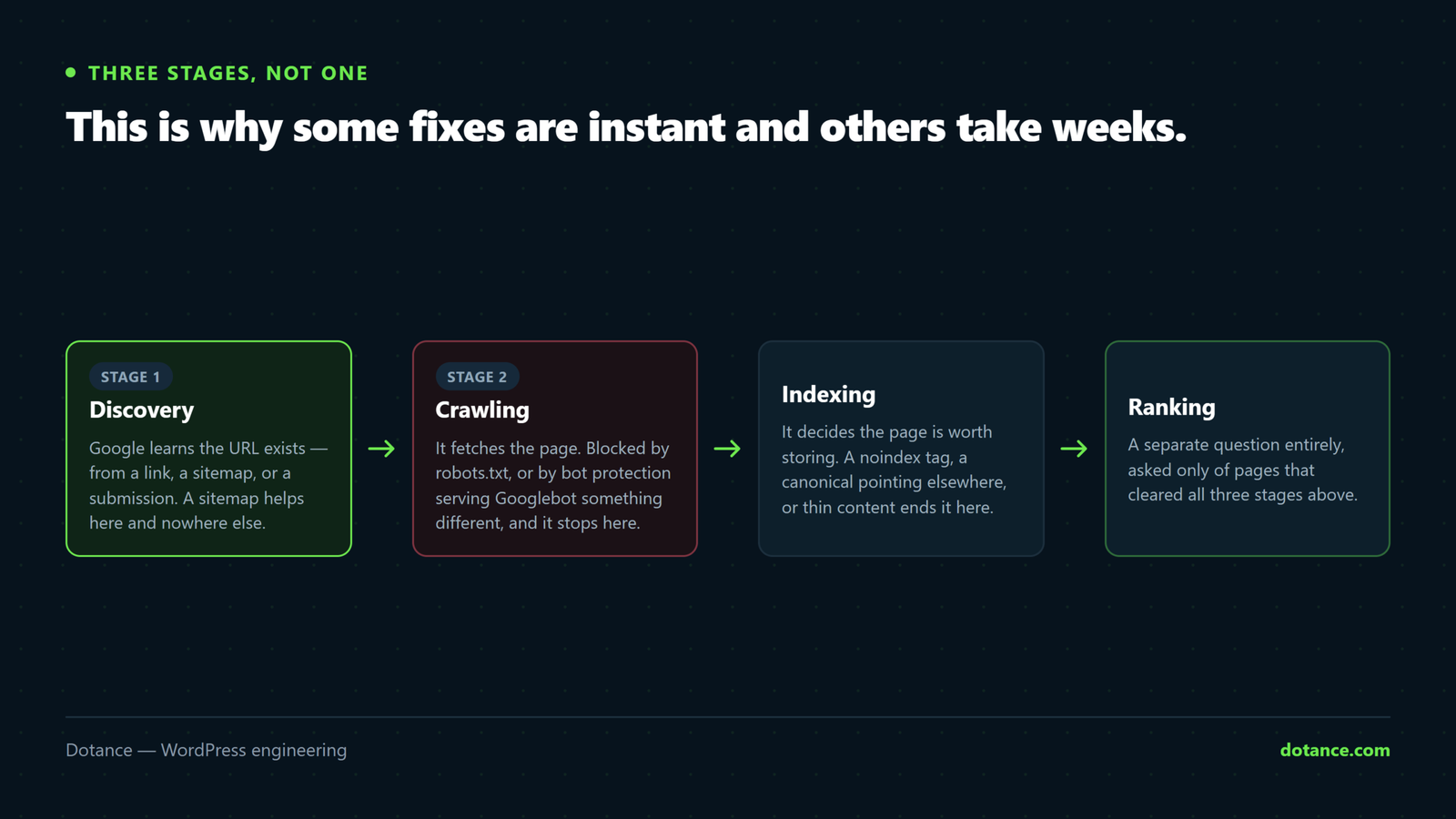
Understanding the sequence explains why some WordPress not showing on Google fixes are instant and others take weeks. There are three separate stages, and a WordPress not showing on Google has failed at one of them:
| Stage | What happens | Blocked by |
|---|---|---|
| Discovery | Google learns the URL exists | No links, no sitemap, orphan pages |
| Crawling | It fetches the page | robots.txt, firewall, server errors |
| Indexing | It decides to store it | noindex, canonical, thin content |
The practical consequence: fixing a noindex does not put you in results immediately, because Google has to come back and re-crawl before it can notice. Request indexing on your key pages to shorten that, then be patient with the rest.
Diagnosing one page, end to end
When one page will not index while the rest are fine, run every WordPress not showing on Google check against that URL in one pass rather than guessing:
URL="https://yoursite.com/your-page/"

# Does it even return 200 to a normal visitor?
curl -s -o /dev/null -w "status: %{http_code}\n" "$URL"

# And to Googlebot?
curl -s -o /dev/null -w "googlebot: %{http_code}\n" \
  -A "Mozilla/5.0 (compatible; Googlebot/2.1; +http://www.google.com/bot.html)" "$URL"

# What does it say about itself?
curl -s "$URL" | grep -iE '<meta name="robots"|rel="canonical"'

# Is it in the sitemap?
curl -s https://yoursite.com/post-sitemap.xml | grep -c "your-page"
Four commands, and between them they eliminate most of this article. Anything that comes back wrong is your cause; if everything comes back right, the answer is in Search Console’s URL Inspection, not in the markup.
Reading Search Console properly
Search Console will name the reason for WordPress not showing on Google if you let it. URL Inspection tells you directly. Paste the URL, read the coverage status, and match it here:
| Status | Means | Do |
|---|---|---|
| Excluded by “noindex” tag | The page says don’t index me | Cause 3 |
| Blocked by robots.txt | Never crawled | Cause 2 |
| Discovered — currently not indexed | Google knows, has not prioritised it | Improve internal links and content depth |
| Crawled — currently not indexed | Read it, judged it not worth indexing | A content quality signal, not a bug |
| Alternate page with canonical | Pointed elsewhere | Cause 4 |
| Duplicate, Google chose a different canonical | Another page looks like the better version | Cause 9 |
| Page with redirect | The URL redirects, so it is not the indexed one | Expected — check the target instead |
“Crawled — currently not indexed” is the one people misread. It is not an error and there is no switch to flip. Google read the page and decided it did not add enough. The fix is the content and the internal links pointing at it, not the technical setup.
WordPress not showing on Google: work it in this order
site:yoursite.com— indexing problem or ranking problem?wp option get blog_public— the five-second check.robots.txt— anything disallowing everything?- The robots meta tag on an affected page.
- The canonical on that same page.
- Fetch as Googlebot — is the crawler getting a 200?
- Search Console: URL Inspection, then Security Issues and Manual Actions.
- Only then: sitemap, internal links, content.
Most cases of WordPress not showing on Google end at step 2 or 3. Working in this order stops you rewriting content to fix a tick box. The broader groundwork is in the technical SEO checklist.
What to do while you wait
Once the cause of WordPress not showing on Google is fixed, indexing runs on Google’s timetable rather than yours. Useful things to do in the meantime, roughly in order of how much they help:
- Link the page from somewhere strong. Your homepage, your main navigation, or a related article. Internal links are the clearest discovery signal you control.
- Remove the orphans. Any page reachable only from the sitemap is a page Google has little reason to prioritise.
- Request indexing for your most important handful of URLs, not the whole site.
- Get one real external link. A supplier listing, a directory, a partner page. It does more for discovery than anything on your own site.
- Check back weekly, not hourly. Re-requesting the same URL daily changes nothing.
Stopping it happening again
Nearly every case of a WordPress not showing on Google traces back to a launch step nobody owned. Four things on the launch checklist prevent almost all of it:
| Check | When |
|---|---|
blog_public is 1 | Launch day, before anything else |
robots.txt has no site-wide Disallow: / | Launch day |
| Canonicals point at the live domain, not staging | Launch day |
| Search Console verified, sitemap submitted | Launch week |
| Coverage report reviewed | Monthly thereafter |
That last row is the one that turns a three-month disaster into a one-week annoyance — somebody looking at the report often enough to notice a drop. It is a standing item in our maintenance checks for exactly this reason.
If you are indexed but not ranking
This is a different problem from WordPress not showing on Google at all, and worth naming plainly because the fixes above will do nothing for it. Being in the index means you are eligible to rank, not that you will.
None of the WordPress not showing on Google fixes above apply here. What actually moves it: content that answers the query better than what currently ranks, internal links from your stronger pages, genuine external links, and pages that load properly on a phone. Nothing on this page’s technical list will help — see how content gets picked up for where that work starts.
Common questions
How long until a new WordPress site shows on Google?
WordPress not showing on Google in the first days after launch is normal. Typically days to a few weeks for the first pages, longer for the whole site. If nothing at all is indexed after a month, it is a technical cause from this list rather than patience.
Why is my homepage indexed but nothing else?
This version of WordPress not showing on Google is usually internal linking. Google found the homepage from an external link and has nothing pointing to the rest. Check the navigation, add contextual links, and confirm the sitemap lists the missing pages.
Will submitting the sitemap fix it?
Rarely on its own. If WordPress is not showing on Google, a sitemap helps discovery; it cannot override a noindex, a robots.txt block or a bad canonical. Fix the cause first, then submit.
My site was indexed and disappeared. What changed?
Something did. A site that was fine and is now WordPress not showing on Google has had a launch, a plugin update, a migration or a security incident. Check blog_public, robots.txt and the robots meta first, then Search Console’s Security Issues. Sudden disappearance is nearly always a switch, not a slow decline.
Does Google index a site with no content?
It can, and often decides not to — thin content is a genuine cause of WordPress not showing on Google. “Crawled — currently not indexed” across a thin site is Google saying the pages are not worth storing yet.