What actually goes wrong
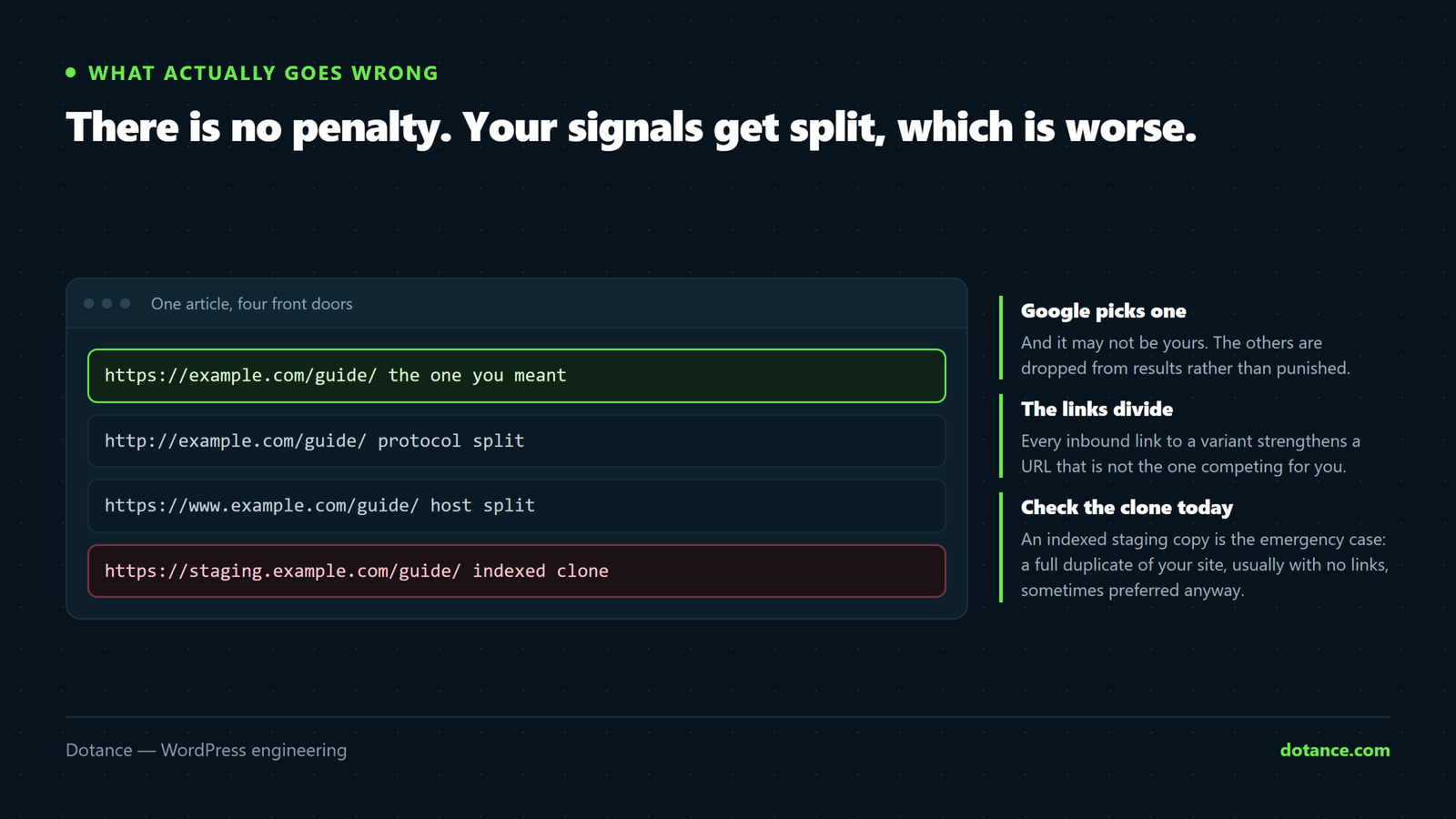
Google does not penalise a site for having the same content at two URLs. What it does is pick one and ignore the other — and it may not pick the one you wanted.
The real costs:
- Split signals. Links to five versions of a page build five weak pages instead of one strong one.
- The wrong URL ranks. A tag archive outranks the article it summarises.
- Wasted crawling. Google spends its visit on near-identical copies.
Check this first: is your staging site indexed?
This is the version that does real damage, because a full copy of your site competes with you for your own brand — and it usually has no links, so Google may prefer it as the “original”.
# In Google, search each of these:
site:staging.yoursite.com
site:dev.yoursite.com
site:yoursite.com -inurl:www
If anything appears, fix it today:
- Password-protect it — HTTP auth is the only reliable block. A robots.txt disallow does not remove what is already indexed.
- Set it to noindex —
wp option update blog_public 0on the staging install. - Request removal in Search Console for the staging property, if you have one.
robots.txt and noindex do not do the same job. Blocking a URL in robots.txt stops Google crawling it — which means it never sees the noindex tag, so an already-indexed page stays indexed. To remove something: allow crawling, serve noindex, wait for the recrawl. Then block it if you like.
Where WordPress duplicates come from
| Source | Example | Fix |
|---|---|---|
| Protocol / host split | http://, www., bare domain | 301 to one canonical form |
| Trailing slash | /page and /page/ | 301 — WordPress usually handles it |
| Tag and date archives | One post on five archive pages | noindex the thin ones |
| Tracking parameters | ?utm_source=… | Self-canonical on the clean URL |
| Comment replies | ?replytocom=123 | Canonical, or disable threaded replies |
| Attachment pages | /photo-name/ holding one image | Redirect to the parent post |
| Faceted navigation | ?filter_colour=red&orderby=price | Canonical to the base category |
| Staging copies | staging.yoursite.com | Auth + noindex — see above |
Three tools, three jobs
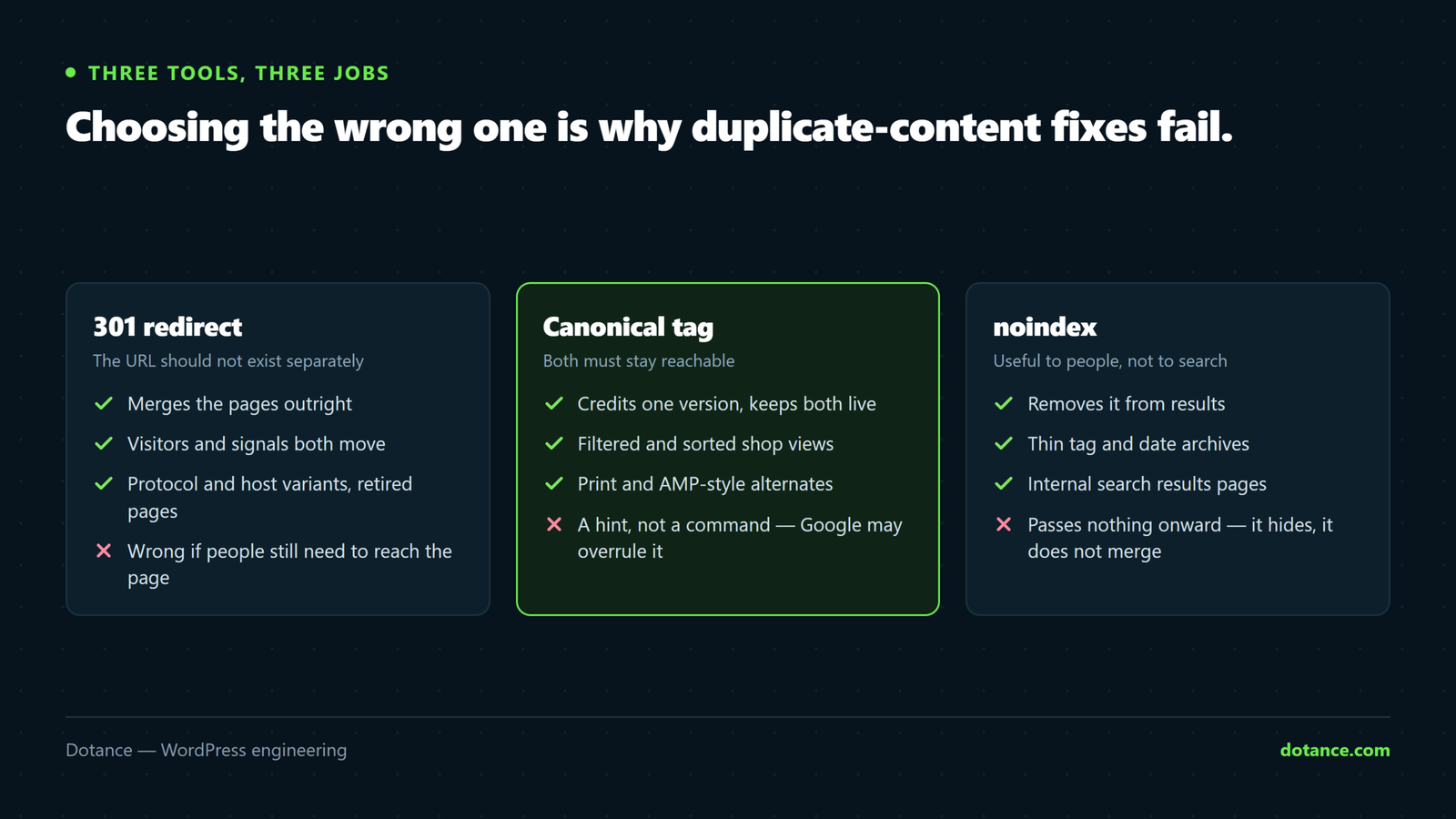
Choosing wrongly here is why duplicate-content fixes so often fail.
| Use | When | Effect |
|---|---|---|
| 301 redirect | The URL should not exist separately at all | Merges the pages. Visitors and signals both move. |
| Canonical tag | Variants must keep working for people | Both stay reachable; one gets the credit. |
| noindex | Useful to visitors, worthless in search | Stays reachable, leaves the index. |
The common error is a canonical where a redirect belonged. A canonical is a hint — Google can ignore it, and does when internal links contradict it. If a URL has no reason to exist, redirect it.
Find your real duplicates
Search Console → Pages is the authoritative list, because it is Google’s own view:
- Duplicate without user-selected canonical — you never said which wins.
- Duplicate, Google chose different canonical — you said, and it disagreed. Check your internal links: they are probably pointing at the version Google picked.
- Alternate page with proper canonical tag — working as intended. No action.
To check a specific page:
# Does a parameterised URL canonical back to the clean one?
curl -s "https://yoursite.com/page/?utm_source=test" \
  | grep -oE '<link rel="canonical"[^>]*'
It should name the clean URL, not the one with the parameter.
The WooCommerce case
Layered navigation generates a combinatorial explosion — colour × size × sort order, each a URL serving a subset of the same category.
- Canonical every filtered view to the base category.
- Keep faceted URLs out of the sitemap.
- Product variations rarely need separate indexable URLs. One strong product page beats twelve near-identical ones.
- Watch
?orderby=— sort orders are the same products in a different sequence, and they multiply fast.
Pagination, honestly
Paginated archives are not duplicates — each page has different posts. Treat them normally:
- Self-canonical each page to itself. Do not canonical page 2 to page 1 — that tells Google to ignore page 2’s content entirely.
rel="next"andrel="prev"do nothing. Google stopped using them for indexing years ago. Keeping them is harmless; adding them is not a fix.- Do not noindex page 2+ unless the archive is genuinely worthless — it can strand the posts only linked from there.
Keep it from coming back
- One canonical host and scheme, enforced by a single 301 hop.
- Staging always password-protected and noindexed — check after every refresh from live.
- Thin archives noindexed once, deliberately.
- A quarterly look at the Indexing report.
Common questions
Will I be penalised for duplicate content?
Not for the ordinary kind. Penalties are for scraped or auto-generated content published deliberately. Your archives and parameters are a signal-splitting problem, not a penalty risk.
Google ignored my canonical tag.
It is a hint, not a directive — and internal links, sitemap entries and redirects all vote too. If your links point at the version Google chose, it is following your behaviour rather than your tag.
Same product on my site and Amazon — is that duplicate content?
Across domains, yes, and marketplaces usually outrank you. The answer is unique descriptions on your own site, not a technical fix.
Should I noindex my category pages?
Only if they are bare lists. A category with a real description and depth is often a strong landing page — better improved than hidden.