The first thing every new Elementor user discovers is that they cannot edit the header, and the second is that the fix is a Pro feature. The logo, the menu, the top bar — that is the theme’s, and free Elementor stops at the edge of the content area.
An Elementor header footer builder is the plugin category that fixes this: it lets you design a header and a footer as Elementor templates and then puts them where the theme’s used to be, on every page or on the pages you choose. Elementor’s own version is part of Pro.
This is a comparison of five free choices, with the one question that decides between them and the three things to test before you trust any of them.
How an Elementor header footer builder actually works
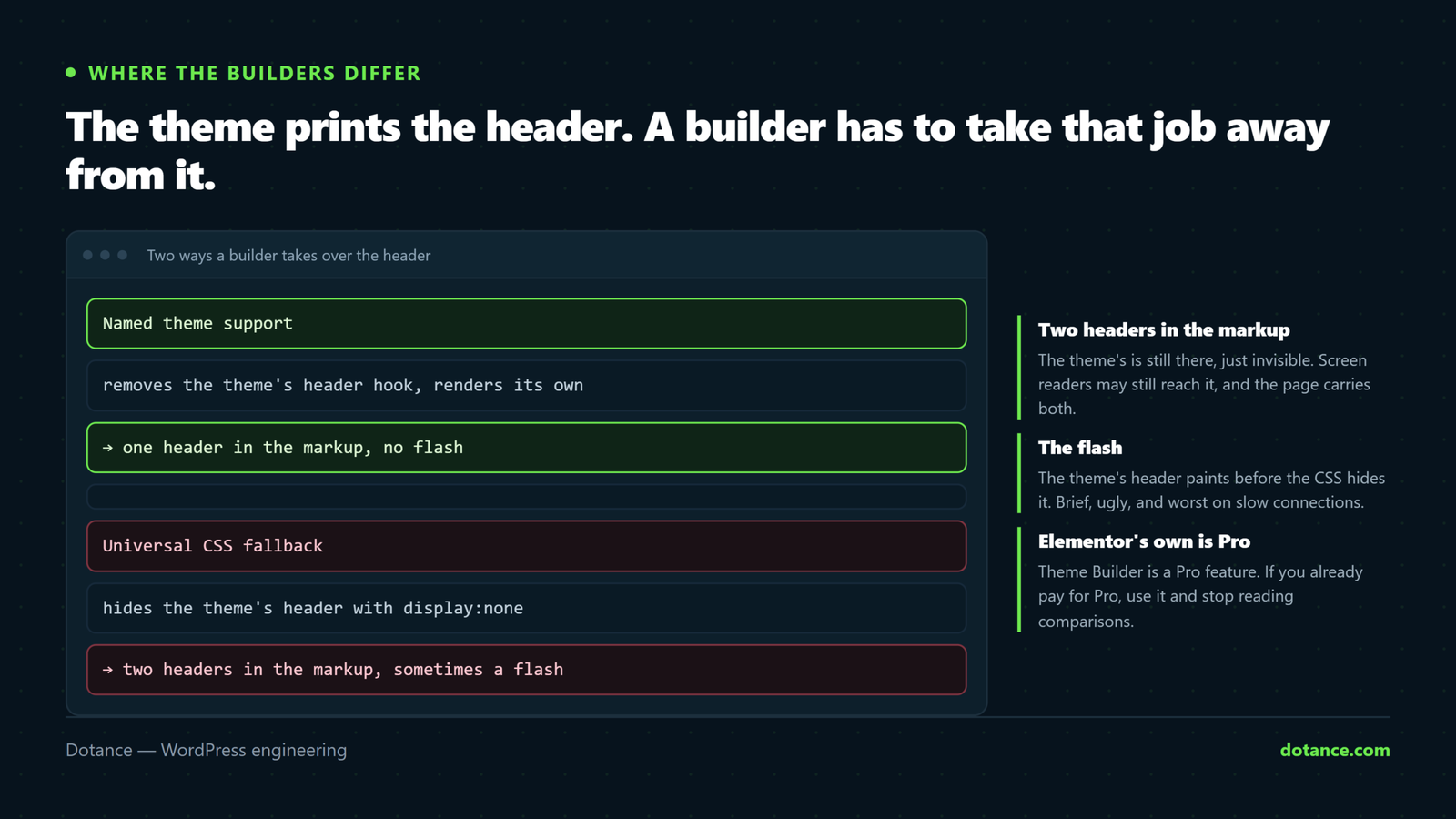
Understanding the mechanism is what makes an Elementor header footer builder comparison meaningful, because it is where the builders differ. A theme prints its header from a template file, usually through get_header(), and its footer through get_footer(). An Elementor header footer builder has to do two things: render your template in those positions, and stop the theme rendering its own. There are three ways to do the second part:
| Method | How | Result |
|---|---|---|
| Theme hooks | The theme offers astra_header-style hooks; the builder removes the theme’s header action and adds its own | Clean: the theme’s header never renders |
| Template override | The builder supplies its own header.php via a filter for themes that support it | Clean, when the theme cooperates |
| CSS hide | The theme’s header still renders; the builder hides it and injects its template after body | Works, with a flash of the old header, wasted markup, and occasional layout gaps |
Every Elementor header footer builder uses the first two methods for the themes it knows and falls back to the third for the rest. That is why “supported themes” is the most important line on any of their pages, and why a builder that names your theme is worth more than one with a longer widget list.
Five free choices, compared
| Plugin | Free? | Named theme support | Fallback | Display rules | Also in the box |
|---|---|---|---|---|---|
| Elemance | Yes, fully | Hello Elementor, Astra, GeneratePress, OceanWP, Neve, Storefront | Universal CSS fallback | Site-wide, or chosen pages | Popup builder, 14 widgets, 41 templates |
| Ultimate Addons for Elementor (the former Elementor Header & Footer Builder) | Free core; paid Pro | Astra, GeneratePress, OceanWP, Hello and others | “Elementor Canvas” and a CSS method | Yes, with conditions | Widget pack; more in Pro |
| ElementsKit Lite | Free core; paid Pro | Several popular themes | CSS | Yes | Large widget pack |
| Theme-native builders (Astra Pro, Kadence, Blocksy) | Paid or block-based, not Elementor | Their own theme only | n/a | Yes | The theme itself |
| Elementor Pro Theme Builder | Paid | Any theme, through Elementor’s own theme.json-style locations | Any theme that declares support; most do | The most complete | Everything in Pro |
Elemance
Elemance is ours. Its header and footer builder works on free Elementor, names six themes for the clean swap — Hello Elementor, Astra, GeneratePress, OceanWP, Neve and Storefront — and falls back to the universal method elsewhere. Headers and footers are ordinary Elementor documents, so every container, responsive and global-style control applies. You choose where each one shows. The same plugin holds a popup builder and fourteen widgets, which is the argument for it: a free-Elementor site that wanted headers, popups and a few extra widgets used to install three plugins, and this is one.
Where Pro still wins: Elementor Pro’s Theme Builder also does single-post, archive, 404 and search templates, and its display conditions are more granular. If you need a custom blog-post template as well as a header, Pro is the complete answer and Elemance is the header-and-footer answer.
Ultimate Addons for Elementor
UAE absorbed the plugin that was, for years, simply called Elementor Header & Footer Builder — the original free Elementor header footer builder — the one most tutorials still screenshot. The header/footer part remains free and solid, with named support for the Brainstorm Force family (Astra first) and the other big themes, and a well-understood fallback. The free core is a good Elementor header footer builder on its own; the widget pack around it is where the Pro upsell lives, and the plugin has grown considerably in weight since its single-purpose days. If you use Astra, it is the safe pick; if you want it light, it no longer is.
ElementsKit Lite
A large addon pack whose Elementor header footer builder module is one feature among many. The builder works and the theme support is reasonable; the trade is that you carry the whole pack’s scripts and styles for the sake of the header. Fine if you want the widgets too; a heavy way to get an Elementor header footer builder if you do not.
Theme-native builders
Astra Pro, Kadence and Blocksy each have their own header/footer builder, tightly integrated and very good — but they are not Elementor. You design the header in the Customizer or with blocks, and the Elementor pages sit between them. For many sites that is the right split: a fast, cached, theme-level header, and Elementor for the content. It stops being right when the design needs the header to be an Elementor thing — a mega-menu built from widgets, a header that changes per landing page — which is what an Elementor header footer builder is for.
Elementor Pro Theme Builder
The reference Elementor header footer builder. Any theme that declares Elementor location support gets clean header and footer replacement, plus every other template type, plus the best display conditions. The price is the Pro licence. If you already have Pro for its forms or its popups, use its Theme Builder and ignore this comparison; if the header is the only Pro feature you need, a free builder saves the licence.
Three things to test before you trust any of them
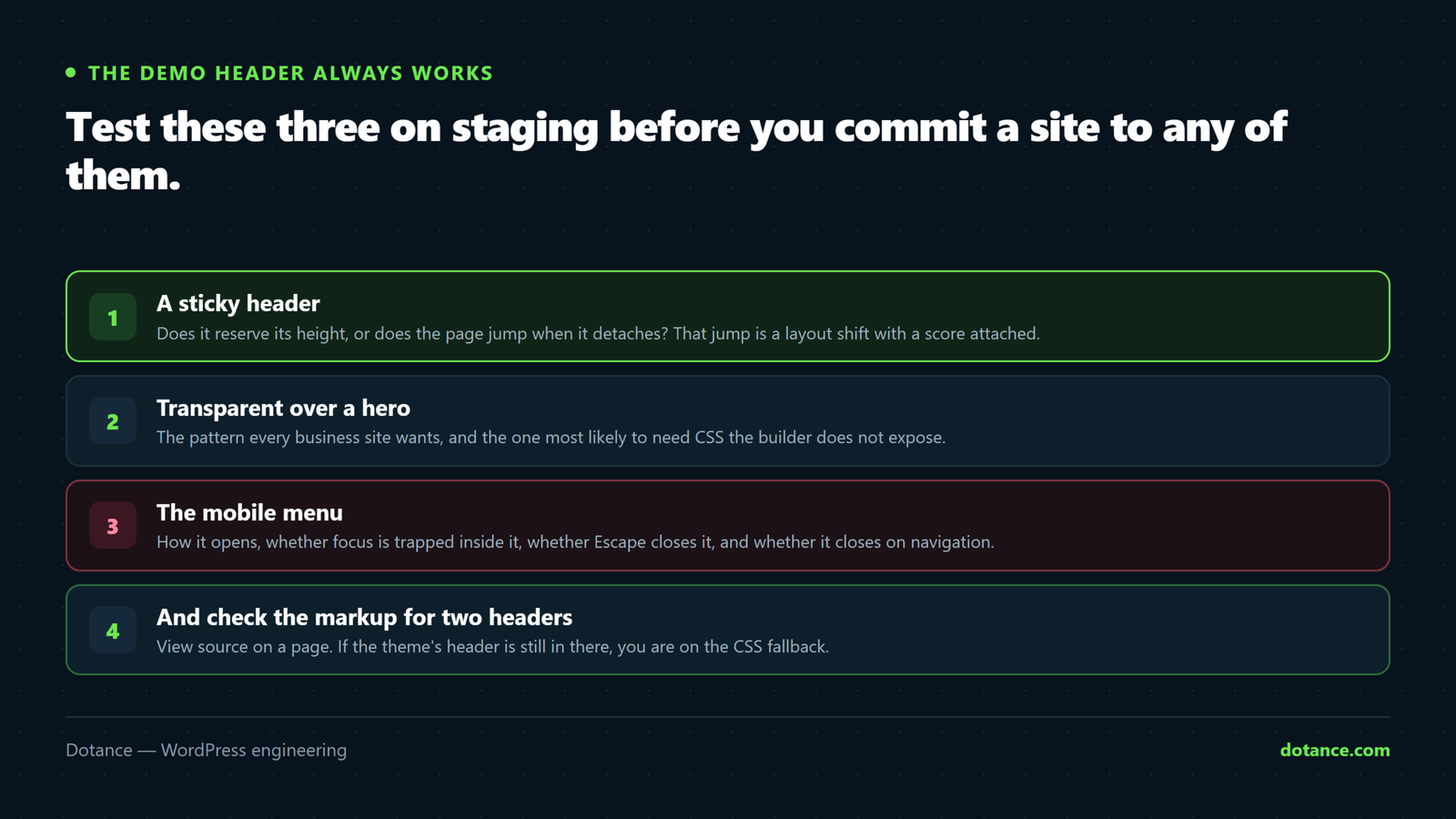
The demo header always works. These three do not, always, and they are the ones your visitors see. Run them against any Elementor header footer builder on a staging copy before it goes near the live site.
1. Sticky, and what happens under it
A sticky header is a container with position: sticky or the builder’s sticky option. The test is not whether it sticks; it is what the page does beneath it. Anchor links that scroll to a section should land below the header, not under it — that needs a scroll margin equal to the header’s height. Elementor’s Advanced › Motion Effects › Sticky on the header container is the usual switch; the scroll offset is a one-line CSS fix if the builder does not add it.
Anchors landing under a sticky header
html { scroll-padding-top: 90px; } /* the header's height */2. Transparent over a hero, then solid on scroll
The pattern every design wants: a header with no background sitting over the hero image, gaining a solid background once the visitor scrolls. In an Elementor header footer builder that is a transparent header container with a class added on scroll, and the class comes from the builder or from four lines of JavaScript. Test it on the pages that do not have a hero — an inner page with a white top needs the solid header from the start, or the menu is white on white.
3. The mobile menu
Free Elementor’s Nav Menu widget is Pro. So the menu inside a free header comes from the builder’s own menu widget or from a theme widget, and mobile behaviour — the hamburger, the drawer, the submenu toggles — is entirely that widget’s. Test on a real phone: open, close, expand a submenu, tap a link. This is where free builders differ most, and where an accessibility audit finds the failures: a hamburger that is a div, a drawer with no focus trap, a submenu that opens on hover and never on tap.
What a header builder costs in speed
The theme’s header is a few dozen lines of HTML and CSS the theme already loads; an Elementor header footer builder replaces that with something heavier. An Elementor-built header is an Elementor document: its own generated stylesheet, Elementor’s frontend script, and whatever widgets it contains, on every page. On a site that already runs Elementor on every page, the marginal cost is small.
On a site that uses Elementor for three landing pages and the theme for the rest, an Elementor header footer builder brings Elementor’s assets to every page, and the LCP and CLS numbers will show it. Measure before and after; the header is above the fold on every page, so it is the worst place to add weight.
If the header is simple and the theme’s own builder is good, the theme-native option is the fast one.
Two mitigations regardless of builder: keep the header to a logo, a menu and one button, and make sure the builder does not also render the theme’s header hidden underneath — the CSS-fallback method does exactly that, which is another reason to prefer named theme support.
Where an Elementor header footer builder goes wrong
| Mistake | What happens | Fix |
|---|---|---|
| Theme not supported by name | Flash of the theme’s header, then yours; two headers in the markup | A builder that names your theme, or switch to Hello Elementor |
| Two builders active | Two headers, or none | One builder; disable the theme’s own header builder |
| Sticky header with no scroll padding | Anchor targets hidden under the header | scroll-padding-top |
| Transparent header on pages without a hero | White menu on white page | A per-page condition, or a solid variant for inner pages |
| Menu widget with no keyboard support | Site unusable without a mouse | Test with Tab and Enter; pick a widget that passes |
| Cached header after an edit | The old header everywhere except the editor | Purge; see Elementor changes not showing |
The last row is the support ticket we receive most: the header was edited, the editor shows the new one, the site shows the old one. It is a page cache serving HTML rendered before the change. Purge everything, including the CDN, before concluding the Elementor header footer builder is broken.
Building the header itself: what belongs in it
Whichever Elementor header footer builder you pick, the header is the most-seen element on the site and the one most often overbuilt. A working default for a business site: one container, three columns — logo, menu, one call to action — 70 to 90 pixels tall on desktop, a hamburger and the logo on mobile. That is it. Every addition — a top bar with a phone number, social icons, a search field, a second row — is weight above the fold on every page and should earn its place with a reason.
The footer is the opposite: it can carry more, because it loads below the fold and visitors who reach it are looking for something. Address, hours, the menu again, legal links, a newsletter field. Keep it to one Elementor document, not three stacked sections, so it renders as one block and caches as one.
Use global colours and fonts rather than values typed into the header, so a brand change is one edit. And set the header’s display rule to exclude any page that has its own — a landing page with a minimal header, a checkout with none — before publishing, because the Elementor header footer builder will otherwise put the full header on the one page where it hurts conversion.
Which one to choose
The short version of the decision, in the order the questions eliminate options:
Decision order
1. Already paying for Elementor Pro? → Use its Theme Builder. Stop here.
2. Is your theme Astra / Kadence / Blocksy and the header simple? → The theme's own builder is faster.
3. Need the header to be an Elementor document (mega-menu, per-page headers)?
     → A free Elementor header footer builder:
        Elemance if you also want popups and a small widget set;
        UAE if you are on Astra and want the Brainstorm ecosystem;
        ElementsKit if you want its widget pack anyway.
4. Whichever: confirm your theme is supported by name before installing.
Step four is the one to do before anything else. It takes a minute on the plugin’s page and it decides whether you get a clean swap or a CSS hide — which, as the features-without-Pro guide puts it, is the difference between replacing the header and papering over it.
Questions about the Elementor header footer builder
Does free Elementor include a header and footer builder?
No. Free Elementor edits the content area. Header and footer templates are part of Elementor Pro’s Theme Builder. A free Elementor header footer builder plugin adds the same capability to free Elementor for headers and footers specifically.
Which is the best free Elementor header footer builder?
The one that supports your theme by name. Elemance names six popular themes and adds a popup builder; Ultimate Addons for Elementor is the safe choice on Astra; ElementsKit if you want its widgets. If none names your theme, use the Hello Elementor theme, which every builder supports, or accept the CSS fallback and test for the flash.
Will an Elementor header footer builder work with my theme?
Cleanly, if the builder names it; roughly, if it does not. The fallback method hides the theme’s header with CSS and inserts the template after the opening body tag, which works on most themes but can leave a gap or a flash. Check the supported list, then test on a phone.
Can I make a sticky or transparent header with a free Elementor header footer builder?
Yes. Sticky is Elementor’s own Motion Effects option on the header container, or the builder’s setting. Transparent-over-hero needs a class toggled on scroll, which some builders add and which is otherwise a few lines of script. Remember the inner pages with no hero.
What about the menu itself?
The Nav Menu widget is Pro. Free builders ship their own menu widget or rely on one from an addon pack; the mobile behaviour and the keyboard behaviour are that widget’s, so test both before choosing.
Does an Elementor header footer builder slow down the site?
It adds Elementor’s assets to every page, which matters on sites that did not already load Elementor everywhere. Keep the header light and measure. If the theme’s own header builder is good and the header is simple, it is the faster option.
Can I use it for blog post or archive templates too?
Not the free builders in this comparison — they do headers and footers. Single-post, archive, 404 and search templates are Elementor Pro’s Theme Builder or a theme-native builder. If you need those, Pro is the complete answer.