The site is finished, the invoice is paid, and now somebody has to hand it over. This is the part of a project with no design review and no deadline, which is why it is so often done in ten minutes over email. A WordPress client handover done properly takes about two hours, protects the client, and protects you — because the arguments that happen eighteen months later are almost always about something that was never written down.
Why handover is where relationships break
Nobody sets out to trap a client, and a bad WordPress client handover is rarely deliberate. It happens by accumulation: the domain was registered on the agency account because that was quicker, the hosting is on a reseller plan, the analytics property belongs to a developer who left, and three plugin licences renew against an email nobody checks.
None of those was malicious. Together they mean the client cannot move without you, which is a position you do not want to be in even when you have behaved perfectly — because it makes every future disagreement feel like leverage.
| What it looks like from your side | What it looks like from theirs |
|---|---|
| “We manage the domain for convenience” | “They control whether my business exists online” |
| “Licences are on our agency account” | “If we leave, things stop updating” |
| “We have the backups” | “We have no copy of our own site” |
| “They can just ask us for access” | “We have to ask permission for our own site” |
The right-hand column is how a WordPress client handover is judged, and you do not get to argue with it. Design the handover so that the left column never has to be explained.
The principle worth adopting: a client should be able to fire you on a Friday and have a fully working site on Monday without needing anything from you. If that is true, you have handed over properly. If it is not, something on the list below is missing.
The nine things a WordPress client handover must include
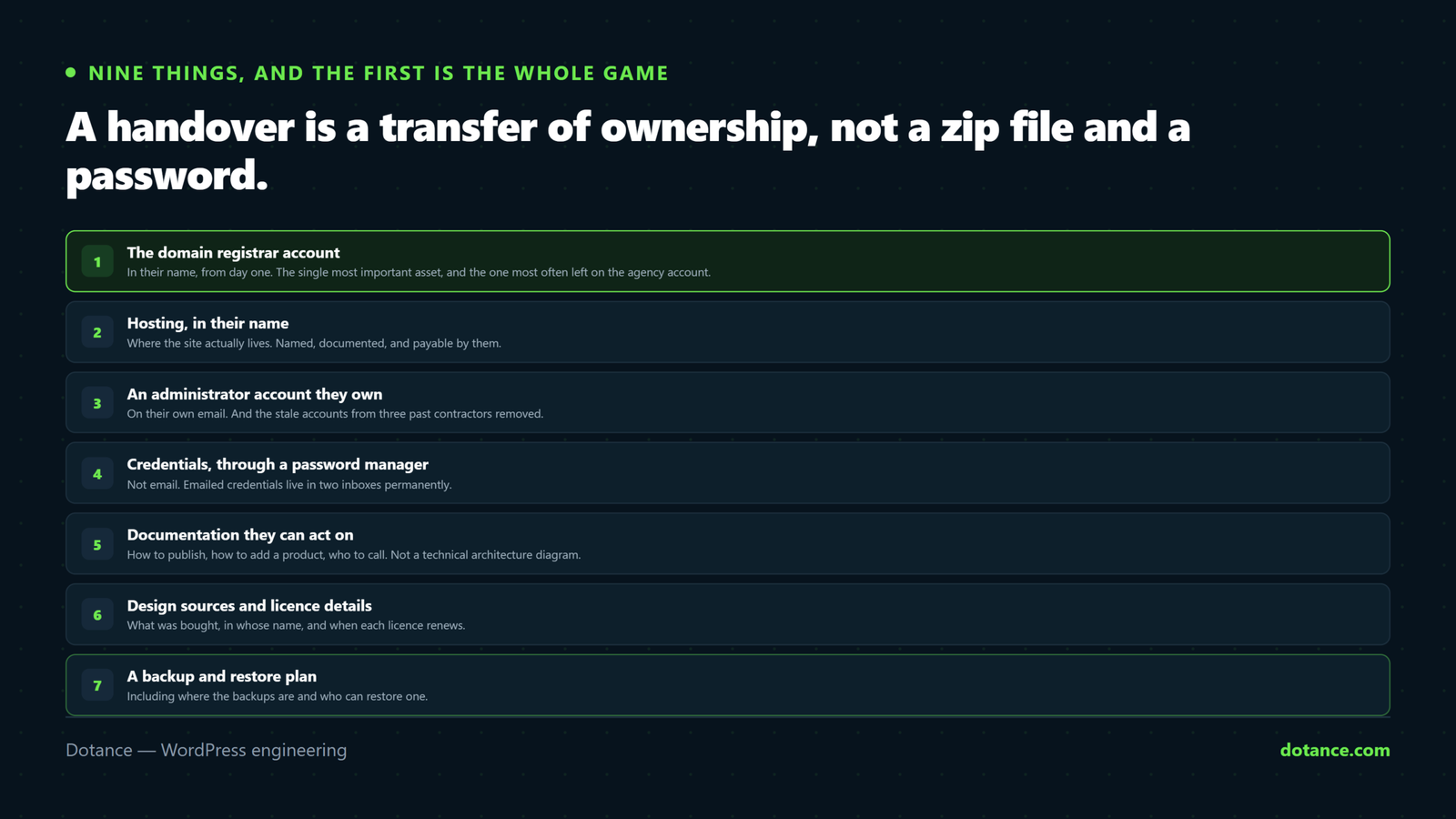
| # | Item | Why it matters |
|---|---|---|
| 1 | Domain registrar account | The single most important asset |
| 2 | Hosting account, in their name | Where the site actually lives |
| 3 | An administrator account they own | Not shared, not “admin” |
| 4 | Credentials, in a password manager | Never in an email thread |
| 5 | Licence keys and renewal dates | Silent expiry is the usual failure |
| 6 | A one-page how-to | The five things they will actually do |
| 7 | The backup arrangement | Including how to restore |
| 8 | Analytics and Search Console ownership | Historic data cannot be recreated |
| 9 | A list of what is custom | So the next developer is not an archaeologist |
1 and 2. Domain and hosting, in the client’s name
This is the part of a WordPress client handover that cannot be fixed later. Register the domain on the client’s own registrar account from the start. Not yours, not “we will transfer it later” — later is when it becomes difficult, because transfers have waiting periods and authorisation codes and somebody has left the company.
Hosting is nearly as important. If it must sit on your reseller account, say so plainly at the start of the project and explain what leaving would involve. A client who knowingly chose that is fine. A client who discovers it during a dispute is not.
Whatever the arrangement, write down which account holds what. A WordPress client handover where the client knows the registrar, the host, and the login route to each has removed ninety per cent of the ways this goes wrong — and if they ever do move, the process is in changing WordPress hosting.
3 and 4. Real accounts, real password hygiene
Create an administrator account in the client’s own name, with their own email. Do not hand over the account you have been using, and do not leave a shared login called admin that four people know.
# Their account, their email, their password reset
wp user create jane jane@client.com --role=administrator

# Then audit who else still has access
wp user list --role=administrator --fields=user_login,user_email,user_registered
That second command is the one to run on every handover. Old developer accounts, a designer from 2022, a plugin vendor’s support login — all with full access, all forgotten. Removing them is part of the job, and it belongs with the rest of hardening a WordPress site.
Credentials go into a shared password manager vault, never into an email. Email is searchable forever, is frequently forwarded, and is the first thing an attacker reads after compromising a mailbox.
5. Licences, with dates
Premium plugins and themes fail quietly, which is why they belong in every WordPress client handover. The licence lapses, updates stop, and nobody notices until something breaks or a vulnerability is published.
| Record | Why |
|---|---|
| Which plugins are premium | The client cannot tell by looking |
| Whose account each licence sits on | Agency or client — be explicit |
| Renewal date and cost | So it appears in a budget |
| What happens if it lapses | Usually: works, stops updating |
If a licence is on your agency account — which is legitimate and common — that belongs in the handover document in plain language, with the cost of the client buying their own. Hiding it is what turns a normal commercial arrangement into a grievance.
6. One page, five tasks
Nobody reads a forty-page manual, whatever the WordPress client handover template says. Write one page covering the things this particular client will actually do: add a post, change a phone number, upload an image, add a team member, check the contact form still arrives.
Screenshots beat prose. A short screen recording beats both. The test of a WordPress client handover document is whether somebody who was not in any of the meetings can use it.
7 and 8. Backups and analytics
A WordPress client handover should tell them where backups go, how often, how long they are kept, and — the part everybody omits — how to restore one. A backup nobody has ever restored is a hope, not a plan, which is the argument in backups done right.
Analytics and Search Console must be owned by the client’s own account with you added as a user, not the reverse. Historic data cannot be recreated, and a client who loses three years of analytics because a contractor’s Google account was deleted has lost something genuinely irreplaceable.
9. What is custom, and where
Six months after any WordPress client handover, somebody will ask why the pricing table behaves oddly. If the answer is in a custom plugin, an mu-plugin, a child theme function and a snippet in a settings field, nobody will find it.
| Write down | Example |
|---|---|
| Custom plugins and what they do | “client-forms: handles the quote calculator” |
| Child theme modifications | “functions.php: custom archive order” |
| Any mu-plugins | “Easy to miss — they are invisible in the plugins list” |
| Snippets in plugin settings | The worst hiding place of all |
| Anything deliberately declined | “No object cache — traffic does not justify it” |
The last row saves the client money later, because it stops the next agency quoting for work you already decided against for good reasons. It also pairs with reading Site Health warnings correctly rather than buying the first recommendation on the screen.
What you legitimately keep
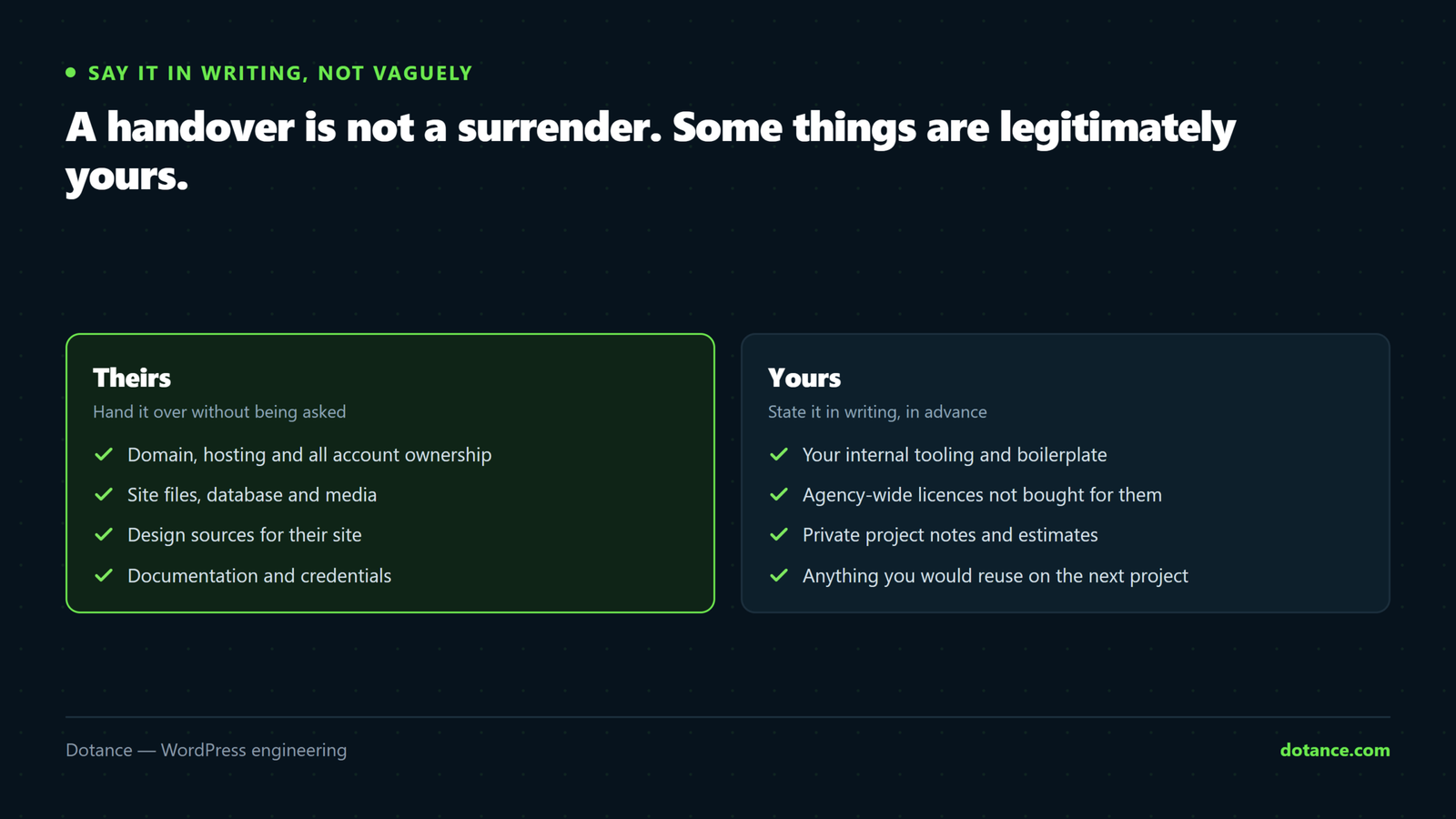
Not everything belongs in a WordPress client handover, and saying so plainly is better than being vague about it.
A WordPress client handover is not a surrender. Some things are yours, and being clear about them is more professional than being vague.
| Yours to keep | Condition |
|---|---|
| Your development environment and tooling | None — it is yours |
| Internal notes and estimates | None |
| Reusable code you own and licensed to them | Say so in the contract, before the project |
| Agency-wide plugin licences | Disclose it, and price the alternative |
| Your staging environment | Give them a copy of the data if asked |
| Design source files | Depends entirely on the contract — decide up front |
The distinction that matters is between keeping something and withholding something. Keeping your own tooling is normal. Withholding a login the client needs to run their business is not, whatever the invoice situation — and if payment is genuinely outstanding, that is a conversation and, if necessary, a legal process, not a lockout.
Decide the source-files question before the project, not at the end. Whether design files transfer is a legitimate commercial choice either way. What causes the argument is that nobody raised it until the client asked for them on the last day.
Test the WordPress client handover before you send it
This is the WordPress client handover step nobody does, and it takes twenty minutes.
- Open a private browser window. Pretend you are the client.
- Using only what you have handed over, log in to the site.
- Log in to the hosting account.
- Log in to the registrar.
- Find where the backups are and confirm a recent one exists.
- Follow your own one-page guide to publish a test post, then delete it.
If any step needs something you did not send, your WordPress client handover is incomplete — and you have found out now rather than in an emergency six months from now when you are on holiday.
The other side: receiving a WordPress client handover
Half the time you are not giving a WordPress client handover, you are inheriting a site from an agency that gave none at all. The work is the same list, run backwards.
- Establish who owns the domain before anything else. A public WHOIS lookup and a question to the client usually settles it.
- Audit administrator accounts and find out who each one is.
- Find the mu-plugins. They do not appear in the plugins list and they are where the surprises live.
- Check which premium plugins have live licences and which have quietly lapsed.
- Find out whether backups exist and whether anyone has ever restored one.
- Look for snippets in settings fields — code-snippet plugins, theme options, custom CSS boxes.
# The invisible plugins nobody mentions
ls -la wp-content/mu-plugins/

# Who has full access, and since when?
wp user list --role=administrator --fields=user_login,user_email,user_registered
Write what you find into the document the previous agency never produced, and give it to the client. It takes an afternoon, it is genuinely useful to them, and it is the most persuasive possible demonstration that this WordPress client handover will be different from the last one.
Charge for it. An access-and-ownership audit is real work with a real deliverable, and a client who has just discovered their domain is registered to a company they no longer speak to will not begrudge the invoice.
When to do a WordPress client handover
The answer is not “at the end”, and treating a WordPress client handover as a launch-day task is why so many are thin. and this is the part that changes outcomes most.
| Stage | What belongs there |
|---|---|
| Before the project starts | Domain ownership, source-file terms, licence arrangements |
| During the build | Hosting account in their name, analytics property created by them |
| At launch | Accounts, credentials, the one-page guide, backup details |
| Two weeks after launch | A short call — what have they actually struggled with? |
| Annually, if you maintain it | Re-check licences, accounts and the custom-code list |
The first row prevents almost every problem in this article. Ownership decided at the proposal stage costs nothing; ownership decided at the end is a negotiation with a deadline attached.
The two-week call is the underrated one. Whatever you put in your guide, the questions they actually ask will be different, and adding those three answers turns a generic document into one written for them. It also surfaces the small frustrations that otherwise quietly become the reason they look elsewhere next year.
Where this goes wrong
| The mistake | What happens | Do this instead |
|---|---|---|
| Domain on the agency account | The client cannot leave, and knows it | Their registrar, from day one |
| Credentials sent by email | Permanently searchable, often forwarded | A shared password manager vault |
| Handing over your own admin account | No audit trail, shared password | Create theirs, remove yours later |
| Leaving old developer accounts active | Access nobody is tracking | Audit administrators at handover |
| Undocumented mu-plugins | Invisible behaviour nobody can explain | Name every custom piece |
| Analytics owned by a personal account | Years of data lost when it closes | Client owns it, you are a user |
| A forty-page manual | Never opened | One page and a screen recording |
| No handover at all on small projects | The same problems, on a smaller site | A short version is still a version |
The last row is worth defending. A five-hundred-pound brochure site does not need a two-hour WordPress client handover — but it does need the domain in the client’s name, a password in a vault and a note saying what is custom. Fifteen minutes, and it removes every version of the phone call that starts “we cannot get into our own website”.
The WordPress client handover checklist
| Done | Item |
|---|---|
| ☐ | Domain in the client’s registrar account |
| ☐ | Hosting account named and documented |
| ☐ | Client administrator account created |
| ☐ | Stale administrator accounts removed |
| ☐ | Credentials in a shared vault |
| ☐ | Licences listed with renewal dates and owner |
| ☐ | One-page guide plus a screen recording |
| ☐ | Backup location, schedule and restore steps |
| ☐ | Analytics and Search Console owned by the client |
| ☐ | Custom code documented, including mu-plugins |
| ☐ | Deliberate decisions written down |
| ☐ | Handover tested from the client’s side |
Twelve rows, two hours, one WordPress client handover per project. If you also maintain the site afterwards, this document becomes the basis of your maintenance notes, so the work is not even single-use.
WordPress’s own documentation on roles and capabilities is worth sending alongside it — most clients do not need an administrator account for every member of staff, and choosing the right role is a five-minute conversation that prevents a lot of accidents.
If you are the agency rather than the client: a handover is much easier when the build was set up for one from day one. We do white label WordPress development for agencies — your brand throughout, ownership in your client’s accounts from the start, and documentation written to be handed on rather than reverse-engineered later.
Frequently asked questions
Can I withhold access until the final invoice is paid?
Withholding a WordPress client handover over money varies by jurisdiction and you should take your own advice. Practically: making it a contractual milestone before the work starts is clean, and locking someone out of a live business asset after the fact is the kind of dispute that ends up public. Staged payments prevent the situation entirely.
Does a WordPress client handover need a formal document?
A shared document, yes — one page of plain language plus the checklist below is plenty. What matters is that it exists somewhere both sides can find it in two years, not that it looks like a legal instrument.
Should the client have an administrator account?
At least one person should, yes — it is their site. Whether every member of staff needs one is a different question, and usually the answer is editor or author. Role choice is the easiest security improvement available on most sites.
What if the client loses the credentials?
They reset them, which is exactly why accounts should be in their own name with their own email. A password manager vault also survives one person leaving, which an individual’s inbox does not.
Do I have to hand over design source files?
Only if your contract says so. Both positions are defensible; the failure is leaving it undecided until the last day of the project.
How long should a WordPress client handover take?
Two hours for a normal project, including writing the document and testing it. Fifteen minutes for a very small one. It is not a day’s work unless the project was genuinely complex.
What about ongoing maintenance — does handover mean goodbye?
The opposite, usually. Clients who feel in control are more likely to keep you on, because the relationship is a choice rather than a dependency. A thorough handover is the best sales document a maintenance plan has.
What is the single most common omission?
Restore instructions. Almost everybody documents where backups are; almost nobody documents how to use one. That gap is only discovered on the worst possible day.