Elementor Pro is $59 a year for one site at the time of writing, and for a lot of projects that is money well spent. It is also the default assumption in most tutorials, which is why so many people never seriously consider Elementor without Pro at all. But plenty of sites do not need what it sells, and pay for it anyway because a tutorial said the feature is Pro-only. Some of those tutorials are years out of date.
This is an honest look at running Elementor without Pro: the nine things you can genuinely do for free, the three you cannot, and the cost of choosing the free route — because it is not zero.
Free Elementor is not a trial. It is a complete page builder with no time limit, no watermark and no feature that stops working — which is what makes Elementor without Pro a real option rather than a compromise. Pro adds capability on top; it does not unlock the base. The plugin listing on WordPress.org is the same build either way.
What Elementor Pro actually sells
Before deciding whether you can use Elementor without Pro, it helps to see the list stripped of marketing. Pro is four things bundled together.
| What Pro adds | What it replaces | Free route exists? |
|---|---|---|
| Theme Builder — header, footer, archives, single templates | Editing theme PHP files | Partly |
| Popup Builder with display and trigger rules | A dedicated popup plugin | Yes |
| Form widget with mail, CRM and webhook integrations | A dedicated forms plugin | Yes, via another plugin |
| Around 60 extra widgets | An addon pack | Yes |
| Dynamic content from custom fields | Custom template code | No |
| WooCommerce product and checkout templates | Theme overrides | No |
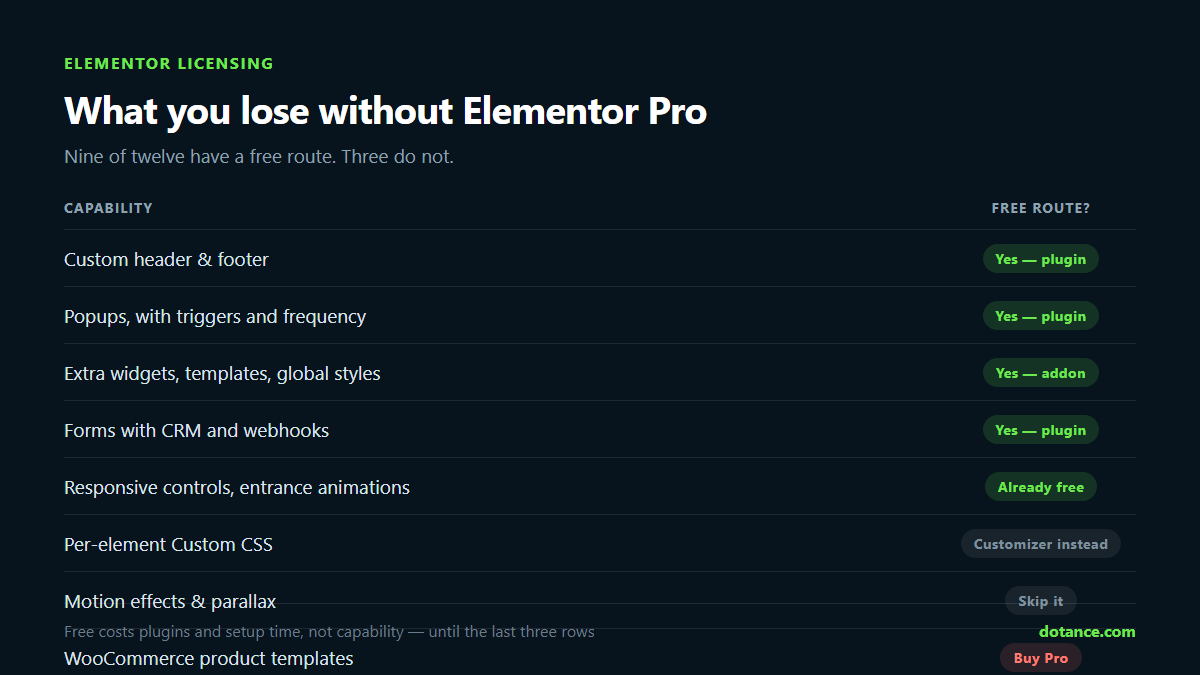
Read that table honestly and the picture is clear. Most of what people upgrade for is available to Elementor without Pro another way. The bottom two rows are where Elementor without Pro genuinely runs out of road, and we will come back to them.
1. A custom header and footer, on Elementor without Pro
This is the number one reason people upgrade, and for anyone on Elementor without Pro it is solvable. Free Elementor builds pages; it does not build the header and footer that wrap them, because those come from your theme. Pro’s Theme Builder lets you design them in Elementor and assign them site-wide.
The free route is a header and footer builder plugin. Several exist, and the mechanism is the same in all of them: a custom post type holds your designed header, the plugin hides the theme’s native header with CSS, and hooks the Elementor template in at wp_body_open instead. It is not a hack — it is the documented way themes expect to be extended, using the wp_body_open hook that core added in WordPress 5.2.
Two things to check before you commit. First, theme compatibility: the plugin has to know which selector to hide, and a theme it has never seen may leave you with two headers stacked. Hello Elementor, Astra, GeneratePress, OceanWP, Neve and Storefront are the ones most tools handle explicitly. Second, display conditions — you want “entire site” plus the ability to override on the front page, because a landing page usually wants a different header.
Running Elementor without Pro here costs you one extra plugin and about ten minutes of setup. It saves you the licence, every year, on every site.
2. Popups
Pro’s Popup Builder is genuinely good, and it is also genuinely replaceable. What you need is a popup that you can design in Elementor and a trigger system: time delay, scroll depth, exit intent, or a click on a specific button.
Free popup plugins cover all four triggers. The part people forget to check is frequency control, and it is the one that decides whether Elementor without Pro looks amateur or not. A popup that reappears on every page load is worse than no popup — it trains visitors to close things without reading them, and on mobile it is an interstitial that Google has penalised since 2017. Look for “once”, “once per session” and “every visit” as explicit options.
If you take one thing from this section: exit intent does not exist on touch devices. There is no cursor leaving the viewport. Any tool promising mobile exit intent is guessing from scroll direction, and guessing badly.
3. The widgets you actually use
Pro ships around sixty extra widgets. Look at a finished site and count how many are in use: it is rarely more than eight or ten. Pricing tables, an accordion, a counter, a testimonial slider, a call-to-action block, maybe a flip card.
Free addon packs cover that comfortably, which is why widget count is a poor reason to buy a licence. The question is not how many widgets a pack has — it is what the pack costs you when you are not using them. This is where Elementor without Pro can go wrong: install three addon packs with two hundred widgets between them and every page loads CSS and JavaScript for widgets that appear nowhere on your site.
The thing to look for is a widget manager: a screen where you switch off what you do not use, and the disabled widget then stops registering with Elementor and stops enqueueing its assets entirely. Not hidden from the panel — genuinely not loaded. That single feature matters more than the widget count, and it is why we built Elemance the way we did.
4. Forms
Pro’s form widget is convenient because it lives inside the editor and connects to Mailchimp, ActiveCampaign, webhooks and the rest without leaving the page. If you are using Elementor without Pro, you use a forms plugin instead and place its shortcode in an Elementor widget.
Honestly, this is a case where the free route is often better. Dedicated forms plugins have proper entry storage, conditional logic, spam protection and export — things Pro’s form widget handles more thinly. The cost is that your form design and your page design now live in two different interfaces.
Whatever you use, put real spam protection on it. A contact form with no protection will be found within days, and the fix is rarely the plugin’s fault.
5. Section templates and a template library
Elementor without Pro still includes the template system — you can save any section, reuse it anywhere and export it as JSON. What Pro adds is its own library of professionally designed blocks.
Free addon packs ship libraries too. The practical difference is curation: a Pro block is designed to work with Pro widgets, so a free library is often more reliable on a free install because it only uses what you have. When you insert a template, check afterwards that no widget in it renders as a grey placeholder — that is the sign it needed something you do not have.
6. Global colours, fonts and site settings
This one surprises people: global styles are free, and they are the most valuable thing in Elementor without Pro. Site Settings, global colours, global fonts, default typography, layout width, and the theme style overrides are all in free Elementor. Set them before you build the first page and every section inherits them.
It is also the single biggest speed-up available to anyone using Elementor without Pro, because it removes the temptation to style each heading individually — which is what makes an Elementor site slow to edit and impossible to restyle later. If your editor already feels sluggish, the causes in fixing a slow Elementor editor are usually the same habit.
7. Responsive control
All of it is free. Per-device visibility, per-device typography and spacing, custom breakpoints, and the mobile preview — nothing here is restricted. There is no responsive feature behind the Pro wall.
The thing worth knowing is that Elementor’s responsive controls cascade downward: a value set on desktop applies to tablet and mobile unless you override it. Setting a mobile value first and wondering why desktop changed is the most common confusion in the editor, and it has nothing to do with which licence you hold.
8. Animations and scroll effects
Entrance animations are free. Motion Effects — parallax, scroll-linked rotation, mouse tracking, sticky elements — are Pro, and this is the clearest gap in Elementor without Pro.
This is the one place where the honest advice is that you probably are not missing much. Scroll-linked motion is easy to overdo and it costs performance on mobile, where most of your traffic is. A tasteful fade-up on entry, which is free, gets you most of the perceived quality for none of the cost. Where you genuinely want a sticky element, CSS position: sticky does it in two lines with no JavaScript at all.
9. Custom CSS
Elementor’s per-element Custom CSS box is Pro. The Customizer’s Additional CSS panel is core WordPress and free, and so is a child theme stylesheet. You lose the convenience of writing CSS next to the element; you do not lose the ability to write it.
In practice a site running Elementor without Pro tends to end up with a tidier stylesheet, because everything lives in one place instead of being scattered across two hundred element settings where nobody will ever find it again.
Three things Elementor without Pro genuinely cannot do
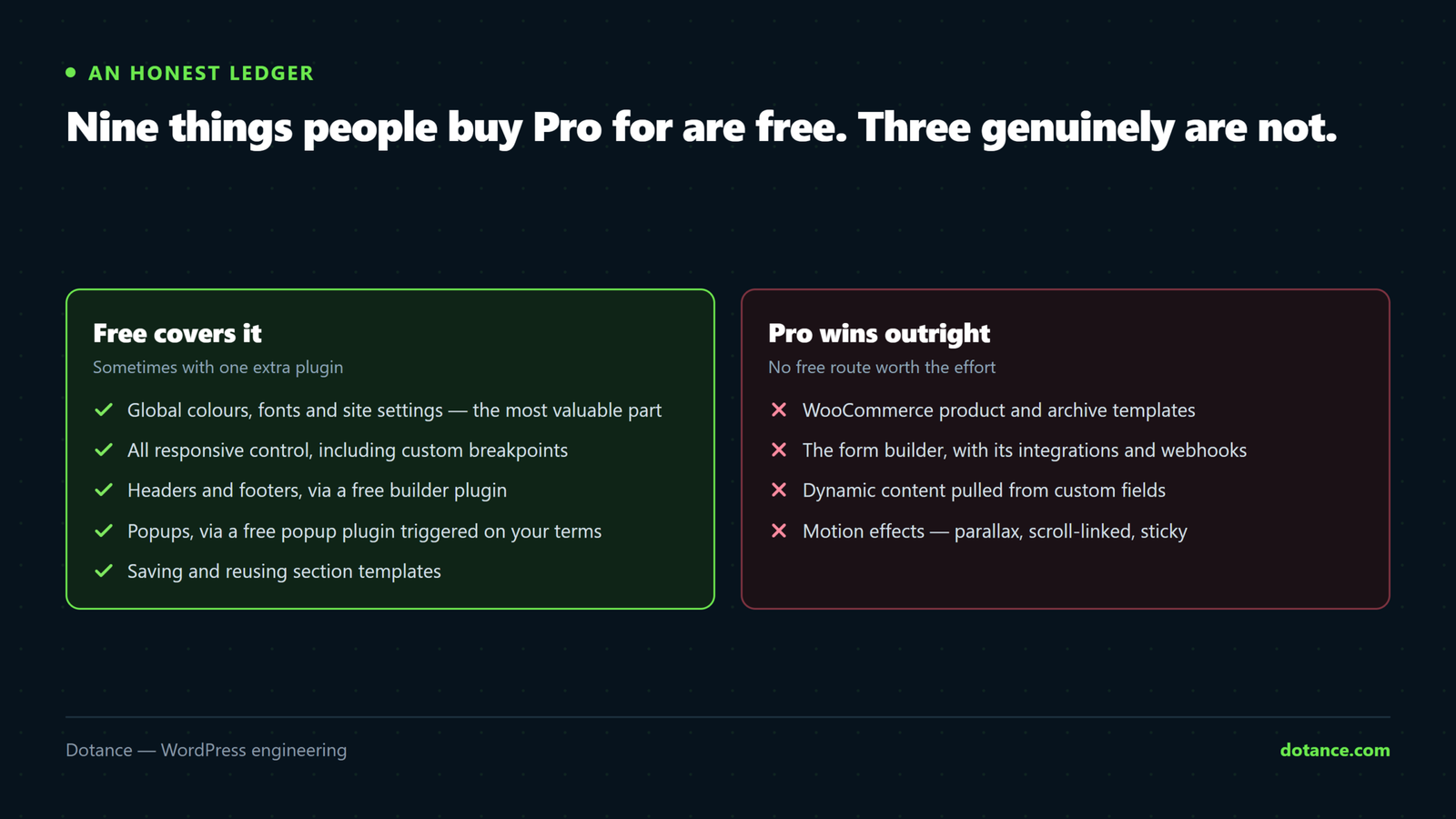
An honest article names where the paid option wins, and these three are real limits on Elementor without Pro.
| Capability | Why free cannot reach it | Who needs it |
|---|---|---|
| WooCommerce product and checkout templates | Needs deep template overrides tied to Woo hooks | Any shop wanting a custom product page |
| Dynamic content from custom fields | Requires the dynamic tags API, which is Pro-only | Directories, listings, anything data-driven |
| Archive and single post templates | Theme Builder territory, beyond header and footer | Blogs wanting a designed post layout |
If any row describes your project, buy Pro. Working around these with free tools means custom PHP, which costs more in developer time than the licence does — and leaves you with code someone has to maintain. That trade-off is the same one covered in custom plugin or off-the-shelf.
What Elementor without Pro actually costs you
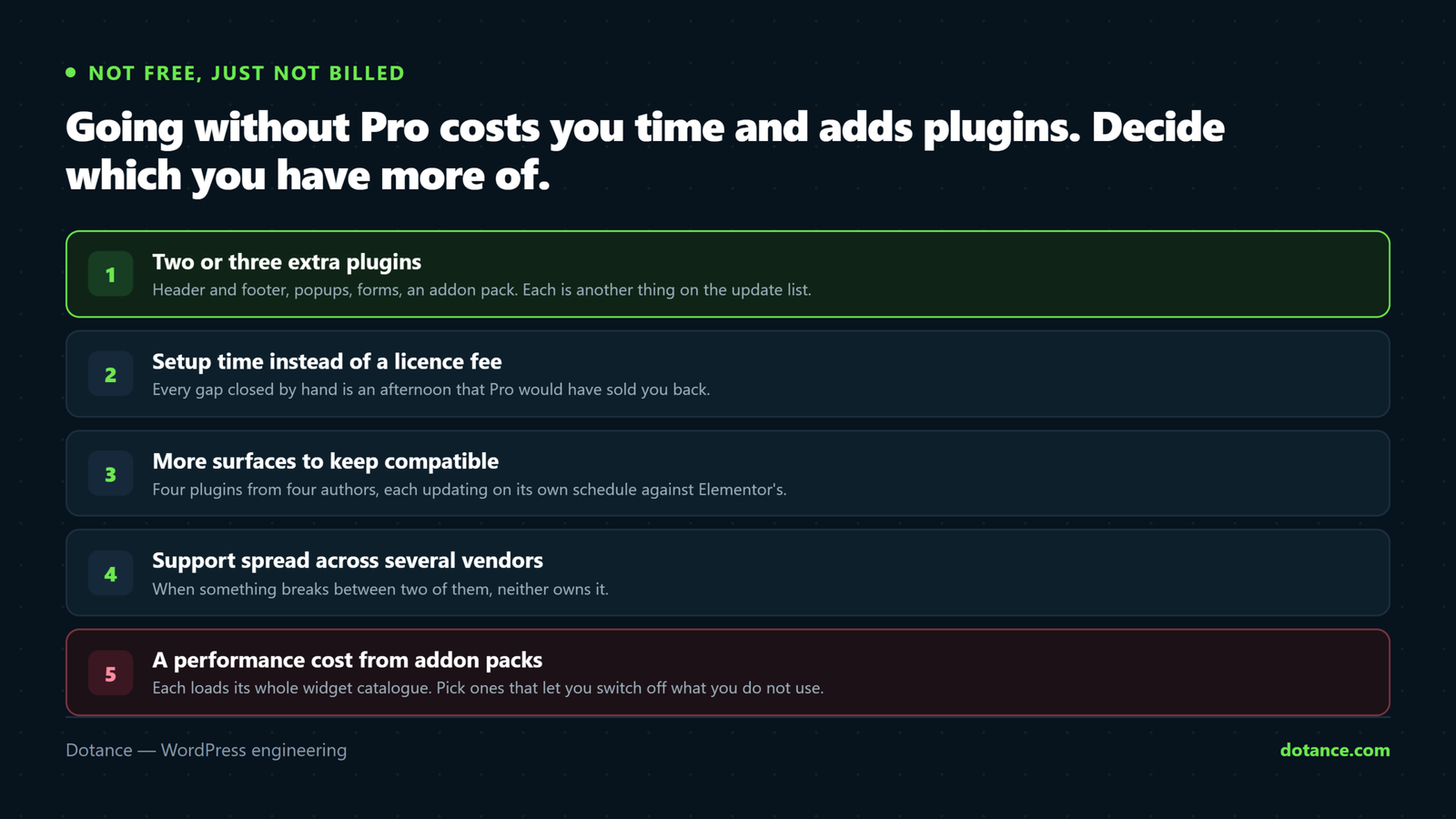
Elementor without Pro is not free, it is just not billed. Here is the real ledger.
| Cost | Detail |
|---|---|
| More plugins | Typically two or three extra: header/footer, popups, forms, addon pack |
| More update surface | Each plugin is another thing that can break on a WordPress or Elementor update |
| Setup time | An afternoon of configuration you would not have spent with Pro |
| Support fragmentation | Four vendors instead of one when something conflicts |
| Possible asset bloat | Unless the addon pack lets you disable unused widgets |
For a personal site or a small business brochure site, that ledger favours free comfortably. For an agency running twenty client sites, the calculation flips — the licence buys consistency, and consistency is what makes twenty sites maintainable.
The question nobody asks before choosing Elementor without Pro
Whether you run Pro or not, the thing that actually determines page speed is how many assets load on a page that does not use them. Elementor has an “Improved Asset Loading” experiment that only loads widget CSS when the widget is present — turn it on. Google's guidance on Largest Contentful Paint is blunt about what render-blocking CSS costs you. Then audit what your addons load.
# Every stylesheet on the front page, with its size, straight from the server
curl -s https://example.com/ | grep -oE 'href="[^"]+\.css[^"]*"' | sort -u

# Which plugins are active at all — the first thing to prune
wp plugin list --status=active --fields=name,version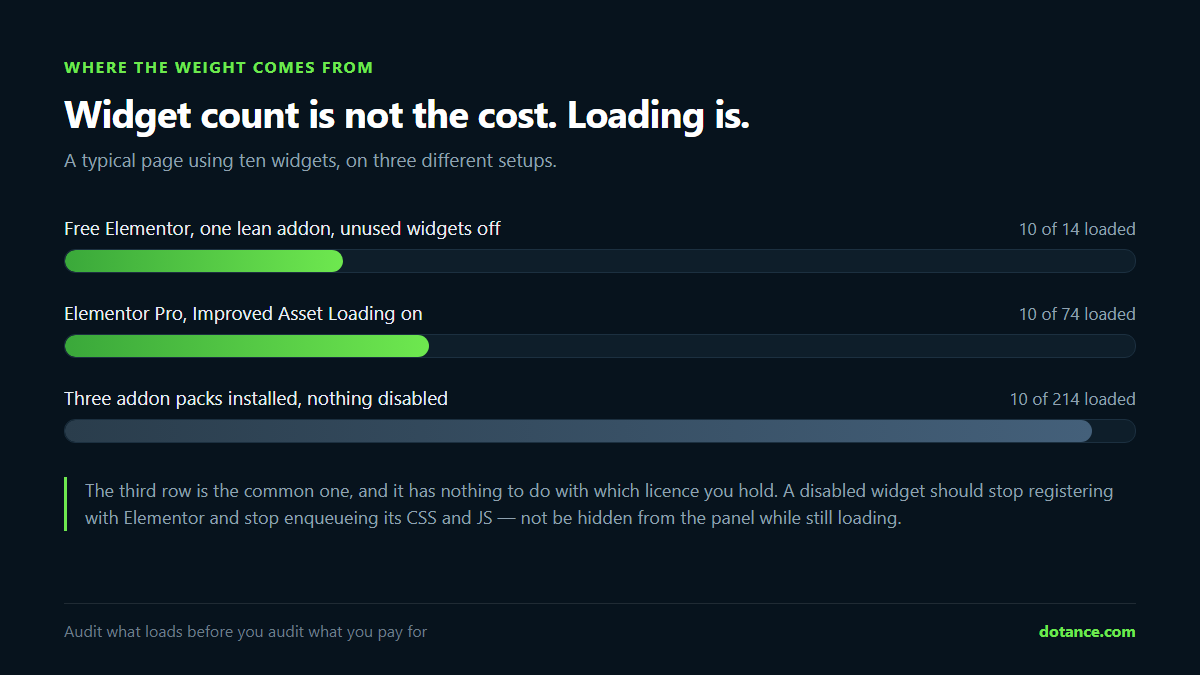
If that first command returns twenty stylesheets, the licence question is not your problem. Two of those files are probably from an addon pack shipping assets for widgets you have never placed. Related reading: why is my WordPress site slow and page builder or custom theme.
Where this goes wrong
| Symptom | Actual cause | Fix |
|---|---|---|
| Two headers on every page | Free header plugin does not know the theme’s selector | Add a CSS rule hiding the theme header, or switch to a supported theme |
| Inserted template shows grey placeholders | Template uses widgets you do not have | Use a library built for free Elementor |
| Site slower after installing an addon pack | Assets load for all widgets, used or not | Disable unused widgets; enable Improved Asset Loading |
| Popup shows on every page load | No frequency rule set | Set once per session at most |
| Editor will not load after adding a plugin | JavaScript conflict between addons | See Elementor not loading |
| Changes not visible on the front end | Cached CSS from before the edit | See Elementor changes not showing |
| Fatal error after an update | An addon calling an API that moved | Restore, then update one plugin at a time |
That last row is worth dwelling on. Running Elementor without Pro usually means more plugins, and more plugins means a higher chance that one update takes the site down. Have a restore path before you need one — the six checks in choosing a WordPress backup plugin exist for exactly this Tuesday afternoon.
Frequently asked questions
Is Elementor without Pro good enough for a business website?
For a brochure site — home, services, about, contact, a blog — Elementor without Pro handles it comfortably. Free Elementor plus a header/footer plugin and a forms plugin builds a professional site with no visible compromise. The moment you add a shop with custom product pages, or content driven by custom fields, the answer changes.
Will free addons break when Elementor updates?
Occasionally, and this is the genuine risk of running Elementor without Pro. Elementor ships frequent releases and addons that reach into internals rather than using the public API can break. Two protections: prefer addons that are actively maintained with a recent update date, and never update Elementor on a live site without a backup you have tested. If one does break the editor, Elementor not loading covers the isolation steps.
Can I switch to Pro later without rebuilding?
Yes. Pro installs alongside free Elementor and your existing pages are untouched. What you would then do is rebuild the header and footer in Theme Builder and retire the free plugin — an hour of work, not a rebuild. Nothing about starting on free paints you into a corner.
Does using Elementor without Pro hurt SEO?
No. Search engines see rendered HTML, and Elementor without Pro renders the same clean markup Pro does. What hurts SEO is page weight, and that is a function of how many assets load — which, as above, is about addon hygiene rather than licence tier. Set your heading levels properly and keep the CSS lean and you are in the same position either way.
How many free addon packs should I install?
One. Every additional pack duplicates widgets you already have and adds another update to track. Pick the one whose widgets you will actually use, disable the rest of its widgets, and stop there.
Is there a free equivalent of Motion Effects?
Partly. Entrance animations are already free. Sticky elements are two lines of CSS. Parallax and scroll-linked motion need JavaScript, and while free addons offer them, this is the one place we would suggest leaving the feature alone rather than adding a plugin for it — the performance cost on mobile rarely pays for itself.
The short answer
If you are building a brochure or content site, Elementor without Pro will do it, and the money is better spent elsewhere — hosting, photography, or someone to write the copy. If you are building a shop with custom product pages, or anything driven by custom fields, buy the licence and stop reading comparison articles.
Either way, the thing that decides how the site performs is not the licence. It is how disciplined you are about what loads on each page.