A product sells out. Somebody ticks “hide out of stock items” because it seems tidy, and six months later the store has four hundred pages that Google still lists, that nothing links to, and that show a dead end to anyone who clicks. Every WooCommerce out of stock product is a small decision about a URL that already has search history attached, and the tidy-looking option is usually the wrong one. Here is how to decide, product by product.
What a WooCommerce out of stock page really costs you
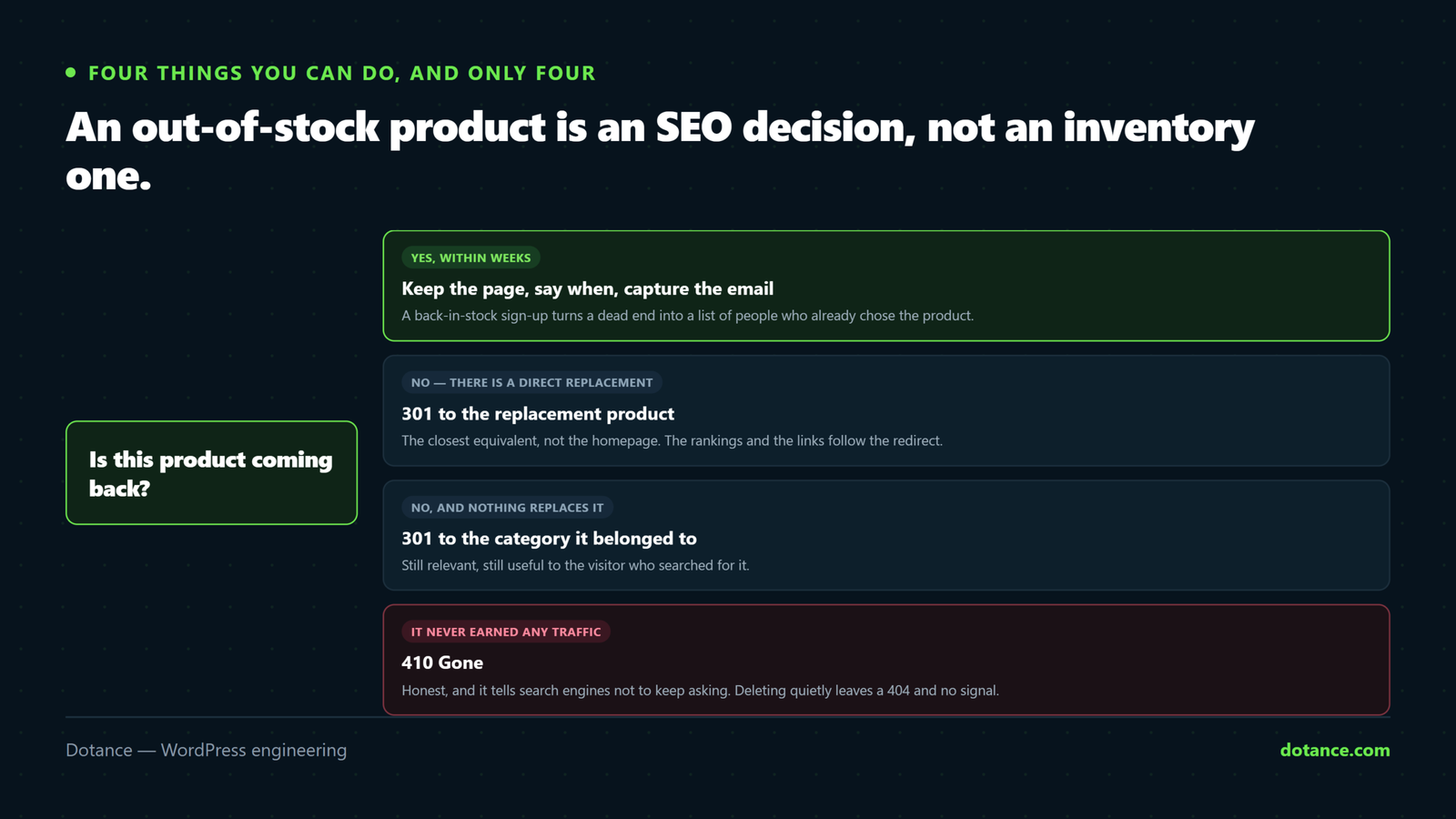
There are four things you can do with the page of a WooCommerce out of stock product, and only four. The inventory checkbox is not one of them — it changes the catalogue, not the URL.
| Option | What the URL returns | Right when |
|---|---|---|
| Keep it live | 200, marked unavailable | Coming back, or still useful to read |
| Hide from catalogue | 200, but orphaned | Almost never — see below |
| 301 redirect | 301 to a replacement or category | Discontinued, with somewhere sensible to send people |
| 410 Gone | 410 | Discontinued, no replacement, no traffic |
Notice that three of the four keep the page working in some form. A WooCommerce out of stock product page that ranks for its model number is an asset even while you cannot sell it — deleting it throws away the ranking and the link equity that came with it.
The question that decides it: will this product ever be purchasable again? Yes means keep the page. No means redirect or retire it. Everything else in this article follows from that one answer, and it is usually a question for the buyer rather than the developer.
Why “hide from catalogue” is the trap
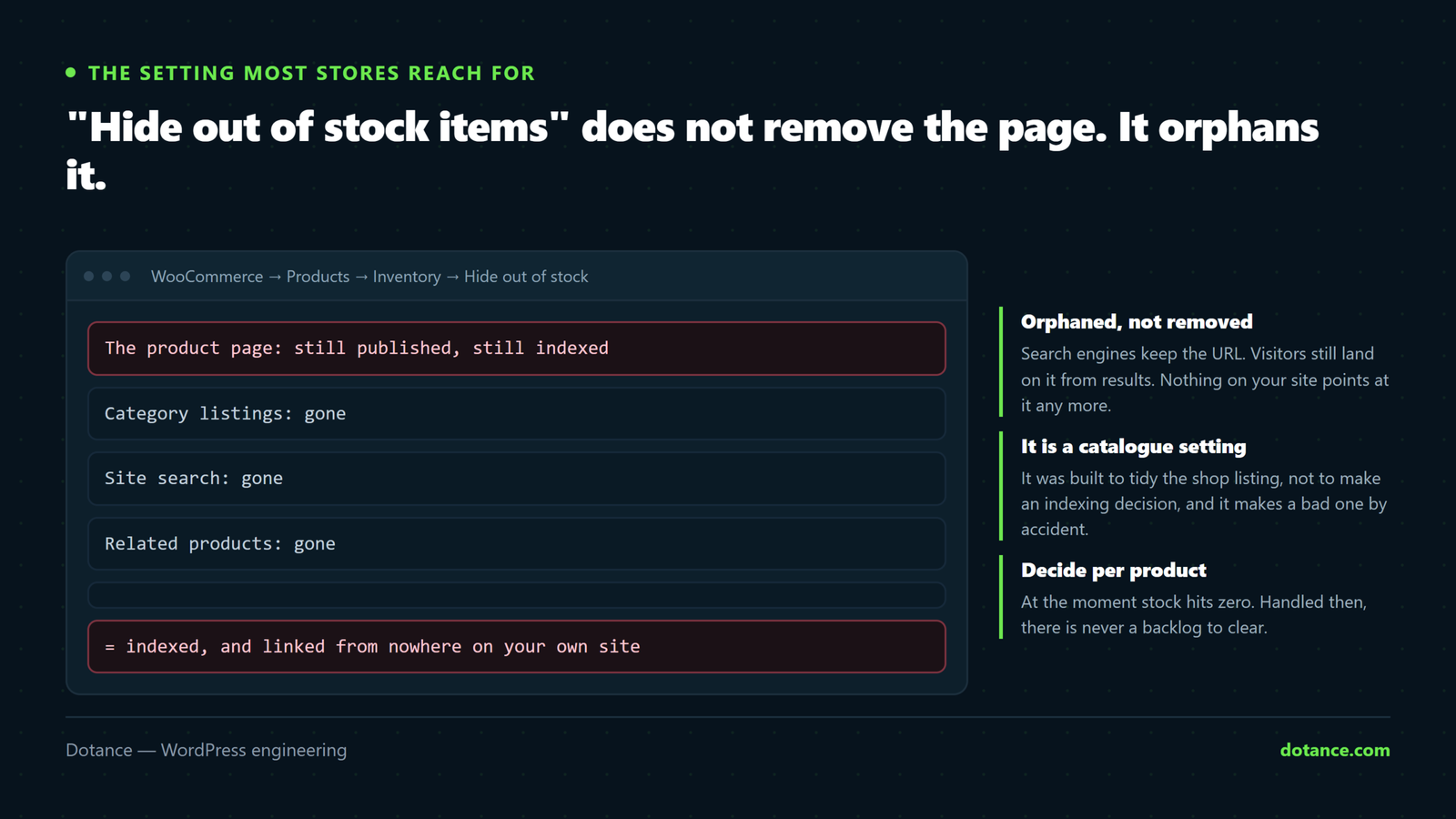
This is the setting most stores reach for, and it is the one that creates the problem. It lives in WooCommerce → Settings → Products → Inventory and reads as though it removes the product. It does not.
| What it does | What it does not do |
|---|---|
| Removes the product from shop and category listings | Remove the product page |
| Removes it from search results on your site | Deindex it from Google |
| Removes it from related-product blocks | Redirect anyone who arrives |
| Hides it from new visitors browsing | Hide it from anyone with the link |
The result is an orphan: a page with no internal links pointing at it, still in the index, still receiving search clicks, showing a visitor a product they cannot buy and no obvious next step. Multiply that by every WooCommerce out of stock item over three years and you have a substantial section of your site that exists only for search engines and disappointed customers.
Orphan pages also dilute how a crawler understands your site. Hundreds of unlinked, thin, unavailable product pages compete for the same crawl attention as the products you are actually selling — the wider version of that argument is in our technical SEO checklist.
Five WooCommerce out of stock fixes, by situation
| # | Situation | Do this |
|---|---|---|
| 1 | Back in stock within weeks | Keep live, state the date, capture emails |
| 2 | Discontinued, direct replacement exists | 301 to the replacement product |
| 3 | Discontinued, no replacement, had traffic | 301 to the parent category |
| 4 | Discontinued, never had traffic | 410 Gone, remove it properly |
| 5 | Seasonal | Keep live all year, say when it returns |
1. Temporarily unavailable: keep the page working
This is the most common WooCommerce out of stock case and the one people handle worst. The page already ranks, the visitor already wants the thing, and you are about to have it again.
- Leave the page live and visible in the catalogue.
- Say when it returns — “back in stock week commencing 14 October” beats “out of stock” enormously.
- Offer a back-in-stock email capture. This is the whole point.
- Link to two alternatives so the visit is not wasted.
- Consider backorders if your supply chain can honour them.
Step three turns a WooCommerce out of stock page from a dead end into a lead. A customer who leaves an email address is worth more than one who bounces, and you get to tell them the moment you can sell to them — which is a far warmer message than any campaign you could otherwise send.
2 and 3. Discontinued: redirect to the nearest useful thing
If a WooCommerce out of stock product is never coming back, the URL should take people somewhere they can still buy something. A 301 preserves most of the ranking signal and gives the visitor a route forward.
| Redirect to | When | Risk |
|---|---|---|
| The direct replacement product | A newer model of the same thing | None — this is the ideal case |
| The closest alternative | Similar product, different brand | Mild — the visitor may feel misled |
| The parent category | No single obvious replacement | Weaker signal, but honest |
| The home page | Never | Treated as a soft 404, helps nobody |
That last row is worth being firm about. Redirecting every dead product to the home page is the most common mistake in this whole area, and search engines treat it as the equivalent of a 404 with extra steps. If you cannot name a better destination than the home page, the right answer is the category.
4. Never had traffic: retire it properly
Not every WooCommerce out of stock product deserves a redirect. A variant that existed for three months and was never linked to or found is clutter, and a redirect rule for it is a rule somebody has to maintain forever.
# Was it ever found? Check before you decide.
# Search Console → Pages → filter by the URL
Zero impressions over twelve months means nobody is looking for it. Return 410, let it drop out, and keep your redirect map short enough that the next developer can read it.
5. Seasonal: leave it alone
Seasonal stock is the case where hiding hurts most. A Christmas product hidden in January has to re-earn its ranking every autumn. Keep it live all year with a clear “available from October” message. The page accumulates history instead of resetting, and you arrive at the season already ranking.
Finding every WooCommerce out of stock page you have
Most stores have no idea how many WooCommerce out of stock pages they are carrying. Products remain posts even after an HPOS migration — that change affects orders only — so one query answers it:
wp db query "SELECT p.post_name, p.post_title
  FROM wp_posts p
  JOIN wp_postmeta m ON m.post_id = p.ID
  WHERE p.post_type = 'product'
    AND p.post_status = 'publish'
    AND m.meta_key = '_stock_status'
    AND m.meta_value = 'outofstock'
  ORDER BY p.post_date DESC;"
Run it, then cross-reference the list against Search Console impressions. That pairing gives you the only two facts you need per URL: is it coming back, and does anyone look for it. Everything else is a judgement you can now make in a few seconds each.
Do it in batches, oldest first. A store with four hundred orphaned products does not need a project. Sort by date, handle the oldest fifty, and add the decision to your process so the backlog never rebuilds.
Keep the structured data honest
Your WooCommerce out of stock status is published in your structured data in your structured data, and it should match reality. The vocabulary has a value for each case:
| Availability value | Use for |
|---|---|
InStock | Purchasable now |
OutOfStock | Temporarily unavailable |
BackOrder | Orderable, ships later |
PreOrder | Not yet released |
Discontinued | Gone for good, page still live |
Marking a WooCommerce out of stock item as InStock to keep a rich result is a bad idea on two counts. It is a structured-data policy violation, which risks losing rich results across the whole site, and it sends customers to a product they cannot buy — so the click you gained is a complaint you now have to handle.
The definitions are at schema.org’s ItemAvailability, and the values are worth checking rather than guessing, because plugins vary in which ones they emit.
What the page itself should say
The technical half of a WooCommerce out of stock decision is only half of it. The other half is what a person reads when they arrive, and most stores say the least useful possible thing: two words in grey.
| Typical | Better | Why |
|---|---|---|
| “Out of stock” | “Back in stock w/c 14 October” | A date is a reason to return |
| No alternatives | Two named alternatives | Salvages the visit |
| No email capture | “Email me when it is back” | Turns a bounce into a lead |
| Price hidden | Price still shown | People are comparing, not only buying |
| Reviews hidden | Reviews still visible | The content that ranks the page |
| “Discontinued” | “Replaced by the X200 →” | A route forward, not a full stop |
The price and reviews rows surprise people. Hiding them on a WooCommerce out of stock page strips out most of what made the page worth ranking, so the page’s position slides further than the unavailability alone would cause. Leave the content intact and change only the buy button.
The date row is the highest-value change of the six. “Out of stock” tells a visitor to go elsewhere; a specific date tells them to wait, and gives your email capture something concrete to promise. If you genuinely do not know the date, say that honestly — “expected within four weeks, leave your email and we will confirm” is still better than silence.
Doing this on a store with thousands of products
Everything above is straightforward on a hundred WooCommerce out of stock products and needs a different shape on ten thousand. At that scale you are setting rules rather than making individual decisions.
| Rule | Applies to | Action |
|---|---|---|
| Unavailable under 90 days | Most of the list | Leave alone entirely |
| Unavailable over 12 months, zero impressions | The long tail | Bulk 410 |
| Unavailable over 12 months, real impressions | A small, valuable set | Decide individually |
| Product line retired | Whole categories | One pattern redirect to the new line |
| Seasonal, tagged as such | Predictable | Exempt from every rule |
The third row is where the value is, and it is usually tiny — a few dozen URLs out of thousands that still pull search traffic despite being unbuyable for a year. Those deserve a human decision each. Everything else can be handled by rule, which is what makes a WooCommerce out of stock backlog tractable rather than a month of work.
Tag seasonal products explicitly so the rules skip them. The alternative is an automated cleanup that quietly retires your Christmas range every February, which is the sort of thing nobody notices until October.
Where this goes wrong
| The mistake | What happens | Do this instead |
|---|---|---|
| “Hide out of stock items” as a policy | Hundreds of orphan pages | Decide per product |
| Deleting discontinued products | 404s, lost rankings, lost links | 301 to a replacement or category |
| Redirecting everything to the home page | Treated as a soft 404 | Category at worst |
| Hiding seasonal products off-season | Re-earning the ranking every year | Keep live, state the return date |
| Faking availability in schema | Policy risk and angry customers | Mark it accurately |
| Hiding a parent because one variation sold out | Losing a whole product’s traffic | Disable the variation only |
| No back-in-stock capture | Demand you never hear about | Capture the email every time |
The variations row catches larger stores in particular. One size selling out should never remove the product; it should grey out that option. If your theme or a plugin hides the parent when any variation is unavailable, that is a bug worth fixing before anything else here — it is silently removing sellable products from your catalogue.
Make it a process, not a cleanup
Handle a WooCommerce out of stock product at the moment stock hits zero and there is never a backlog to clear.
| Trigger | Decision | Who |
|---|---|---|
| Stock hits zero | Returning or not? | Whoever buys stock |
| Not returning | Name the replacement | Same person |
| Replacement named | Add the 301 | Whoever maintains the site |
| No replacement, no traffic | 410 and remove | Same |
| Quarterly | Re-run the query, catch strays | Same |
Five rows, and no WooCommerce out of stock backlog ever forms. The reason stores end up with hundreds of stranded pages is never that somebody decided badly — it is that nobody was asked to decide at all, so the default setting decided for them.
Worth checking the customer-facing side too. A visitor landing on a WooCommerce out of stock page with no alternatives and no email capture is an abandoned session you paid to acquire, which makes this part of the same conversation as reducing cart abandonment and checkout optimisation.
Knowing whether it worked
Three numbers tell you whether the effort paid back, and none of them needs a new tool.
| Measure | Where | What good looks like |
|---|---|---|
| Back-in-stock sign-ups | Your email platform | Any number above zero — it was zero before |
| Soft 404s reported | Search Console coverage | Falling, as redirects replace dead ends |
| Orphan product pages | Re-run the stock query | Shrinking quarter on quarter |
The first row is the one to watch, because it converts. A WooCommerce out of stock page that collects fifty email addresses over a quarter has given you fifty people who told you exactly what they want to buy, and a restock email to that list outperforms almost anything else you could send.
Frequently asked questions
Does a WooCommerce out of stock product hurt my rankings?
A WooCommerce out of stock page tends to slip while it is unavailable, because engagement drops. It does not drag the rest of the site down. Hundreds of orphaned, thin, unlinked pages can dilute how your site is understood, which is a different and more gradual problem.
Should I noindex out of stock products?
Not for temporarily unavailable items. Noindexing a WooCommerce out of stock product throws away a ranking you will want back in three weeks. For permanently discontinued products with no replacement, a 410 is cleaner than a noindex that leaves the page live forever.
Is it better to allow backorders?
If you can genuinely honour them, yes. It keeps the product purchasable, keeps the page fully functional, and the schema value exists for exactly this. If your lead times are unpredictable, do not — a late order is worse than a delayed sale.
What about products out of stock for years?
They are discontinued, whatever the inventory system says. Apply fix two, three or four. A WooCommerce out of stock page that has been unavailable for two years is not temporary and treating it as such helps nobody.
Should the product stay in my sitemap?
Yes while it is temporarily unavailable, because you want it crawled and ready when it returns. Remove it when you retire it with a 410 — a sitemap listing a WooCommerce out of stock URL you have deliberately killed is a contradictory signal.
Will redirects slow my site down?
A few hundred, no. Thousands of rules evaluated on every request, measurably — which is another argument for using 410 on products nobody searches for rather than redirecting everything.
Can I automate the decision?
Partly. You can automate finding them and automate the 410 for zero-traffic products. Naming the right replacement is a judgement about your catalogue that no rule will make well.
Does hiding out of stock items speed up my shop?
Marginally, by shortening category queries — hiding WooCommerce out of stock items is not a speed strategy. It is nowhere near the top of the list — the things that actually matter are in speeding up a slow WooCommerce store, and none of them are inventory settings.