You updated to WordPress 7.1, opened a post, and a block that has worked for three years is now a grey rectangle with an error, or unstyled, or simply inert. Meanwhile the published page renders it beautifully. This guide explains why custom blocks broken after 7.1 behave that way, and walks the three fixes in the order that finds the cause fastest.
Why the iframe leaves custom blocks broken
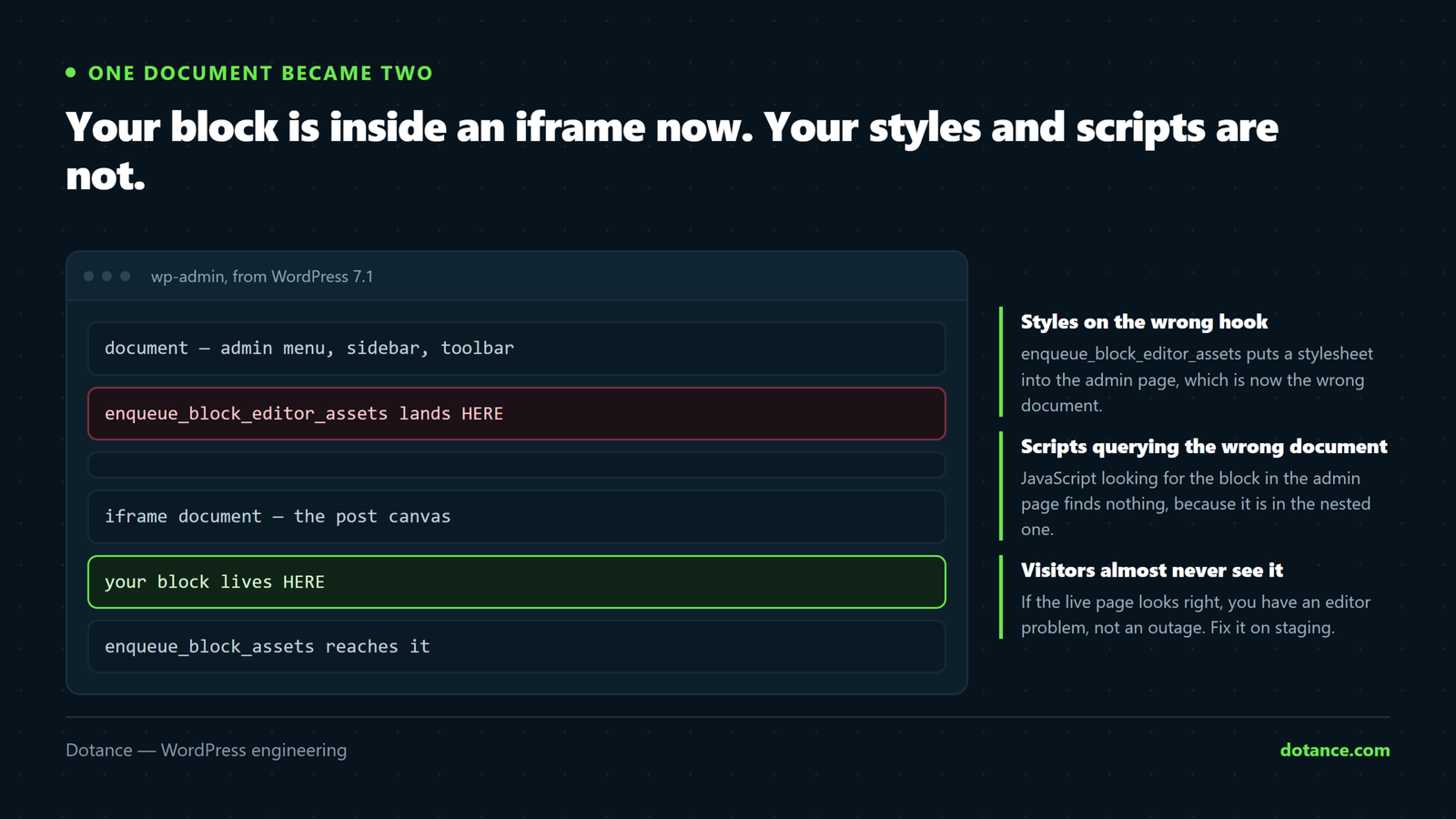
Before 7.1, the block editor drew your post into the same HTML document as the rest of wp-admin. Your block, the sidebar, the admin menu — one document, one stylesheet cascade, one document object.
From 7.1 the canvas is an iframe: a complete, separate document nested inside the admin page. WordPress did this for good reasons. Media queries finally reflect the real canvas width, and admin styles stop bleeding into your content preview.
But an iframe is a boundary. Styles do not cross it unless something puts them on the other side, and document inside the admin page is no longer the document your block lives in. Every instance of custom blocks broken by this release traces back to one of those two facts.
The tell: if the block is correct on the published page and wrong in the editor, the block’s own code is fine. Something about how the editor is being fed is wrong.
Match your symptom to its cause
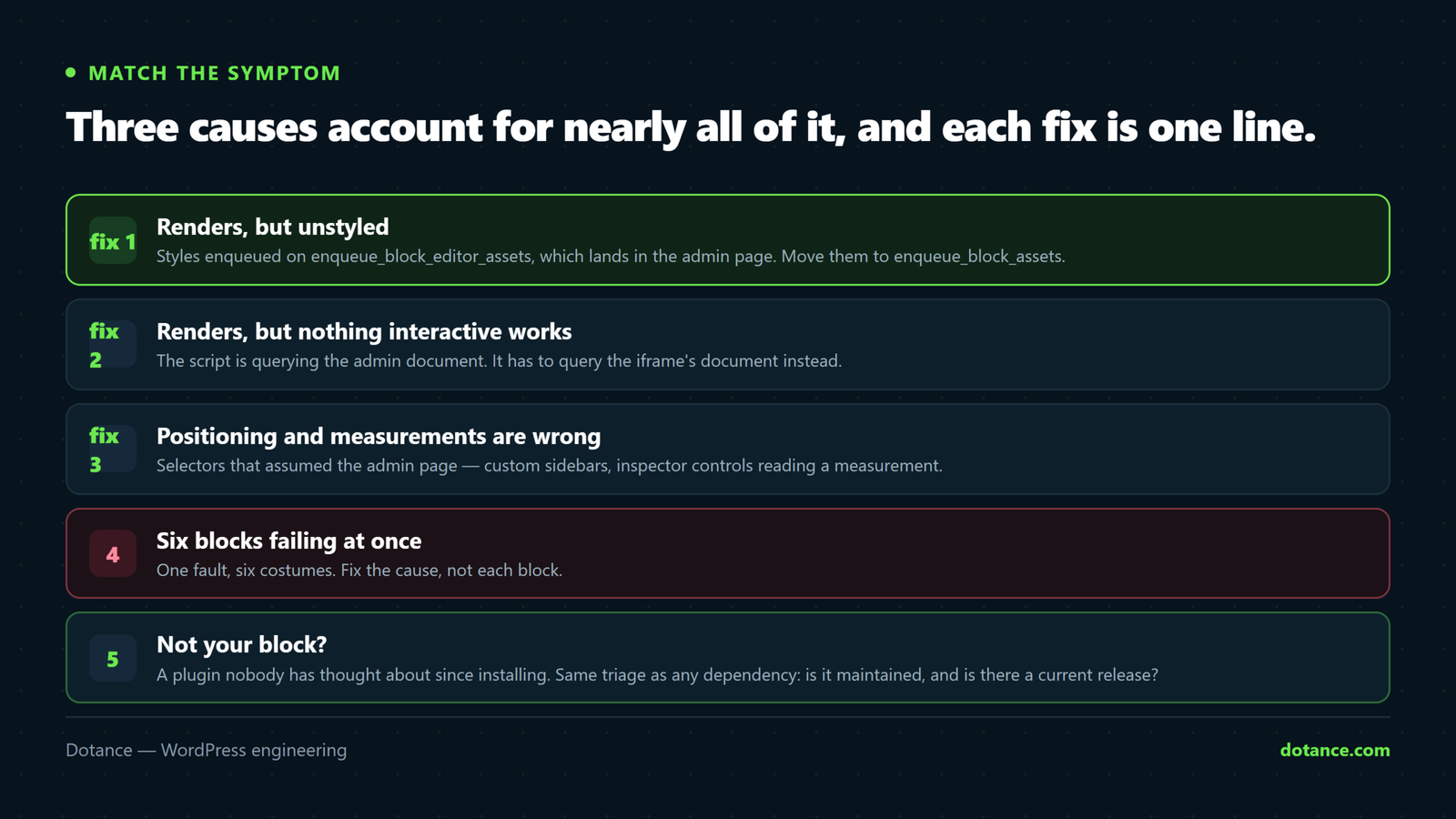
| What you see in the editor | Almost certainly | Go to |
|---|---|---|
| Block renders, but unstyled | Styles on enqueue_block_editor_assets | Fix 1 |
| Block renders, but nothing interactive works | Script querying the parent document | Fix 2 |
| “This block has encountered an error” | A script threw; usually a null from a failed query | Fix 2 |
| Block is correct, a sidebar panel is misplaced | Positioning against the wrong document | Fix 3 |
| Fonts fall back to Times | Font CSS never reached the iframe | Fix 1 |
| Also wrong on the live site | Not the iframe. A different problem | See below |
That last row matters. If the front end is also wrong, stop reading this and check whether the block’s render_callback or its saved markup changed — the iframe cannot touch published output. Our guide to diagnosing a fatal is the better starting point there.
Fix 1 — styles enqueued on the wrong hook
This is the single most common reason for custom blocks broken after the upgrade, and the fix is one word.
enqueue_block_editor_assets puts a stylesheet into the admin page. That used to be where your block was. It no longer is. enqueue_block_assets puts it into both the front end and the iframe, which is where the block is now.
# Before — editor styles that no longer reach the block
add_action( 'enqueue_block_editor_assets', function () {
    wp_enqueue_style( 'my-blocks-editor', get_stylesheet_directory_uri() . '/blocks.css' );
} );

# After — reaches the iframe and the front end
add_action( 'enqueue_block_assets', function () {
    wp_enqueue_style( 'my-blocks', get_stylesheet_directory_uri() . '/blocks.css' );
} );
If you genuinely need editor-only styling — a dashed outline round an empty block, say — keep a second, small stylesheet and guard it:
add_action( 'enqueue_block_assets', function () {
    if ( ! is_admin() ) { return; }   # editor only
    wp_enqueue_style( 'my-blocks-editor-only', get_stylesheet_directory_uri() . '/blocks-editor.css' );
} );
Registering a block through block.json avoids the question entirely. style goes to both contexts, editorStyle to the editor, and WordPress handles the iframe for you.
{
  "apiVersion": 3,
  "name": "mytheme/feature-card",
  "style": "file:./style.css",
  "editorStyle": "file:./editor.css"
}
Set apiVersion to 3. It is what tells WordPress the block is iframe-ready. A block still declaring version 1 or 2 gets compatibility shims that are being wound down, and shims are not a plan.
Fix 2 — scripts querying the wrong document
The second cause of custom blocks broken in 7.1 is JavaScript that goes looking for the block and finds nothing, because it is searching the admin page rather than the iframe.
# Returns null in 7.1 — the block is not in this document
const el = document.querySelector( '.my-block' );

# The editor canvas, when it exists
const canvas = document.querySelector( 'iframe[name="editor-canvas"]' );
const doc    = canvas ? canvas.contentDocument : document;
const el     = doc.querySelector( '.my-block' );
That works, and it is still the wrong instinct. The better answer is not to query the DOM at all. Inside a block’s edit function, React gives you a ref, and a ref is correct in any document:
import { useRef, useEffect } from '@wordpress/element';

export default function Edit( { attributes } ) {
    const ref = useRef();

    useEffect( () => {
        // ref.current is the real node, whatever document it lives in
        if ( ref.current ) { ref.current.classList.add( 'is-ready' ); }
    }, [] );

    return <div ref={ ref } className="my-block">{ attributes.title }</div>;
}
If your block needs the canvas document for something legitimate — measuring, or attaching a listener — use the hook WordPress provides rather than reaching for the iframe by hand. useRefEffect from @wordpress/compose and the __unstableEditorStyles family exist precisely so block authors stop guessing.
Fix 3 — selectors that assumed the admin page
Third, and rarer among custom blocks broken this way: code that positions something relative to the editor, or reads a measurement from it. Custom sidebars, inspector controls that draw a preview, review tools that highlight a paragraph.
These are not broken in the sense of throwing. They are broken in the sense of being fifty pixels out, or measuring a width that belongs to the admin page rather than the canvas.
# Wrong: the admin page's width, not the canvas's
const width = document.body.clientWidth;

# Right: ask the canvas
const canvas = document.querySelector( 'iframe[name="editor-canvas"]' );
const width  = canvas ? canvas.contentWindow.innerWidth : window.innerWidth;
If the code is a third-party plugin’s, do not patch it. Update it, or replace it. Patching someone else’s editor integration is a commitment you will still be honouring in two years.
Proving it is actually fixed
Three checks, in this order, on staging, before you call the custom blocks broken list closed.
- Open a post containing the block. It should render and be styled.
- Open the browser console and confirm it is clean — a block can look right while quietly throwing on every keystroke.
- Change something in the block, save, and load the published page. Editor-correct and front-end-correct are two separate claims.
Then check the block still validates, because an editor error and a block-validation error look similar and are not the same thing:
# Any post whose content no longer matches its block definitions
wp post list --post_type=post --format=ids | xargs -n1 -I{} \
  wp eval 'echo has_blocks( get_post( {} )->post_content ) ? "" : "{} has no blocks\n";'
That is a different failure from custom blocks broken by the iframe: a validation error means the saved markup no longer matches what the block’s save function now produces. That is a versioning problem, not an iframe one, and it needs a block deprecation rather than a hook change.
When the custom blocks broken are not yours
Plenty of sites carry custom blocks broken by 7.1 that came from a plugin nobody has thought about since installation. The triage is the same one we use for any dependency.
| Situation | Do this |
|---|---|
| Vendor shipped a 7.1 fix | Update. Read the changelog first |
| Vendor is active, no fix yet | Open a ticket with your WordPress and plugin versions |
| Last updated over 18 months ago | Treat it as abandoned. Plan the replacement |
| The block is used on two pages | Rebuild those two pages with core blocks and remove it |
| The block is used on two hundred pages | Budget properly. This is a project, not a fix |
Counting first is what keeps this proportionate. Before deciding anything, find out how many posts actually use the block:
wp db query "SELECT COUNT(*) FROM wp_posts
  WHERE post_status = 'publish'
  AND post_content LIKE '%wp:vendor/their-block%';"
We have had that number come back as 3 often enough to recommend running it before any meeting about it. Our note on building versus buying covers the same maths from the other direction.
A worked example: one block, three faults
Abstract advice is easy to nod at and hard to apply, so here is a shape of custom blocks broken that we have now seen several times. A theme carries a “feature card” block — an icon, a heading, some text and a link. After the upgrade it appears in the editor as a bare stack of text with no card, no icon, and clicking the icon picker does nothing.
Three separate faults, all in the same block, all typical of custom blocks broken by the iframe.
Fault one: the card styling never arrived
The theme enqueued blocks.css on enqueue_block_editor_assets. In the admin page, that stylesheet is present and doing nothing, because the element it styles is one document away. Moving it to enqueue_block_assets restored the card, the padding and the border in a single deploy.
Worth noticing what this fault is not: nothing threw, nothing logged, and the front end was perfect throughout. Nothing in the site’s error log would ever have mentioned it.
Fault two: the icon was drawn by a script that could not find its target
The block rendered an empty <span class="fc-icon"> and a script filled it by querying the document on load. Post-7.1 that query returns null, the script exits early, and the icon is simply never drawn. No error, because the code politely checked for null before using it — which is good practice and, here, the reason it failed silently.
Rewriting the icon as part of the block’s own edit return removed the script entirely. That is the theme of most of these repairs: the iframe does not just break DOM-walking code, it exposes that the DOM-walking was never the right approach.
Fault three: the picker positioned itself against the wrong window
The icon picker opened as an absolutely positioned panel, placed using coordinates read from the admin document. It opened off-screen. Switching to Elementor-free core components — Popover from @wordpress/components — meant WordPress handled the positioning, in whichever document the block happens to be in.
The pattern across all three: every fault came from code that treated the editor as a page it could reach into. The version that survived 7.1 is the version that asked WordPress for things instead.
How to build blocks so this does not recur
WordPress will keep changing the editor, and each change finds some custom blocks broken. The blocks that sail through those changes share four habits, and adopting them is cheaper than fixing custom blocks broken by each release in turn.
| Habit | Why it survives |
|---|---|
Register through block.json | WordPress decides where assets go, not you |
apiVersion: 3 | Declares the block iframe-aware; no shims |
Refs instead of querySelector | A ref is correct in any document |
| Core components for UI | Popovers and modals position themselves |
| Deprecations kept, never deleted | Old saved markup keeps validating |
| One stylesheet for both contexts | Editor and front end cannot drift apart |
None of this is new advice. It is the advice the block handbook has given since the block editor shipped; 7.1 is simply the release where ignoring it stopped being free. If you are weighing whether to modernise a block library or replace it, our note on builders versus a custom theme covers the same trade-off at the level of a whole site.
One practical suggestion: fix the blocks you actually use. Run the count query above across your whole library first. On the last site we did this for, nineteen registered blocks turned out to be eleven in use, four used once each, and four used nowhere at all — and four of those “custom blocks broken” were deleted rather than repaired.
Where this goes wrong
| Mistake | What happens |
|---|---|
| Rolling WordPress back and stopping there | The problem waits for you, plus a version of core that stops getting patched |
Adding !important until the editor looks right | The stylesheet still is not in the iframe. You have styled the parent |
Reaching into contentDocument everywhere | Works until WordPress renames the iframe. Use refs |
| Fixing the editor, never checking the front end | Half the job, and the half nobody sees |
| Patching a vendor’s plugin in place | The next update overwrites it, at the worst moment |
| Debugging on live | Every reload is in front of visitors |
If several blocks are affected at once, resist fixing them one at a time. Almost always there is a single shared enqueue or a single bundled script, and the one change clears all of them. Our safe-update routine exists to catch exactly this before it reaches production.
Triage when several blocks fail at once
If one block misbehaves, fix the block. If your custom blocks broken list runs to six, fix the cause. If six do, you almost certainly have one fault wearing six costumes, and fixing them individually is five wasted afternoons.
Work from the shared thing outward. Are all the custom blocks broken registered by the same plugin or theme? Do they share an enqueue? Do they load one bundled JavaScript file? On a theme that registers its blocks in a loop, a single wrong hook name takes down every block in the loop, and one deploy brings them all back.
# Which of your blocks share an asset handle
wp eval '
foreach ( WP_Block_Type_Registry::get_instance()->get_all_registered() as $n => $b ) {
    if ( 0 === strpos( $n, "core/" ) ) { continue; }
    printf( "%-34s style:%-22s script:%s\n", $n,
        implode( ",", (array) $b->style_handles ),
        implode( ",", (array) $b->script_handles ) );
}'
A column of identical handles is the answer. Change it once.
The opposite pattern is worth naming too. If your custom blocks broken are spread across three vendors with nothing in common, you are not looking at one fault — you are looking at three plugins that each skipped the same modernisation, which says something about how the site’s dependencies were chosen. That is a maintenance conversation, and our maintenance checklist is where it starts.
Common questions about custom blocks broken in 7.1
Will visitors see my custom blocks broken?
Almost never. Published pages render from saved markup and the front-end stylesheet, neither of which the iframe touches. If the live page is also wrong, you are looking at a different fault.
Should I roll back to 7.0?
Only to buy yourself a scheduled window in which to repair the custom blocks broken by the change. Rolling back leaves you on a release that will stop receiving security fixes, and it does not make the work smaller — see the 7.1 upgrade checks for how to time it properly.
How long does a typical fix take?
A single hook change is minutes. A handful of custom blocks broken the same way is still minutes, because it is one edit. A block whose JavaScript assumed the document throughout is an afternoon. A plugin with dozens of blocks and no maintainer is a replacement project — which is a decision, not a fix.
Is apiVersion 3 required?
Not strictly, and you should set it anyway. It declares the block iframe-aware and opts out of compatibility behaviour that is being removed over time.
Why did this work fine in the 7.1 beta?
Usually because the beta ran with a different plugin set, or a caching layer was serving an older editor bundle. Clear every cache before concluding anything about custom blocks broken by an upgrade.
Can I just disable the iframe?
Filters exist that appear to. Do not. You would be opting out of the direction the editor is going, and you would be doing it on a site whose next developer has no idea you did.
Is there a quick way to know if I am affected at all?
Open one post of each type in the editor. If every block renders and behaves, you have no custom blocks broken and nothing to do. The check takes two minutes and settles the question better than any audit of your codebase.
My blocks came from a page builder. Am I exposed?
No. Elementor, Divi and Bricks do not render inside the block editor canvas, so the iframe never touches them. Custom blocks broken by 7.1 means Gutenberg blocks specifically — the ones registered with register_block_type.
Do I need to fix blocks I no longer use?
Delete them instead. A registered block that appears on zero posts is not custom blocks broken, it is dead code that survived a tidy-up. Count first with the query above, then remove rather than repair.