Most WordPress sites have a cookie banner. Far fewer have one that does its job. On the sites we audit, the most common pattern is a neat banner at the bottom of the screen while Google Analytics, the Meta Pixel and a YouTube embed have already loaded behind it. The visitor has not chosen anything yet, and the tracking has already happened.
This guide covers the nine rules a WordPress cookie banner has to follow in 2026, in the order we check them, with commands to test your own site. It is written for site owners and developers, not lawyers. Laws differ by country and change over time, so treat this as a practical checklist and take legal advice for anything that matters to your business.
What a WordPress cookie banner actually has to do
In the EU, the ePrivacy rules say you need consent before storing or reading anything on a visitor’s device that is not strictly necessary for the service they asked for. The GDPR then sets the standard for that consent: freely given, specific, informed and unambiguous, and as easy to withdraw as to give. The UK’s PECR works the same way, and the ICO’s guidance on cookies is one of the clearest explanations.
In practice, that gives a WordPress cookie banner three jobs:
- Ask before anything optional loads. Analytics, advertising pixels, chat widgets, video and map embeds all wait.
- Offer a real choice. Accept, Reject and a way to choose by category, all equally easy.
- Remember and respect the answer, let the visitor change it, and keep a record that it was given.
A WordPress cookie banner does not have to ask about everything. Strictly necessary cookies, such as a login session, a shopping cart or the cookie that remembers the visitor’s consent choice itself, do not need consent. Everything else usually does.
The nine rules at a glance
| Rule | What goes wrong without it |
|---|---|
| 1. Block scripts until consent | Tracking runs before the visitor chooses |
| 2. Reject as easy as Accept | The banner pushes people to agree |
| 3. No pre-ticked boxes | Consent is not valid |
| 4. Let visitors change their mind | Withdrawing is harder than agreeing |
| 5. Keep a record of consent | No proof when someone asks |
| 6. Google Consent Mode v2 | Google Ads and Analytics lose European data |
| 7. Work with page caching | The banner breaks or scripts leak on cached pages |
| 8. The right banner per region | Europeans get opt-out, or Americans get a wall |
| 9. Accessible and fast | Keyboard users are stuck; the page gets slower |
1. Block scripts until the visitor consents
This is the rule most WordPress cookie banner setups break. Showing a banner is easy. Stopping every optional script until the visitor says yes is the hard part, and it is the part the law actually cares about.
There are two common ways to make a WordPress cookie banner block scripts. The plugin can rewrite known scripts so the browser does not run them, then switch them back on after consent. Or you load your tags through Google Tag Manager and let consent settings decide what fires. Either works, as long as nothing optional reaches the browser first. Embeds count too: a YouTube or Google Maps iframe sets cookies the moment it loads, so it should show a placeholder with a “Load video” button instead.
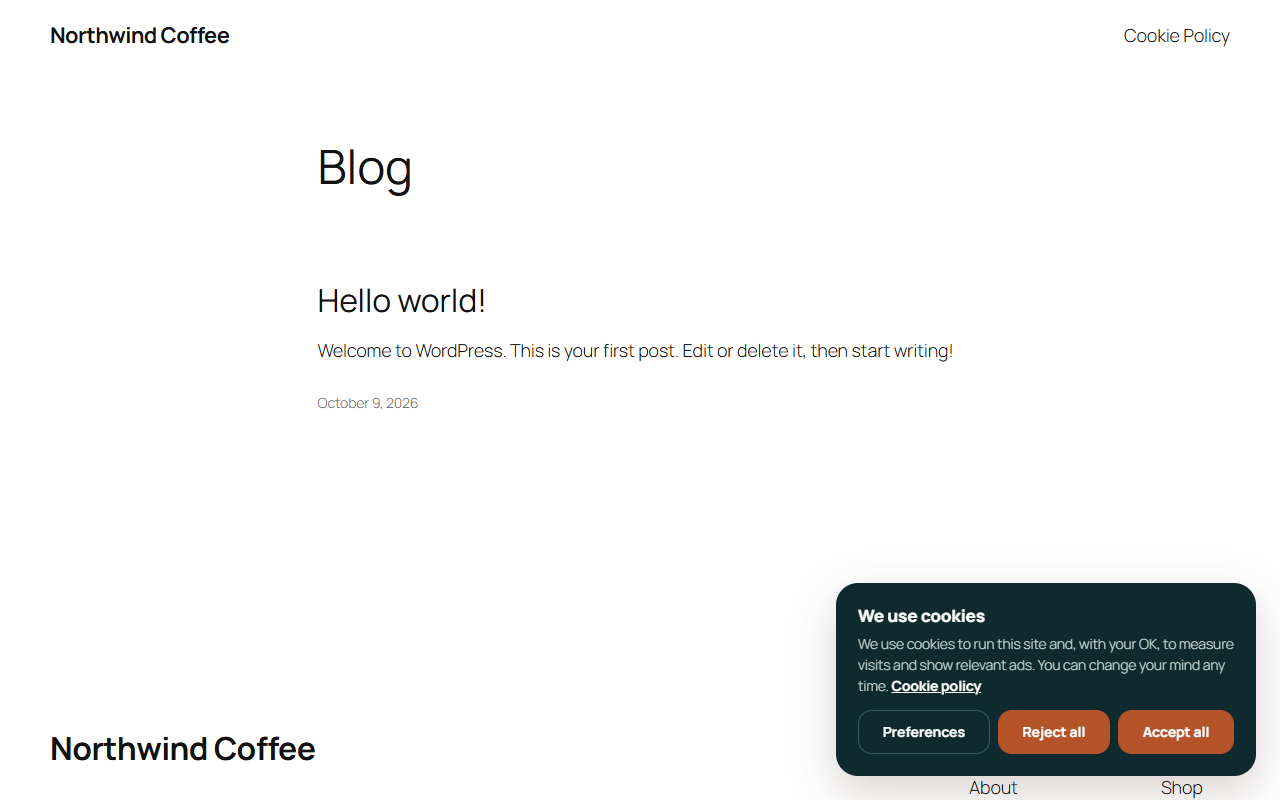
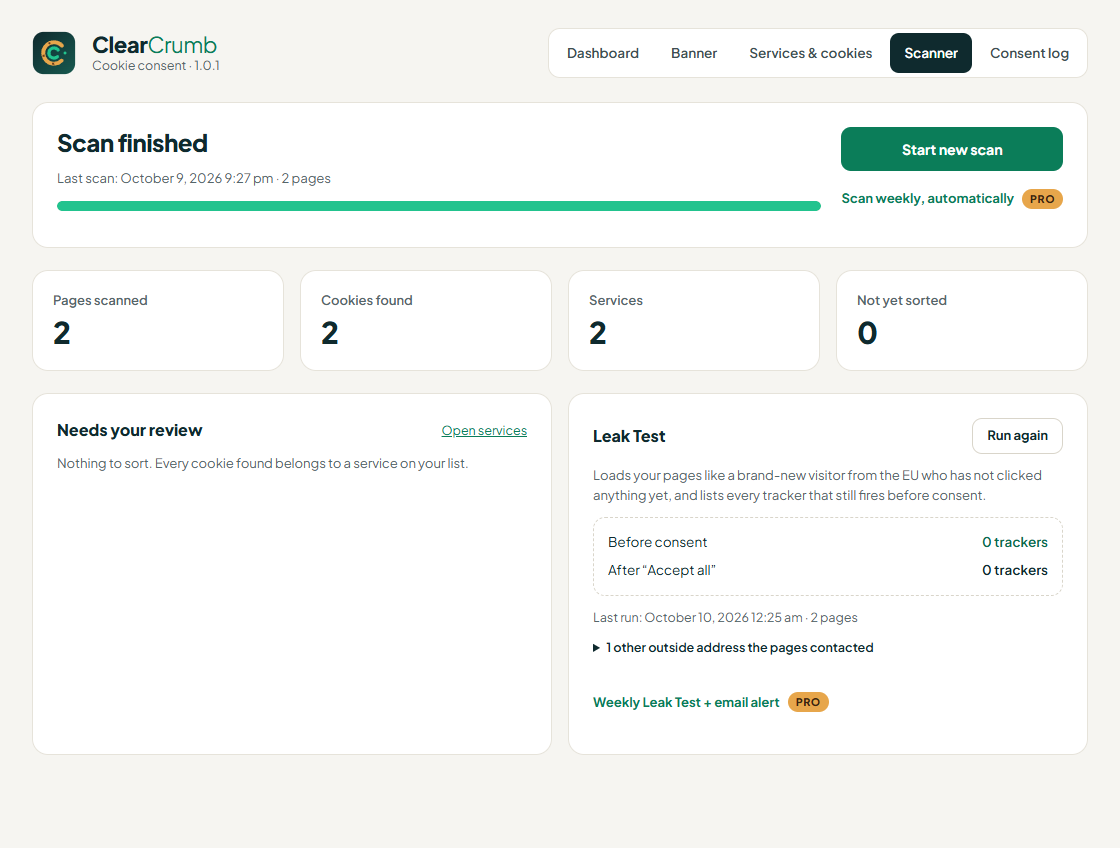
The only way to know whether your WordPress cookie banner blocks scripts is to test it. Open the site in a private window, do not touch the banner, and look at what has loaded. Some plugins now include this as a built-in check: ClearCrumb, a free cookie banner plugin on WordPress.org, has a leak test that lists what loads before consent and after it. You can do the same by hand with the commands in the testing section below.
2. Make Reject as easy as Accept
A WordPress cookie banner with a big green “Accept all” button and a small grey “Settings” link is not offering a fair choice. European regulators have been clear on this. In January 2022 the French regulator, the CNIL, fined Google €150 million and Facebook €60 million, largely because refusing cookies took more clicks than accepting them.
The European Data Protection Board’s cookie banner taskforce report lists the patterns regulators object to: no reject button on the first layer, deceptive colours and contrast, and pre-ticked boxes. The safe WordPress cookie banner design is simple. Put Accept and Reject on the first layer, give them the same size, style and weight, and add a third button for choosing by category.
3. No pre-ticked boxes, and clear categories
Since the Planet49 ruling at the EU’s Court of Justice in 2019, a pre-ticked box does not count as consent. Every optional category in your WordPress cookie banner should start switched off, and only the visitor should switch it on.
Most banners use four categories: necessary (always on), preferences, statistics and marketing. In your WordPress cookie banner, describe each category in a sentence a visitor understands, such as “Statistics: helps us see which pages are read, using Google Analytics.” Avoid vague labels like “Performance” that could mean anything. A cookie policy page that lists each service and its cookies backs this up, and good plugins keep that page up to date from their scan.
4. Let visitors change their mind
Withdrawing consent must be as easy as giving it. A WordPress cookie banner that disappears forever after the first click fails this test, because the visitor has no way back.
The usual fix is a small floating button or a “Cookie settings” link in the footer that reopens the preferences. When someone withdraws consent, the site should stop the optional scripts from then on and, where it can, remove the cookies they set. Ask your plugin for a shortcode or block so the link sits in the footer of every page, not only on the privacy policy.
5. Keep a record of consent
Under the GDPR you must be able to show that consent was given. For a WordPress cookie banner, that means a log of choices: when, what was accepted or refused, and which version of the banner text the visitor saw.
Keep the WordPress cookie banner log lean. You do not need names or full IP addresses; a random ID and a hashed or shortened IP are enough. Decide how long to keep records, a year or two is common, and make sure old entries are deleted automatically. Storing the log in your own WordPress database, rather than with a third-party service, keeps the data under your control and out of your list of processors.
6. Set up Google Consent Mode v2
If you use Google Analytics or Google Ads and have visitors from the European Economic Area, your WordPress cookie banner needs to talk to Google. Since March 2024, Google has required Consent Mode v2 signals for EEA traffic to keep features such as remarketing and full conversion measurement working.
Consent Mode works by sending Google the visitor’s choice through four settings: ad_storage, analytics_storage, ad_user_data and ad_personalization. The defaults should be “denied” until the visitor agrees. Google’s consent mode documentation explains basic and advanced modes. Most modern cookie banner plugins set the signals for you; check that yours sends all four, not only the two from the original version.
If your conversion numbers dropped after adding a banner, that is expected to some degree, because people who refuse are no longer counted in full. If they dropped to zero, something is wrong. Our guide to fixing broken tracking covers the usual causes.
7. Make the banner work with page caching
Page caching is where many WordPress cookie banner setups quietly fail. A caching plugin or your host saves one copy of each page and serves it to everyone. If the banner decides on the server which scripts to print, the cached copy can contain the scripts of whoever visited first, consent or not.
The fix is to make the decision in the visitor’s browser. The page is cached with every optional script switched off, and the banner switches scripts on in the browser after it reads the visitor’s own choice. Check your plugin’s documentation for your cache, whether that is LiteSpeed, WP Rocket, Cloudflare or your host’s own, and clear the cache after every banner change.
See whether a page is served from cache, and whether tracking is in the cached HTML
curl -sI https://yourdomain.com/ | grep -i -E "cache|age|x-litespeed|cf-cache-status"
curl -s https://yourdomain.com/ | grep -o -E "googletagmanager\.com/gtag|connect\.facebook\.net|fbq\(" | sort | uniq -c
# Tracking code in the HTML is fine only if it is disabled until consent (for example type="text/plain").
8. Show the right banner in each region
One WordPress cookie banner for the whole world is either too strict or not strict enough. Europe, the UK and Switzerland expect opt-in: nothing optional until the visitor agrees. Most US privacy laws, led by California’s, work the other way round: optional tracking can run, but visitors must be able to opt out of the sale or sharing of their data.
For US visitors, respect the Global Privacy Control signal. When a browser sends it, treat it as an opt-out, without asking. Several plugins detect the visitor’s region and show an opt-in banner in Europe and a lighter opt-out notice in the US. If yours cannot, the safe default is the European opt-in banner for everyone.
9. Make it accessible and fast
A WordPress cookie banner is the first thing every visitor meets, so it has to work for everyone. It should be reachable and usable with a keyboard alone, announced properly to screen readers, readable in contrast, and closeable without a mouse. A banner that traps keyboard focus can make the whole site unusable. Our guide to WordPress accessibility covers the wider checks.
Speed matters as well, because a WordPress cookie banner loads on every single page. Some banner plugins load a large script from a third-party server on every page, before anything else. Prefer one that loads a small script, deferred, from your own site, and that reserves space for the banner so the page does not jump. Layout shifts from late banners are a common cause of poor CLS scores.
How to test a WordPress cookie banner
Test your WordPress cookie banner from a visitor’s point of view, in a private window, with an empty cache. Do it after you set the banner up, after every plugin or theme update, and whenever you add a new tool to the site.
- Load the home page and do nothing. Open the browser’s developer tools and check the Application tab for cookies, and the Network tab for requests to analytics, ad and video domains. You should see none.
- Click Reject. Reload and browse a few pages. Still nothing optional should load.
- Open the preferences, accept statistics only, and check that analytics now loads but marketing tags do not.
- Reopen the banner from the footer link and withdraw consent. Optional scripts should stop on the next page.
- Check the consent log for the choices you just made.
List the cookies a page sets before any choice is made
curl -s -D - -o /dev/null https://yourdomain.com/ | grep -i "^set-cookie"
# Server-set cookies only. Scripts set most tracking cookies in the browser, so check developer tools too.
Where a WordPress cookie banner goes wrong, and the fix
| Symptom | Likely cause | Fix |
|---|---|---|
| Analytics records visits before anyone clicks | Scripts are not blocked, only the banner is shown | Turn on script blocking, or gate tags in Tag Manager |
| Banner shows again on every page | Consent cookie blocked, or cached with the wrong domain | Check the cookie domain and exclude the consent cookie from cache rules |
| Tracking loads for some visitors who refused | Server decides which scripts to print on a cached page | Decide in the browser; clear the cache |
| YouTube or Maps set cookies before consent | Embeds load as normal iframes | Use placeholders that load the embed on click |
| Google Ads conversions collapse in Europe | Consent Mode missing or only v1 signals sent | Send all four Consent Mode v2 signals |
| Keyboard users cannot leave the banner | Focus trapped or buttons not real buttons | Use a banner that supports keyboard and screen readers |
| Pages got slower after adding a banner | Large third-party script loaded first | Use a small, deferred, self-hosted banner script |
Which WordPress cookie banner plugin fits your site
Most sites are well served by a plugin rather than a hosted consent platform, because the banner, the scan and the log all stay on your own server. The differences that matter are how well a plugin blocks scripts, whether it copes with caching, and what it costs as you grow.
| Option | Type | Worth knowing |
|---|---|---|
| Complianz | Plugin, free and premium | Popular and thorough; many settings to work through |
| CookieYes | Plugin linked to a hosted app | Easy setup; the free plan has limits and data is handled in its web app |
| Cookiebot | Hosted consent platform | Scans and logs on its own servers; priced by site size |
| Borlabs Cookie | Premium plugin | Strong in German-speaking markets; no free version |
| ClearCrumb | Plugin, free on WordPress.org | Consent log in your own database, leak test, imports Complianz, CookieYes and Cookiebot settings |
Whichever WordPress cookie banner plugin you pick, run the tests above after setup. A banner plugin is only as good as its configuration, and every extra plugin is one more thing to keep updated, as our piece on WordPress plugin bloat explains. If your site also collects leads, the same consent thinking applies to your forms; see our guide to the WordPress contact form.
Frequently asked questions about a WordPress cookie banner
Does my WordPress site need a cookie banner?
Yes, in most cases. If you have visitors from the EU, the UK or Switzerland and use anything beyond strictly necessary cookies, such as analytics, ad pixels or video embeds, you almost certainly need one. A site with no optional cookies at all may not, but that is rare once Google Analytics or a YouTube video is added.
Is a WordPress cookie banner enough on its own?
No. The banner must also block optional scripts until consent, record the choice, and be backed by a cookie policy that lists the services you use. A banner that only shows a message does not meet the rules.
Can I use Google Analytics without a cookie banner?
Not for visitors in the EU or UK, in most cases. Google Analytics sets cookies that are not strictly necessary. With Consent Mode, Google can model some data from visitors who refuse, but you still need to ask first.
Do I need a reject button on the first layer?
European regulators expect Reject to be as easy as Accept, and a missing first-layer reject button is one of the patterns they have fined. Put Accept and Reject side by side, in the same style.
How long should I keep consent records?
Long enough to prove consent if asked, and no longer. A year or two is common. Set automatic deletion so old records do not pile up.
Will a cookie banner slow down my site?
It can. Choose a banner that loads a small, deferred script from your own site and reserves space on the page, and check your Core Web Vitals before and after.