★ Free theme

Consultation Booking — a WordPress theme for consultants who take bookings.

A free consultant WordPress theme for coaches, advisers and consultancy firms. Five ready-made Elementor pages, a booking button that opens your booking form in a popup, motion that points people at the next open time, and fonts served from your own site. GPL, and it works without any plugin.

5ready-made pages
0axe accessibility issues
WP 7.1tested up to
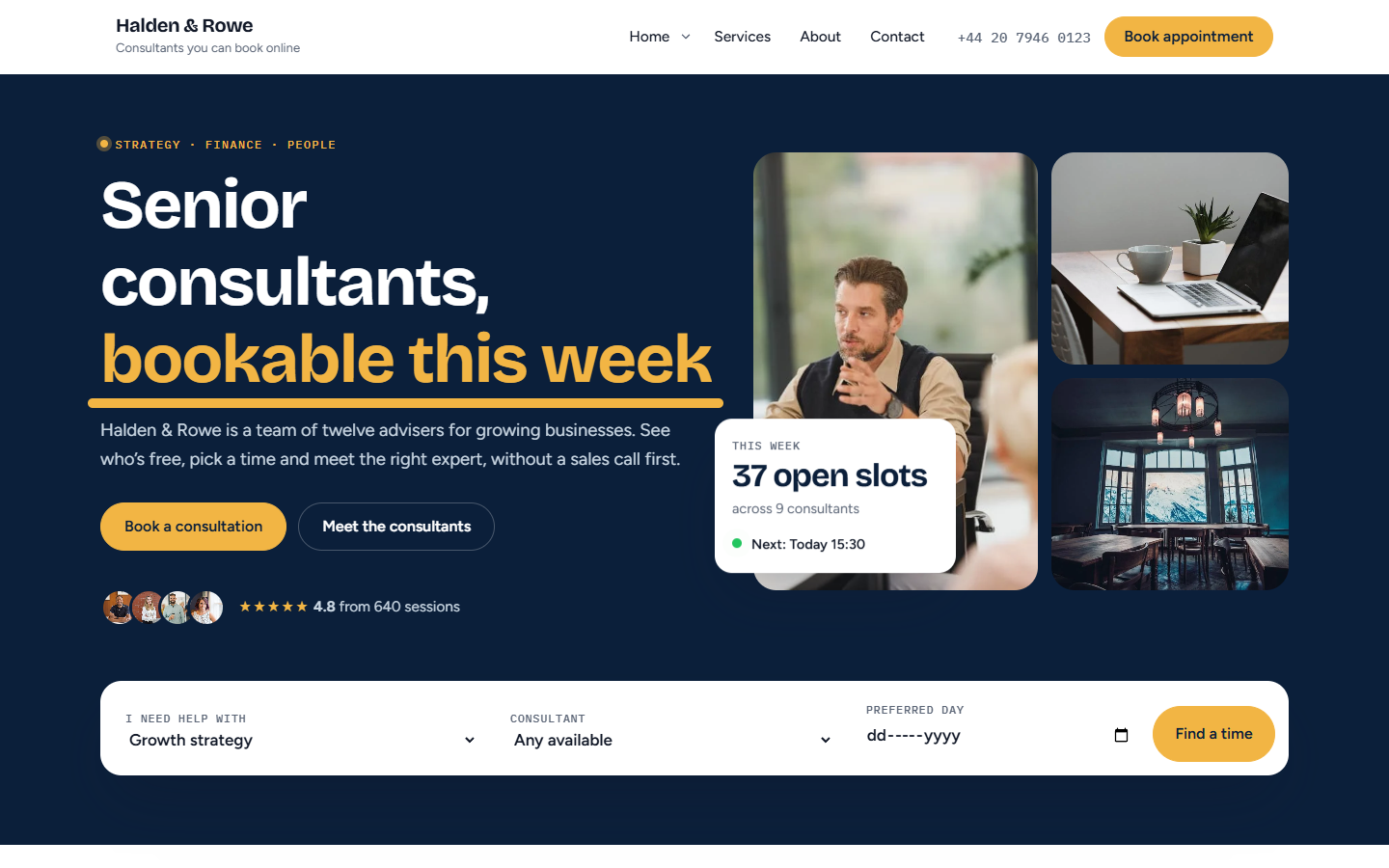
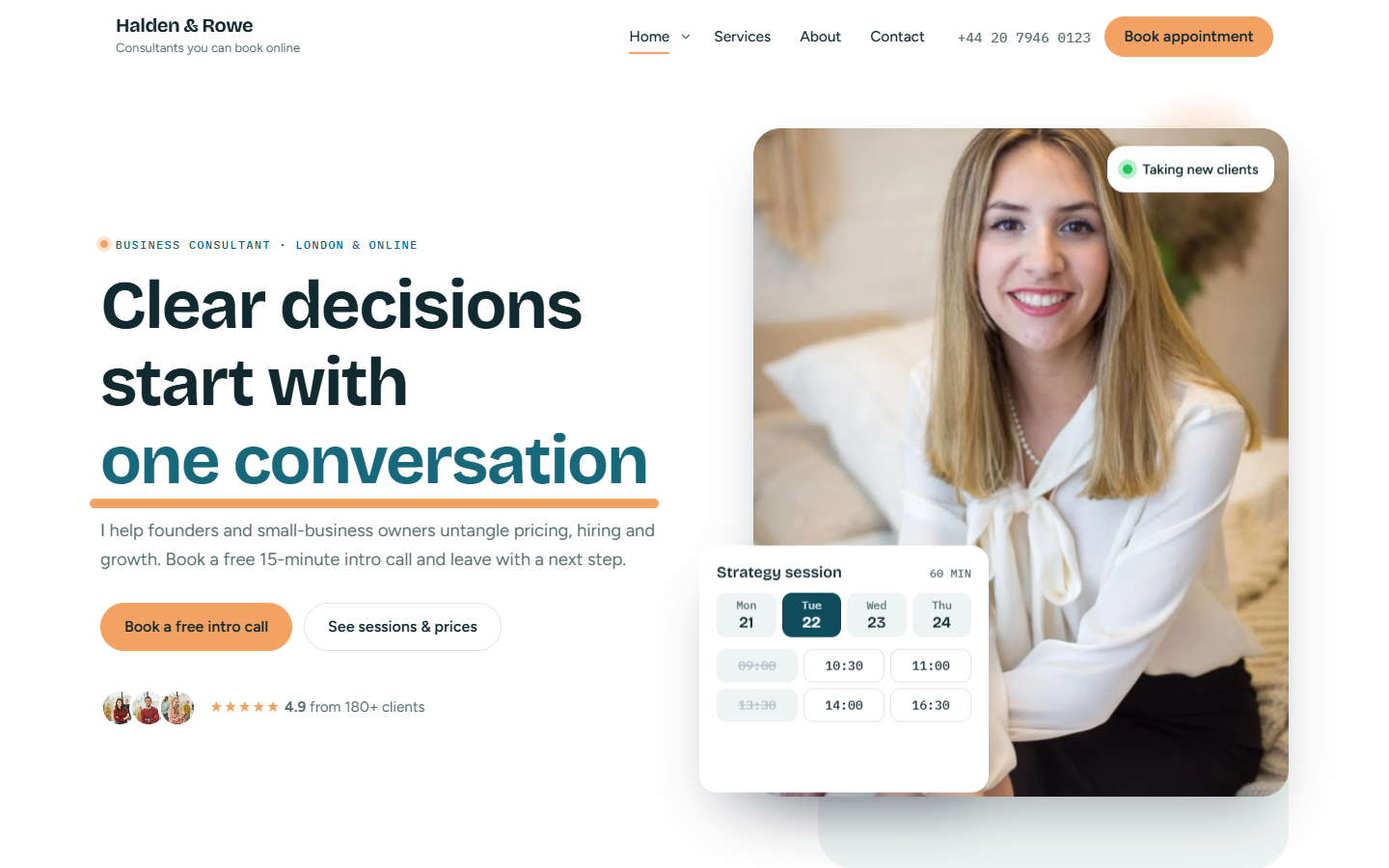
Consultant WordPress theme home page with a live booking slot card

Overview

What this consultant WordPress theme does.

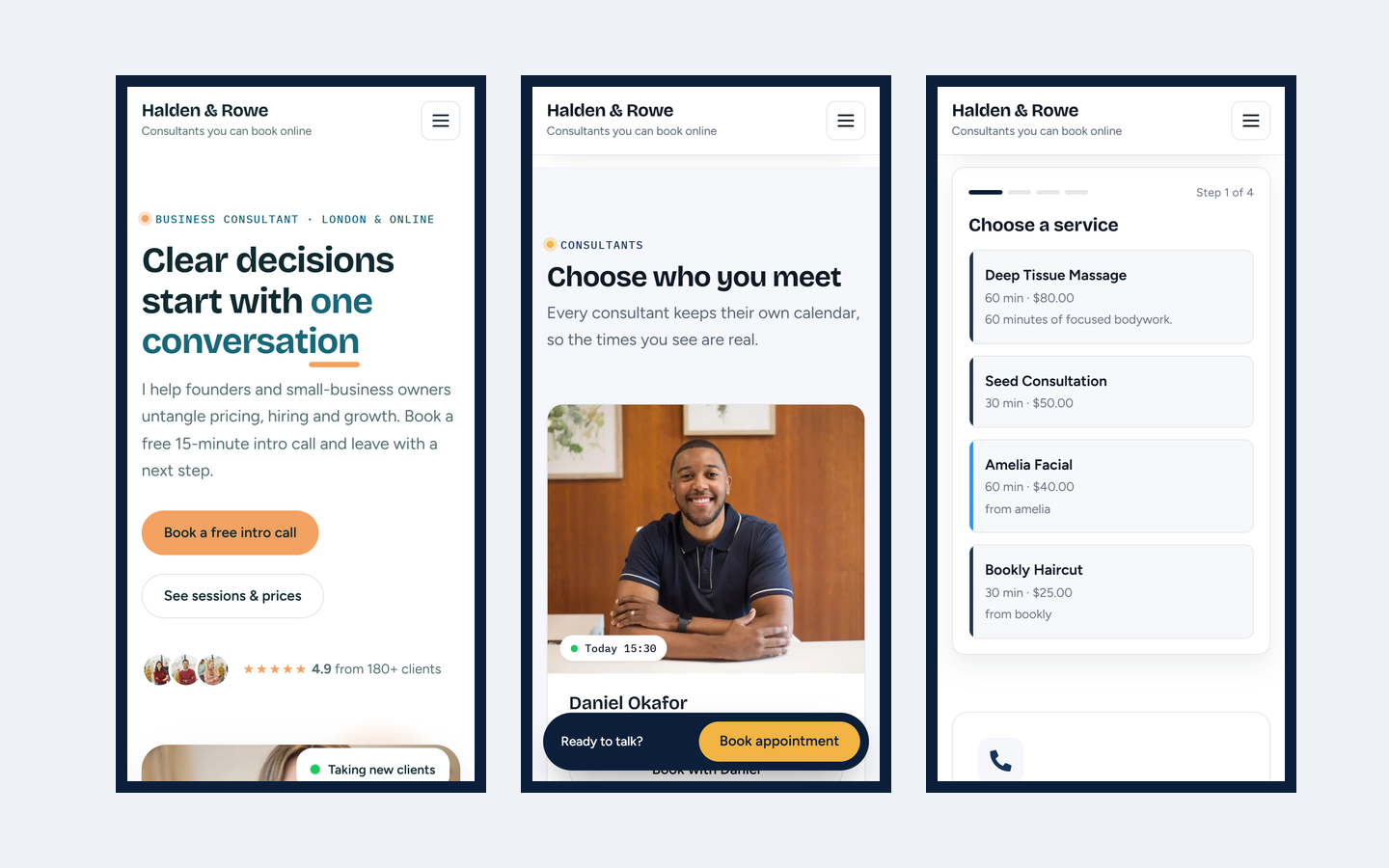
Consultation Booking is a free consultant WordPress theme built for one job: turning a visit into a booked session. Most consultant themes are a portfolio with a contact form bolted on. The visitor reads about you, then has to email to ask when you are free. Consultation Booking is built the other way round: every page leads to an open time, and the Book button is always one tap away, including a bar at the bottom of the screen on phones.

The theme itself stays small: a header with your booking button, a footer, a blog and full-width Elementor pages. The designed pages come from the free Elemance library, and the booking form comes from the free Bookance plugin. Leave either plugin out and the theme still works; the button simply links to your booking page instead of opening a popup.

Who it’s for

Who this WordPress booking theme is for.

Anyone who sells their time by the session. The pages of this consultant WordPress theme are written for consultants, but the booking flow works the same for any business that takes appointments.

Solo consultants and coaches

Home 1 is built around one person: your photo, your sessions and the next time you are free. Coaches, therapists, tutors and independent advisers can swap the copy and take bookings the same day.

Consultancy firms

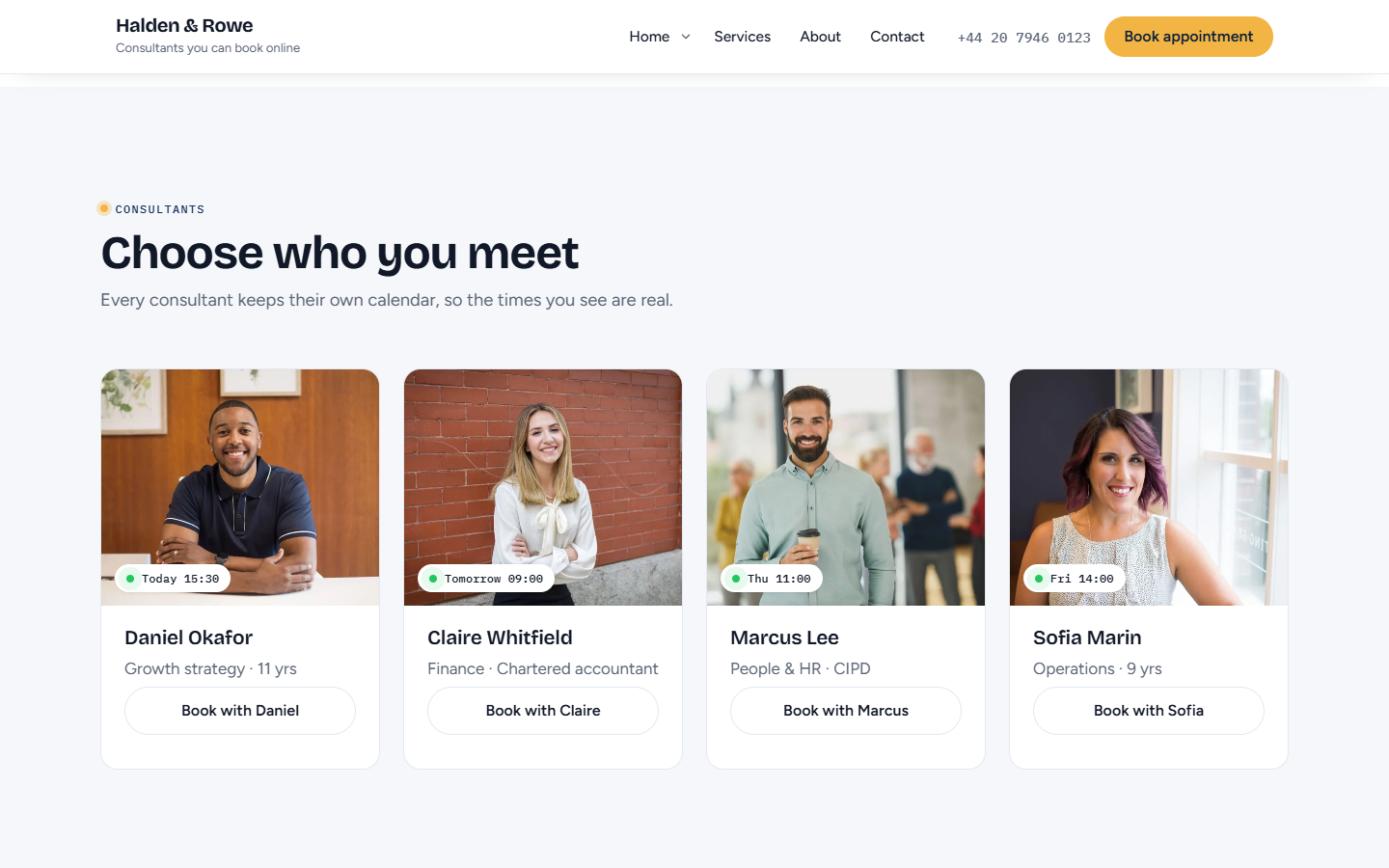
Home 2 is built for a team: a finder bar, practice areas, packages and consultant cards that each show their next open time, so visitors book the right person without a phone call.

Financial, legal and HR advisers

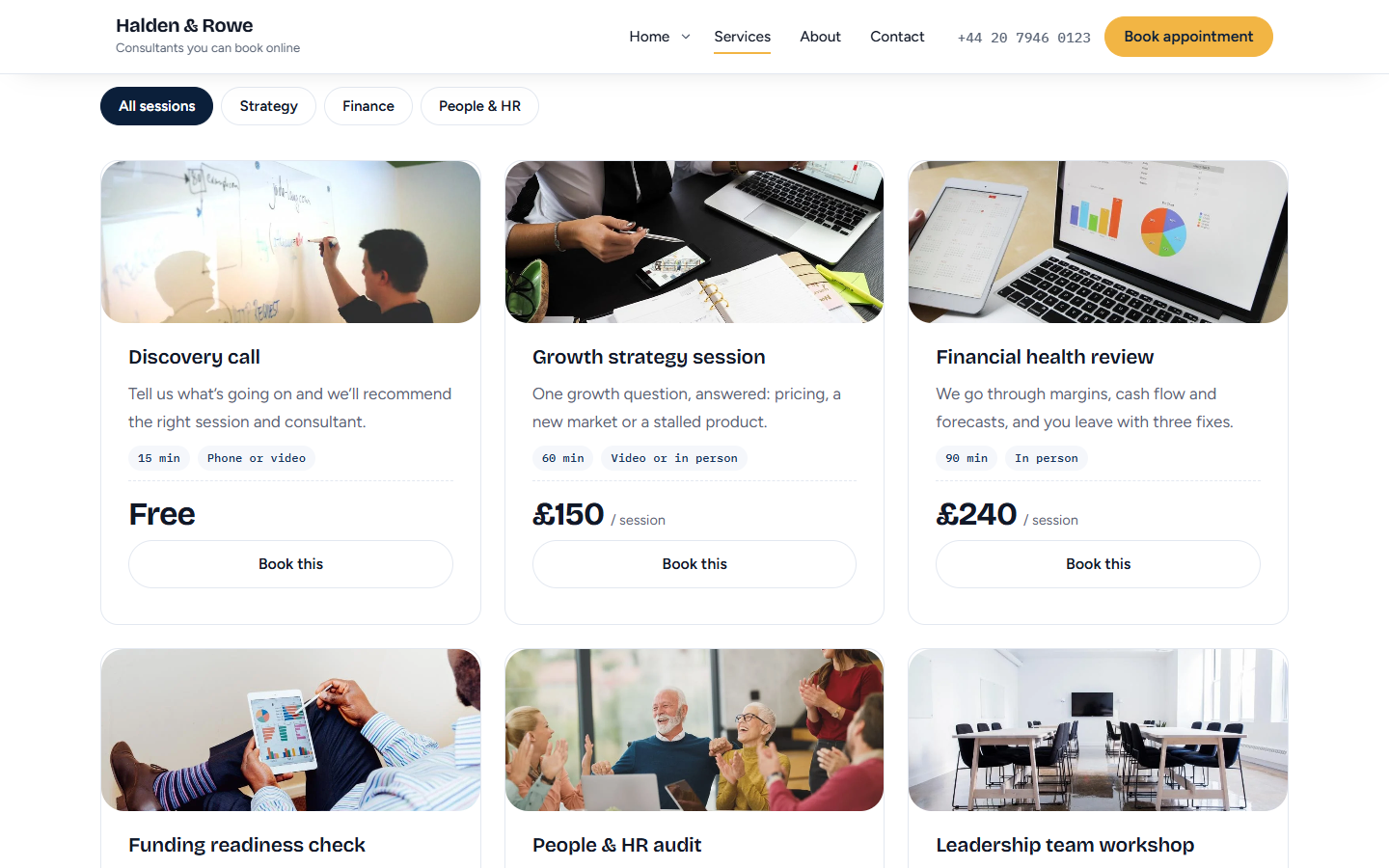
People choosing an adviser want to see the price, the session length and who they will talk to before they book. The Services page puts all three on every card.

Agencies building for clients

It is GPL, with no licence key and no upsell notices, so you can use this consulting WordPress theme on every client site and hand each one over clean.

Get started

From download to a working booking site in five steps.

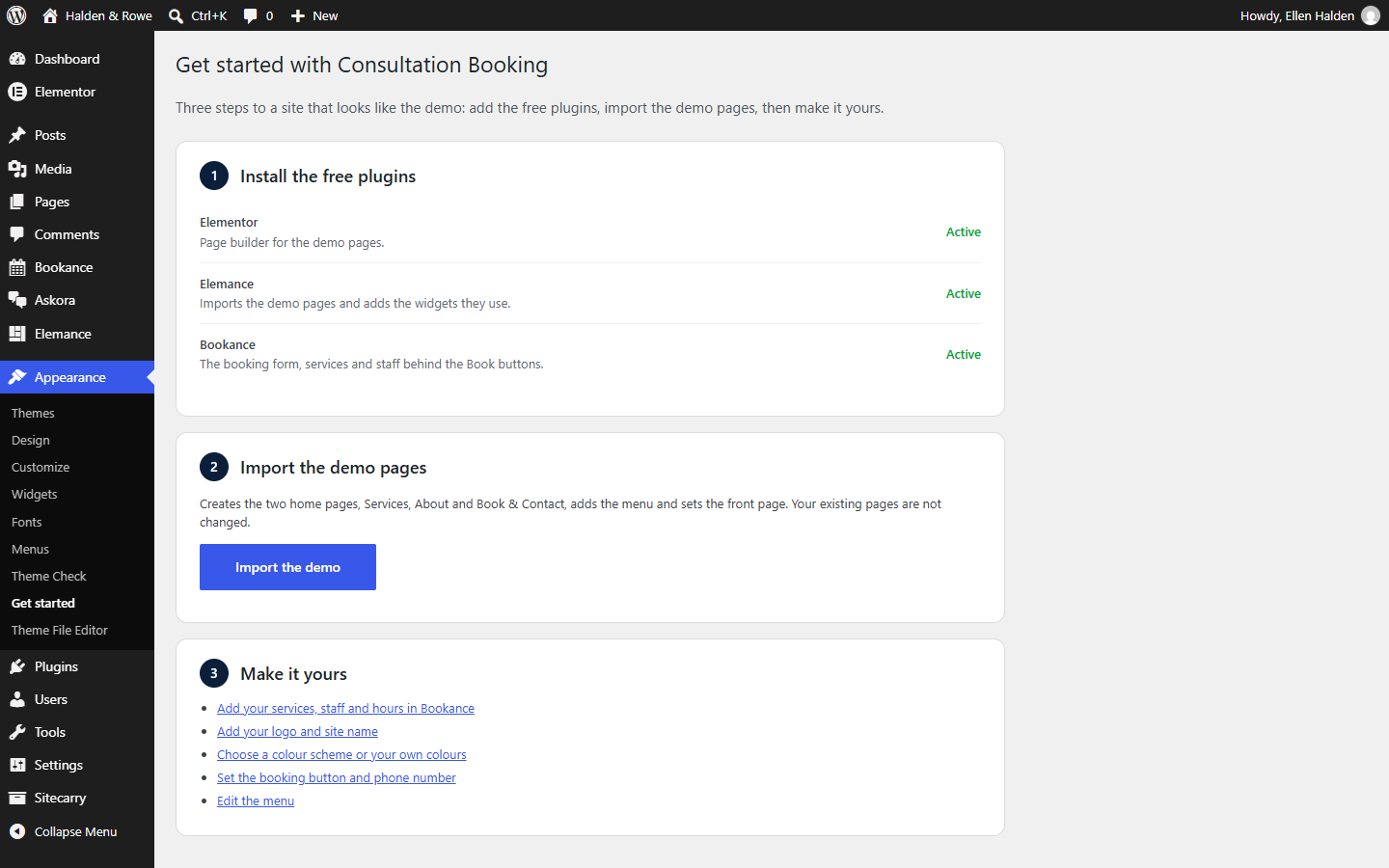
Setting up this consultant WordPress theme takes no demo files to upload and no settings to copy. The theme walks you through it from Appearance → Get started, and the demo import creates new pages without touching the ones you already have.

  1. Install the theme

    Appearance → Themes → Add New → Upload Theme, choose the zip, then Activate.

  2. Add the free plugins

    Appearance → Get started. One button installs and activates Elementor and Elemance.

  3. Add Bookance

    Download it from its page and upload it under Plugins → Add New. It runs the booking form and popup.

  4. Import the demo

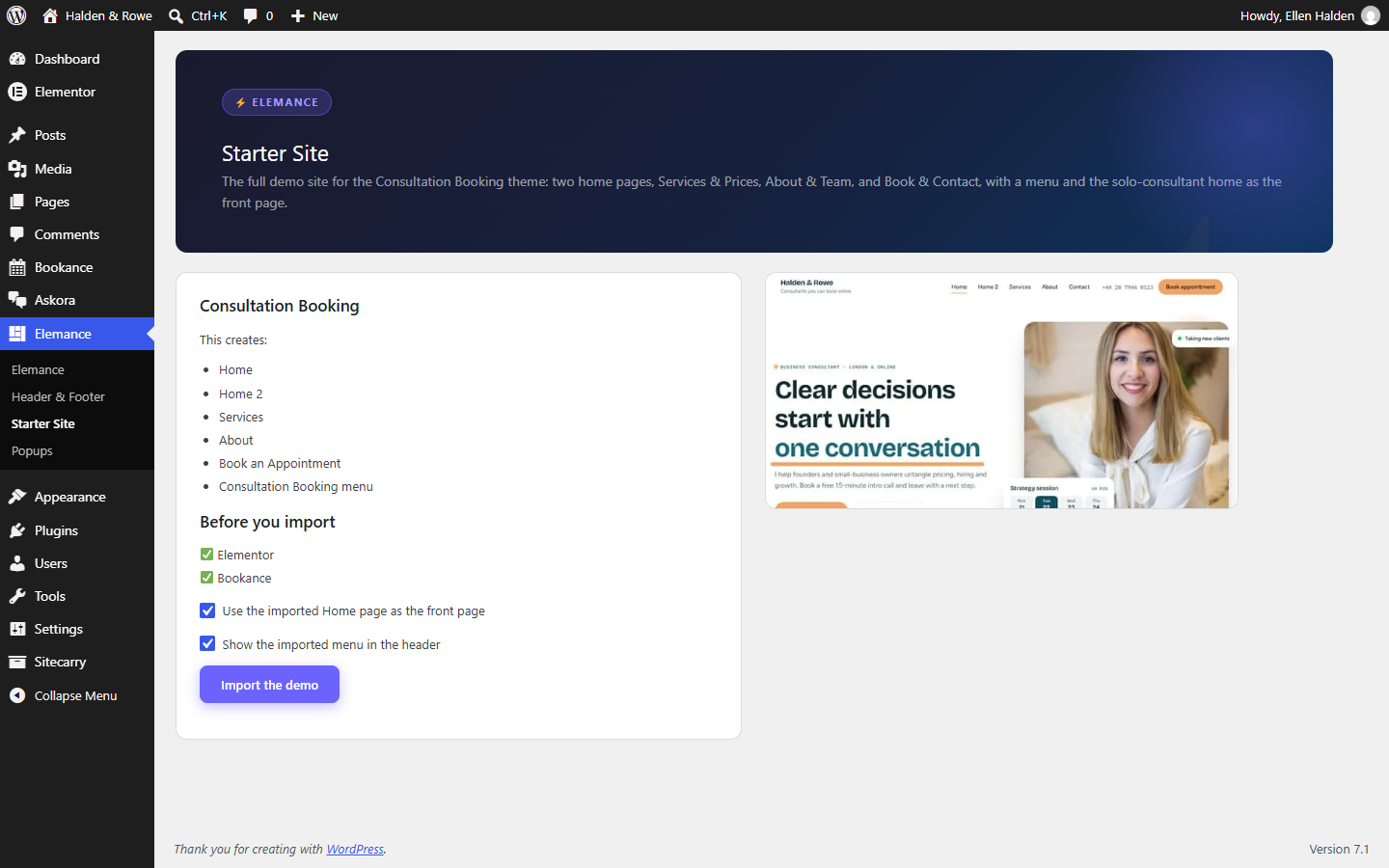
    Click Import the demo: five pages, the menu and your front page, in one go.

  5. Make it yours

    Add services and hours in Bookance, then your logo and colours in Appearance → Customize.

Features

What's inside this booking theme.

Download free ↗︎

Two home pages, three inner pages

A solo-consultant home and a consultancy-firm home, plus Services & Prices, About & Team, and Book & Contact. Import all of them with one click from Appearance → Get started, or insert single pages from the Elemance library in Elementor.

A booking popup, everywhere

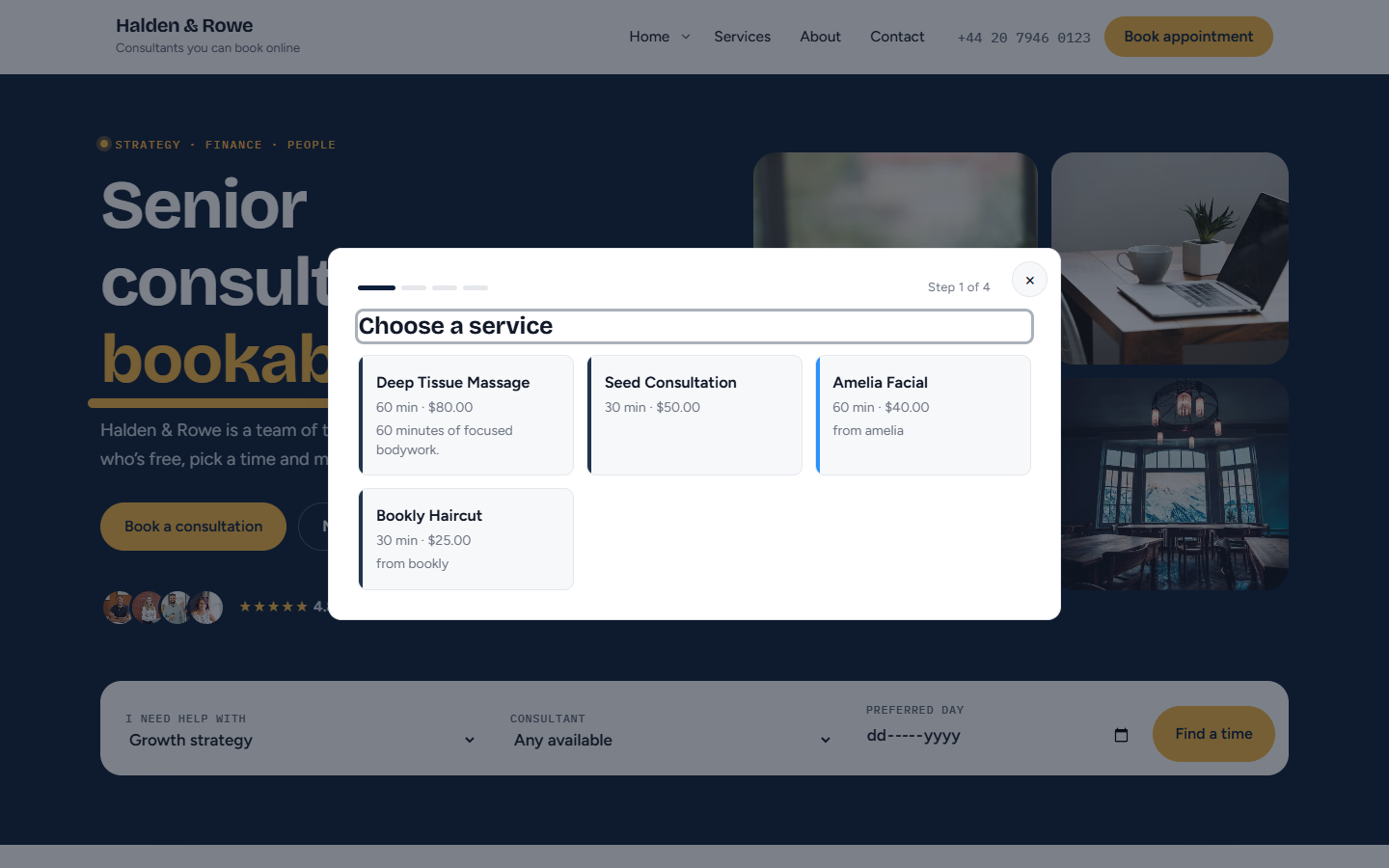
With Bookance active, the header button, the phone booking bar and any Elementor button with the class cb-book-link open the booking form in an accessible popup. Focus returns to the button you used.

Motion with a job

A slot card that picks a time and confirms it, headlines that build word by word, counters and a process line that fills as you scroll. All of it switches off for visitors who ask for reduced motion.

Your colours, per page if you like

Navy and gold or teal and apricot, or your own primary and accent — text on the accent switches between dark and light for contrast. Any page can use a different scheme, and the booking form follows.

Accessible and quick

Zero axe-core issues across the demo pages, blog, post, search and 404 at desktop and phone widths. Fonts are served from your site, and a fresh Elementor install gets the theme's fonts instead of Roboto from Google.

Works without plugins

Unlike many consulting WordPress themes, nothing breaks without its plugins. Blog, post, page, search and 404 templates, four footer widget columns, custom logo and menus with keyboard-friendly dropdowns. Elementor Pro header and footer locations are supported when you have it.

Buyer’s guide

How to choose a consultant WordPress theme.

A consultant WordPress theme has to do more than look professional. It has to get a visitor from reading about you to a booked session. Before you pick one, check four things, in this order.

Booking first. Look for a booking button in the header that stays in reach on phones. If the only way to book is a contact form, every lead turns into an email thread about when you are free.

Speed and fonts next. Many consulting WordPress themes load several Google Fonts and a slider library on every page. Fonts served from your own site, and scripts loaded only where a widget is used, keep pages quick and keep visitor data off third-party servers.

Then accessibility. A booking form that a keyboard or screen reader user cannot finish is a lost client. Ask whether the theme was tested, and with what tool.

Finally, lock-in. Check what happens if you remove the page builder or the booking plugin. A good WordPress booking theme still shows your pages and still sends people to your booking page. Consultation Booking was tested without Elementor, Elemance and Bookance, and it keeps working.

0 Google Fonts requests
0 axe accessibility issues
5 ready-made pages
$0 licence cost

Compare

Consultation Booking vs a typical consulting WordPress theme.

Where this consultant WordPress theme differs from the themes in most “best consulting themes” lists.

Booking built in, not bolted on

A typical consulting theme ships a contact form. This one ships a header booking button, a booking bar on phones and a popup booking form through the free Bookance plugin.

Free, with nothing held back

Premium consulting themes usually charge for a licence and again for a year of updates. Consultation Booking is free and GPL, with no Pro version and no locked demo pages.

Five pages, not forty demos

Multipurpose themes import dozens of demos and hundreds of options. This one ships two home pages and three inner pages written for consultants, so there is less to delete and less to load.

Your bookings stay on your site

No Google Fonts, no external scheduling service and no iframe. Bookance stores every booking in your own WordPress database, where you control the data.

Screenshots

What this consultant WordPress theme looks like.

Consultant WordPress theme home page for a solo consultant
Consulting WordPress theme home page for a consultancy firm
The booking form opened in a popup from the header button
Consultant cards with their next open time and a Book button
Services page with filter tabs and session cards
The Get started screen: install the free plugins, import the demo, make it yours
The Elemance Starter Site screen that imports the demo
Three phone screens of the WordPress booking theme

Pricing

Free. All of it.

Built for you

Quoted

Want the booking site without doing the setup? We build booking websites on WordPress, from your services and calendar to the finished pages.

  • Services, staff and hours set up
  • Your branding and copy on every page
  • Reminders and calendar sync configured
  • Handed over with training
Booking website development ↗︎

Custom design

Let’s talk

Need a design that is all your own? Tell us about your business and we will design and build the site around it.

  • A design made for your brand
  • Pages planned around how you take bookings
  • Built on WordPress, yours to keep
  • Help after launch
Contact us ↗︎

This WordPress booking theme will be submitted to the WordPress.org theme directory once Bookance is listed there, because WordPress.org themes may only recommend plugins from the directory. Until then the download here is the same build, straight from us.

Changelog

Release history.

  • v1.1.0

    Appearance → Get started installs and activates the free plugins with one button, then imports the whole demo site through Elemance 1.21.0: every page, the menu and the front page.

  • v1.0.0

    Theme with Customizer colours and booking button, mobile booking bar, per-page colour scheme, Elementor integration and the Bookance popup; five demo pages added to Elemance 1.20.0.

Questions

Questions about this consultant WordPress theme.

Questions about a custom plugin built for your site are on the plugin development page.

Do I need Elementor Pro?

No. Every demo page is built with free Elementor and the free Elemance plugin. If you do have Elementor Pro, the theme registers its header and footer locations so you can replace them with your own.

How do I get the demo site?

After activating the theme, go to Appearance → Get started. One button installs and activates Elementor, Elemance and (once it is on WordPress.org) Bookance. A second button imports the demo: both home pages, Services, About and Book & Contact, the menu, and your front page. Your existing pages are not changed.

You can also insert single pages: open a page in Elementor, click the Elemance button and pick one from the Consultation Booking category.

Does it need the Bookance plugin?

No, but it is built for it. With Bookance active, booking buttons open the booking form in a popup and the form takes the theme colours. Without it, set a booking page link in Appearance → Customize → Header & booking button and the buttons go there.

Does the theme load Google Fonts?

No. Bricolage Grotesque, Figtree and IBM Plex Mono ship inside the theme and are served from your own site. On a fresh Elementor install the theme also stops Elementor downloading Roboto, until you choose fonts in Elementor's Site Settings.

Can I change the colours?

Yes. Pick a scheme, or set your own primary and accent colours, in Appearance → Customize → Colors. Each page also has a Colour scheme box in the editor sidebar, so a landing page can look different from the rest of the site.

Can I use this free consultant WordPress theme on client sites?

Yes. Consultation Booking is licensed under GPLv2, so you can use it for your own consulting business or on as many client sites as you like. There is no licence key, no Pro version holding features back and no upgrade notice in the dashboard.

Is it a good WordPress booking theme for coaches and therapists?

Yes. The solo-consultant home page is written around one person taking sessions: your photo, your services with price and length, and the next time you are free. Coaches, therapists, tutors and independent advisers can swap the copy and start taking bookings the same day. Bookance sends the confirmation emails and can push each booking to Google Calendar.

How is it different from other consulting WordPress themes?

Most consulting WordPress themes are built to show a business and end with a contact form. This one is built to book: a booking button in the header, a booking bar on phones and a popup booking form. It also stays small, with two home pages and three inner pages instead of dozens of demos, and fonts served from your own site.

Does it work with the block editor?

Yes. The blog, posts, plain pages, search and 404 use the theme's own templates and work with the block editor. You only need Elementor for the five designed pages.

Will the theme slow my site down?

It is built not to. Fonts ship inside the theme, there is no slider or icon library on every page, and Elemance loads a widget's CSS and JavaScript only on pages that use it. On shared hosting the consultancy-firm home page finishes loading in about 1.7 seconds.

Which pages come with the consultant WordPress theme?

Five designed pages: a home page for a solo consultant, a home page for a consultancy firm, Services & Prices, About & Team, and Book & Contact. The theme also has its own templates for the blog, single posts, plain pages, search results and the 404 page, so the rest of the site matches.

Can I use a booking plugin other than Bookance?

Yes. In Appearance → Customize → Header & booking button, switch the button to link mode and paste the address of any booking page, whether it is built with another plugin or hosted by a scheduling service. The header button and the phone booking bar then go there. The popup and the automatic colour matching only work with Bookance.

Do I need coding skills to set up this WordPress booking theme?

No. Install the theme, open Appearance → Get started, click one button for the plugins and one for the demo. Colours, logo, menus and the booking button are set in the Customizer, and page text is edited in Elementor by clicking on it.

Which WordPress and PHP versions does it need?

WordPress 6.5 or newer and PHP 7.4 or newer; tested up to WordPress 7.1 and PHP 8.3. The theme passes Theme Check with no required changes.