
A verdict for every plugin
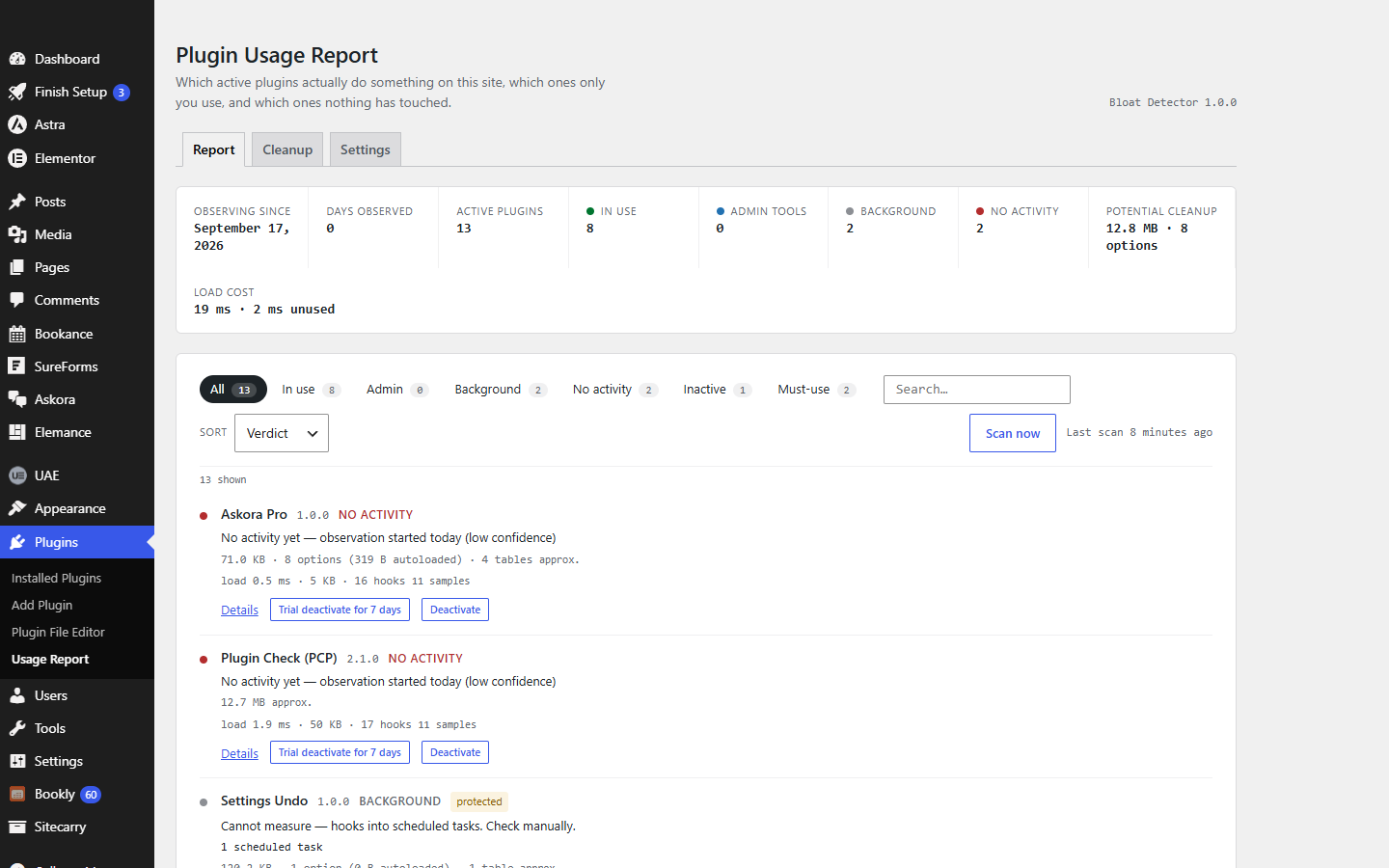
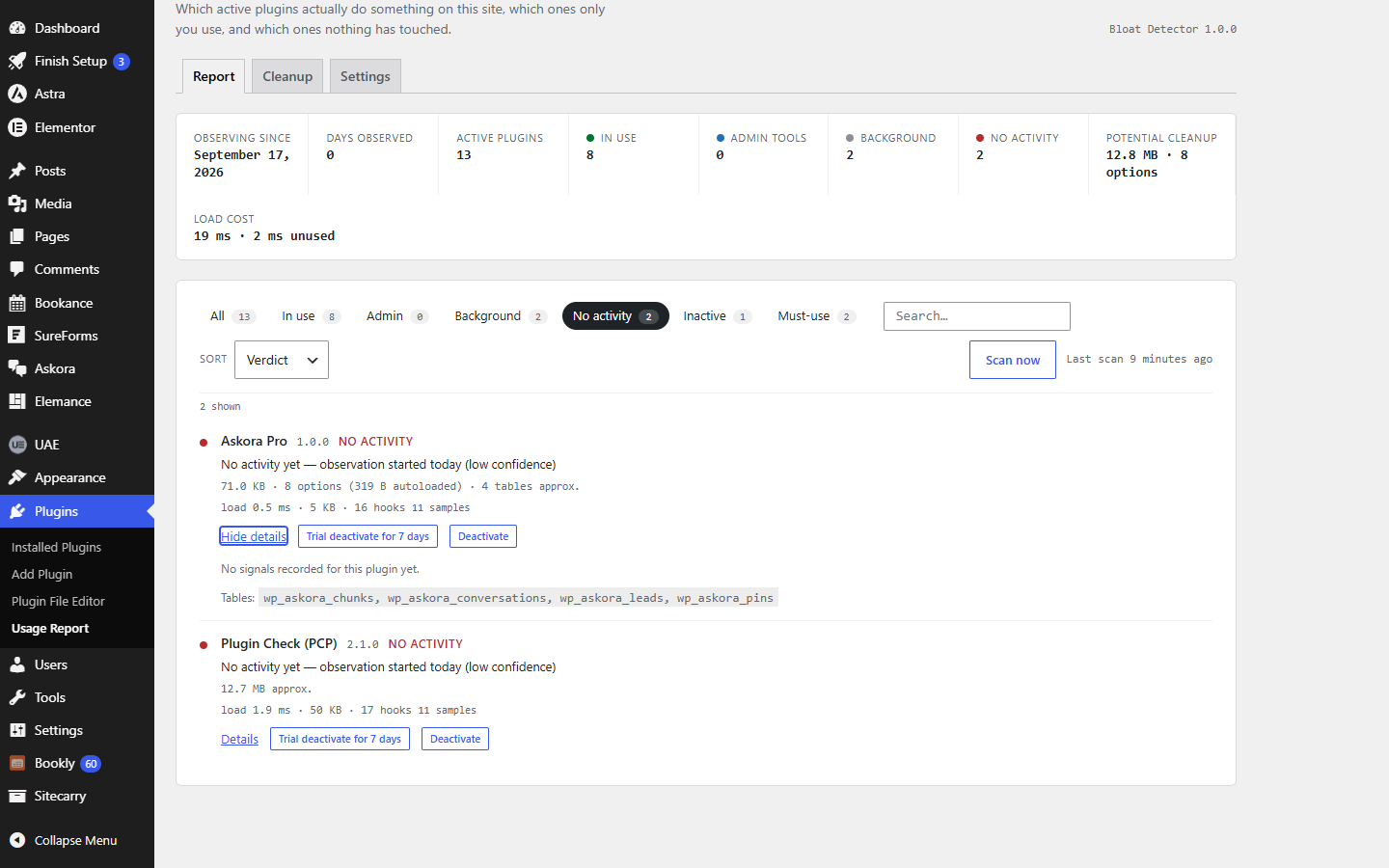
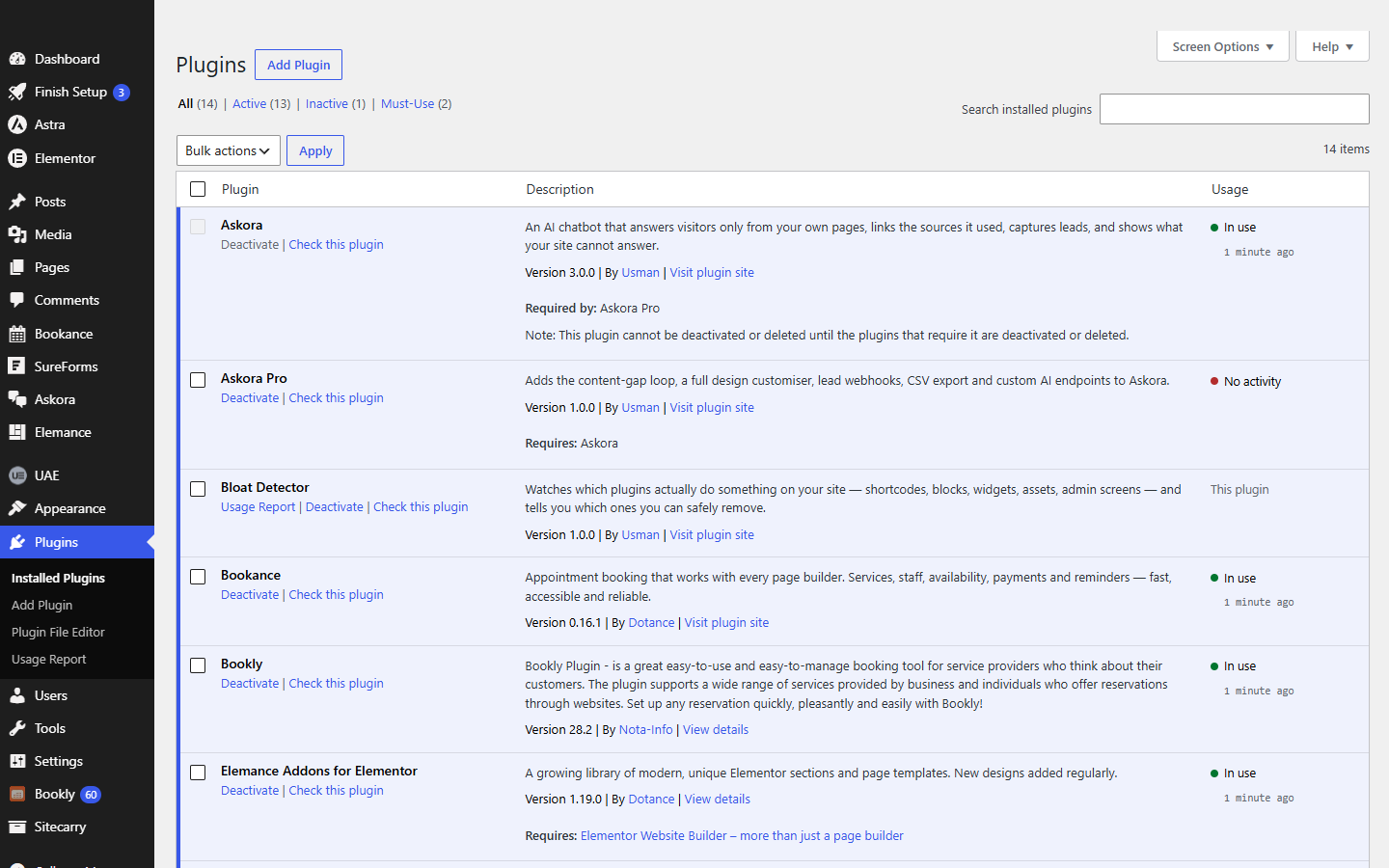
In use, admin tool, background or no activity — based on shortcodes, blocks, Elementor and sidebar widgets, scripts and styles, REST and AJAX calls and admin screens that actually ran.
★ Free plugin
The Plugins screen tells you which plugins are inactive. It says nothing about the forty active ones nobody remembers installing. Bloat Detector watches what each active plugin really does — shortcodes, blocks, Elementor widgets, scripts, admin screens, scheduled tasks — gives every plugin an honest verdict, shows what it costs to load, and finds the options and tables deleted plugins left behind.
Overview
Sites collect plugins. A contact form from the first build, a slider replaced two redesigns ago, three SEO helpers, a migration tool used once. Every one of them loads on every request, and nobody wants to be the person who deactivated the one that mattered. So they stay.
Bloat Detector replaces the guesswork with evidence. It records what each active plugin actually does — on the front end, in wp-admin and in the background — and scans your published content so plugins whose shortcodes, blocks or Elementor widgets are on a page are marked in use on day one. Each plugin gets a verdict: in use, admin tool, background, or no activity, with a confidence that grows with the days observed. Plugins that only hook into mail, login or checkout are never called unused. When something really is idle, switch it off for a trial week; if nobody confirms, it switches itself back on.
Features
In use, admin tool, background or no activity — based on shortcodes, blocks, Elementor and sidebar widgets, scripts and styles, REST and AJAX calls and admin screens that actually ran.
A scan of your published posts and Elementor data finds every plugin shortcode, block and widget in use right away. Runtime verdicts then grow more confident each day.
Milliseconds and memory to load, hook callbacks registered, folder size, options and autoloaded bytes, custom tables. The report adds it up for the plugins nothing uses.
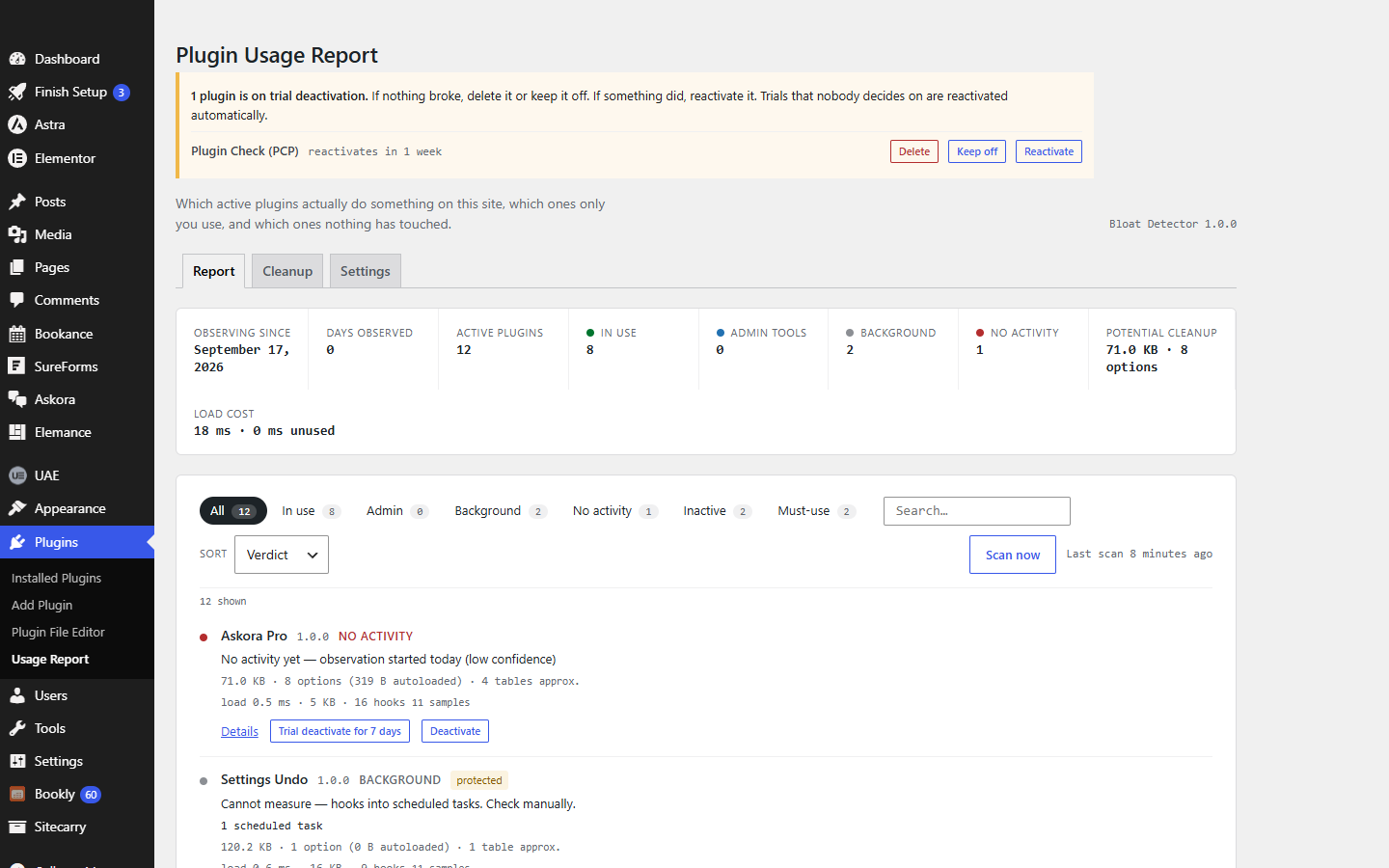
Switch a plugin off for a week instead of deleting on a hunch. A notice offers Delete, Keep off or Reactivate; if nobody decides, it comes back on by itself.
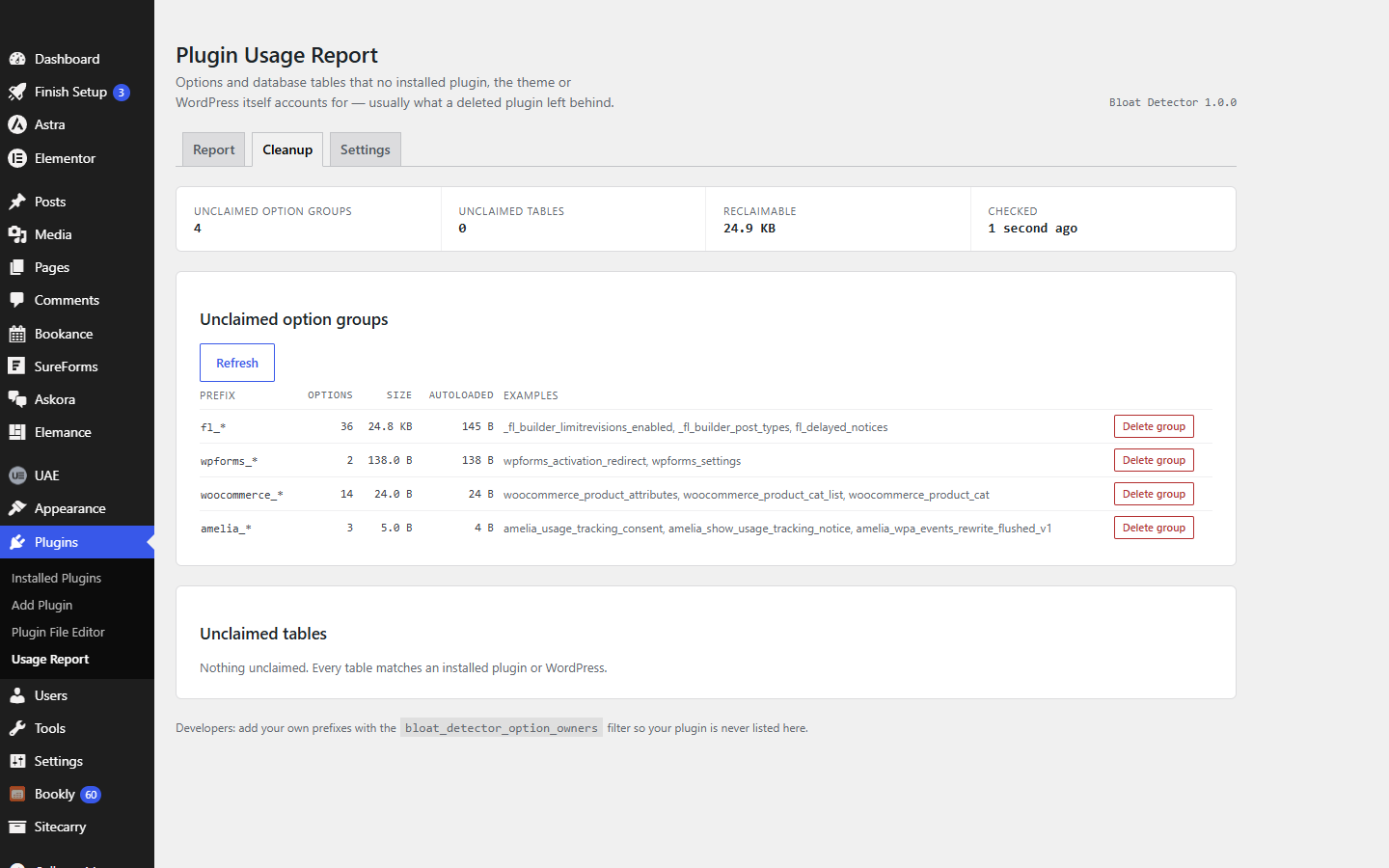
The Cleanup tab lists option groups and database tables that no installed plugin, theme or WordPress itself claims, with example names and a typed confirmation before anything is removed.
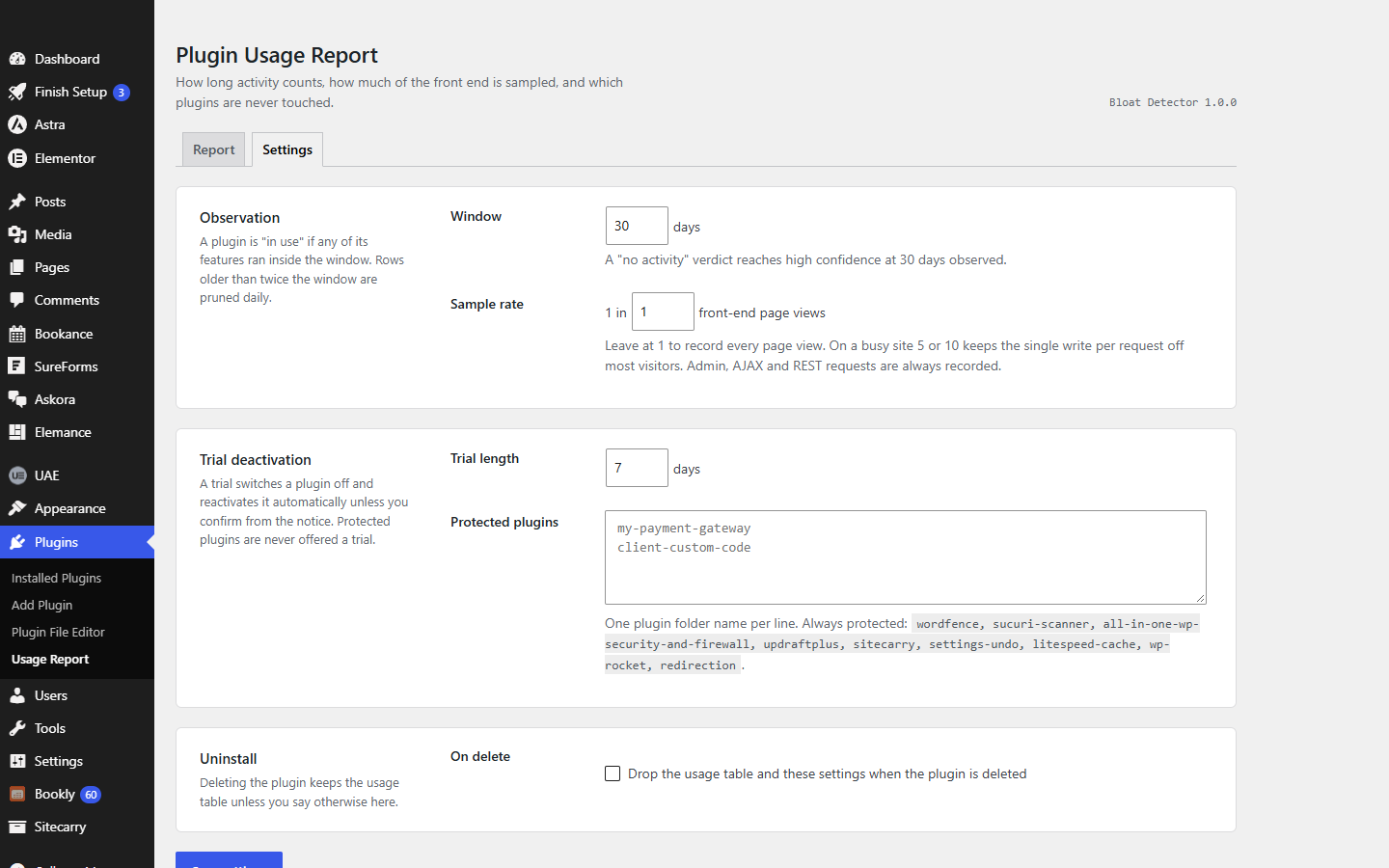
One database write per request, optional sampling on busy sites, administrators only, nonces on every action. Security, backup and cache plugins are never offered a trial.
Screenshots
Pricing
$0
The whole plugin. Every verdict, the load-cost numbers, the Cleanup tab and trial deactivation, on as many sites as you like.
Quoted
Want someone else to read the report, remove what is safe and speed the site up? That is work we do.
Bloat Detector will be submitted to the WordPress.org plugin directory once our current submissions clear review. Until then the download here is the same build, straight from us. There is no Pro version and nothing in the plugin is locked.
Changelog
New animated icon beside the page title in the admin screens.
Runtime observation of shortcodes, blocks, Elementor and sidebar widgets, assets, REST routes, AJAX actions and admin screens; daily content scan; passive-hook and cron detection; four verdicts with confidence; footprint and per-plugin load cost; trial deactivation with auto-reactivate; Cleanup tab for unclaimed options and tables; Usage column on the Plugins screen.
Questions
Questions about a custom plugin built for your site are on the plugin development page.
Install Bloat Detector, go to Plugins → Usage Report and click Scan now. Plugins whose shortcodes, blocks or Elementor widgets appear in your published content are marked in use straight away. Leave it running for a week or more and every active plugin gets a verdict based on what actually ran: in use, admin tool, background, or no activity.
Not on a hunch. Some plugins do their work where page views cannot show it — sending mail, handling logins, running checkout. Bloat Detector labels those background and never calls them unused. For the rest, use Trial deactivate: the plugin is switched off for a week, and if you do not confirm, it is switched back on automatically. Take a backup before deleting anything.
No measurable amount. Each observation is a lookup in a cached name-to-plugin map and one entry in an in-memory list, and the list is written once, at the end of the request, in a single query. On very busy sites you can record only one front-end page view in five or ten.
Because nothing it does was seen inside the observation window. Either observation has only just started — the header shows how many days — or the plugin works somewhere an observer cannot see, such as a theme template calling its functions directly. A "no activity" verdict is a reason to run a trial deactivation, not proof.
WordPress announces each plugin as its main file finishes loading. Bloat Detector records the time and memory between those moments, keeps a moving average across real requests, and counts the hook callbacks each plugin registers. To measure every other plugin it keeps itself first in the load order, the same technique the Freemius SDK uses.
It only lists options and tables whose name matches no installed plugin, no active theme and nothing in WordPress core. That is a name-based heuristic, so read the example names first and take a backup. Deleting needs you to type the prefix or table name, and the list is re-checked on the server before anything is removed.
Security, backup, cache and redirect plugins — Wordfence, Sucuri, All In One WP Security, UpdraftPlus, Sitecarry, Settings Undo, LiteSpeed Cache, WP Rocket and Redirection — plus anything you add under Settings. They still get a verdict.
WordPress 5.9 or newer and PHP 7.4 or newer; tested up to WordPress 7.1 and PHP 8.3. No external services, no API keys, no data leaves your site.
We would like to use analytics cookies to understand how the site is used. They are not needed for the site to work, and nothing is loaded unless you agree. Privacy policy